The fastest browser for AI agents to run browser automation






ego (lite) is a browser where you and your AI agents work in parallel. Your agents run multiple browser tasks in their own Spaces while your tabs stay yours, and tasks complete faster on fewer tokens.
Existing tools like browser-use and agent-browser are browser automation frameworks: they need a separate browser to drive, logins never carry cleanly, and you and the agent end up fighting for the same tabs. ego lite is one browser designed from the start for the two of you to share. No extra setup, and the agent can always reach your real logins and tabs through ego-browser.
Demo
https://github.com/user-attachments/assets/ffe7954b-58ee-411e-b35d-ec30c58a08bc
Quick Start
ego lite runs on macOS today. Windows and Linux are on the roadmap.
1. Install
Pick whichever fits your flow.
1.1 Download the macOS app


Click to download, then open it to install. Either way, ego lite adds the ego-browser skill to every agent's skills directory on your machine.
1.2 Add the skill with npx
Install just the ego-browser skill:
npx skills add citrolabs/ego-lite
The first time your agent runs a browser task, it walks you through installing the ego lite app.
1.3 Let your agent set it up
Paste this into your agent:
Set up ego lite for me: https://github.com/citrolabs/ego-lite

Read `skills/ego-browser/references/install.md` and follow the steps to install ego lite.
On first launch, ego lite asks one question, whether to migrate your Chrome data. Say yes and your agent inherits your existing logins, cookies, extensions, and bookmarks.
2. Run your first task
In your agent CLI, type /ego-browser followed by a space, then describe what you want in plain language:
ego-browser follow @ego_agent on x.com for me
The agent picks up the ego-browser skill, opens the page in its own Space, reads a Snapshot, acts on the page, and reports back, all while your own tabs stay untouched.
Your browsing data stays on your device. ego lite only records whether you opted into Chrome migration during setup.
Highlight of ego lite
| Feature | What it does |
|---|---|
| Code base, not CLI base, for faster runs with fewer tokens on complex tasks | The capabilities ego lite exposes to the agent are wrapped as JavaScript functions the agent calls directly. The agent gets to do what it does best: write code, composing a multi-step task into a single output instead of getting stuck in a "call two commands, look at the result, call two more commands" loop. Compared to the conventional CLI approach, complex workflows finish up to 2.5× faster with higher task success rates and far fewer tool calls per task. |
| A dedicated Space for every agent | ego lite gives each agent its own fully isolated Space. You browse up front, your agent works in the background, and they don't get in each other's way. You can see which Space has an agent running at any moment, and take it over or stop it whenever you want. |
| Your agents multitask in Spaces, parallel workspaces inside the same browser | Each Space gets its own AI agent or its own task, all running at the same time. Claude Code enriching 10 leads in 10 parallel Spaces. Codex scraping 5 competitor sites in 5 more. They don't collide or steal your tabs. Your mouse stays where you left it. |
| The strongest page Snapshot on the market | Thanks to kernel-level customization, ego lite produces the highest-quality page snapshots, the view text models rely on to "see" and act on a webpage. It reliably handles tough cases like deeply nested iframes, exactly where other approaches consistently break down. |
Any agent can drive it through ego-browser |
ego-browser is the connection layer between any agent CLI (Claude Code, Codex, Cursor, or a custom one) and ego lite. It exposes the browser as a set of in-page JavaScript tools: snapshot, fill, click, wait, navigate, capture. The agent writes a JavaScript snippet calling those tools, and ego-browser runs it on the page in one pass. |
| Experience accumulation that makes your agent faster the more you use it (coming soon) | Most of an agent's time on browser tasks goes to trial and error. ego lite's official Skill distills every successful action into reusable tools and workflows, so similar tasks down the line run up to 5x faster. |
ego lite vs existing products
Most tools can automate a browser. The real questions are what browser the agent gets, whether you can keep working at the same time, and whether the tool is built for the agent you already use or a built-in one.
| Capability | ego lite | Browser-Use | agent-browser (Vercel) | ChatGPT Atlas | Perplexity Comet |
|---|---|---|---|---|---|
| Multitask in parallel | ✓ | — | — | — | — |
| Reusable skills | ✓ | — | — | — | — |
| Inherits Chrome's data | ✓ | — | — | ✓ | ✓ |
| Same browser, separate workspace | ✓ | — | — | — | — |
| Compressed semantic input | ✓ | — | ✓ | — | — |
| Controllable by external agents | ✓ | ✓ | ✓ | — | — |
| Data stored locally | ✓ | ✓ | ✓ | — | — |
| No login friction | ✓ | — | — | ✓ | ✓ |
| Daily-use browser | ✓ | — | — | ✓ | ✓ |
| Free | ✓ | ✓ | ✓ | — | — |
Two other categories try to solve the same problem. Browser automation frameworks like Browser-Use and Vercel's agent-browser are libraries the agent calls; they ship no browser of their own, so they need a separate one to drive and your logins rarely carry cleanly. AI browsers like ChatGPT Atlas and Perplexity Comet ship a built-in agent, and only that agent can drive the browser. ego lite is one browser, designed from the start for you and any agent you bring to share.
Benchmarks
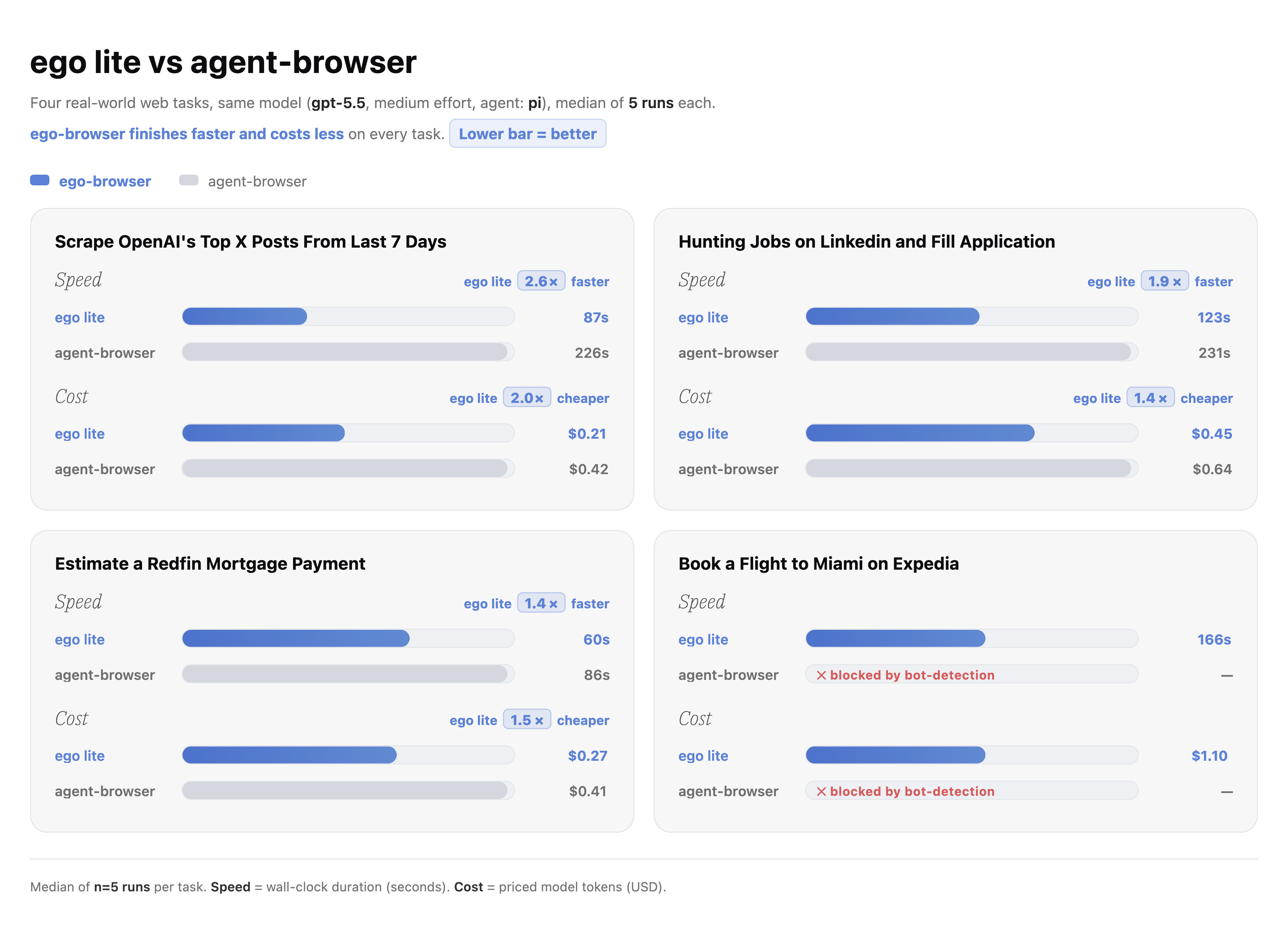
We benchmarked ego lite against Vercel's agent-browser on four complex browser automation tasks. ego lite finished each task up to 2.5× faster, with substantially fewer tokens. The harder the task, the bigger the gap. Check the comparison.
Docs
Tutorials, the full tool reference, and integration guides live at lite.ego.app/document/.
Community
- Discord, questions, setup help, and skill sharing
- GitHub Discussions, ideas and longer threads
- X/Twitter, updates and releases
Star History
License
The contents of this repository are released under the MIT License. The ego lite browser is a separate, free download.