
Edge-Drop
Zero-click, hover-activated clipboard shelf and desktop file-transfer hub with native OS integration.
Lives invisibly on the screen edge. Approach it, and it springs open. Drag anything out — anywhere.
Download • Why • Demos • Features • Quick Start • Architecture • Sponsor • Contributing





Why
Every clipboard manager on the market breaks your flow. You copy something, switch apps, paste, then hunt through Win+V history with arrow keys or dig into a tray menu. Multi-step. Modal. Slow.
Edge-Drop removes the friction. It anchors to the screen edge of your monitor as a transparent, always-on-top, click-through surface. When your cursor approaches the edge, the shelf springs open. Drag images, file stacks, rich text, and HTML bundles out of it — directly into whatever desktop app you're already using. No shortcuts. No window switching. No modal dialogs.
It is built for the developer and creative workflow where you constantly juggle screenshots, code snippets, file paths, design assets, and reference links between many windows at once.
Demos
All demos are fast-loading, silent autoplay loops.
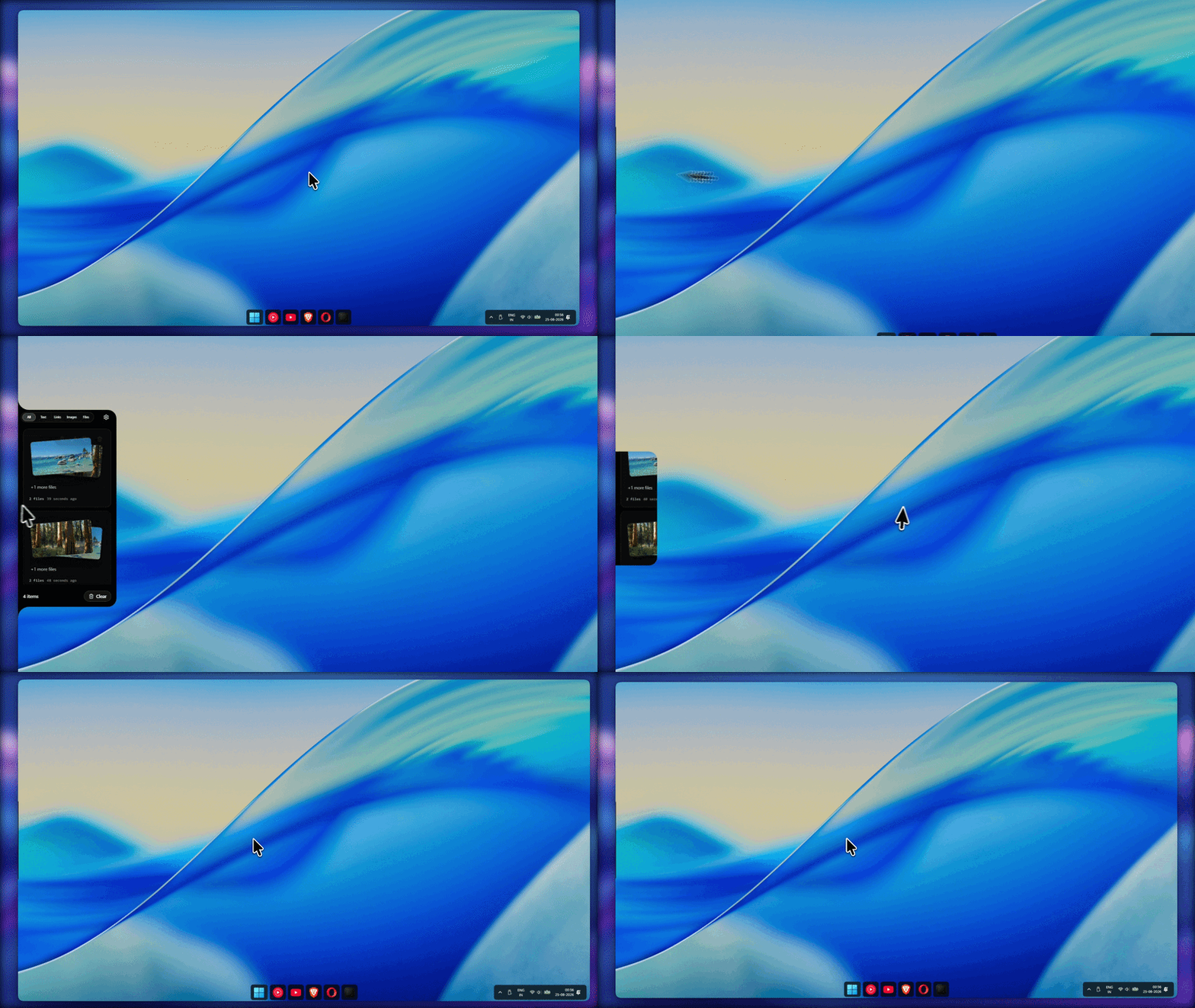
Full Overview: Welcome to Edge-Drop
Zero-click edge-hover activation, fluid spring physics, and seamless drag-and-drop into any desktop app.
|
1. Collect Anything Captures text, high-res images, files, and links in real time. 
|
2. Drag & Drop Anywhere Drag items directly into any app or workspace. 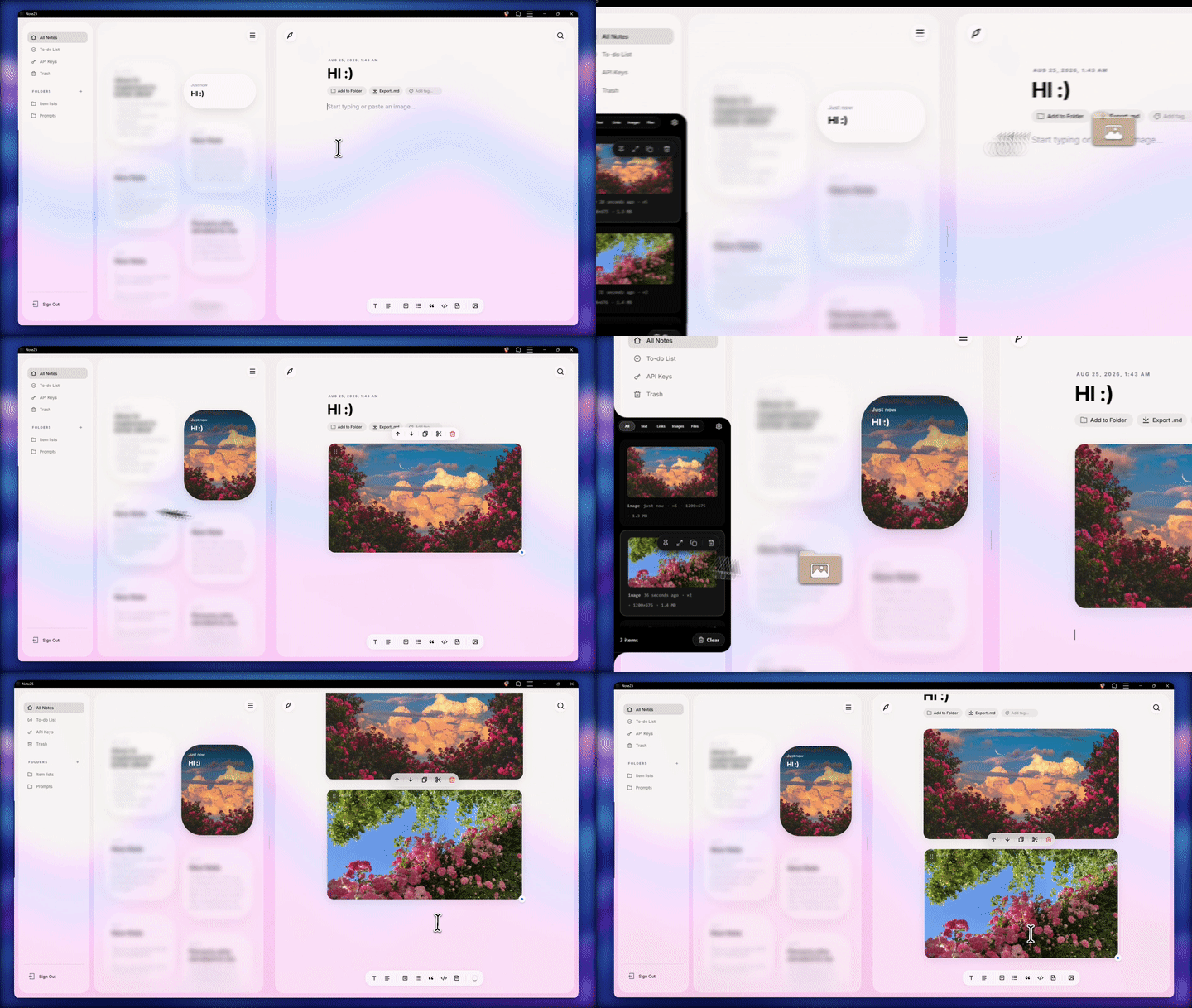
|
|
3. Copy Multiple Files Select several files at once and drop them wherever you need. 
|
4. Ungroup & Split Stacks Break file packages into individual standalone clipboard cards. 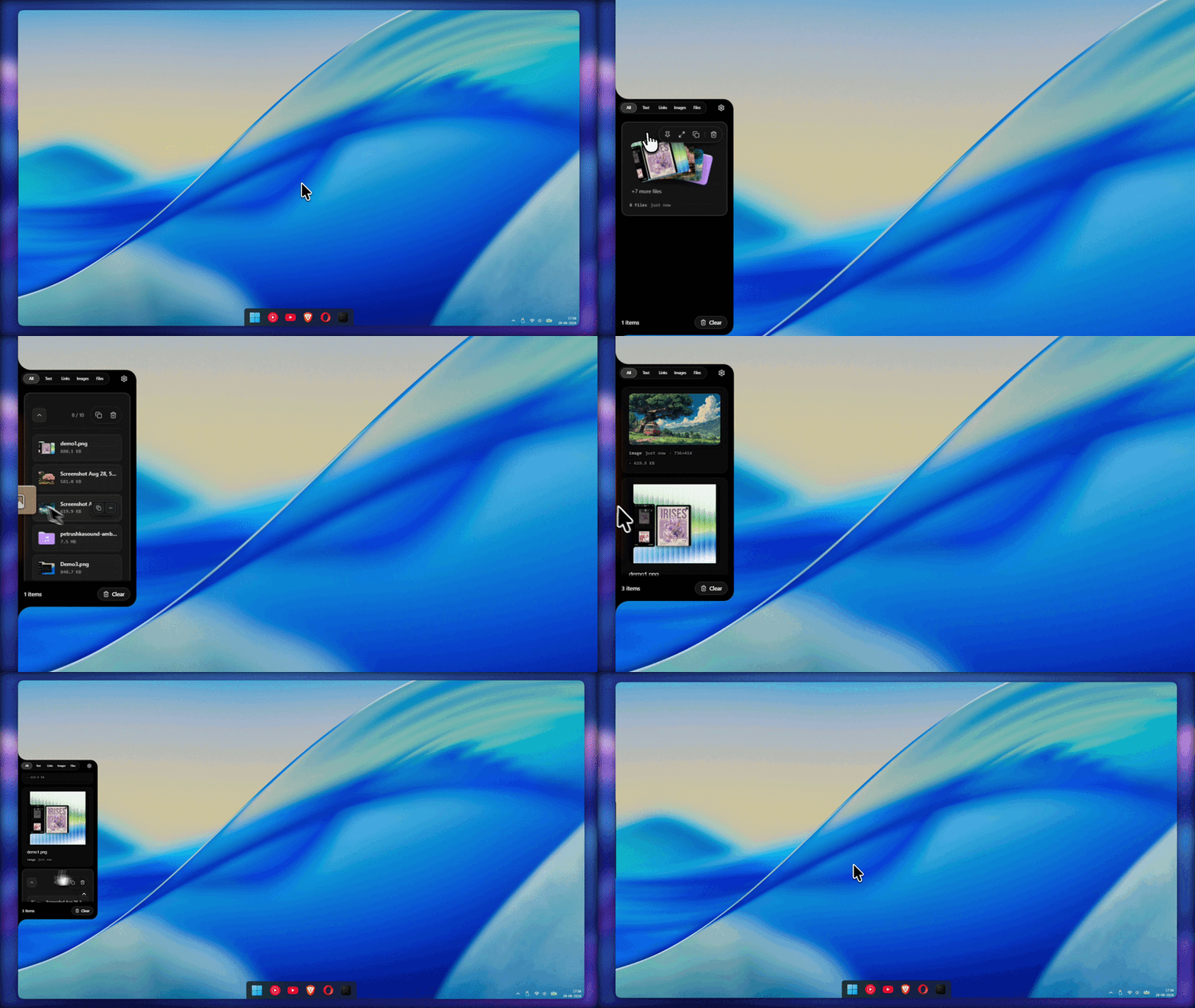
|
|
5. Combine & Merge Items Select and merge multiple clipboard items into a single stack. 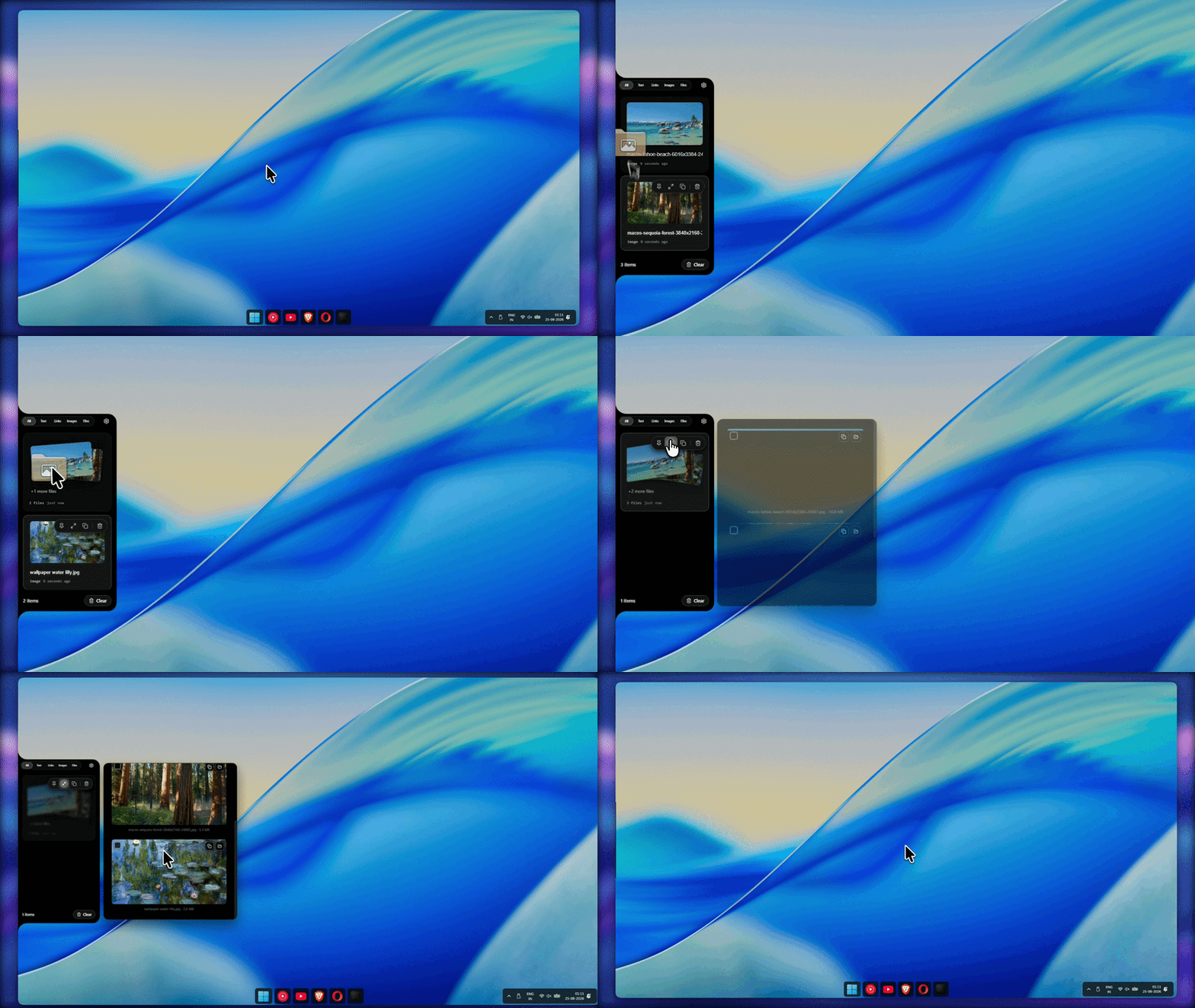
|
6. Quick Preview Flyout Inspect high-res images, formatted text, and code with zoom. 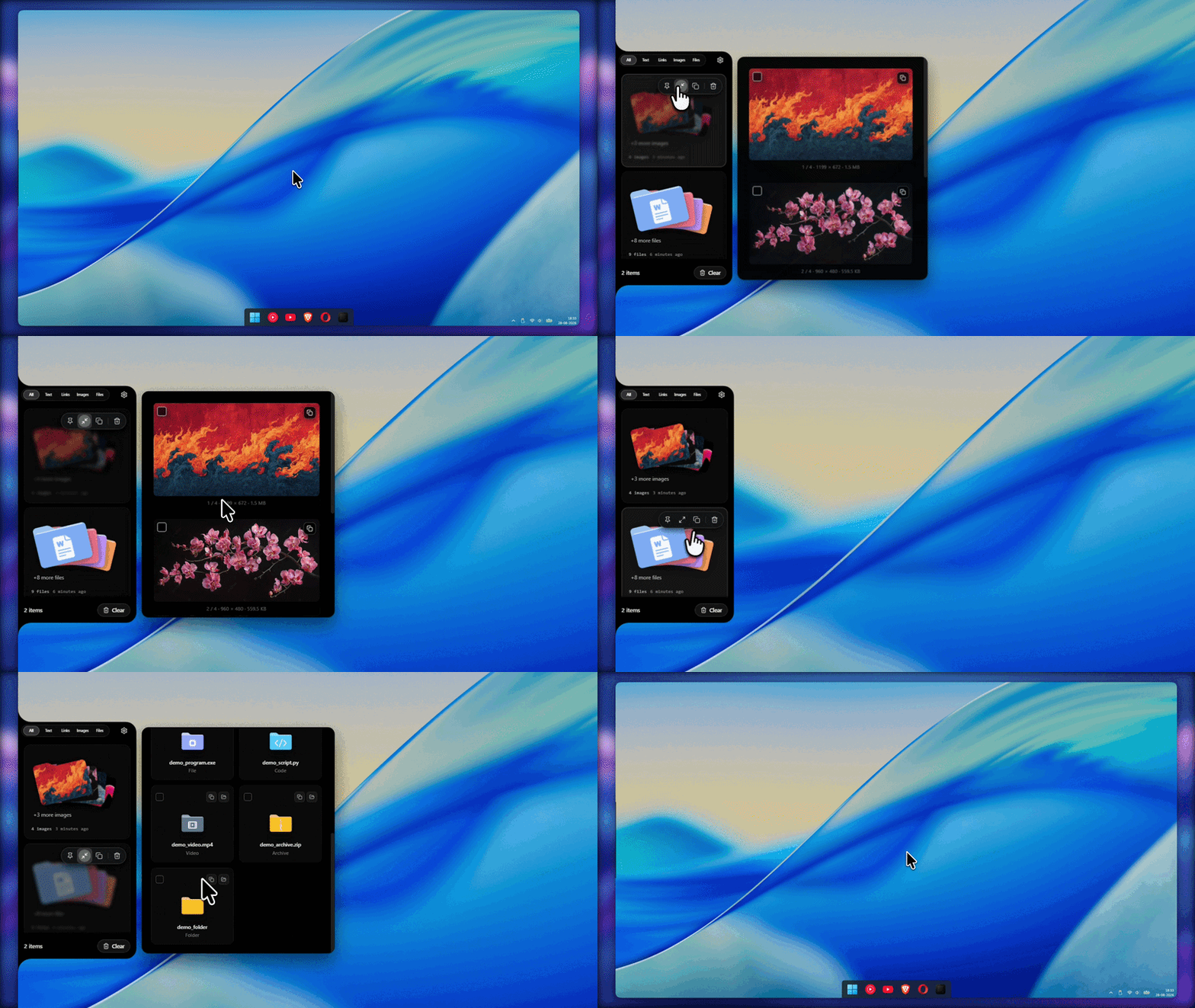
|
Support & Sponsor
Edge-Drop is 100% free and open-source forever.
If Edge-Drop speeds up your daily workflow, consider supporting ongoing development!
🌍 International (Ko-fi) |
🇮🇳 India (UPI) |
|---|---|

|
|

|

|
| * Note: Scanning or clicking the UPI card opens the UPI Donation Page (GPay, PhonePe, Paytm, or any UPI app). | |
Project Sponsors & Featured Products
A huge thank you to the incredible sponsors and products actively sponsoring Edge-Drop!
| Sponsor / Product | Links | Description |
|---|---|---|
| Website · X · Bluesky | When it comes to wine, there is an objective reality out there, and it is on Elitistreview.com. |
💡 Want your product, startup, or website featured here and seen by developers? Sponsor Edge-Drop on Ko-fi or UPI and share your link!
Download
Choose your preferred installation method for Windows 10 & 11:
Microsoft Store |
Windows Installer |
|---|---|
|
|
|
| Automatic background updates & native sandbox | Standalone setup with built-in auto-updater |
Quick Start
Prerequisites
- Node.js v18 or higher
- OS: Windows 10/11 (uses Win32 OLE drag pipelines and transparent-window cursor polling)
Run from source
git clone https://github.com/Deepender25/Edge-Drop.git
cd Edge-Drop
npm install
npm run dev          # launches Electron + Vite HMR
Type-check
npm run typecheck # runs tsc --noEmit against both node and web configs
Build Windows installers
npm run build:github # outputs an NSIS .exe for GitHub releases
npm run build:store  # outputs an MSIX .appx for Microsoft Store submission
[!NOTE] On Windows, if packaging fails with
EBUSY: resource busy or locked, close any running Edge-Drop instances first:taskkill /F /IM electron.exe /T.
Features
Zero-click edge hover
- Frameless, transparent, always-on-top
BrowserWindowanchored atx=0or right screen edge - 100% click-through when collapsed — desktop stays fully usable
- Configurable hot-zone height (25% / 40% / 60% of screen) and blade height (50% – 80%)
- Edge Trigger Proximity Slider: Range slider (1px – 7px) allowing precise pixel calibration of the edge sensor region.
- Independent Edge Trigger Placement: Choose exact trigger strip alignment (Top, Center, or Bottom) relative to the shelf, with dynamic CSS
clipPathcalculation matching the exact sensor region. - Edge Location Hint (Proximity Beacon): Subtle 1.5px hairline gradient pulse that flashes once on the screen edge when cursor touches the edge at a misaligned vertical position, guiding users to the shelf.
- Multi-monitor support: Pick exactly which display the panel sticks to, with options for Left or Right screen edges. Features a single source of truth multi-display engine (
getDisplayListOptions()) with real-time physical resolution calculation (3840×2160, 2560×1440, 1920×1080) across all High-DPI Windows display scaling factors. - Rest-as-Intent Seam Policy (Multi-Monitor): Intelligent 140ms dwell threshold for interior monitor boundaries. Moving your cursor between displays passes through smoothly without accidental shelf triggers, while stopping deliberately at the edge opens the shelf instantly.
- Versioned Screen Geometry & Probe: Replaced asynchronous display queries with a pure geometric screen probe (
stickProbe.ts) backed by versioned display-change caching, eliminating boundary seam jitter across mixed-DPI monitor arrays. - Cross-Reboot Display Persistence: Edge-Drop remembers your chosen monitor across device restarts. A 4-tier resolution pipeline silently re-identifies the correct physical monitor after Windows re-assigns numeric display IDs on reboot.
- Smart Windows Fullscreen Game Detection: Native Win32
SHQueryUserNotificationStateOS detection (fullscreen.ts) combined withGetForegroundWindow+GetClassNameAfiltering (Progman,WorkerW,Shell_TrayWnd) automatically suppresses edge hover during Direct3D games (VALORANT, Cyberpunk, PowerPoint) while allowing Edge-Drop to open smoothly on the Windows Home Screen / Desktop. - Self-Healing Launch at Login (Quoted Paths): Automatic Windows Registry synchronization (
HKCU\Software\Microsoft\Windows\CurrentVersion\Run) strictly quotes executable paths, guaranteeing that usernames or installation paths with spaces launch cleanly on startup. Includes automatic migration and healing for unquoted keys across updates. - RAM Footprint Stabilization (~130 MB): Large text entries (>300 chars) are stored as disk payload files (
payloads/.txt), holding only 300-char preview snippets in memory. Locks operational RAM to ~130 MB–160 MB with a V8 ceiling cap of 512 MB. - High-Performance Image Thumbnailing Protocol (
edgelocal://thumb/): Custom Electron protocol streams 240px thumbnails for history cards instead of loading multi-megapixel raw image files into memory, preventing GPU memory bloat.
Configurable Global Toggle Shortcut
- Tactile Keycap Hotkey Recorder (``): Customize the shelf toggle shortcut (defaults to
Alt+C) with live modifier keycap preview, instant clear/reset buttons, and non-blocking key capture. - Collision Detection & Dynamic Registration: Dynamically updates Electron
globalShortcutwith automatic collision resolution and instant toast feedback. - Zero OS Focus Stealing: Dynamically toggles window focusability exclusively during active key recording, keeping normal shelf clicks non-intrusive.
Selective & Filter-Scoped History Clearing
- Time-Based Preset Windows: Clear history in convenient time windows (Last 1 hour, 6 hours, 24 hours, or Clear all).
- Filter-Aware Scoping: Clearing history while viewing a category tab (e.g.
Images,Files,Links,Text) or an active search query only deletes unpinned items in that active view, leaving the rest of your history completely safe.
Custom 3D Pastel SVG File Iconography Suite
- Handcrafted 3D Vector Icons: Custom crafted SVG icons for all file categories (Folders, Code, Documents, Spreadsheets, PDFs, Presentations, Audio, Video, Archives, and Executables) displayed across clipboard cards, file bundles, preview flyouts, and OLE drag ghosts.
- Office & Spreadsheet Ingestion: Intelligently preserves copied tabular cells from Microsoft Excel and Google Sheets as structured text/HTML, preventing false screenshot image misclassifications.
Windows Snipping Tool & Native Screenshot Integration
- Snipping Tool Awareness: Detects rectangular, freeform, window, and fullscreen screenshot clips captured via
Win+Shift+S. - Smart Timestamped Naming: Automatically names screenshot files as
Screenshot YYYY-MM-DD HH.MM.SS.pngfor clean file drag-out.
Synthesized Web Audio Haptic Suite
- Zero-Asset Audio Engine (
soundEffects.ts): Real-time synthesized Web Audio API sound suite providing tactile audio feedback for UI micro-interactions without audio file assets. - Mechanical Dial Ticks: High-frequency 1800Hz → 900Hz micro-ticks (
playDialTickSound) when sliding position controls. - Mechanical Delete Haptic: Dual-stage downward pitch sweep (1400Hz → 250Hz in 14ms + 150Hz → 40Hz thud) when deleting items (
playDeleteSound). - Tactile Switches & Buttons: Resonant pops for toggle switches (
playToggleSound) and crisp clicks for buttons (playButtonClickSound). - Global Audio Control: Global
Sound effectstoggle switch in Settings (ON by default) withisSoundEnabled()guard across all synthesis routines. EagerAudioContextauto-unlock on initial interaction (pointerdown/mouseenter/keydown).
Segmented Settings Architecture
- Stationary 3-Category Navigation Bar: Organized into three clean, emoji-free tabs:
Behaviour(1st),Position(2nd), andAppearance(3rd). - Stationary Header & Independent Scroll Area: Fixed top tab bar (
.settings-fixed-header) stays 100% stationary while settings controls scroll independently underneath it. - Independent Scroll Position Memory: Each category section maintains its own separate
scrollTopstate across tab switches (tabScrollPositions). - Pure CSS Selection Synchronization: Native CSS active tab styling (
.settings-tab-btn.active) eliminating layout projection glitches during panel position adjustments. - 5% Magnetic Tick Slider: Smooth
0.002real-time 1-to-1 continuous tracking during drag with 60fps/120fps precision, featuring 21 visual tick dashes, live percentage badge (50%), percentage quick-jump buttons (0%,50%,100%), and magnetic 5% snapping on pointer release. - Position & Display Switch Preview: 1.75s temporary interactive preview window when changing
Stick position(Left/Right) orDisplaymonitor in settings. - CPU Performance Optimization & Zero Blur Jank: Replaced heavy
backdrop-filter: blur()calls across UI components with high-performance solid/semi-transparent dark fills, eliminating CPU rasterization overhead for 60fps/120fps butter-smooth panel opening and scrolling. - Prominent Support Section & Matching Pill Buttons: Re-ordered settings footer placing the Support & Sponsor card prominently above the Quit button, linking to official domain
www.edgedrop.app. Features matching 40px height pill buttons for Support and GitHub Star. - Low-Profile Bottom Quit Pill: Compact, subtle Quit pill button (
.subtle-quit-btn) centered at the very bottom of the settings view without noisy header text.
Silent Background Auto-Updates
- Zero-Friction Updates (
electron-updater): GitHub releases feature background downloading, live download progress streaming, and a single-click "Restart to Update" button. - Interactive Floating Update Badge: Displays live download percentages, transferred byte counts, and a one-click restart action on the shelf without layout obstruction.
- Windows Light Theme Adaptive System Tray: Dynamically detects Windows taskbar theme changes and automatically swaps between pure-white and high-contrast dark vector tray icons.
- Monochrome Glassmorphic Banner: Prominently positioned at the top of the scrollable content area across all category tabs. Styled with a dark-mode glassmorphic 4% white card fill (
rgba(255, 255, 255, 0.04)), 12% white border, and high-contrast white button. - Microsoft Store Isolation: Isolated build pipelines ensure Microsoft Store (MSIX) builds remain 100% compliant with Store terms and conditions without integrated update mechanisms (
isStoreBuild()).
Multi-format clipboard engine
- Captures plain text, URLs, rich HTML, raw images, spreadsheets, and multi-file selections
- Win32
FileNameW/ HDROP parsing via PowerShell to bypass Electron's single-file limit - Respects password-manager and dictation-tool privacy flags (case-insensitive matching)
- Smart deduplication — re-copies bump
hitCount, trigger a subtle glowing copy flare, and move the item to the top - Move Pasted Items to Top Toggle: Optional setting to move unpinned items to the top of Recent upon pasting.
- Incognito mode — one click suspends polling for sensitive data
- Auto-delete timer options (Never / 1h / 6h / 24h / 7d) and clear unpinned on restart
- Dynamic Relative Timestamp Aging: Active 5-second interval timer continuously ages card timestamps ("just now" → "1m" → "1h") without requiring filter tab switching.
Offline Rich URL Previews & One-Click Launch
- Apple-Inspired URL Cards: Full link destination displayed cleanly beneath the webpage title with domain tag, custom site favicon, and humanized headline.
- Zero-Cost Offline URL Previews: Automatically parses website domain names, titles, and site favicons for copied URLs without external API overhead.
- Quick Action Links & Browser Launch: Clicking the external link launcher button on URL cards or flyouts opens links directly in your default web browser. Click-outside dismisses the flyout without pasting.
Universal Native OS Drag & Drop Vault
- 0ms Instant Drag-out (Hover Pre-staging): Background hover pre-staging (
window.edge.prestageDrag) loads temp file handles and generates pastel vector drag ghosts before mouse drag begins, yielding 0ms drag latency. - Return-to-Shelf Integrity (Self-Drop Protection): Returning dragged items back onto the shelf is a clean no-op. The capturing preload drop filter prevents accidental re-ingestion, card duplication, usage count increments, or card splitting.
- Click vs. Drag Gesture Discrimination: Intelligent 5px movement guard prevents mouse drags across text and link cards from triggering accidental click-to-paste actions, while preserving instant single-click copy/paste.
- External Usage Accounting: Item usage counts (
hitCount) and move-to-top reordering are strictly gated to drops that land in external applications (e.g. Word, Photoshop, Discord, Explorer). - Original Filename Preservation: Images and files captured or dropped into Edge-Drop preserve their original source filenames across clipboard transfers, drag operations, and disk exports.
- Dynamic Z-Band Demotion: Temporarily demotes window Z-band during active drags (
setAlwaysOnTop(true, 'normal')) to ensure smooth drag-out into all Windows desktop software. - Universal Drag-in Vault: Drag text, web images, links, and local files directly into the Edge-Drop shelf.
Fluid collections & stacks
- 20% Larger 154px Stack Fan Tiles: Collapsed file bundles feature 154px presentation cards with folder-silhouette masks and category-specific pastel vector badges.
- Animated GIF Streaming: Integrated fallback streaming via the internal protocol (
edgelocal://), providing full animated playback for GIF files directly within stack tiles. - Fluid Outside-Click Folding: Expanding and collapsing bundles is completely seamless—clicking anywhere outside an open stack neatly folds it back into place without layout shifting.
- Auto-group multi-file drag-ins and multi-image copies into 3D card stacks (max 10).
- Preview Flyout Drag-to-Stack: Drag any shelf item directly onto an open Preview Flyout to stack and merge them seamlessly.
- Expand stacks with a single click on the Expand action button or Preview Flyout; drag a sub-item to the screen edge or click the ungroup button to split it back out.
Complete 31-Language Internationalization & Smart Selector
- 100% Native Localization: Fully translated dictionaries for 31 global languages with 100% section & key coverage (
en,es,fr,de,it,pt,ru,ja,ko,zh-CN,zh-TW,hi,ar,bn,tr,vi,pl,nl,sv,id,uk,el,cs,ro,hu,da,fi,th,he,no,fa). - Native Right-to-Left (RTL) Support: Automatic text direction and layout mirror switching for Arabic (
ar), Hebrew (he), and Persian (fa). - Auto-Scroll Language Viewport: Language selector anchors
System Default (Auto)at index 0 while auto-scrolling to bring the active selected language directly into view on open. - Haptic Sound Feedback: Integrated audio dial ticks (
playDialTickSound()) during dropdown item hover and scroll.
Laptop Sleep/Wake Guard (powerMonitor)
- Native
powerMonitorevent handlers (suspend,lock-screen,resume,unlock-screen) pause clipboard polling on system sleep and re-seed the clipboard signature on wake. - Eliminates false Copy Indicator beacon flares when opening the laptop lid or unlocking the screen.
Customizable Text Size Scale Setting
- Select between Small, Normal, Medium, and Large typography scaling in Settings (
Appearancetab), dynamically driving--font-scaleacross all components.
Multi-File Selection & Obsidian Glass Action Bar
- Tap-to-toggle multi-select mode in Preview Flyout with vector checkmarks (
✓). - Integrated Obsidian Glass action bar for batch operations: Select All, Copy Selected, Paste Selected, Clear Selection.
Adaptive Battery Power Optimization
- Battery-aware cursor polling interval (
powerMonitor.isOnBatteryPower()) reduces CPU draw and conserves laptop battery life.
UI / UX & Hardware Compositor Motion
- Hardware Compositor-Only Transitions: Converted card pinning, unpinning, and category tab transitions to GPU-accelerated transforms (
transform&opacity), eliminating layout reflows during rapid interactions. - Virtualized Scroll Performance: Implemented list virtualization with
content-visibility: auto,itemRenderKeyvalue signatures, and a shared 30-second relative-time tick for smooth 60 FPS scrolling across large history databases. - Obsidian Light-Reflection Filter Tiles: Header category filters feature hardware-accelerated dual-stop specular reflection borders (
22%white at 12 o'clock tapering to3%at 6 o'clock) matching item card rims, built on neutral#141414/#1c1c1cobsidian bases with zero blue tint. - Satin White Sliding Pill: Single persistent indicator pill with tactile spring physics (
stiffness: 440,damping: 34), satin pearl gradient (#ffffffto#ebebeb), and top bevel highlight. - Smart Copy Indicator Discrimination: The sine-curve copy indicator badge appears instantly when copying across external desktop apps, but is smartly suppressed when using in-shelf copy buttons to prevent redundant flashes.
- Zero-Gap Layout Exit Animation: Smooth physical height and margin collapse during item deletion, completely preventing empty phantom gaps or frozen offsets in the list.
- Independent Pinned Section State per Filter: Each filter category tab maintains its own independent pinned section collapse/expand state (
collapsedMap), persisted across sessions inlocalStorage. - Unified Image Entity Classification: Native screenshots (
Win + Shift + S) and copied image files (.png,.jpg,.webp,.svg) are unified under theImagesfilter tab with visual thumbnail cards. - HD Anti-Aliased Curved Edges: GPU layer promotion (
transform: translateZ(0)),-webkit-background-clip: padding-box, and smooth vector rasterization delivering 100% HD anti-aliased curved borders across all display scales. - Tactile Micro-Interactions & Spring Motion: Card hover 2px lift with ambient backlight glow, micro radial copy ripple effect, and smooth Framer Motion
layoutIdspring list reflow (stiffness: 500,damping: 32). - Refined Obsidian Aesthetics & Multi-Layer Depth: Dual-layer 3D glass hairline highlights (
inset 0 1px 0 rgba(255, 255, 255, 0.12)) and dual typography hierarchy (monospaced JetBrains Mono metadata + Inter/SF Pro system title font stack). - What's New Web Changelog: Direct link from the header and settings footer to the official release notes and changelog timeline at edgedrop.app/changelog.
- Dynamic Preview Flyout: Responsive layout for single files and multi-file collections with calibrated hover boundary tracking.
- Customizable Copy Indicator Styles: Select from 4 vector copy indicators (Edge-Drop Logo, Tick, Copy, and Sparkle) in a 2x2 grid flyout selector.
- Universal Click-to-Paste: Click any text snippet, image thumbnail, or file tile inside Preview Flyout to instantly paste into active desktop applications.
- Minimalist macOS aesthetic — deep black obsidian surface, hairline borders, and adaptive spring physics (
useAdaptiveSpring).
Codebase & Architecture
Process Isolation & IPC Contract
Edge-Drop is organized into three strictly isolated layers:
- Main Process (
electron/main/): Node.js runtime handling OS integrations, Win32 OLE drag pipelines, Windows DPAPI encryption (safeStorage), nativeClipboardWatcherpolling, and background auto-updates (updater.ts). - Preload Sandbox (
electron/preload/): Context-isolated bridge (contextBridge.exposeInMainWorld('edge', api)). Consumes single-source-of-truth contracts inshared/ipc.ts(InvokeMap,EventMap,SendMap) andshared/bridge.ts(EdgeApi). - Renderer Process (
src/): React 19 UI powered by Zustand state management (appStore.ts), Web Audio synthesis (soundEffects.ts), and Framer Motion spring physics (useAdaptiveSpring.ts).
Key Engine Components
ClipboardWatcher.ts: Polls system clipboard every 600ms. Computes cheap FNV-1a hashes over BGRA bitmap bytes for zero-overhead image deduplication.ItemStore.ts: Atomic JSON persistence withsafeStorageDPAPI encryption, automatic duplicate bumping, and stack merging/splitting.soundEffects.ts: Synthesized Web Audio API sound suite (dial ticks, button clicks, toggle pops, delete thuds) with global toggle controls.updater.ts: SingletonautoUpdatermodule handling background downloading and single-click restart installation for GitHub builds, gated behind!isStoreBuild().drag.ts: Server-side SVG → PNG icon rendering via@resvg/resvg-jsfor stacked drag ghosts with hover pre-staging.window.ts: Native Win32 window management viakoffi(WS_EX_NOACTIVATE,WS_EX_TOOLWINDOW,TaskbarCreatedExplorer restart recovery).
Security
Edge-Drop touches the OS clipboard, the filesystem, and the Win32 OLE drag pipeline — so the security posture is intentional, not optional.
| Control | Implementation |
|---|---|
| Modern Runtime | Electron 34.2.0+ — Patches EOL Chromium memory corruption and RCE vectors |
| Encrypted Storage | Windows DPAPI safeStorage — Plaintext history (items.json) encrypted at rest with user-session DPAPI keys & zero-data-loss auto-migration (.bak backups) |
| Process Isolation | contextIsolation: true · nodeIntegration: false · sandbox: true on all browser windows |
| PowerShell Hardening | Absolute executable path ${SystemRoot}\System32\WindowsPowerShell\v1.0\powershell.exe, non-blocking execFile, strict path validation (pathValidation.ts), and queue deadlock protection |
| Protocol Confinement | edgelocal:// canonical path resolution (path.resolve()) strictly confined within %APPDATA%/Edge-Drop/images/ and SHA-256 ETag revalidation |
| Detector Teardown | Static resources/detector.html (zero data: URL inline scripts) with explicit closed lifecycle memory dereferencing |
| Typed IPC | shared/ipc.ts defines InvokeMap, EventMap, SendMap — channel names and payload types are statically checked on both sides |
| Privacy-Aware Clipboard | Honors ExcludeClipboardContentFromMonitorProcessing, ClipboardViewerIgnore, CanIncludeInClipboardHistory, CanUploadToCloudClipboard, plus 1Password / Bitwarden / KeePass concealed formats |
| Atomic Persistence | JSON index written via temp-file + rename; image bytes stored as per-id PNG files |
| Dev-Safe Startup | app.setLoginItemSettings is gated by app.isPackaged — dev builds never touch the Windows Registry |
| External Links | setWindowOpenHandler forces all window-open requests to shell.openExternal — no in-app navigation |
Tech Stack
| Layer | Choice | Why |
|---|---|---|
| Desktop runtime | Electron 34+ | Only way to access Win32 OLE drag pipelines and native clipboard formats from JS |
| Build tooling | electron-vite | Separate Main / Preload / Renderer builds with Vite HMR |
| UI | React 19 + TypeScript 5.7 | Strongly typed component hierarchy |
| Audio | Web Audio API | Synthesized haptic audio feedback (ticks, clicks, pops, thuds) with 0 audio asset overhead |
| Animation | Framer Motion | Adaptive spring physics (useAdaptiveSpring), layout transitions, gesture animations |
| State | Zustand | Selector-optimized, zero cascading re-renders during drags |
| Drag icons | @resvg/resvg-js | Server-side SVG → PNG rendering for custom drag ghosts |
| Auto-Updates | electron-updater | Background downloading and single-click installation for GitHub builds |
Project Structure
Edge-Drop/
├─ shared/                 Typed IPC contracts & domain models
│  ├─ types.ts             ClipboardItem, Bundle, Settings, DragRequest DTOs
│  ├─ bridge.ts            EdgeApi preload interface
│  └─ ipc.ts               InvokeMap / EventMap / SendMap channel definitions
├─ electron/               Node.js backend & OS integrations
│  ├─ main/
│  │  ├─ index.ts          Single-instance lock, IPC registration, startup
│  │  ├─ window.ts         Frameless window, setIgnoreMouseEvents, cursor poll, Win32 NOACTIVATE
│  │  ├─ updater.ts        Background auto-update engine (electron-updater)
│  │  ├─ tray.ts           System tray icon & context menus
│  │  ├─ fullscreen.ts     Windows SHQueryUserNotificationState game detection
│  │  └─ drag.ts           OLE startDrag, temp-file staging, hover pre-staging, icon generation
│  ├─ preload/             Sandbox bridge exposing window.edge
│  ├─ clipboard/
│  │  ├─ ClipboardWatcher.ts   600ms poll loop, transient-copy rejection
│  │  └─ formats.ts        FNV-1a signatures, Win32 HDROP, spreadsheet parsing, privacy flags
│  └─ store/
│     ├─ ItemStore.ts      Atomic JSON persistence, DPAPI encryption, dedup
│     ├─ settings.ts       User config & startup registration
│     └─ paths.ts          AppData + temp directory resolution
├─ src/                    React renderer
│  ├─ components/          Panel, ItemList, ClipboardItem, SearchBar, Settings, HotkeyRecorder, Icons
│  ├─ hooks/               useEdgeHover (hysteresis), useDragOut, useFilteredItems
│  ├─ lib/                 soundEffects (Web Audio API), theme tokens, format helpers
│  ├─ store/               Zustand appStore
│  └─ styles/              tokens.css, panel.css, settings.css, item.css, global.css
Roadmap
Edge-Drop is in public beta. The following are planned, in rough priority order:
- AI semantic self-organization — embed text/URL/HTML items, auto-cluster into named groups, replace manual pinning
- AI summarization — condense multi-file bundles and long HTML copies into one-line summaries + tags
- Multi-monitor support — anchor to any display edge, not just primary
- Silent background auto-updates — background download and 1-click update installation
- Configurable global toggle hotkey — interactive keycap recorder UI in Settings
- Filter-scoped & time-based history clearing — selective time window & active category deletion
- Folder & category vector iconography — custom 3D pastel SVG icons and Excel copy ingestion
- Windows Snipping Tool integration — auto-detect screenshots with timestamped naming
- Synthesized Web Audio Haptic Suite — real-time sound effects for ticks, toggles, clicks, and deletes
- Segmented Settings Architecture — 3 stationary category tabs with independent scroll positions
- 31-language internationalization — 100% native localization with RTL support
- Linux port — replace Win32-specific paths with cross-platform equivalents
- Plugin SDK — let users write custom format readers and drag-out targets
- Cloud sync (opt-in, E2E encrypted) — sync pinned items across machines
- Search across full history — currently capped at
historyLimit(default 500)
Contributing
Edge-Drop is Apache-2.0 licensed and open to contributions. As a solo-maintained project in active beta, the best ways to help right now are:
- File issues for bugs, crashes, or privacy-edge-cases you hit (especially around clipboard format detection on different apps)
- macOS porting — Currently Edge-Drop only supports Windows; contributions for a macOS port are welcome
- Suggest format readers — if you copy from an app whose content Edge-Drop mis-categorizes, open an issue with the available formats list (
clipboard.availableFormats()output) - Pick up a roadmap item — open an issue first to discuss scope, then send a PR against a feature branch
Development workflow
npm install
npm run dev          # Electron + Vite HMR
npm run typecheck    # tsc --noEmit (node + web configs)
npm run build:github # build Windows NSIS installer for GitHub
npm run build:store  # build Windows AppX package for Microsoft Store
License
Apache License 2.0 — see LICENSE. Commercial and non-commercial use, modification, and distribution all permitted with attribution.