dstack is a free, open source machine learning infrastructure project written in Python and released under MPL-2.0. It has 2,252 GitHub stars, 262 forks and 68 open issues, and was last pushed 10 hours ago. On this registry it ranks #44 of 57 tracked projects in Machine Learning Infrastructure, with 5 head-to-head comparisons available. It gained 4 stars over the last 6 tracked days.

What is dstack?

What it is

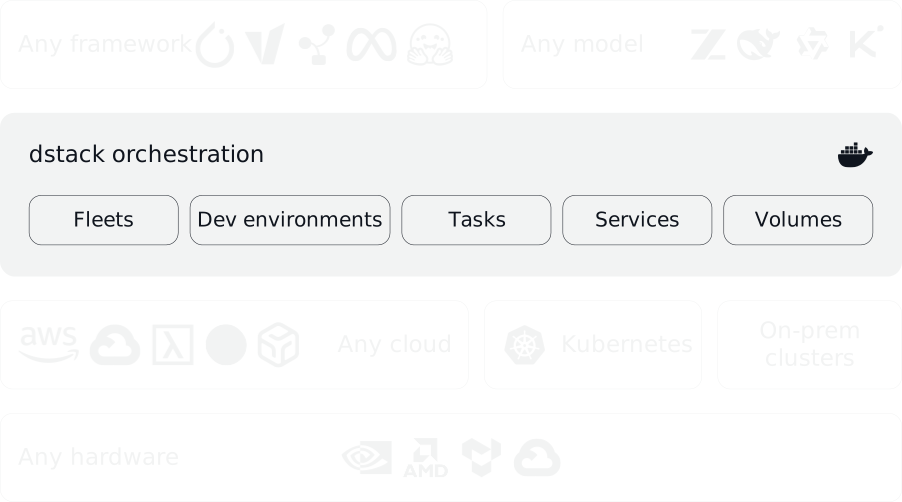
dstack is an open-source Python project in the AI and machine learning infrastructure ecosystem. It is a unified control plane for GPU provisioning and orchestration that works with GPU clouds, Kubernetes, and on-prem clusters. The project supports NVIDIA, AMD, Google TPU, and Tenstorrent accelerators, and it is compatible with open-source tools and frameworks.

The concrete problem it solves is the operational split between development, training, fine-tuning, and inference workloads on heterogeneous hardware. Instead of managing each cloud, Kubernetes cluster, or on-prem server separately, teams can define fleets, dev environments, tasks, and services in one system. This lets the same workflow target cloud backends, Kubernetes clusters, Slurm, and SSH-based on-prem machines.

Key capabilities

  • Provision and manage fleets across GPU clouds, Kubernetes, and on-prem servers, including SSH fleets for self-managed clusters.
  • Run development environments, training tasks, batch jobs, and cluster workloads through fleet, task, and service configurations.
  • Deploy model inference as secure and scalable endpoints, with replica groups, gateway replicas, and PD disaggregation support.
  • Support NVIDIA, AMD, Google TPU, and Tenstorrent accelerators, plus Kubernetes volumes, Slurm backend, and NVIDIA Dynamo integration.
  • Provide a server, CLI, and API workflow that requires Git and OpenSSH on Linux, macOS, or Windows through WSL 2.
  • Install agent skills so AI agents such as Claude, Codex, and Cursor can create and manage fleets and submit workloads.
  • Offer experimental presets for agent-driven inference optimization.

Who uses it and how

  • ML platform teams use dstack to provision GPU compute across clouds, Kubernetes, and on-prem clusters without binding workloads to one accelerator vendor.
  • Researchers and engineers use dev environments, tasks, and services to develop, train, fine-tune, and serve models, including LLM workloads.
  • On-prem operators launch the server and create SSH fleets, avoiding backend configuration for self-managed GPU servers.
  • Cloud and Kubernetes operators configure backends, manage multiple Kubernetes clusters, and attach Kubernetes volumes to workloads.
  • Agent-driven teams use dstack skills so coding agents can edit configuration and submit fleets, tasks, and services.

Getting started

Install the server with uv tool install "dstack[all]" -U, run dstack server, then install the CLI with uv tool install dstack -U and point it to the server address, user token, and project name.

When to use it — and when not to

Use dstack when vendor-agnostic GPU orchestration across clouds, Kubernetes, and on-prem is the priority, because no paid replacement is named in the facts. Self-hosting requires operating the server, configuring cloud or Kubernetes backends, maintaining SSH fleets, and providing Git and OpenSSH. Do not use it when a mature maintainer record or stable inference optimization is required, because the facts show 0 contributors, 68 open issues, a repo age of 0 years, and experimental presets.

project readme (upstream, from github) — read inline

dstack

Last commit PyPI - License Discord

dstack is a unified control plane for GPU provisioning and orchestration that works with any GPU cloud, Kubernetes, or on-prem clusters.

It streamlines development, training, and inference, and is compatible with any hardware, open-source tools, and frameworks.

Accelerators

dstack supports NVIDIA, AMD, Google TPU, and Tenstorrent accelerators out of the box.

Latest news ✨

How does it work?

Launch the server

Before using dstack through CLI or API, set up a dstack server. If you already have a running dstack server, you only need to install the CLI.

To orchestrate compute across GPU clouds or Kubernetes clusters, you need to configure backends.

When using dstack with on-prem servers, backend configuration isn’t required. Simply create SSH fleets once the server is up.

The server can be installed on Linux, macOS, and Windows (via WSL 2). It requires Git and OpenSSH.

$ uv tool install "dstack[all]" -U
$ dstack server

Applying ~/.dstack/server/config.yml...

The admin token is "bbae0f28-d3dd-4820-bf61-8f4bb40815da"
The server is running at http://127.0.0.1:3000/

For more details on server configuration options, see the Server deployment guide.

Install the CLI

If the CLI is not installed with the server

Once the server is up, you can access it via the dstack CLI.

The CLI can be installed on Linux, macOS, and Windows. It requires Git and OpenSSH.

$ uv tool install dstack -U

To point the CLI to the dstack server, configure it with the server address, user token, and project name:

$ dstack project add \
    --name main \
    --url http://127.0.0.1:3000 \
    --token bbae0f28-d3dd-4820-bf61-8f4bb40815da

Configuration is updated at ~/.dstack/config.yml

Install agent skills

Install dstack skills to help AI agents use the CLI and edit configuration files.

$ npx skills add dstackai/dstack

AI agents like Claude, Codex, and Cursor can now create and manage fleets and submit workloads on your behalf.

Define configurations

dstack supports the following configurations:

  • Fleets — Provision and manage clusters across clouds, Kubernetes, and on-prem
  • Dev environments — Launch dev environments to be accessed by agents or from your IDE
  • Tasks — Run training, batch or other jobs across a single node or clusters
  • Services — Deploy model inference as secure and scalable endpoints
  • Presets — Agent-driven inference optimization (experimental)
  • Volumes — Managing instance and network volumes for persisting data

Configuration can be defined as YAML files within your repo.

Apply configurations

Apply the configuration via the dstack apply CLI command, a programmatic API, or through AI agent skills.

dstack automatically manages provisioning, job queuing, auto-scaling, networking, volumes, run failures, out-of-capacity errors, port-forwarding, and more — across clouds and on-prem clusters.

Useful links

For additional information, see the following links:

Contributing

You're very welcome to contribute to dstack. Learn more about how to contribute to the project at CONTRIBUTING.md.

License

Mozilla Public License 2.0

Frequently asked questions

Is dstack free to use?

dstack is open source under the MPL-2.0 licence. There is no licence fee and no seat count — you can self-host it or, where the project offers one, pay a vendor for a managed version instead.

What does dstack do?

GPU orchestration across clouds, Kubernetes, and on-prem

What is dstack written in?

dstack is primarily written in Python. Its source is publicly available at https://github.com/dstackai/dstack, and it has 2,252 GitHub stars.