❄ DSCODE
Write code in your terminal. Plug scripts into a live session. Hand tasks between agents.








Core features · What's new · Quick start · Commands · Changelog · Docs
DSCODE is a terminal coding agent for macOS, built on DeepSeek Harness. A persistent shell reads and writes code and runs tests; the TUI, the CLI and your scripts all share one session runtime instead of each starting their own. It installs as a pinned, reproducible harness—DSH dependencies, TUI and plugins are versioned and verified together.
Most coding agents work alone. DSCODE is built on the opposite assumption: sessions on your machine are visible to each other, so one can hand a task over, another can review the diff, and an independent reviewer decides approvals from your instruction rather than from a rule table.
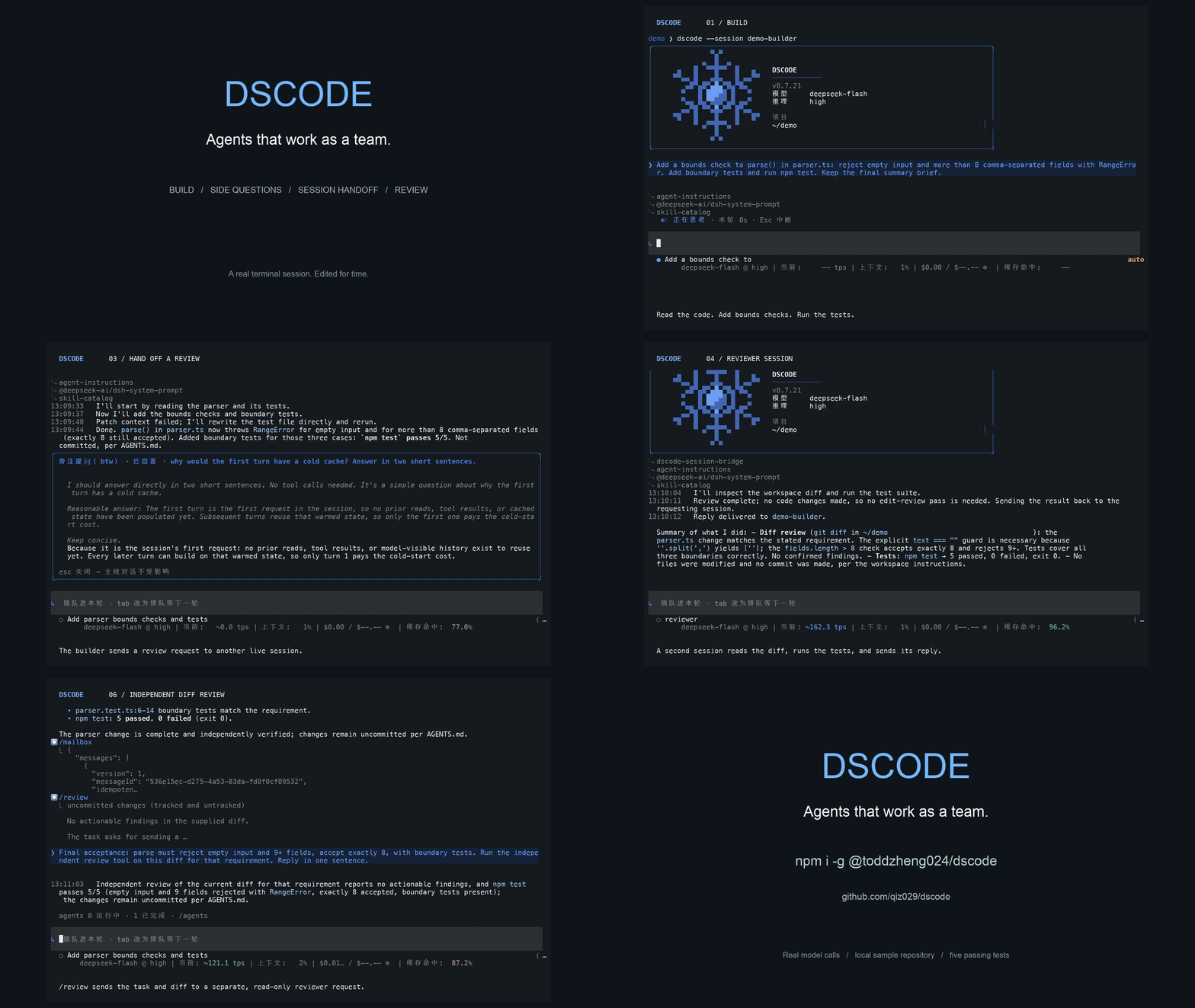
See it in 60 seconds. Three things most coding agents cannot do, and where to look:
| In one terminal | What it shows |
|---|---|
/btw why is the cache cold on the first turn? |
A side question runs in its own read-only child session and answers in a panel; the exchange never enters the main conversation. |
dscode send --steer "review the change in parser.ts and reply" |
Work handed to another session on this machine; it can read your transcript, answer, and hand the result back. |
/permission auto-review · /review-usage |
Approvals decided by an independent reviewer from your instruction, with what it allowed and what it cost. |
The 90-second demo script has the shot list, the exact commands, and how to record it.
🧭 Core features
| Feature | What you get |
|---|---|
| Agentic coding loop | A persistent shell that keeps cwd, environment and background jobs, plus file edits, search, patch application and tests. Project instructions, skills, plan, goal and hooks are wired in. |
| Session bridge | Start a task in the TUI, then add requirements, read output or subscribe to progress from another terminal (dscode sessions, send, read, watch). Every source enters the same runtime and context, and readers never take the session write lock. |
| Agent-to-agent tasks | The agent finds, reads and messages other sessions with list_sessions, read_session, send_session and reply_session, choosing queue, steer or defer. A persisted mailbox, retry de-duplication and a finite budget bound message loss, double processing and wake-up loops. |
| Session cards | Each session advertises its project, workspace and the topics of its last five user requests—enough to pick the right collaborator without reading its transcript. Cards describe what the user asked for, not conclusions. |
| Cross-session memory | Reusable experience is extracted in the background and retrieved together with its workspace and source messages. Memory can be disabled per session or globally, and its model usage is tracked separately. |
| Effort and sub-agents | Ultra uses the model's max reasoning and decides how far to investigate, delegate and verify; below Ultra the agent can still delegate, but only when a task clearly warrants it. Parents pick a separate effort per child, and children that edit can work in isolated Git worktrees created from a clean HEAD. |
| Independent review | After a code change passes its relevant checks, the agent sends the Git diff—or, outside a repository, the changes since a snapshot taken when the task began—to a separate read-only model and fixes concrete findings before ending the turn. /review runs the same reviewer by hand, scoped to the staging area, a base branch, a commit or a path. |
| Non-interactive runs | dscode exec "prompt", or git diff | dscode exec "review this", runs a full turn in scripts and CI: the reply streams to stdout, tool activity and the session id go to stderr, and the exit code reflects the turn. --json and --resume are supported. |
| Terminal UX | Six interface languages, select-and-copy text, scrollback through history, a verbose view of thinking and tool calls, an input area pinned to the bottom, a sub-agent overview, and footer TPS / context / cost / cache figures. |
| Guardrails | A workspace-write sandbox by default and Auto permission review by an independent model, switchable to human approval. Ultra grants no extra permissions and Computer Use keeps human authorisation. |
| Agent email | A local [ToAgent] inbox shared by all sessions: Enter steers a message into the live session as user-selected context, and with Gmail configured the agent can send mail through the same approval flow. |
🆕 What's new
0.7.32 — OpenCode Go now signs in only with an OpenCode account: /opencode login shows a code, opens the console and signs in in the background. The login renews itself and sends requests to the inference endpoint the console names for your organisation. The console API key from 0.7.31 is no longer read, so run /opencode login once. The footer shows the subscription's usage of its five-hour, weekly and monthly caps, and when an exhausted one lifts. The consent page names the OpenCode CLI, whose login client DSCODE uses.
0.7.31 — OpenCode Go joins /provider: /provider opencode-go stores the key from the OpenCode console and serves Go's chat-completions models — DeepSeek, GLM, Kimi, MiMo, LongCat, Hy and Space Bunny — with the reasoning efforts each one accepted on the live gateway, the session id Go asks for, and reasoning passed back across tool calls. A Go session searches the web through Exa, as OpenCode does, with no extra key. Qwen, MiniMax and Go's Grok and GPT models use other protocols and are not offered yet.
0.7.30 — /delegate turns the main agent into a coordinator: it plans the task on a board with priorities and dependencies, runs ready parts as child agents in isolated Git worktrees, verifies each result and merges the accepted ones in dependency order, staged and uncommitted. /delegate-dashboard shows the board as a colour-coded kanban — pending, running, verifying, complete. Parents now run up to five children at once below Ultra and twenty at Ultra, and the welcome snowflake is redrawn.
0.7.29 — /account signs the DeepSeek route in with a DeepSeek account through the system browser: the grant is stored on this machine, a signed-in machine needs no DEEPSEEK_API_KEY, and the command also reads the account identity, recharge and bonus balances, and signs out. The profile composes a loopback callback server for it, which carries a route only while a sign-in runs; DSCODE_ACCOUNT_LOGIN=0 removes it. Two composition fixes came with it: the host-plane workflow engine is disabled again after an upstream rename silently voided the patch that disabled it, and the redundant PTC runtime row is gone now that the base composition ships one.
0.7.28 — The DSH runtime moves from 0.1.5-rc.2 to 0.1.7-alpha.2, bringing sandbox escalation with justification on the retry shell, durable image offload, MCP resource tools, subagent permission inheritance and compaction retry recovery. The reviewed permission preset is renamed auto → auto-review, because DSH now reserves auto for its own integration: use /permission auto-review, dscode exec --permission auto-review and permission: auto-review. Computer Use keeps live activation and its native helper, but a resumed session regains its execution tools only once the computer-use skill is loaded again.
0.7.27 — Fixes fresh Hub installation failing after Harness composition generates its empty cordis.yml. The launcher carries a narrowly patched Hub CLI, and release verification now checks the native locked installer, launcher first start and Hub doctor.
0.7.26 — Triggers now support fresh or persistent sessions, durable cron and delay jobs, and supervised script sources. Manage them from /trigger, the CLI or agent tools with the same workspace and approval boundaries. The TUI stays in DSCODE mode and model switches reset unsupported effort values to the target default. TPS uses API-reported tokens with request-count exponential smoothing; runtime metrics and skills sit on the left, while cost, DeepSeek balance, peak/off-peak and cache align right or move together onto a third row. OpenRouter content-policy rejections now explain why the turn stopped.
0.7.25 — Running the installer again now keeps a tar installation current instead of refusing: an older one is updated through its own dscode update (state migrated, the old tree kept as .dscode-backup-), an equal or newer one is reported and left alone, and anything the installer did not create is still refused with the path it found. A Homebrew formula joins the install paths — brew tap qiz029/tap && brew trust qiz029/tap && brew install dscode installs the same launcher, and there dscode update moves only the Hub profile because brew upgrade dscode owns the launcher.
0.7.24 — An event can start a session unattended: trigger definitions live in /triggers/ and /.dsh/triggers/, an event carries only data under a required eventId, and dscode trigger / /triggers run and inspect them, with trigger install writing a launchd LaunchAgent — a failed run notifies nobody yet. /goal[20] sets or re-caps the goal's round cap from the command plane. On OpenRouter, MiMo V2.6 (pro, flash and ultraspeed) joins the models that pass thinking back, and /model now offers a curated 28-model list — the five tuned labs plus the flagship line of Anthropic, OpenAI, Google and xAI — instead of all 373 tool-calling models, while a session already on a trimmed model keeps running.
Every release is listed in the changelog; the 0.7.29 notes have the long version.
🚀 Quick start
Requires macOS 14+, Node 22.19+ (22.x) or 24+, npm, Git and Google Chrome.
npm install -g @toddzheng024/dscode
cd /path/to/project
dscode
Every other install path reaches the same pinned harness:
| Method | How |
|---|---|
| npm / Hub | the command above; the launcher installs the pinned profile from DSH Plugin Hub |
| Homebrew | brew tap qiz029/tap && brew trust qiz029/tap && brew install dscode (Homebrew 7 refuses an untrusted third-party tap); the formula installs the same launcher, dscode update then moves only the profile, and brew upgrade dscode owns the launcher |
| GitHub release, one line | curl -fsSL https://raw.githubusercontent.com/qiz029/dscode/main/install.sh | sh |
| Release tarball | download dscode--darwin-arm64.tar.gz (or -darwin-x64) from Releases, unpack it and run sh dscode-install/install.sh |
| Source checkout | git clone https://github.com/qiz029/dscode.git && cd dscode && npm ci --ignore-scripts && npm run setup |
The one-line installer resolves the newest release, verifies the sha256 digest GitHub publishes for its tarball and then runs the installation the tarball carries; sh -s -- pins an exact release instead of tracking the latest. Every path needs Node and Git. The GitHub release paths need nothing else: the prebuilt tarball (dscode--darwin-arm64.tar.gz or -darwin-x64) already carries the locked node_modules, so it installs without npm and without reaching an npm registry—the one to use behind a corporate registry proxy. The plain dscode-.tar.gz is the source tarball, which installs its lockfile with npm ci; the installer falls back to it on a platform without a prebuilt package, and DSCODE_INSTALL_SOURCE=1 asks for it. The npm path installs the pinned profile from the Hub.
The first launch installs the pinned complete preset from DSH Plugin Hub—no manual plugin assembly, no global pnpm. Then enter /login and paste your DeepSeek API key into the hidden input: it is stored locally in ~/.dscode/credentials.yaml with 0600 permissions, shared across projects and installed versions, and never sent to the agent. A DEEPSEEK_API_KEY environment variable takes precedence. To use OpenRouter, enter /provider openrouter: DSCODE asks for your OpenRouter key (stored the same way, or taken from OPENROUTER_API_KEY) and switches the session to the DeepSeek model you were on; /model then lists a curated set instead of the whole catalogue—the current flagship models from DeepSeek, GLM, Kimi, Qwen and MiMo, plus the flagship line of Anthropic, OpenAI, Google and xAI—and typing searches it. Those five are tuned and tested; the Western flagships work on a best-effort basis. A model outside the list still runs when a session is already on it. /provider deepseek switches back, and /login openrouter replaces the key. An OpenCode Go subscription works the same way: /opencode login signs in with your OpenCode account, then /provider opencode-go offers Go's DeepSeek, GLM, Kimi, MiMo, LongCat, Hy and Space Bunny models. Use /model to pick a model or another provider, and /effort to adjust reasoning effort; the default route is deepseek-official/deepseek-flash. The TUI checks npm for a newer release at startup and /update upgrades the whole installation after you exit.
Six interface languages, English by default. /language opens the picker and /language ja switches straight to a locale; 中文, 日本語 and 한국어 are accepted as names too. The set is English, 简体中文, 繁體中文, 日本語, 한국어 and Español. The choice is stored per machine in ~/.dsh/dsh-code/language.json, and DSCODE_LANGUAGE=es overrides it for one run.
dscode --continue                 # continue the last session
dscode --resume SESSION_ID        # resume a specific session (it runs in the folder it was created in)
dscode --cwd /another/project     # work in another directory
dscode trigger list               # event-driven runs defined in this project (run|fire|install|log)
dscode doctor                     # analyse recent logs and session traces
dscode --version                  # print the DSCODE version
The launcher checks installed bundles and Harness dependencies against the recommended combination; on a mismatch it prints one consolidated warning and keeps running, without editing dependencies or downgrading. No MCP server is mounted by default. Desktop tools load progressively through a skill, screenshot understanding needs a model that accepts images, the MCP bridge provides tools rather than resources or prompts, and Computer Use permissions are granted separately in macOS. Add your own MCP servers — Chrome DevTools MCP among them — in config/mcp.local.yml.
Other install paths, upgrades and rollback
From source
git clone https://github.com/qiz029/dscode.git
cd dscode
npm ci --ignore-scripts
npm run setup
npm start

# Work on another project
npm start -- --cwd /path/to/project
One-line install — the installer runs straight from the repository and fetches the release itself; name an exact version after -- to pin one instead of tracking the latest:
curl -fsSL https://raw.githubusercontent.com/qiz029/dscode/main/install.sh | sh
curl -fsSL https://raw.githubusercontent.com/qiz029/dscode/main/install.sh | sh -s -- 0.7.29
From a tar package — download the prebuilt dscode--darwin-arm64.tar.gz (Apple silicon) or dscode--darwin-x64.tar.gz (Intel) from GitHub Releases, then:
mkdir dscode-install
tar -xzf dscode-<version>-darwin-arm64.tar.gz -C dscode-install
sh dscode-install/install.sh
The command lands in ~/.local/bin/dscode by default—make sure that directory is on your PATH. Running it again keeps a tar installation current: an older one is updated through its own dscode update, an equal or newer one is reported and left alone, and anything else — a directory that is not a DSCODE installation, or a dscode command that belongs to another installation — is refused with the path it found.
If the npm name lookup returns 404, install the same version straight from the official registry tarball:
npm install -g https://registry.npmjs.org/@toddzheng024/dscode/-/dscode-0.7.29.tgz
Upgrade — dscode update [exact-version] updates the whole installation in one step, and requires no running DSCODE sessions. On the npm/Hub install it replaces the launcher binary with npm and then upgrades the installed profile to the same version. On a tar install it downloads the release tarball (the prebuilt one for this platform when the release has it, so the update needs no npm either), verifies it against the release's sha256 digest, swaps the installation directory in place and migrates .runtime, .env and local config/; the previous installation is kept as a sibling backup directory. A source checkout updates itself the same way: git pull --ff-only on the branch it tracks, then npm ci --ignore-scripts and npm run setup; uncommitted changes in tracked files refuse before anything runs, so a failed update never half-applies.
dscode update                  # latest release
dscode update 0.7.29           # an exact version
dscode history lists retained versions and dscode rollback returns to the previous preset revision (npm/Hub install). Tar installs older than the first release with dscode update upgrade by installing the new tarball into a fresh directory and migrating the state once. Source, tar and npm/Hub installs use different data directories, and sessions and credentials are not migrated between them. See the tar distribution notes and the npm + Hub guide.
⌨️ Commands
| Command | What it does |
|---|---|
/login |
Paste the DeepSeek API key into a hidden input; saved under ~/.dscode/ and loaded at startup |
/account |
Sign in to a DeepSeek account in the browser instead of pasting a key; also its identity, balance and sign-out |
/model, /effort |
Choose a model (type to search) or configure other credentials; models with four levels use a horizontal effort bar |
/new |
Start a fresh session; the TUI is fixed to the dscode preset, including resumed conversations |
/status, /doctor |
Session state and runtime diagnostics |
/memories |
Global memory state, background usage, switches and cleanup |
/session |
Current session id, its card, and the external access entry point |
/permission auto-review, /permission ask |
Switch between automatic review and human approval |
/review-usage |
Extra tokens and time spent on automatic review |
/shell, /shell reset |
Inspect or reset the persistent terminal |
/mcp, /skills, /hooks |
Manage MCP, inspect skill sources, view or reload hooks |
/plan, /goal |
Plans and long-running objectives |
/agents |
Sub-agent tasks, status and current activity |
/delegate |
The main agent plans the task on a board with priorities and dependencies, dispatches ready tasks in priority order to child agents in isolated Git worktrees as child slots free up, answers their questions, verifies each result and finally stages what it merges |
/delegate-dashboard |
Kanban popup of the delegated tasks: pending, running, verifying, complete |
/btw |
Ask a side question in a child session; the answer shows in its own panel and never enters the main conversation |
/mailbox |
Session messages and deferred notes |
/email |
Press i to configure IMAP and an app password; browse [ToAgent] mail and press Enter to steer it into the session |
/compact |
Compact the conversation context |
/diff, /review |
Inspect edits; /review asks an independent, read-only model to review a Git diff |
/clear |
Start a new session with empty context; the old session stays resumable |
/resume, /fork |
Resume or fork a session |
Shift+Enter inserts a newline, !command runs a local shell command, Ctrl+L clears only the screen, and Esc interrupts the current operation. The TUI's /help is the authoritative list, and commands and hooks covers the rest.
🔧 Permissions & configuration
The default is a workspace-write sandbox with Auto permission review, where applicable approval requests go to an independent model; /permission ask hands them back to you. Ultra adds no permissions. Scope, cost and limits of auto review →
| Install method | Sessions, credentials and stats | Local configuration |
|---|---|---|
| npm / Hub | ~/.local/share/dscode-hub, overridable with DSCODE_HOME |
.env and config/ in the data directory |
| Source | repository .runtime/ |
repository .env and config/ |
| tar | .runtime/ inside the install directory |
.env and config/ in the install directory |
config/hooks.local.json, config/mcp.local.yml and config/harness.local.yml are supported. Local configs, secrets and sessions never enter a release package. Skills are discovered in the target project's .agents/skills and .dsh/skills, plus an isolated user skill directory; /skills conflicts diagnoses same-name overrides. A project's .codex/hooks.json, .dsh/hooks.json and .claude/settings.json are layered on top of config/hooks.local.json by default; set DSCODE_PROJECT_HOOKS=0 to load the installation file alone. Skills come from the project's .dsh/skills and .agents/skills plus the user roots, and by default .dsh/skills, .agents/skills and .claude/skills are also read from every directory between the working directory and home, nearest first; DSCODE_SKILL_ANCESTORS=0 keeps discovery to the project and user roots alone. AGENTS.md/CLAUDE.md in those ancestor directories is folded into the workspace instructions.
🧩 Development
npm test                    # unit and contract tests (upstream dependencies isolated)
npm run check               # coverage, integration, TUI and packaging checks
npm run doctor              # deterministic local agent integration check
npm run build:packages      # build the launcher and complete bundle npm tgz
npm run release:hub         # build the Hub release and .dshprofile
npm run verify:hub          # temp install, agent check, failed upgrade and rollback
npm run dist                # build the fallback tar installer
make release runs the whole build job in that order—version check, npm run check, the three build steps, verify:hub, then release-candidates.tar.gz—and make publish runs the publish job's phases in order. make help lists every target; the workflow itself does not call make.
| Distribution component | Contents |
|---|---|
@toddzheng024/dscode |
The dscode command, first-install bootstrap and Hub version management |
@toddzheng024/dscode-bundle |
Base layer, Computer Use, custom plugins and the modified TUI/runtime |
Hub profile dscode |
Pinned bundle and runtime versions with integrity hashes |
The bundle generates its modified modules at build time and never rewrites third-party sources on a user's machine. DSH dependencies are pinned to 0.1.7-alpha.2; the TUI is based on [email protected] and Computer Use on 0.3.2. The full pipeline—bundle, then Hub release, then launcher—is in the distribution guide. Context-compaction evaluation lives under eval/ and runs with npm run eval:compaction.
📚 Documentation
| Document | Contents |
|---|---|
| Changelog | Every release, newest first |
| Non-interactive runs | dscode exec, JSON output, resume and effort/model/permission flags |
| Triggers | Event-driven runs with fresh or persistent sessions: cron, delay jobs, supervised script loops, /trigger TUI management, agent tools, the run log |
| Session bridge | dscode sessions, send, read, watch against a live session |
| Session communication | Agent-side messaging, delivery modes, budgets and de-duplication |
| Session cards | Project, workspace and topic fields, and how they are derived |
| Memory | Global cross-session memory, background usage and switches |
| Persistent shell and Ultra | Presets, reasoning effort, per-child effort and worktree isolation |
| Account login | Signing the DeepSeek route in with a browser account instead of an API key: the flow, the loopback callback, the limits |
| OpenCode Go | Running a session on an OpenCode Go subscription: the account login, footer usage, the models and their reasoning efforts, what is not supported yet |
| Auto review | Scope, cost and limits of independent permission review |
IMAP setup, the inbox panel, send_email and aliases |
|
| Skills and workspace instructions | Discovery scopes, the ancestor mode and instruction files |
| TUI commands | Command reference and hooks |
| Session metrics | Definition of the footer TPS, context, cost and cache figures |
| Demo script | The 90-second demo: shot list, exact commands, how to record it |
| npm + Hub distribution | Bundle, Hub release and launcher pipeline |
| tar distribution | The standalone tar installer |
| Verification | What the maintained checks cover |
Design records do not repeat the guides above:
| Document | Contents |
|---|---|
| Session messaging design | Rationale, boundaries and fixed limits behind agent-to-agent tasks |
| Cloud web app host | Design baseline and trust model for browser access; not implemented |
| Triggers | Why the trigger mechanism is shaped this way: the ingress, the supervised scheduler, the run log as a contract |
| Verification | What the maintained checks cover, and what cannot run inside a session |
| Maintainability | What checks the forked terminal, and what stays unverified |
| Upgrading the vendored terminal | Taking a new upstream dsh-code release: the merge procedure, and what only a smoke test catches |
| Releases | Long-form notes for every release, newest first |
| Context handoff | Development checkpoint for a fresh session; not user documentation |
🤝 Contributing
Issues and pull requests are welcome. Run npm run check before sending a change, and keep the release flow intact: bundle first, then Hub release, then launcher.
📄 License
MIT © 2026 Todd Zheng
Built on DeepSeek Harness, DSH-Code and DSH Plugin Hub. An independent community project, not an official DeepSeek product.