
Drama Skills
面向编剧、漫剧工作室和编导的 AI 短剧创作工作流:十一个技能,从一个点子或一部原著做到分集剧本、分镜、图片/视频提示词和成片。





上面这段 24 秒竖屏样片是一次完整实跑的最后一步:从一部 20 章的原著开始,经原著分析、剧本、视觉设定、 图片提示词、分镜(21 镜)、视频提示词,只为剧本第三场(SC003)逐镜生成八段素材,再按剪辑单剪成成片。
这是什么
Drama Skills 覆盖 AI 短剧 / 漫剧从点子或原著到成片的全流程:原著分析 → 分集剧本 → 视觉设定 → 图片提示词与分镜 → 视频提示词 → 确认后生产 → 剪辑成片 → 审查。 它以 11 个 skill 的形式装进你已经在用的编程 Agent(Claude Code、Codex 及其他支持 Agent Skill 规范的环境), 写作用的模型就是该 Agent 的模型。
- 五份 Markdown 就是创作事实 — 每集只维护
剧本.md、视觉设定.md、分镜.md、图片提示词.md、视频提示词.md,剪成片时多一份剪辑单.md。没有并行的数据库,改哪份文件就是改哪一层决定。 - 人物和造型跨镜不走样,靠的是写进文件、脚本能核对的事实 — 需要跨镜保持的造型写成一条能原样贴进提示词的短语(连续性锁); 每一镜写完关键帧后要说明它依据了哪些条目;漏了的,检查脚本会指出来,真实报错见下文。
- 先预览、确认,再生产 — 任何图片、视频、配音或音乐任务,都先在文件里看到这一批准确的内容和参数, 明确确认后才调用外部接口花钱。
- 成片也在套件里 — 剪辑技能逐段写下入点、出点为什么选在那里,字幕逐字取自剧本,统一响度后渲染; 核对和测量脚本只回报事实,不下判断。
由来
这套技能来自我们自己的漫剧工作室产线:2025 年至今累计上千个 AI 短剧 / 漫剧项目, 中间换过几轮自建和开源工具。前后端加起来近 8 万行代码,在模型能力和需求的迭代速度 面前逐渐维护不动了。
后来干脆抛开自建的一体化图形工具,把历史项目工程和图片 / 视频提示词蒸馏成这套技能, 让制作人直接用 agent CLI 加文件维护工程、生成提示词,确认之后再送去生成——结果意外地顺手。 现在留在自建工具里的,只剩排队抽卡。
刻意把确认放在生产之前:提示词先落进文件,生产 skill 展示本次准确数量、内容、参考、 参数、输出和 adapter;用户看到预览并明确确认后才执行。供应商凭据不进入项目, 项目文件和其他 Skill 都不绑定供应商。
安装
前提:你已经在用 Claude Code、Codex 或其他支持 Agent Skill 规范的编程 Agent;下面这条命令需要终端里能运行 npx(Node.js)。
npx skills add zenstory-ai/drama-skills -y -g
-g 全局安装,所有目录可用;去掉 -g 则只装到当前目录。更新时重新执行同一条命令即可。
脚本需要 Python 3.9 或更新版本(macOS 自带的即可);剪辑成片另需 ffmpeg / ffprobe 在 PATH 上。
也可以直接对 Agent 说一句话(支持导入 GitHub 仓库 / skill 的平台都适用):
安装这些技能 https://github.com/zenstory-ai/drama-skills
手动链接(可安装全部,也可只链接需要的技能)
git clone https://github.com/zenstory-ai/drama-skills.git && cd drama-skills

# Claude Code
mkdir -p "$HOME/.claude/skills"
for skill in skills/*; do
  ln -s "$PWD/$skill" "$HOME/.claude/skills/$(basename "$skill")"
done

# Codex
mkdir -p "${CODEX_HOME:-$HOME/.codex}/skills"
for skill in skills/*; do
  ln -s "$PWD/$skill" "${CODEX_HOME:-$HOME/.codex}/skills/$(basename "$skill")"
done
每个技能都是独立安装单元;只用写作、审查或生产等单一能力时,只链接对应目录即可。
short-drama 提供项目初始化、路由与 Dashboard。
调用写法随运行环境而变:Claude Code 用 /short-drama,Codex 用 $short-drama,
也可以不写前缀、直接用自然语言说明要做什么。两种写法在下文示例中可以互换。
变更见 CHANGELOG.md 与 Releases; 升级既有项目要做什么,见常见问题「升级到新版本后要做什么」。
快速开始
下面的请求复制改一改就能用:
# 0. 有原著时(可选):先抽样快评,再决定要不要全量拆
用 $short-drama-novel-analyze 快评 输入/这本小说.txt,先告诉我值不值得拆

# 已有多集完整剧本时(可选):按文件实际结构索引,每次只读当前集,断点续做分集地图
用 $short-drama-develop 从 输入/剧本完整版.txt 生成分集地图;先识别这份文件的分集方式,不要整稿塞进上下文

# 1. 新建项目
用 $short-drama 初始化一个都市打脸题材的短剧项目,竖屏 9:16

# 2. 写第一集
用 $short-drama-write 写第 1 集:外卖员在高档餐厅被经理羞辱,亮出集团董事身份

# 3. 拆资产,写提示词与分镜(可在同一请求内连续完成)
用 $short-drama-assets 从第 1 集拆人物/场景/道具
需要统一视觉语言时,可选用 $short-drama 做 Look Development
用 $short-drama-image-prompts 为已接受的资产写参考图提示词
用 $short-drama-storyboard 给第 1 集做正式分镜与冻结关键帧
用 $short-drama-video-prompts 把分镜逐镜翻译成视频提示词
# 指定目标视频模型、并且要人物/场景/道具跨镜一致时,把参考图的事也说清楚:
用 $short-drama-video-prompts 按 MiniMax H3 写第 1 集视频提示词;先在项目里找已有的角色图、场景图、道具图和本镜起始帧绑成参考,缺哪张就列出来,不要改成文生视频
# 参考图在自己的界面里出、不进项目时,让技能写出逐镜挂图计划,视频提示词照常产出:
用 $short-drama-video-prompts 按 MiniMax H3 写第 1 集视频提示词;参考图我自己挂,逐镜告诉我挂哪几张、什么顺序、每张管什么

# 4. 明确确认后投产
用 $short-drama-produce 预览第 1 集已接受的图片、视频、TTS 或时间线音乐任务;等我确认后再执行

# 5. 把生产出来的素材剪成成片
用 $short-drama-edit 把第 1 集已生产的镜头剪成成片,逐段写清入出点理由

# 6. 需要时再审查
用 $short-drama-review 审查第 1 集的剧本与提示词
从原著出发、第一轮只要文本交接的写法:
用我拥有或获准改编的
输入/故事.txt,先列出必须保留的事实、人物动机与暂不可揭示的信息,再提出分集方案;章节数不要直接当集数。只写第一集,并交接其中三个镜头的起止动作、双手、持物和视线。区分IMG-*、待提供的PLAN-*与已实际检查的REF-*,止步于文本,不生成图片、视频、配音或音乐。
看看它的输出
下面三段节选都来自仓库里的文件或一次真实运行,省略处以「……」标出。完整版(原著快评的回填对照、改编契约、 剪辑实测与模型行为观察)在真实产出节选。
一集写出来是什么样
公开样例 《让你管账号》EP001 里,同一个镜头在四份文档里各管一层。剧本只写发生了什么:
桌对面,周薄森把一摞材料推过厚玻璃桌面。纸角碰到江晨指尖。
……
周薄森端起缺口搪瓷茶缸,抿一口冷茶,眉头皱得更深。
视觉设定.md 给需要跨镜保持的造型上「连续性锁」,锁面是一条能原样贴进提示词的短语:
- 连续性锁:LOCK-JIANGCHEN-DRESS《江晨橄榄绿立领常服》(镜头:SHOT-EP001-002、SHOT-EP001-003、SHOT-EP001-007;
  图片提示词项:IMG-JIANGCHEN-SHEET)· 锁面:olive-green stand-collar service dress
分镜.md 写这一镜的起点和终点,冻结关键帧只画起点那一格,锁面原样出现在里面:
## SHOT-EP001-002 · 把空白交到他手里
- 起点:材料在周薄森手下,茶缸停在旧茶渍旁。
- 终点:纸角抵住江晨指尖;周薄森说出“基本还是空白”。

### 冻结关键帧提示词
> 9:16 vertical two-person medium shot inside an old regiment office, Zhoubosen, a broad square-faced middle-aged officer on
> frame right rests one hand on a stack of papers ……, Jiangchen, a lean young man in olive-green stand-collar service dress,
> seen three-quarter from behind on frame left ……; chipped white enamel mug beside an old tea ring, …… no text, no logo.
视频提示词.md 只写起点到终点之间模型要执行的动作,整段复制进生成界面就能用:
## MOTION-EP001-002 · 把空白交到他手里
### 可复制提示词
> …… The middle-aged officer pushes the paper stack about twenty centimeters across the glass desk while speaking calmly.
> The young man does not reach for it until the paper touches his fingertip. The officer then lifts the chipped white enamel
> mug for one small sip, frowns at the cold tea, and returns it exactly to the old tea ring. ……
四份原文:剧本.md ·
视觉设定.md ·
分镜.md ·
视频提示词.md。
写漏了会被指出来
creator_markdown_check.py 核对五份文档之间的引用。把样例故意改坏两处——删掉 SHOT-002 视觉依据里的周薄森、
把 MOTION-003 的时长从 5s 改成 4s——它报的是原因,不是「校验失败」:
ERROR: SHOT-EP001-002: 冻结关键帧提示词写到人物「周薄森」,视觉依据没有覆盖;本镜确实看不见时在视觉依据末尾加「;画外:人物「周薄森」」,正文里这个名字不可靠时在《视觉设定.md》写「画面代称:无」
ERROR: SHOT-EP001-003: 分镜时长 5 秒与视频提示词 4 秒不一致;视频提示词只能原样照抄已接受的镜头时长
样片是怎么剪出来的
文首样片按 剪辑单.md 剪成:每一刀写画面上发生了什么,字幕逐字取自剧本,时间来自对素材的实测。最后一段:
## CUT-EP001-008 · 诸君,且听龙吟
- 来源:MOTION-EP001-017 · 制作成果/video/MOTION-EP001-017.mp4
- 入点:2.00
- 出点:7.00
- 时长:5.00
- 取舍:入点=开头 1.5 秒的凝视与上一段发布前的蓄势重复,整段去掉,从身体前倾进;出点=实测句尾收音在源 6.82 秒,
  出点留到 7.00 秒,身体后靠的姿态变化已完成(素材总长 7.29 秒,可用余量只有 0.29 秒)
- 字幕:诸君,且听龙吟
十一个技能
flowchart LR
    classDef phase fill:#e8f4fd,color:#1a1a2e,stroke:#4a9be8,stroke-width:1px
    classDef final fill:#fce4ec,color:#333,stroke:#e57373,stroke-width:1px

    nva["原著分析<br/>$short-drama-novel-analyze"]:::phase
    dev["故事开发<br/>$short-drama-develop"]:::phase
    write["分集剧本<br/>$short-drama-write"]:::phase
    assets["资产决策<br/>$short-drama-assets"]:::phase
    img["图片提示词<br/>$short-drama-image-prompts"]:::phase
    sb["分镜/关键帧<br/>$short-drama-storyboard"]:::phase
    vid["视频提示词<br/>$short-drama-video-prompts"]:::phase
    prod["确认后生产<br/>$short-drama-produce"]:::phase
    cut["剪辑成片<br/>$short-drama-edit"]:::phase
    rev["审查<br/>$short-drama-review"]:::final
    pkg["文本交付包"]:::final

    nva -.有原著时.-> dev
    dev -.可选.-> write --> assets
    assets --> img
    assets --> sb --> vid
    img --> prod
    vid --> prod
    prod --> cut --> rev --> pkg
| 技能 | 职责 |
|---|---|
short-drama |
初始化、路由、视觉方向/Look Development 与 Dashboard |
short-drama-novel-analyze |
长篇原著的抽样改编快评、章节索引、逐章功能提取、剧情单元与节奏、改编价值与分集候选 |
short-drama-develop |
小说/长材料的可追溯改编、多集整稿的 Agent 主导切片与续跑、故事引擎、分集地图、导演阐述、题材与钩子手册 |
short-drama-write |
单集目标、因果节拍、可拍剧本和项目选择的制作稿格式 |
short-drama-assets |
人物/造型、地点/视图、道具/状态、可选的角色声音方向与连续性决策 |
short-drama-image-prompts |
Lookdev 风格帧、角色/场景/道具参考板提示词与定点修改说明 |
short-drama-storyboard |
可选场次视觉计划与 Coverage Audition、原文落实、镜头、边界和冻结关键帧 |
short-drama-video-prompts |
单镜动作、多人物表演与注意交接、摄影、声音、起止状态、补拍说明,以及跨镜时间线音乐规格 |
short-drama-produce |
展示有边界的图片/视频/TTS/音乐任务,取得本次明确确认后通过外部 adapter 执行并记录结果;可选支持 Seedance、GPT Image 2、MiniMax H3 视频与 MiniMax Music |
short-drama-edit |
逐镜素材的可用带、入出点取舍、镜序、台词完整性、字幕与响度,写成剪辑单并渲染成片 |
short-drama-review |
结构/内容审查、授权生产观察的项目级校准诊断与修订结论 |
本地短剧创作台
在智能体里一句话启动(Codex 写作 $short-drama dashboard):
/short-drama dashboard
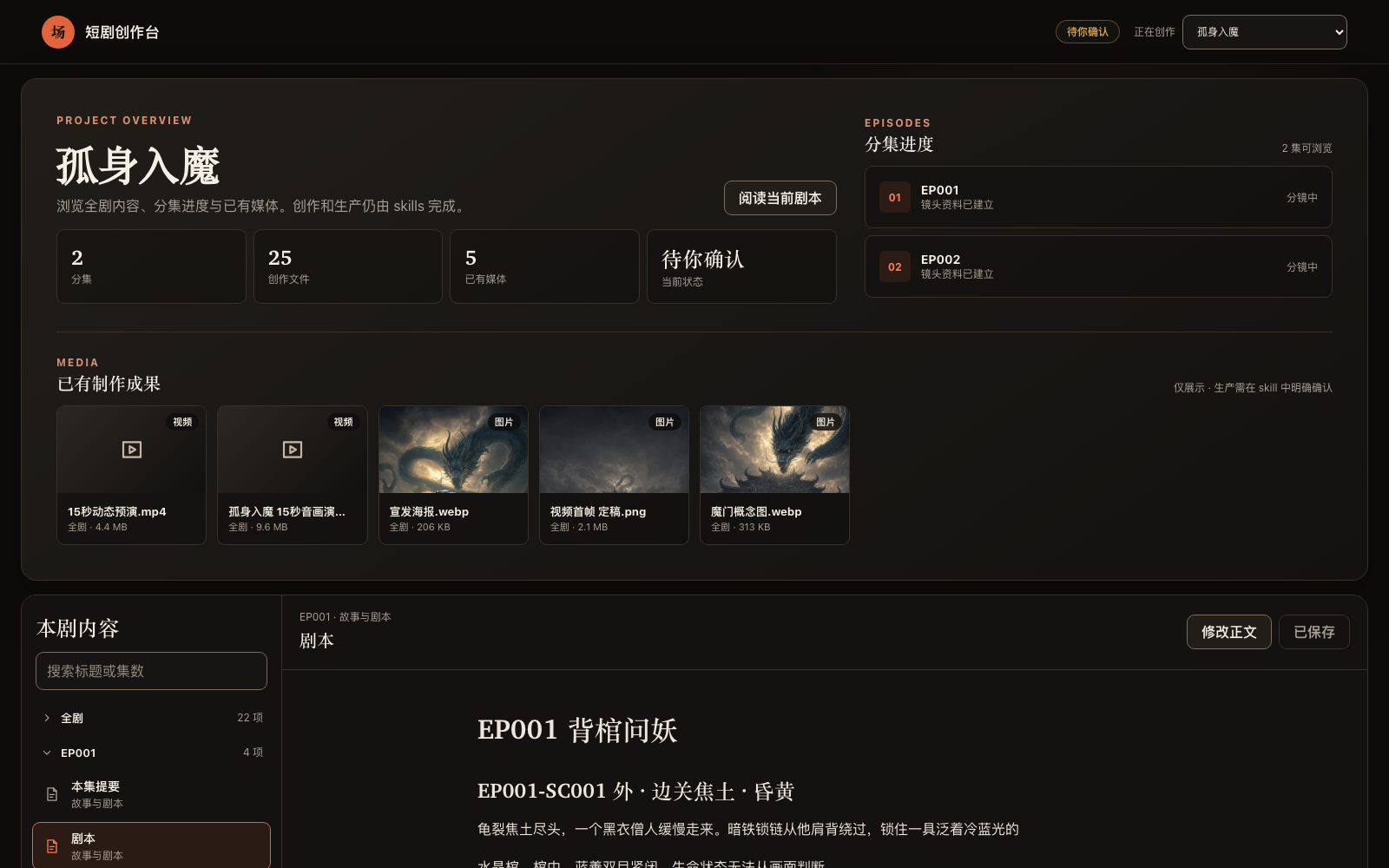
macOS、Linux、WSL 与 Windows 原生都可运行。创作台以 --detach 独立进程运行,链接在整个创作期间
保持有效;--status 打印当前链接,--stop 关闭。服务只监听本机,项目内容不上传。
全部跑完后导出交付:$short-drama 用 project_tool.py export --out
把每集现有的五份 Markdown 和 制作成果/ 复制成一份带清单和校验和的交付目录。
常见问题
MiniMax H3 的提示词有六段,全部复制还是只复制第一段?
全部复制。六段属于同一条正文、一次提交:retention_analysis 引用的 在 `subject_definitions` 里定义, 按本镜「输入参考图」的顺序编号,拆开提交后面几段就没有指代对象了。从 ### 可复制提示词 下第一行到最后一行
整段贴进那一次生成,下一镜换它自己那条。见五份创作文档与
MiniMax H3 方言。
参考图我在自己的界面里出、不想放进项目,还能拿到图生视频提示词吗?
能。让分镜把这一镜要挂的图写成 PLAN-* 槽位(定位符是 IMG-* 板子或本镜 SHOT-* 冻结关键帧,顺序 就是挂图次序,
每张写用途),视频提示词照常按图生视频产出,并逐镜列出挂哪几张、什么顺序、每张管什么;只有让套件实际调用接口生成时才需要真实文件。
REF-* 留给项目里确实存在并检查过的图片。
指定了目标视频模型,为什么收到的是文生视频提示词?
点名模型不等于选择文生视频。先把模型写进 short-drama.json 的 production_profile,再让分镜按可见人物、地点、道具和起始帧
去项目里找已有的图绑成带用途的 REF-*;仍缺图就列表停下,不改成文生视频。见
漫剧创作全流程指引 · 常见卡点。
H3 视频里对白赶读或被截断怎么办?
分镜阶段先估对白时长再定镜长:H3 中文小样本约 4.1 个可发声字/秒,较密的输入会赶词或静默截断。分镜把估时依据写在本镜「声音」里, 放不下就延长镜头或拆镜;视频提示词只能原样照抄已接受的时长。见对白估时。
说话的是 A,口型却落在画里 B 的脸上?
声音没选错,错的是口型落到画里最显眼的正脸。说话人第一次出现时在 `` 外交代画内画外与音色,台词紧跟他的动作句; 台词期间画里还有别的正脸时,把那个人明写成闭嘴不说话,分镜能安排时先让他出画或背身。见 MiniMax H3 方言 · 说话人绑定;样本小,生成后仍核对。
视频任务提交后进程断了,要重投吗?
不要。任务在提交那一刻就已计费,内置 adapter 拿到供应商任务 ID 就落盘。中断后跑 audit,它把这次尝试报成 orphaned_provider_job;
再用 collect --job-id 取回结果,取回不花钱、不走确认闸门。只有 collect 也确认那边确实失败,才重新确认与重投。见
确认后生产。
需要 GPU 或自己部署模型吗?生成媒体的钱从哪出?
不需要 GPU。写作、分镜和提示词由你正在用的编程 Agent 的模型完成,本地只跑确定性的检查脚本。生成媒体走 $short-drama-produce
的外部 adapter,用你在项目外配置的供应商凭据、按供应商计费,每个任务预览并明确确认后才执行。剪辑成片需要本机有 ffmpeg / ffprobe。
能在 Codex 里用吗?Windows 能用吗?
能。Claude Code 用 /short-drama,Codex 用 $short-drama,其他支持 Agent Skill 规范的环境按各自写法调用。
创作台在 macOS、Linux、WSL 与 Windows 原生都能跑;CI 在 Windows 上单独回归安装、分集导入与创作台。
静态漫剧(关键帧切换 + 配音)也要写视频提示词吗?
不用。分镜关键帧与图片提示词直接进入生产预览,跳过视频提示词那一层。见漫剧创作全流程指引。
升级到新版本后要做什么?
重跑同一条安装命令;既有项目对每集跑一次 creator_markdown_check.py,收紧过的规则会在这里报出来(例如 v0.7.0 起,
分镜「来源」引文点到的人物或道具没进视觉依据、也没声明画外会报错,视频提示词与分镜时长不一致会报错),文档规则的改法见
CHANGELOG.md 里的《升级》段。剪过片的再跑一次 edit_tool.py check:v0.7.1 起「未采用镜头」要逐个写镜号和理由,
「001 至 009」这种范围写法不再被接受。
延伸阅读
- 示例:examples/,公开完整样例是 《让你管账号》EP001;其余目录是仓库校验器的回归夹具。
- 真实产出节选:一镜穿过四份文档、检查器报错、剪辑单与实测、原著快评回填、改编契约、模型行为观察。
- 评估:按文档实跑一次的完整产物、发布前的回归闸门与主工作流实跑方法。
- 漫剧创作全流程指引:把十一个技能按漫剧产线从头串一遍,每步命令、产物与卡点。
- 跨镜一致性怎么做:跨镜、跨集角色一致性,三视图之外的三层文件事实。
- 小说改短剧指南:从有权改编的原著出发,形成分集决策、单集剧本与小范围分镜交接。
- 角色跨镜一致性指南:分开人物身份、本场造型与逐镜变化的双手、持物、视线;区分
IMG-*、PLAN-*与REF-*。 - An open-source AI short-drama pipeline:英文读者的分阶段说明。
贡献
欢迎提交 Bug、输出质量 Case 与功能请求到 Issues,请按结构化表单附上复现材料或具体输出。修改原则与必跑测试见 CONTRIBUTING.md。
致谢
LINUX DO - The New Ideal Community — 社区支持
ZenStory AI 项目
本项目由 ZenStory AI 维护——一组开源、面向 agent 的故事创作、改编与生产工具(GitHub 组织:zenstory-ai)。同组织项目:
| 项目 | 用途 |
|---|---|
| oh-story-claudecode | 网文写作 skill 包:扫榜、拆文、写作、去AI味、封面图 |
| drama-skills | AI 短剧 / 漫剧创作 skill 合集:剧本、资产、分镜、图片/视频提示词、独立审查(本仓库) |
| novel-to-game | 面向原著改编、指定运行环境构建与运行证据 QA 的 agent skills |
| video-recap-skills | 将支持的视频文件制作成中文解说,可选导出可编辑的剪映/CapCut 草稿 |
| oh-story-dsh | DeepSeek Harness 社区插件,提供小说、短剧、游戏和视频解说工作台 |
| zenstory | 对话即创作的 AI 小说写作工作台(app.zenstory.ai) |