DotnetSpider is a free, open source data extraction & web scraping project written in C# and released under MIT. It has 4,139 GitHub stars, 1,052 forks and 6 open issues, and was last pushed 6 months ago. On this registry it ranks #33 of 45 tracked projects in Data Extraction & Web Scraping, with 5 head-to-head comparisons available.

What is DotnetSpider?

DotnetSpider is an MIT-licensed .NET Standard web crawling and scraping framework written in C#, aimed at .NET developers who need to build high-level crawlers that run either on a single machine or across a distributed cluster.

What it is

DotnetSpider is a .NET Standard library and framework for web crawling and scraping, distributed as the DotnetSpider NuGet package and maintained as a member project of the .NET Core Community (NCC). It is written in C# and lives in the .NET Core ecosystem, with development documented against Visual Studio 2017 (15.3 or later) or JetBrains Rider on .NET Core 2.2 or later. The registry topics describe it as a crawler, cross-platform, distributed, csharp, and dotnetcore project. The repository carries an Azure DevOps build pipeline for dotnetcore.DotnetSpider on master, and a companion wiki holds the fuller documentation.

The concrete problem it addresses is the plumbing between "fetch this URL" and "store this record". Instead of hand-writing download, scheduling, link-following, and parsing code per site, a developer declares an entity class inheriting EntityBase and annotates it with selectors such as [EntitySelector], [ValueSelector], [GlobalValueSelector], and [FollowRequestSelector], using SelectorType.XPath for expression evaluation. The EntitySpider sample shows this shape directly: a CnblogsEntry entity carrying [Schema("cnblogs", "news")], index configuration through HasIndex, and validation attributes including [Required] and [StringLength(200)]. What it replaces is bespoke, per-target extraction and persistence scaffolding.

Key capabilities

  • Attribute-driven entity extraction: [EntitySelector], [ValueSelector], [GlobalValueSelector], and [FollowRequestSelector] declare what to scrape and which links to follow, with SelectorType.XPath evaluation.
  • Configurable entity spider: the EntitySpider sample maps a page into a strongly typed class, including [ValueSelector(Expression = "类别", Type = SelectorType.Environment)] for values taken from request environment metadata.
  • Storage schema and indexing declared in code: [Schema("cnblogs", "news")], HasIndex(x => x.Title), and composite indexes such as HasIndex(x => new { x.WebSite, x.Guid }, true).
  • Fluent builder entry point: Builder.CreateDefaultBuilder, options.Speed, UseSerilog(), IgnoreServerCertificateError(), and Build().RunAsync().
  • Lifecycle hooks: InitializeAsync, AddDataFlow, AddRequestsAsync, and Request objects carrying a metadata dictionary such as { "网站", "博客园" }.
  • Distributed operation across message and coordination services: RabbitMQ, Redis (optional), HBase, and the Docker remote API, with socat exposing the Docker socket on port 2375 for macOS.
  • Pluggable storage backends: MySql, SqlServer, PostgreSQL (optional), and MongoDb (optional) are all provisioned in the documented development environment.

Who uses it and how

  • .NET teams working in Visual Studio 2017 (15.3 or later) or JetBrains Rider on .NET Core 2.2 or later, integrating the library through the DotnetSpider NuGet package.
  • Distributed crawl deployments that use RabbitMQ as the message broker and the Docker remote API to run downloader or agent containers, with Redis optionally handling coordination.
  • Data collection pipelines that write crawled entities into relational stores such as MySql, SqlServer, or PostgreSQL, or into MongoDb and HBase for larger volumes.
  • Developers who need pre-release builds can add the MyGet feed to obtain the latest beta packages rather than waiting on the stable NuGet release.
  • Single-machine development and evaluation follows the samples in the DotnetSpider.Sample project, beginning with BaseUsageSpider.cs.

Getting started

Install the DotnetSpider NuGet package, adding the MyGet feed only when beta packages are required, and run the samples under src/DotnetSpider.Sample/samples/ such as BaseUsageSpider.cs and EntitySpider.cs. The documented development environment is provisioned with docker run commands for MySql, Redis, SqlServer, PostgreSQL, MongoDb, RabbitMQ, and HBase.

How it compares

No comparable crawling or scraping tools are named in the facts provided, and no list of paid products it displaces is supplied, so it stands alone in this registry. Contrasts against commercial scraping services on licence, self-hosting, data ownership, or cost model cannot be drawn from the available material.

When to use it — and when not to

The operational burden is real: a working environment assumes MySql plus RabbitMQ, and potentially Redis, HBase, SqlServer, PostgreSQL, MongoDb, and a Docker remote API endpoint alongside the crawler itself, all of which a self-hoster must run and maintain. Teams outside the .NET ecosystem, or those wanting a managed service rather than a library, should look elsewhere. The README is thin as documentation — much of it is a Chinese-language disclaimer about lawful use plus a list of docker run commands — with real documentation pushed to the GitHub wiki, and the NuGet badge points at vpre, indicating pre-release packaging.

project readme (upstream, from github) — read inline

DotnetSpider

免责申明:本框架是为了帮助开发人员简化开发流程、提高开发效率,请勿使用此框架做任何违法国家法律的事情,使用者所做任何事情也与本框架的作者无关。

Build Status NuGet Member project of .NET Core Community GitHub license

DotnetSpider, a .NET Standard web crawling library. It is a lightweight, efficient, and fast high-level web crawling & scraping framework.

If you want to get the latest beta packages, you should add the myget feed:

DESIGN
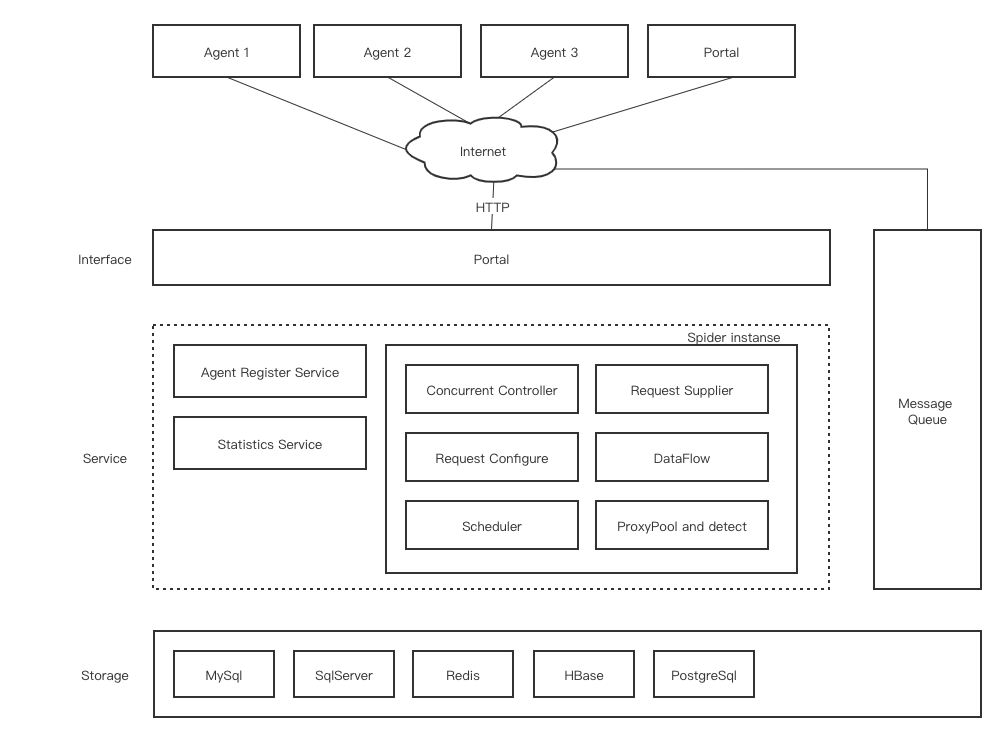
DESIGN IMAGE

DEVELOP ENVIROMENT

  1. Visual Studio 2017 (15.3 or later) or Jetbrains Rider

  2. .NET Core 2.2 or later

  3. Docker

  4. MySql

     docker run --name mysql -d -p 3306:3306 --restart always -e MYSQL_ROOT_PASSWORD=1qazZAQ! mysql:5.7
    
  5. Redis (option)

     docker run --name redis -d -p 6379:6379 --restart always redis
    
  6. SqlServer

     docker run --name sqlserver -d -p 1433:1433 --restart always  -e 'ACCEPT_EULA=Y' -e 'SA_PASSWORD=1qazZAQ!' mcr.microsoft.com/mssql/server:2017-latest
    
  7. PostgreSQL (option)

     docker run --name postgres -d  -p 5432:5432 --restart always -e POSTGRES_PASSWORD=1qazZAQ! postgres
    
  8. MongoDb (option)

     docker run --name mongo -d -p 27017:27017 --restart always mongo
    
  9. RabbitMQ

    docker run -d --restart always --name rabbimq -p 4369:4369 -p 5671-5672:5671-5672 -p 25672:25672 -p 15671-15672:15671-15672 \
           -e RABBITMQ_DEFAULT_USER=user -e RABBITMQ_DEFAULT_PASS=password \
           rabbitmq:3-management
    
  10. Docker remote api for mac

    docker run -d  --restart always --name socat -v /var/run/docker.sock:/var/run/docker.sock -p 2376:2375 bobrik/socat TCP4-LISTEN:2375,fork,reuseaddr UNIX-CONNECT:/var/run/docker.sock
    
  11. HBase

    docker run -d --restart always --name hbase -p 20550:8080 -p 8085:8085 -p 9090:9090 -p 9095:9095 -p 16010:16010 dajobe/hbase
    

MORE DOCUMENTS

https://github.com/dotnetcore/DotnetSpider/wiki

SAMPLES

Please see the Project DotnetSpider.Sample in the solution.

BASE USAGE

Base usage Codes

ADDITIONAL USAGE: Configurable Entity Spider

View complete Codes

[DisplayName("博客园爬虫")]
public class EntitySpider(
    IOptions options,
    DependenceServices services,
    ILogger logger)
    : Spider(options, services, logger)
{
    public static async Task RunAsync()
    {
        var builder = Builder.CreateDefaultBuilder(options =>
        {
            options.Speed = 1;
        });
        builder.UseSerilog();
        builder.IgnoreServerCertificateError();
        await builder.Build().RunAsync();
    }

    protected override async Task InitializeAsync(CancellationToken stoppingToken = default)
    {
        AddDataFlow>();
        AddDataFlow(GetDefaultStorage);
        await AddRequestsAsync(
            new Request(
                "https://news.cnblogs.com/n/page/1", new Dictionary { { "网站", "博客园" } }));
    }

    [Schema("cnblogs", "news")]
    [EntitySelector(Expression = ".//div[@]", Type = SelectorType.XPath)]
    [GlobalValueSelector(Expression = ".//a[@]", Name = "类别", Type = SelectorType.XPath)]
    [GlobalValueSelector(Expression = "//title", Name = "Title", Type = SelectorType.XPath)]
    [FollowRequestSelector(Expressions = ["//div[@]"])]
    public class CnblogsEntry : EntityBase
    {
        protected override void Configure()
        {
            HasIndex(x => x.Title);
            HasIndex(x => new { x.WebSite, x.Guid }, true);
        }

        public int Id { get; set; }

        [Required]
        [StringLength(200)]
        [ValueSelector(Expression = "类别", Type = SelectorType.Environment)]
        public string Category { get; set; }

        [Required]
        [StringLength(200)]
        [ValueSelector(Expression = "网站", Type = SelectorType.Environment)]
        public string WebSite { get; set; }

        [StringLength(200)]
        [ValueSelector(Expression = "Title", Type = SelectorType.Environment)]
        [ReplaceFormatter(NewValue = "", OldValue = " - 博客园")]
        public string Title { get; set; }

        [StringLength(40)]
        [ValueSelector(Expression = "GUID", Type = SelectorType.Environment)]
        public string Guid { get; set; }

        [ValueSelector(Expression = ".//h2[@]/a")]
        public string News { get; set; }

        [ValueSelector(Expression = ".//h2[@]/a/@href")]
        public string Url { get; set; }

        [ValueSelector(Expression = ".//div[@]")]
        [TrimFormatter]
        public string PlainText { get; set; }

        [ValueSelector(Expression = "DATETIME", Type = SelectorType.Environment)]
        public DateTime CreationTime { get; set; }
    }
}
Distributed spider

Read this document

Puppeteer downloader

Coming soon

NOTICE

when you use redis scheduler, please update your redis config:
timeout 0
tcp-keepalive 60

Dependencies

Package License
Bert.RateLimiters Apache 2.0
MessagePack MIT
Newtonsoft.Json MIT
Dapper Apache 2.0
HtmlAgilityPack MIT
ZCJ.HashedWheelTimer MIT
murmurhash Apache 2.0
Serilog.AspNetCore Apache 2.0
Serilog.Sinks.Console Apache 2.0
Serilog.Sinks.RollingFile Apache 2.0
Serilog.Sinks.PeriodicBatching Apache 2.0
MongoDB.Driver Apache 2.0
MySqlConnector MIT
AutoMapper.Extensions.Microsoft.DependencyInjection MIT
Docker.DotNet MIT
BuildBundlerMinifier Apache 2.0
Pomelo.EntityFrameworkCore.MySql MIT
Quartz.AspNetCore Apache 2.0
Quartz.AspNetCore.MySqlConnector Apache 2.0
Npgsql PostgreSQL License
RabbitMQ.Client Apache 2.0
Polly BSD 3-C

AREAS FOR IMPROVEMENTS

QQ Group: 477731655 Email: [email protected]

Frequently asked questions

Is DotnetSpider free to use?

DotnetSpider is open source under the MIT licence. There is no licence fee and no seat count — you can self-host it or, where the project offers one, pay a vendor for a managed version instead.

What does DotnetSpider do?

DotnetSpider, a .NET standard web crawling library. It is lightweight, efficient and fast high-level web crawling & scraping framework

What is DotnetSpider written in?

DotnetSpider is primarily written in C#. Its source is publicly available at https://github.com/dotnetcore/DotnetSpider, and it has 4,139 GitHub stars.
