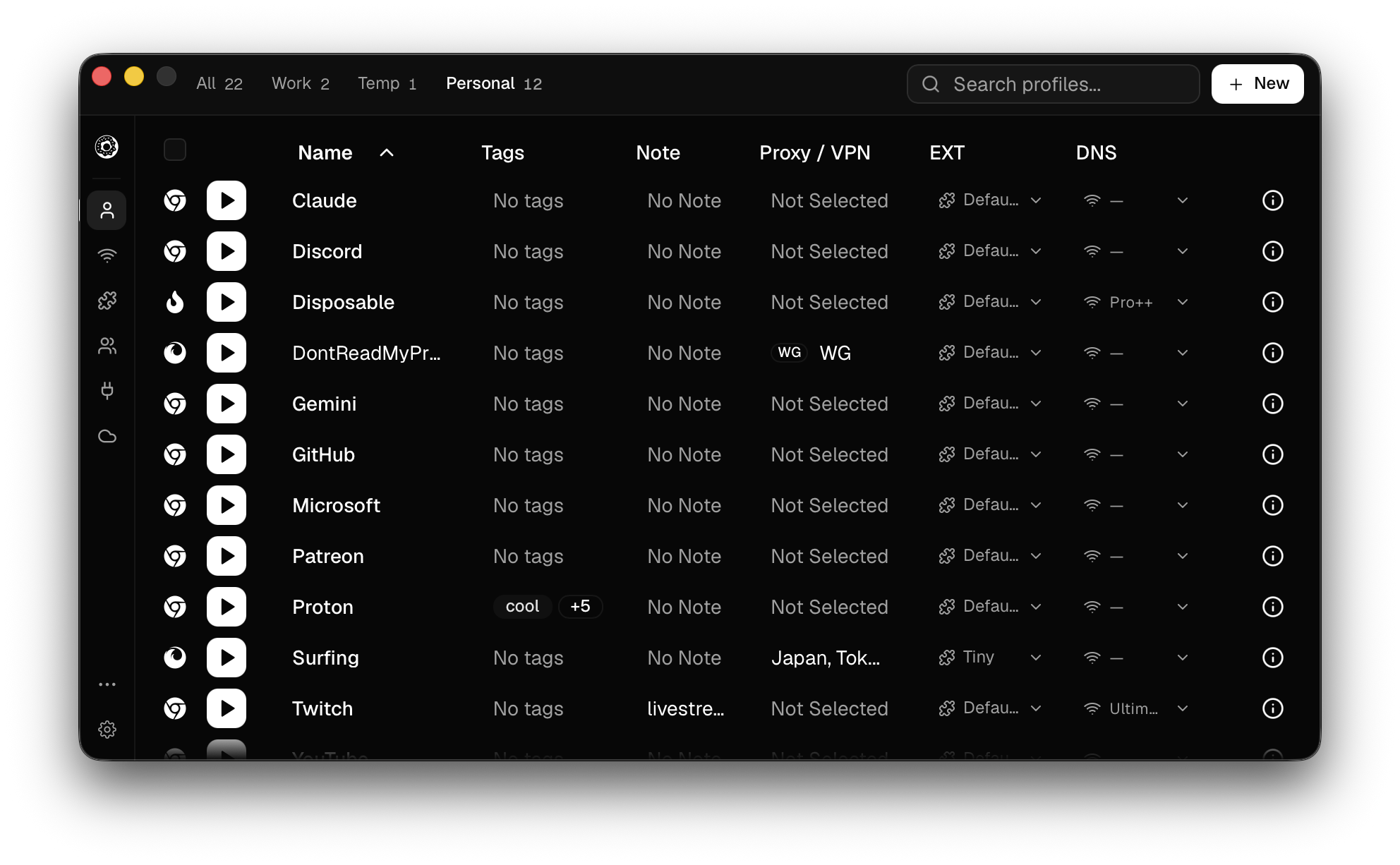
donutbrowser is a free, open source orchestration & scheduling project written in Rust and released under AGPL-3.0. It has 4,197 GitHub stars, 437 forks and 28 open issues, and was last pushed 12 hours ago. On this registry it ranks #39 of 130 tracked projects in Orchestration & Scheduling, with 5 head-to-head comparisons available. It gained 282 stars over the last 30 tracked days.

What is donutbrowser?

Donut Browser is a free, open-source anti-detect browser written in Rust for anyone who needs many fully isolated browser identities โ€” each with its own fingerprint, cookies, extensions, proxy, and VPN โ€” running from one desktop install, and for the automation engineers and teams who script or sync those profiles.

What it is

Donut Browser is a desktop anti-detect browser licensed under AGPL-3.0, written in Rust and filed in this registry under Infrastructure & Operations / Orchestration & Scheduling. Its distinguishing component is its engine: an anti-detect Chromium build powered by Wayfern, a privacy-focused Chromium fork whose fingerprint spoofing the README states is not detected by Cloudflare, reCaptcha v3, or other browser fingerprinting and anti-bot services. On top of that engine it offers unlimited browser profiles, each fully isolated with its own fingerprint, cookies, extensions, and data. The project ships native installers for macOS, Windows, and Linux, exposes a local REST API and a Model Context Protocol server, and includes a self-hostable cloud sync service for moving profiles, proxies, and groups between devices. Stars sit at 3,855 with 411 forks and 28 open issues, and the repository was last pushed on 12 September 2026.

The concrete problem it solves is identity separation in the Chromium ecosystem. Running several stock Chromium-derived browsers side by side โ€” Chrome, Edge, or Brave โ€” leaks fingerprints and mixes cookies, extensions, and session data across the accounts a user is trying to keep apart, and no amount of separate user-data directories fixes the shared engine signature. Donut Browser replaces that arrangement with per-profile fingerprints, per-profile network routing, and per-profile DNS blocking inside one application, and it provides a documented import path so existing Chrome, Edge, and Brave profiles can be migrated rather than rebuilt by hand. Where the anti-detect browser category has traditionally meant paid commercial products, this is the open-source, self-hostable alternative.

Key capabilities

  • Unlimited browser profiles, each isolated with its own fingerprint, cookies, extensions, and data.
  • Anti-detect Chromium engine built on the Wayfern privacy-focused Chromium fork, with fingerprint spoofing the README reports as undetected by Cloudflare and reCaptcha v3.
  • Per-profile proxy support for HTTP, HTTPS, SOCKS4, and SOCKS5, including dynamic proxy URLs, plus WireGuard VPN configurations per profile.
  • DNS AdBlocker applied per profile to block ads, trackers, and other unwanted content.
  • Local REST API and a Model Context Protocol server for integration with Claude, automation tools, and custom workflows.
  • Profile groups with bulk settings, cookie import and export, and per-profile extension management.
  • Cloud sync that is self-hostable, with optional end-to-end encryption under a password only the user knows, delivered alongside a zero-telemetry stance.

Who uses it and how

  • Automation engineers connect Claude or custom workflow tooling to the local REST API and MCP server instead of driving a shared browser instance.
  • Operators running many accounts use one isolated profile per identity, each pinned to its own proxy or WireGuard configuration, so sessions never share state.
  • Distributed teams sync profiles, proxies, and groups across devices by running the Docker-based sync server themselves, optionally with end-to-end encryption enabled.
  • Users migrating from Chrome, Edge, or Brave import existing profiles, then set Donut as the default browser and choose which profile opens each link.
  • Contributors work without touching Rust code by fixing translations in src/i18n/locales, filing issues, or answering questions in GitHub Discussions.

Getting started

Install from a platform package โ€” brew install --cask donut on macOS, the .deb, .rpm, or AppImage on Linux, or the Windows installer or portable archive โ€” or run curl -fsSL https://donutbrowser.com/install.sh | sh; Nix users can run nix run github:zhom/donutbrowser#release-start. Self-hosting sync uses the Docker-based instructions in the Self-Hosting Donut Sync guide.

How it compares

No comparable products are named anywhere in the supplied facts, so no head-to-head comparison can be made here. On the evidence available, Donut Browser stands alone in this registry.

When to use it โ€” and when not to

Choose Donut Browser when identity isolation, per-profile proxies and VPNs, and scriptable control through a local API and MCP server matter more to you than vendor-managed convenience. Be aware that self-hosting the sync service is Docker-based work you operate yourself, the AGPL-3.0 licence carries copyleft obligations that extend to network use, and the README is a feature list rather than a reference โ€” it documents installation and the self-hosting guide but no REST or MCP endpoint schema. Anyone who needs a managed, turnkey sync service, or who cannot accept AGPL-3.0 terms, should look elsewhere.

project readme (upstream, from github) โ€” read inline

Donut Browser

Open Source Anti-Detect Browser
donutbrowser.com

GitHub release PRs Welcome License GitHub forks

Features

  • Unlimited browser profiles: each fully isolated with its own fingerprint, cookies, extensions, and data
  • Anti-detect Chromium engine: powered by Wayfern, a privacy-focused Chromium fork whose fingerprint spoofing is not detected by Cloudflare, reCaptcha v3, or other browser fingerprinting and anti-bot services
  • DNS AdBlocker: block ads, trackers, and other unwanted content with per-profile DNS blocking
  • Proxy support: HTTP, HTTPS, SOCKS4, SOCKS5 per profile, with dynamic proxy URLs
  • VPN support: WireGuard configs per profile
  • Local API & MCP: REST API and Model Context Protocol server for integration with Claude, automation tools, and custom workflows
  • Profile groups: organize profiles and apply bulk settings
  • Import profiles: migrate from Chrome, Edge, Brave, or other Chromium browsers
  • Cookie & extension management: import/export cookies, manage extensions per profile
  • Default browser: set Donut as your default browser and choose which profile opens each link
  • Cloud sync: sync profiles, proxies, and groups across devices (self-hostable)
  • E2E encryption: optional end-to-end encrypted sync with a password only you know
  • Zero telemetry: no tracking or device fingerprinting

Install

macOS

Apple Silicon Intel
DMG Download Download

Or install via Homebrew:

brew install --cask donut

Windows

Download Windows Installer (x64) ยท Portable (x64)

Linux

Format x86_64 ARM64
deb Download Download
rpm Download Download
AppImage Download Download

Or install via package manager:

curl -fsSL https://donutbrowser.com/install.sh | sh
Troubleshooting AppImage

If the AppImage segfaults on launch, install libfuse2 (sudo apt install libfuse2 / yay -S libfuse2 / sudo dnf install fuse-libs), or bypass FUSE entirely:

APPIMAGE_EXTRACT_AND_RUN=1 ./Donut.Browser_x.x.x_amd64.AppImage

If that gives an EGL display error, add WEBKIT_DISABLE_DMABUF_RENDERER=1 or GDK_BACKEND=x11 to the command above. If issues persist, the .deb and .rpm packages are more reliable.

Nix

nix run github:zhom/donutbrowser#release-start

Self-Hosting Sync

Run your own sync server to sync profiles, proxies, and groups across devices for free. See the Self-Hosting Donut Sync guide for Docker-based setup instructions.

Contributing

Donut Browser is built by the people who use it, and plenty of the most useful help involves no code at all.

  • Tell other people about Donut. Word of mouth is how most users find the project, so talking about it is a real contribution.
  • Report bugs and request features in GitHub Issues.
  • Answer questions in GitHub Discussions.
  • Fix and improve translations in src/i18n/locales.
  • Write code. Start with CONTRIBUTING.md.
  • Star the repo so more people see it.

Star History

Cumulative GitHub stars for zhom/donutbrowser over time

Contributors

Everyone who has landed commits in zhom/donutbrowser, ranked by commit count

Contact

For urgent questions or security vulnerability reports, email contact@donutbrowser.com.

License

This project is licensed under the AGPL-3.0 License. See the LICENSE file for details.

Frequently asked questions

Is donutbrowser free to use?

donutbrowser is open source under the AGPL-3.0 licence. There is no licence fee and no seat count โ€” you can self-host it or, where the project offers one, pay a vendor for a managed version instead.

What does donutbrowser do?

Simple Yet Powerful Anti-Detect Browser ๐Ÿฉ

What is donutbrowser written in?

donutbrowser is primarily written in Rust. Its source is publicly available at https://github.com/zhom/donutbrowser, and it has 4,197 GitHub stars.