
Digler - Go Deep. Get Back Your Data
⚠️ Note: Digler is in early development (v0.1.0). Some bugs may exist. Please report issues!

Why Digler?
While many data recovery tools exist, few offer the combination of simplicity, flexibility, and modern design with deep disk analysis and effective file carving.
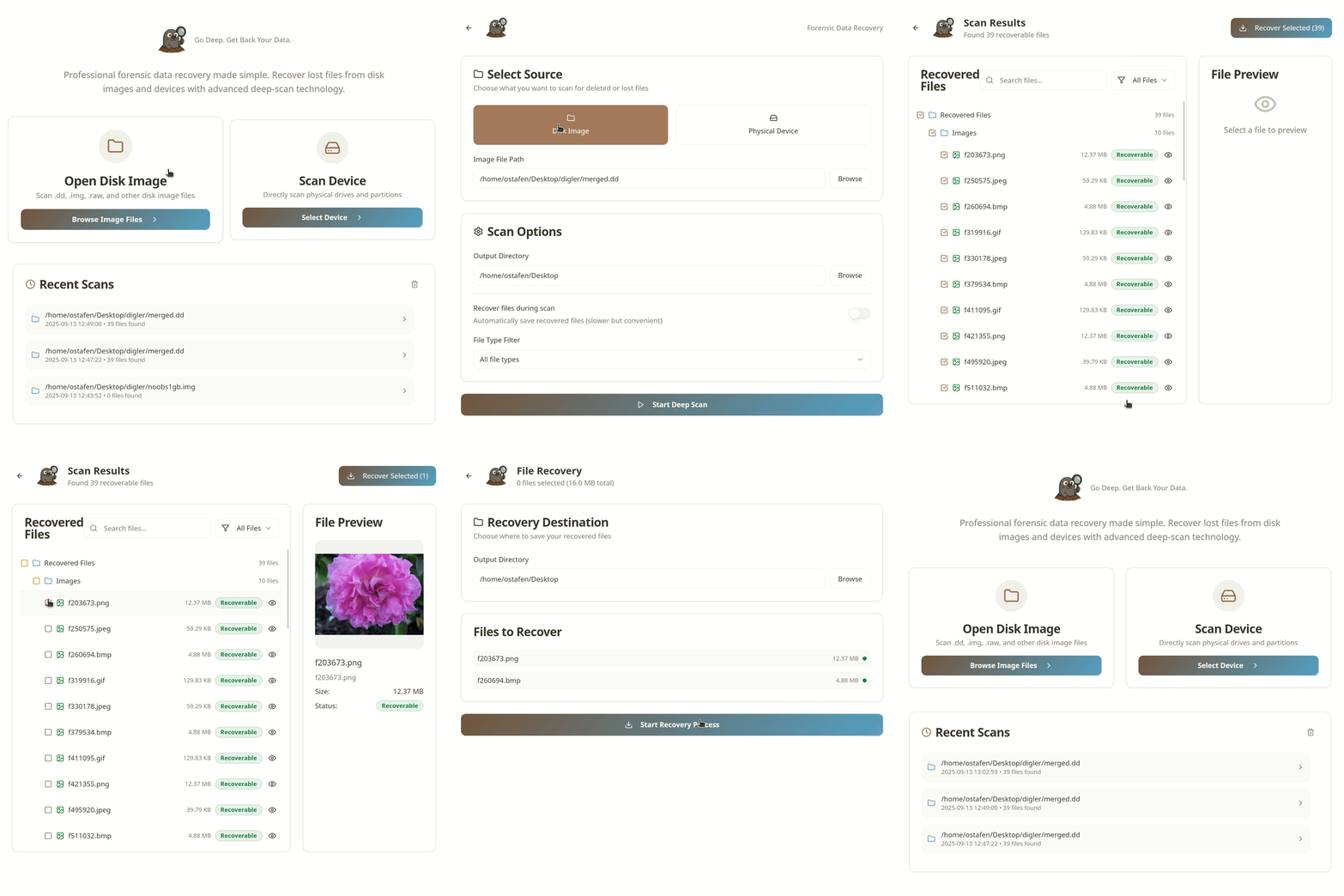
Digler was created to fill this gap by providing a streamlined, plugin-extensible tool for data recovery that’s both powerful and easy to use. It offers both a command-line interface and a user-friendly desktop application, making it accessible for professionals and casual users alike. Whether you prefer the speed and scriptability of the CLI or the convenience of a visual interface, Digler adapts to your workflow without the complexity of heavyweight GUIs or fragmented tools.
Built in Go, Digler leverages the language’s strengths in performance, cross-platform support, and maintainability to deliver a fast and dependable solution for today’s data recovery challenges.
Features
Broad Disk Image and Raw Device Support: Analyze a wide array of disk image formats (
.dd,.img, etc...) or directly access physical disks.File System Agnostic Analysis: Recover deleted files regardless of the underlying file system (e.g., NTFS, FAT32, ext4), even when metadata is lost.
Plugin-Based Extensibility: Support for custom file scanners through plugins, simplifying integration with new file formats.
Reporting Capabilities: Generate detailed reports, compliant with the
Digital Forensics XML (DFXML)format, of recovered data and analysis findings.Post-Scan Data Recovery: Utilize the generated DFXML reports to precisely recover specific files.
Dual Interface Options: Use Digler through a fast, intuitive command-line interface or a modern desktop application—choose the interface that best fits your workflow.
Installation
From Source:
git clone https://github.com/ostafen/digler.git
cd digler
make build
From Precompiled Binaries:
Precompiled binaries are available for Linux, macOS, and Windows on the Releases page.
CLI Usage
Digler follows a simple but powerful workflow: scan first, recover later. This approach lets you analyze disks or images thoroughly before extracting any files.
1. Scan a Disk Image or Device
foo@bar$ digler scan <image_or_device>
Example:
foo@bar$ digler scan dfrws-2006-challenge.raw
or, to scan an entire disk partition:
foo@bar$ digler scan /dev/nvme0n1 # or C: on Windows
By default, the command generates a detailed DFXML report describing the findings, together with a detailed execution log. However, you can optionally specify a dump directory to to recover files immediately during scanning.
foo@bar$ --dump <path/to/dump/dir>
2. Mount Scan Results as a Filesystem (Linux only)
foo@bar$ digler mount <image_or_device> <report_file.xml> --mountpoint /path/to/mnt
Example:
digler mount dfrws-2006-challenge.raw report.xml --mountpoint /mnt/recover
This mounts a FUSE filesystem allowing you to browse and access recovered files directly from the scan report, without copying anything yet.
3. Recover Files Based on Scan Report
foo@bar$ digler recover <image_or_device> <report_file.xml> --dir /path/to/dir
Example:
foo@bar$ digler recover dfrws-2006-challenge.raw report.xml --dir ./recover
Test Datasets
To help you get started with real-world testing and evaluation, here are some publicly available disk image datasets commonly used in digital forensics research:
DFRWS Forensic Challenge Images DFRWS 2006 Challenge — a classic forensic image used for recovery challenges and benchmarking.
Digital Corpora Digital Corpora Repository — a rich collection of forensic datasets including disk images, memory dumps, and more.
National Institute of Standards and Technology (NIST) Datasets NIST Computer Forensics Reference Data Sets (CFReDS) — a wide variety of forensic datasets for research and tool evaluation.
You can download these images and use Digler’s scan and recover commands to experiment and validate your setup.
Supported File Types
Even in its early stages, Digler is already capable of recovering a wide range of file types, including documents, images, audio, and archives.
To see the complete list of supported formats, run:
foo@bar$ digler formats
Adding Custom Scanners via Plugins
Digler supports a plugin architecture that allows you to extend the tool with custom file scanners. This makes it easy to add support for new file formats or specialized carving logic without modifying the core code.
Plugin Interface
Your plugin must implement the following interface:
type FileScanner interface {
    Ext() string                  // Returns the file extension this scanner handles
    Description() string          // A brief description of the file type
    Signatures() [][]byte         // Byte signatures used to identify the file type
    ScanFile(r *Reader) (*ScanResult, error) // Logic to scan and recover files from a Reader
}
When your plugin is ready, place its source file in the plugins/ directory and compile all plugins by running:
foo@bar$ make plugins
This will build your plugin(s) as .so files and place them in the bin/plugins/ folder, ready to be loaded by Digler.
To verify that your plugins are correctly loaded, run:
foo@bar$ digler formats --plugins ./bin/plugins
This command will lists all supported file formats, including those provided by your custom plugins.
Finally, use the same --plugins flag when scanning to enable your plugins:
foo@bar$ digler scan <image_or_device> --plugins ./bin/plugins
Contributing
Writing a comprehensive file carver is a complex challenge. Each supported file type often requires a format-specific decoder to properly identify, validate, and reconstruct data. This makes the development of Digler both technically demanding and highly modular — the perfect scenario for open source collaboration.
We welcome contributions of all kinds, especially in areas like:
- Implementing new file format decoders
- Improving existing carving heuristics
- Optimizing performance
- Enhancing the CLI interface
- Writing tests, docs, or usage examples
Whether you're familiar with Go or just interested in digital forensics, your help is appreciated.
Getting Started
Before you start, please open an issue (or pick an existing one) to discuss your idea or planned changes. This helps avoid duplicate work and keeps development aligned.
Please read our Code of Conduct before getting started.
Once you're ready, fork the repository and submit your pull request!
License
Digler is released under the MIT License.