DiceBear is an MIT-licensed, self-hostable avatar library that turns any seed string — a username or an email address, for example — into a deterministic SVG avatar in one of 63 styles, built for designers and developers who need profile images without storing or uploading them.
What it is
DiceBear is an open source avatar library. It converts a seed string into an SVG avatar, and the same seed always produces the same avatar, so an application stores a string instead of an image and never asks users to upload a profile picture. Avatars are customizable through style options covering colors, backgrounds, rotation, and individual features such as hair or glasses. Version 10 ships as native libraries for JavaScript, PHP, Python, Rust, Go, Dart, and C#, and every port passes a shared test suite that requires byte-identical SVG output against the JavaScript reference implementation. The 63 styles are plain JSON definitions from the dicebear/styles repository, and they are consumed as a package for each supported language.
The concrete problem it solves is the profile-picture pipeline in the web application ecosystem. Instead of accepting, validating, storing, moderating, and serving uploaded avatar images, an application derives an avatar deterministically from data it already holds, such as a username or an email address. That removes the upload step and the stored binary entirely. The library lives across the mainstream package ecosystems — npm, Packagist, PyPI, crates.io, the Go module proxy, pub.dev, and NuGet — and it also covers paths that require no code at all. An HTTP API returns an avatar from a plain URL, a CLI generates files in bulk, and an editor lets a person assemble a single avatar by hand and export it.
Key capabilities
- 63 avatar styles distributed as plain JSON definitions from the
dicebear/styles repository, covering styles reflected in the topic list such as avataaars, bottts, and pixel-art.
- Deterministic output: identical seeds produce identical bytes, enforced by a shared test suite across the seven language ports.
- Per-style options for colors, backgrounds, rotation, and individual features like hair or glasses.
- Free HTTP API requiring no account:
https://api.dicebear.com/10.x/lorelei/svg?seed=Felix.
- CLI for terminal output and bulk file generation:
npx dicebear create lorelei -o ./avatars --count 10.
Avatar.toString() and Avatar.toDataUri() methods in JavaScript, the latter returning data:image/svg+xml;charset=utf-8,....- JSON Schema in
dicebear/schema behind definitions and options, plus an SVG-to-raster converter in the monorepo.
Who uses it and how
- Backend teams in Go or PHP that regenerate avatars byte-identically to those already produced in the browser by the JavaScript library.
- Applications that want no profile-picture upload at all, seeding avatars from a username or an email address and storing only the string.
- Teams needing privacy and full control that self-host the HTTP API as a single Docker container rather than calling the hosted endpoint.
- Developers generating avatars in bulk for a list of seeds through the CLI, writing the output to a directory.
- Designers assembling or creating styles through
editor.dicebear.com, the playground, the Figma plugin DiceBear Studio, or from scratch.
Getting started
Install the native package for the target language — npm install @dicebear/core, composer require dicebear/core, pip install dicebear-core, cargo add dicebear-core, go get github.com/dicebear/dicebear-go/v11, dart pub add dicebear_core, or dotnet add package DiceBear.Core. For a no-code path, call the hosted HTTP API from a plain URL or self-host it with a single Docker container.
How it compares
No list of paid products is provided in the facts, and no comparable alternative tools are named either. DiceBear stands alone in this registry on the evidence available.
When to use it — and when not to
A self-hoster taking the HTTP API route operates a single Docker container, and teams that need raster output rather than SVG must run the SVG-to-raster converter themselves. The provided facts do not include release history, so there is no release cadence to judge stability by, and the documentation is spread across dicebear.com and the separate dicebear/styles, dicebear/schema, dicebear/api, and dicebear/studio repositories. The repository is classified under Vue even though the monorepo contains the seven core libraries, the CLI, the converter, the documentation site, and the editor, so that language tag understates its scope.
project readme (upstream, from github) — read inline
 DiceBear Avatar Library
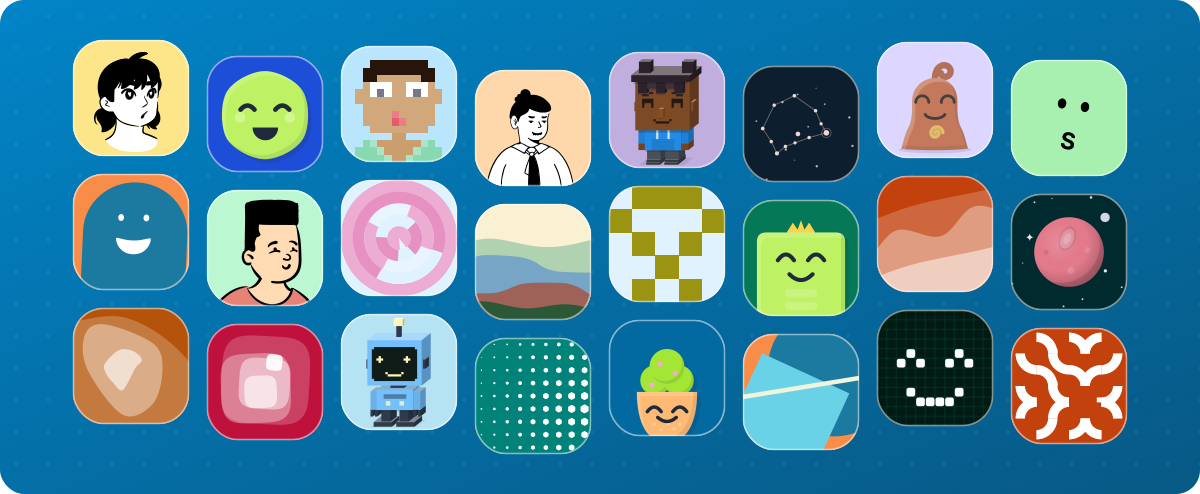



DiceBear is an open source avatar library. It turns any seed string (a username
or an email address, for example) into an SVG avatar in one of 63 styles, from
hand-drawn characters to abstract patterns. The same seed always produces the
same avatar, so you store a string instead of an image and never ask users to
upload a profile picture.
Avatars are customizable through style options: colors, backgrounds, rotation,
individual features like hair or glasses.
Playground |
Documentation |
Editor
One library, seven languages
DiceBear 10 ships as native libraries for JavaScript, PHP, Python, Rust, Go,
Dart, and C#. Every port passes a shared test suite that requires byte-identical
SVG output to the JavaScript reference. Generate an avatar in the browser,
regenerate it later in a Go or PHP backend, and you get the same bytes.
In JavaScript it looks like this; the
documentation has the
equivalent for each language:
import { Avatar, Style } from '@dicebear/core';
import definition from '@dicebear/styles/lorelei.json' with { type: 'json' };

const avatar = new Avatar(new Style(definition), {
  seed: 'John',
  size: 128,
});

avatar.toString(); // SVG string
avatar.toDataUri(); // data:image/svg+xml;charset=utf-8,...
The 63 avatar styles are plain JSON definitions from the
dicebear/styles repository, available as
a package for each language. You can also
create your own style,
with Figma or from scratch.
Without writing code
- The HTTP API returns
avatars from a plain URL, free and without an account:
https://api.dicebear.com/10.x/lorelei/svg?seed=Felix. For full control and
privacy you can
host it yourself
with a single Docker container.
- The CLI prints an avatar to the
terminal or generates files in bulk:
npx dicebear create lorelei -o ./avatars --count 10.
- The editor lets you assemble a single avatar by
hand and export it.
This repository
This monorepo contains the seven core libraries, the CLI, the SVG-to-raster
converter, the documentation site (dicebear.com),
and the editor. Related projects live in their own repositories:
Contributions are welcome; CONTRIBUTING.md explains the
setup and where each kind of change belongs.
License
The code is MIT licensed, including commercial use. The avatar
styles are the work of their respective creators and carry their own licenses;
the license overview lists them all, and
many only ask for attribution.
Star this repository
If DiceBear saved you some work, a star makes the project easier to find for the
next person looking for an avatar library. The
support page lists the other ways to help.
Sponsors
Advertisement: Many thanks to our sponsors who provide us with free or
discounted products.