
Website • Quickstart • Documentation • Blog • Twitter





Client-Only Developer Tool for Cloud-Native Development with Kubernetes
- Build, test and debug applications directly inside Kubernetes
- Develop with hot reloading: updates your running containers without rebuilding images or restarting containers
- Unify deployment workflows within your team and across dev, staging and production
- Automate repetitive tasks for image building and deployment

⭐️ Do you like DevSpace? Support the project with a star ⭐️
DevSpace was created by Loft Labs and is a Cloud Native Computing Foundation (CNCF) sandbox project.
Contents
Why DevSpace?
Building modern, distributed and highly scalable microservices with Kubernetes is hard - and it is even harder for large teams of developers. DevSpace is the next-generation tool for fast cloud-native software development.
Standardize & Version Your Workflows
DevSpace allows you to store all your workflows in one declarative config file: devspace.yaml
- Codify workflow knowledge about building images, deploying your project and its dependencies etc.
- Version your workflows together with your code (i.e. you can get any old version up and running with just a single command)
- Share your workflows with your team mates
Let Everyone on Your Team Deploy to Kubernetes
DevSpace helps your team to standardize deployment and development workflows without requiring everyone on your team to become a Kubernetes expert.
- The DevOps and Kubernetes expert on your team can configure DevSpace using
devspace.yamland simply commits it via git - If other developers on your team check out the project, they only need to run
devspace deployto deploy the project (including image building and deployment of other related project etc.) and they have a running instance of the project - The configuration of DevSpace is highly dynamic, so you can configure everything using config variables that make it much easier to have one base configuration but still allow differences among developers (e.g. different sub-domains for testing)
Giving everyone on your team on-demand access to a Kubernetes cluster is a challenging problem for system administrators and infrastructure managers. If you want to efficiently share dev clusters for your engineering team, take a look at www.loft.sh.
Speed Up Cloud-Native Development
Instead of rebuilding images and redeploying containers, DevSpace allows you to hot reload running containers while you are coding:
- Simply edit your files with your IDE and see how your application reloads within the running container.
- The high performance, bi-directional file synchronization detects code changes immediately and synchronizes files immediately between your local dev environment and the containers running in Kubernetes
- Stream logs, connect debuggers or open a container terminal directly from your IDE with just a single command.
Automate Repetitive Tasks
Deploying and debugging services with Kubernetes requires a lot of knowledge and forces you to repeatedly run commands like kubectl get pod and copy pod ids back and forth. Stop wasting time and let DevSpace automate the tedious parts of working with Kubernetes:
- DevSpace lets you build multiple images in parallel, tag them automatically and and deploy your entire application (including its dependencies) with just a single command
- Let DevSpace automatically start port-fowarding and log streaming, so you don't have to constantly copy and paste pod ids or run 10 commands to get everything started.
Works with Any Kubernetes Clusters
DevSpace is battle tested with many Kubernetes distributions including:
- local Kubernetes clusters like minikube, k3s, MikroK8s, kind
- managed Kubernetes clusters in GKE (Google Cloud), EKS (Amazon Web Service), AKS (Microsoft Azure), Digital Ocean
- self-managed Kubernetes clusters created with Rancher
DevSpace also lets you switch seamlessly between clusters and namespaces. You can work with a local cluster as long as that is sufficient. If things get more advanced, you need cloud power like GPUs or you simply want to share a complex system such as Kafka with your team, simply tell DevSpace to use a remote cluster by switching your kube-context and continue working.
Quickstart
Please take a look at our getting started guide.
Architecture & Workflow
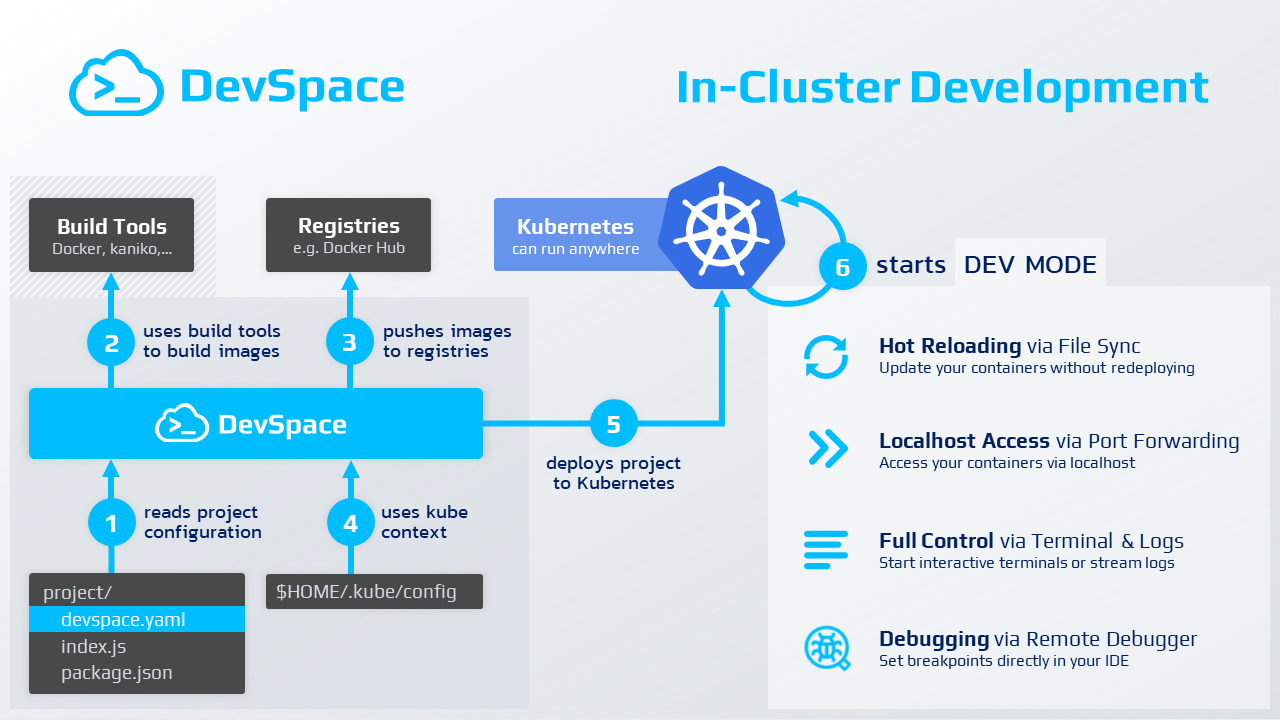
DevSpace runs as a single binary CLI tool directly on your computer and ideally, you use it straight from the terminal within your IDE. DevSpace does not require a server-side component as it communicates directly to your Kubernetes cluster using your kube-context, just like kubectl.
Contributing
Participation in the DevSpace project is governed by the CNCF code of conduct.
Help us make DevSpace the best tool for developing, deploying and debugging Kubernetes apps.
Reporting Issues
If you find a bug while working with the DevSpace, please open an issue on GitHub and let us know what went wrong. We will try to fix it as quickly as we can.
Feedback & Feature Requests
You are more than welcome to open issues in this project to:
Contributing Code
This project is mainly written in Golang. If you want to contribute code:
- Ensure you are running golang version 1.11.4 or greater for go module support
- Set the following environment variables:
GO111MODULE=on GOFLAGS=-mod=vendor - Check-out the project:
git clone https://github.com/loft-sh/devspace && cd devspace - Make changes to the code
- Build the project, e.g. via
go build -o devspace[.exe] - Evaluate and test your changes
./devspace [SOME_COMMAND]
See Contributing Guidelines for more information.
The DevSpace project follows the CNCF Code of Conduct.
FAQ
What is DevSpace?
DevSpace is an open-source command-line tool that provides everything you need to develop, deploy and debug applications with Docker and Kubernetes. It lets you streamline deployment workflows and share them with your colleagues through a declarative configuration file devspace.yaml.
Is DevSpace free?
YES. DevSpace is open-source and you can use it for free for any private projects and even for commercial projects.
Do I need a Kubernetes cluster to use DevSpace?
Yes. You can either use a local cluster such as Docker Desktop Kubernetes, minikube, or Kind, but you can also use a remote cluster such as GKE, EKS, AKS, RKE (Rancher), or DOKS.
Can I use DevSpace with my existing Kubernetes clusters?
Yes. DevSpace is using your regular kube-context. As long as you can run kubectl commands with a cluster, you can use this cluster with DevSpace as well.
What is a Helm chart?
Helm is the package manager for Kubernetes. Packages in Helm are called Helm charts.
License
DevSpace is released under the Apache 2.0 license. See the LICENSE file for details.
DevSpace is a Cloud Native Computing Foundation (CNCF) sandbox project and was contributed by Loft Labs.