Denova is an open-source, Apache-2.0-licensed AI writing and interactive-story workbench — a Go application with a browser-based, IDE-style interface — for novelists and interactive-fiction authors who need to maintain long-running world settings, revise repeatedly, and keep AI agents, image generation and version history inside a single project workspace.
What it is
Denova combines novel writing, interactive story games, a structured lore library, AI agents, image generation, automation and local version management in one workspace. It is written in Go, released under Apache-2.0, and appears in this registry under Developer Tools / IDEs & Code Editors, a classification that matches its shape: it is less a word processor than an editor for prose projects, with project files, multi-document tabs, agents that read and modify files, and reviewable changes. Writing and games are peer top-level entry points; the lore library, creation schemes, Skills and version management are shared between the two, while chapter progress and game state stay independent so that temporary state in one entry point does not disturb the other. The interface ships in Chinese and English with light and dark themes, on Windows, macOS and Linux.
The problem it addresses is the fragmentation of long-form creative work. Projects that must keep settings consistent over months, survive repeated revision and keep accumulating material tend to scatter across a Markdown editor, separate chat windows, a notes store, an image generator and manual copies of files. Denova's answer is to put those activities in one place, where an agent can read project content, call tools and modify files while every important change remains checkable, undoable and restorable. A project can start from an idea, continue an imported existing novel, or be built as a branching text adventure from character cards and the lore library.
Key capabilities
- A writing environment with Markdown documents and source editing, multi-document tabs, find and replace, outline and chapter sub-outline, progress tracking, comments on body text, revision review and import of existing novels.
- Creation agents supporting Native, Codex and Claude Code, working from the current selection, project files, images and the lore library, with multiple sessions, SubAgent collaboration and pausing and resuming of tasks.
- Interactive games where player input advances the story through plot branches, story-line switching, action suggestions, character and world state, rule checks, plot planning and voice reading, with staging assembled from lore-library backgrounds and character variants and saved per branch.
- A lore library with custom categories, a document-style index, @ references and backlinks, retrieval of mentions across work files and a specified story branch, and grouped context supplied to writing and game agents, with multi-image, audio and cover management.
- Creation schemes and Skills that reuse narrative style, image style and rule configurations and extend agent workflows, including a built-in web-novel writing Skill covering ideation, outline, scenes and revision.
- Plugins and game extensions: plugins can provide agent tools, direct operation commands and standalone panels, while custom games define their own interface, gameplay and saves through workspace create, build, isolated preview and export.
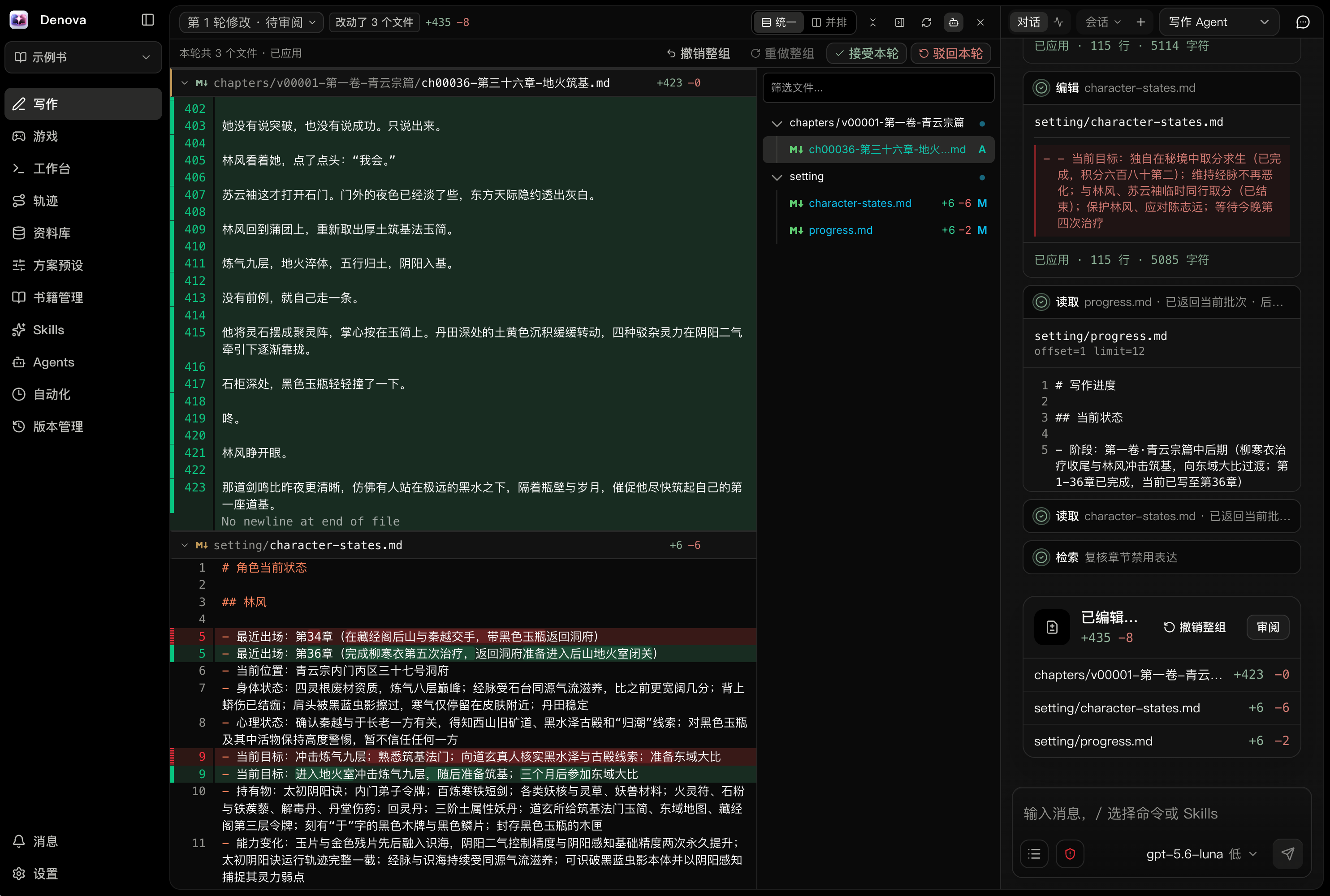
- Local versions with diffs and file restore, review or rollback of agent modifications, plus automation that runs scheduled review, continuation and custom creation tasks.
Who uses it and how
- Novelists running long projects keep setting detail retrievable through outlines, chapter sub-outlines, progress tracking and the lore library's @ references and backlinks, then check agent output in revision review before accepting it.
- Interactive-fiction authors build branching adventures from character cards and lore-library background, staging each story branch with character variants and tracking character and world state separately from chapter progress.
- Authors working across devices enable LAN access in Settings → Access with a username and password, then log in on a phone in the same network through a one-time five-minute QR code or link; the browser session persists for 30 days and the page can be added to the phone home screen as a PWA.
- Self-hosters exposing the tool beyond the local machine are expected to place it behind a reverse proxy such as Caddy or Nginx for HTTPS, so login credentials are not transmitted in plaintext.
- Plugin and game-extension developers add agent tools, direct commands or standalone panels, or build custom games with their own interface, gameplay and saves, using the isolated preview and export flow.
Getting started
On macOS and Linux, a one-line script installs the release build — curl -fsSL https://raw.githubusercontent.com/alfredxw/denova/master/scripts/install.sh | sh — after which the command denova starts the application; Windows users and anyone preferring a manual install download the archive for their platform from GitHub Releases and run denova.exe. Running from source requires Go 1.26.9+, Node.js 22.13+, pnpm, ripgrep and Bash, followed by git clone, corepack enable and ./scripts/bootstrap.sh, with the frontend on http://localhost:7788 and the backend on http://localhost:7789.
How it compares
No list of paid products that Denova replaces is provided, and no directly comparable tool is named in the facts, so it stands alone in this registry as an AI-native writing and game workbench filed under IDEs and code editors. The coding agents it integrates — Codex and Claude Code — appear as selectable agent backends inside Denova rather than as substitutes for it.
When to use it — and when not
A self-hoster must operate the application and supply their own model access: a language-model API key and model name are configured through the first-run guide, image models are configured separately, and public deployment requires a reverse proxy for HTTPS, while building from source adds a Go and Node toolchain with pnpm, ripgrep and Bash. Anyone who wants a finished, stable product, or who does not want to hold API keys and run a server, should look elsewhere: the current release is v0.6.3 (2026-10-20), marked Beta, and the master branch may contain unreleased changes, so releases are the advised route for stable use. Release builds also collect usage statistics through PostHog by default — activity, feature use, retention, version, platform, execution results, timings, error categories, HTTP status codes and theme and language changes, linked by a random local identifier, with the connecting IP reaching the cloud — which can be disabled in Settings → General and is not sent by source or development builds.
project readme (upstream, from github) — read inline

Denova 是一个面向小说写作与 AI 角色扮演游戏的一体化 AI 创作平台,内置 AI Agents、Skills、SubAgent 协作、自动化、图像生成与项目版本管理
English | 中文





当前版本:v0.6.3(2026-10-20) · Beta · 下载最新版本
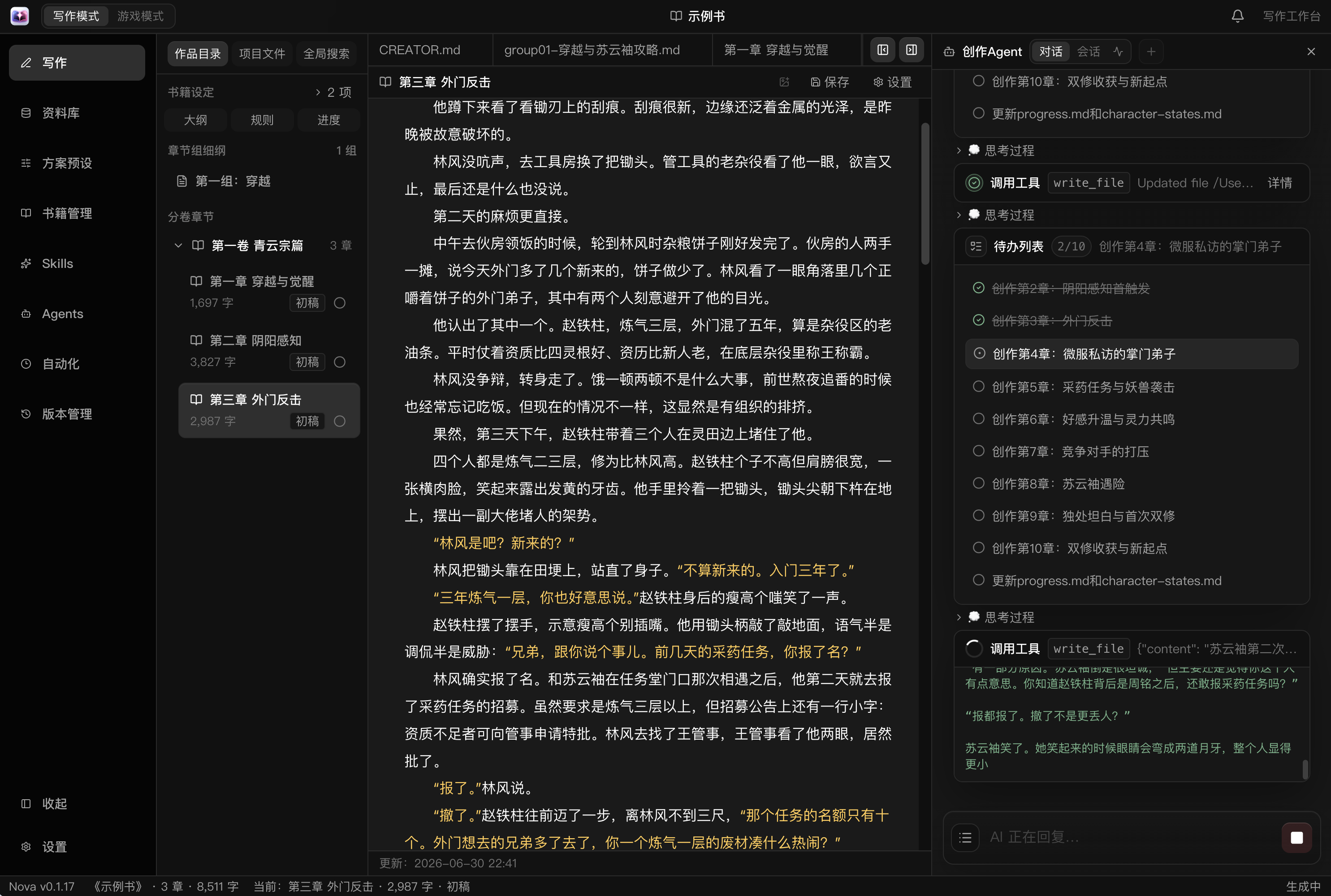
查看更多界面截图
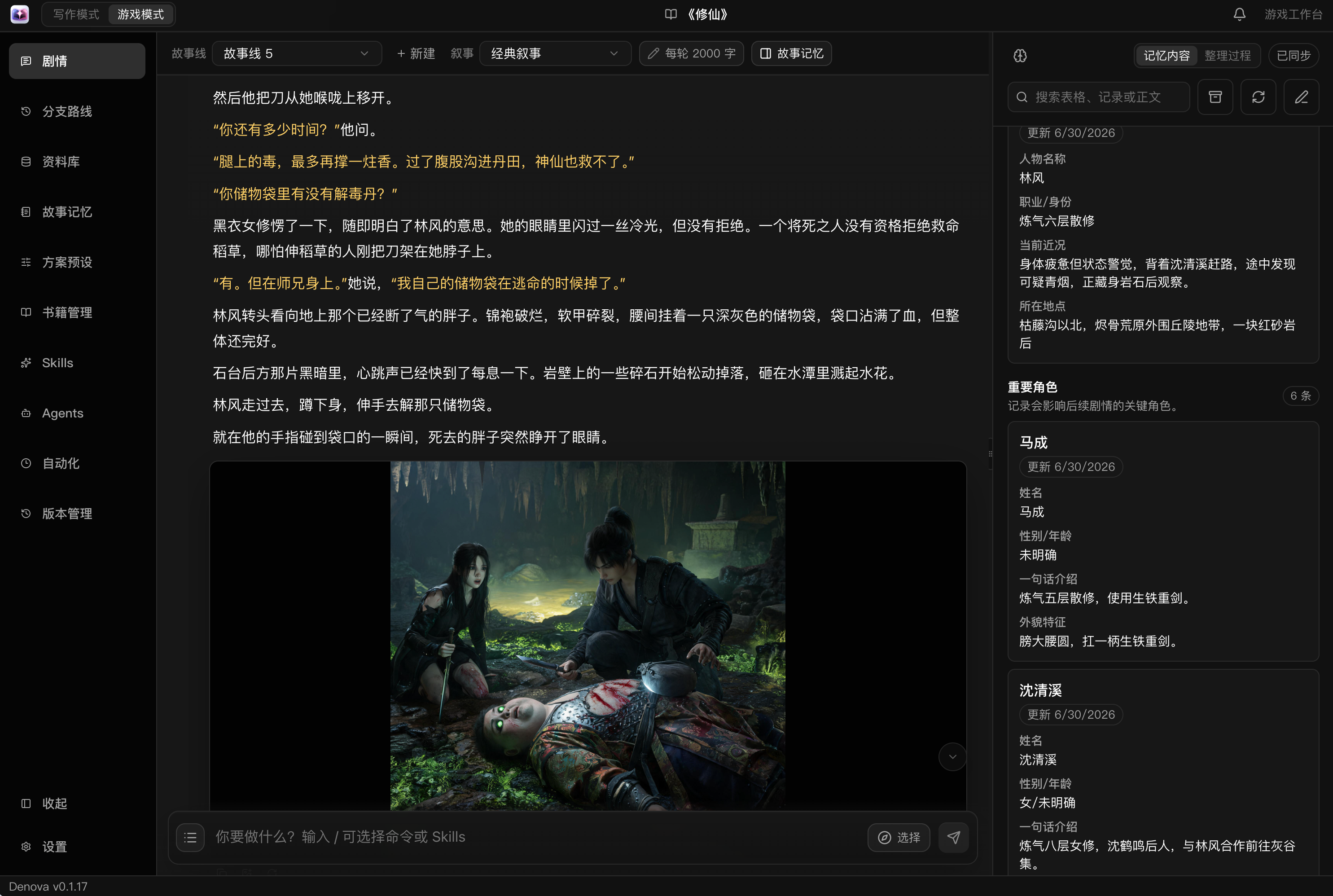
游戏
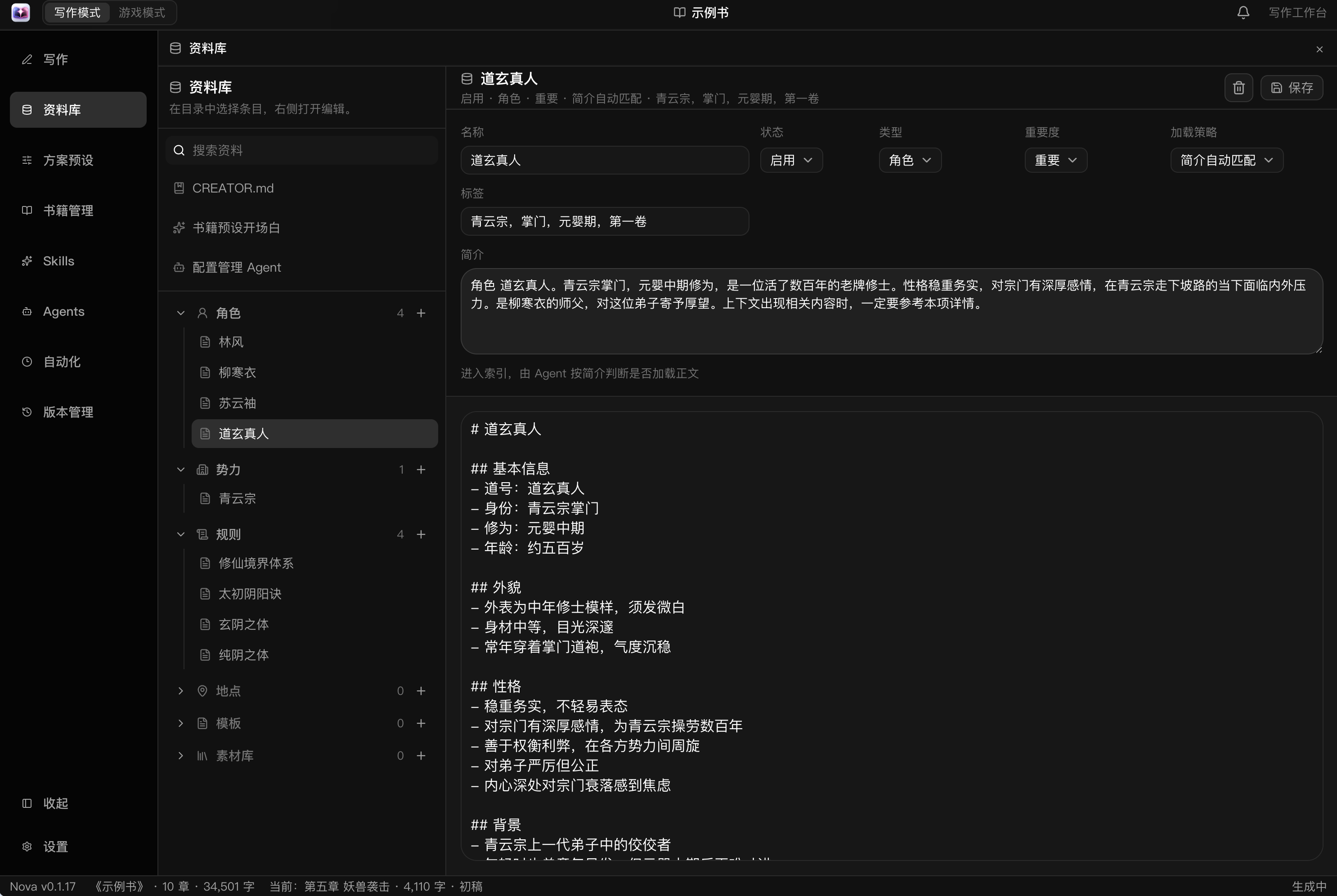
资料库
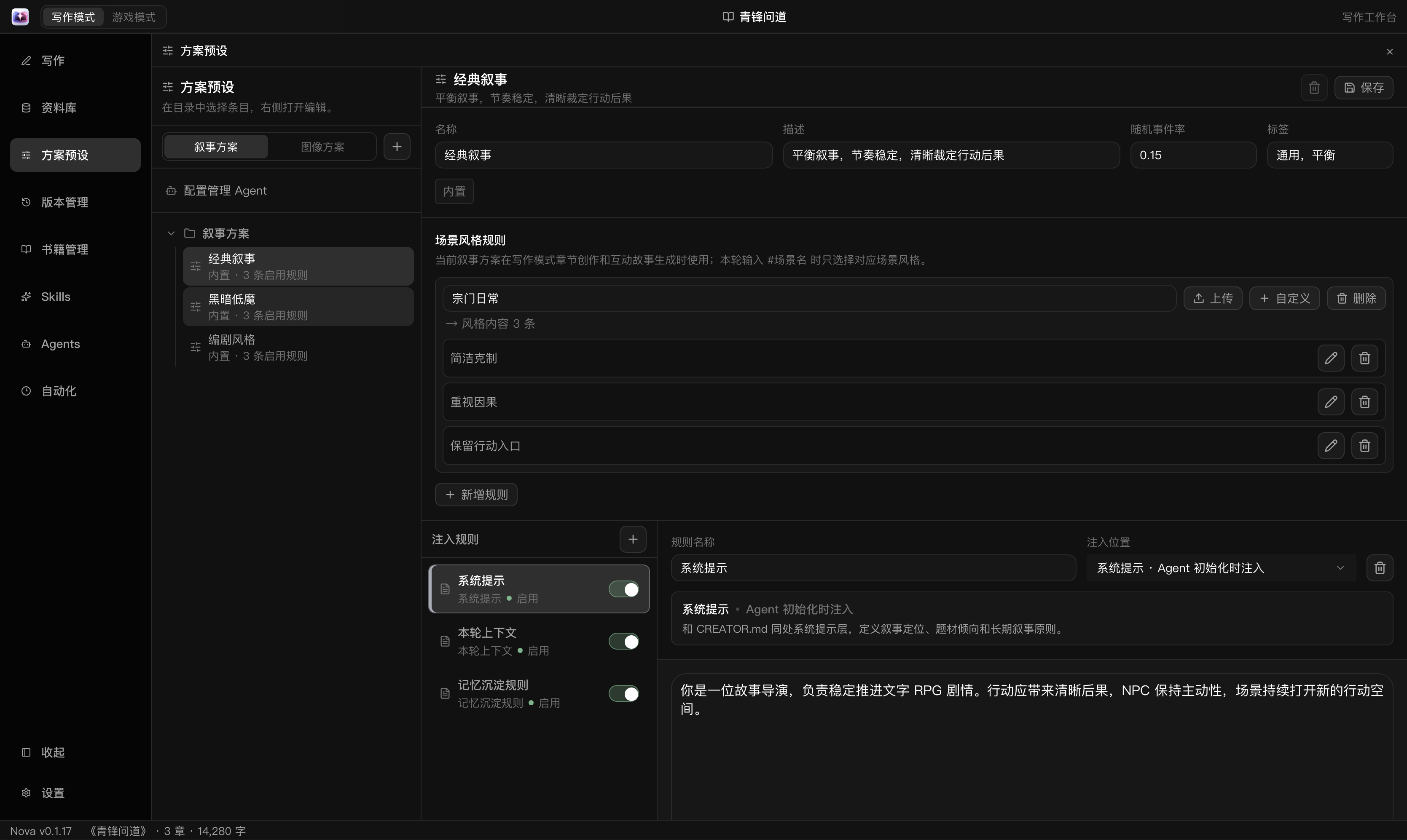
创作方案
修改审阅
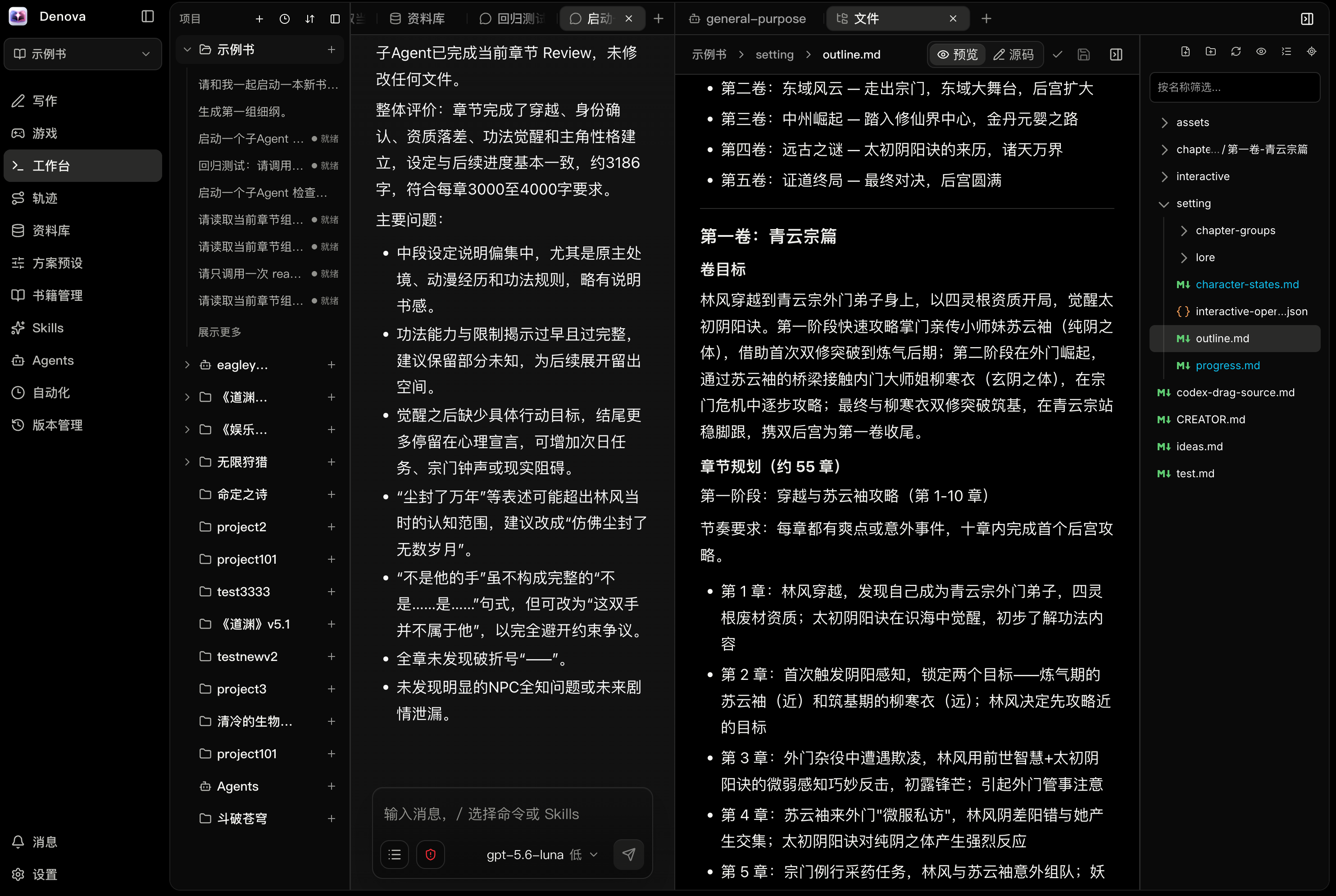
工作台
支持局域网连接、手机自适应布局和 PWA 应用。

为什么选择 Denova
Denova 把小说写作、互动故事、结构化资料库、AI Agent、图像生成、自动化和本地版本管理放进同一个工作区,适合需要长期维护设定、反复修改并持续积累内容的创作项目。
你可以从一个灵感开始新书,导入已有小说继续创作,也可以使用角色卡和资料库搭建可分支的文字冒险。Agent 能读取项目内容、调用工具并修改文件,所有重要变更仍可检查、撤销和恢复。
核心能力
- 小说写作:Markdown 文档与源码编辑、多文档 Tab、查找替换、大纲与章节细纲、进度追踪、正文评论、修改审阅和现有小说导入。
- 创作 Agent:支持 Native、Codex 和 Claude Code,结合当前选区、项目文件、图片和资料库进行创作;支持多会话、SubAgent 协作和任务暂停恢复。
- 互动游戏:通过玩家输入推进故事,支持剧情分支、故事线切换、行动建议、角色与世界状态、规则检定、剧情规划和语音朗读;可用资料库背景与角色差分编排舞台演出,并随故事分支保存。
- 资料库:通过自定义分类、文档式索引、@ 引用和反向引用组织设定,检索作品文件与指定故事分支中的正文提及,按组为写作与游戏 Agent 提供上下文;资料支持多图、音频与封面管理。
- 创作方案与 Skills:复用叙事风格、图像风格和规则等创作配置,通过 Skills 扩展 Agent 工作流;内置网文创作 Skill,覆盖构思、大纲、场景与改稿。
- 资源中心:发现、预览并按需导入创作方案、Skills、资料、插件和游戏;支持组合导出、来源追踪、更新审阅与备份恢复。
- 插件与游戏扩展:安装并管理插件与自定义游戏;插件可提供 Agent 工具、直接操作命令和独立面板,游戏可自定义界面、玩法与存档;工作台支持创建、构建、隔离预览和导出。
- 图像创作:生成书籍封面、章节插画、游戏背景与角色素材,并在界面中预览、关联资料和管理结果。
- 版本与恢复:保存本地版本、查看差异、恢复历史文件,并审阅或撤销 Agent 对工作区的修改。
- 自动化:按计划运行审阅、续写和自定义创作任务。
- 跨平台体验:支持中文与英文、浅色与深色主题、Windows / macOS / Linux、远程访问和添加到手机主屏幕,提供应用内更新与安装包上传更新。
写作与游戏
写作和游戏是工作台中并列的一级入口。写作侧重构思、设定、大纲、章节和进度;游戏侧重玩家行动、剧情分支、角色状态和故事线推进。
资料库、创作方案、Skills 和版本管理由两类流程共享;章节进度和游戏状态则各自独立,避免一个入口的临时状态干扰另一个入口。
快速开始
安装发布版
macOS / Linux 可以使用一键安装脚本:
curl -fsSL https://raw.githubusercontent.com/alfredxw/denova/master/scripts/install.sh | sh
安装完成后运行 denova。Windows 用户以及希望手动安装的用户,可以从 GitHub Releases 下载对应平台的压缩包;Windows 运行 denova.exe。
稳定使用建议选择 Release;master 分支可能包含尚未发布的改动。
第一次使用
- 按启动引导添加语言模型的 API Key 和模型名。
- 创建或导入一本书,也可以直接打开已有项目目录。
- 从「写作」开始创作,或从「游戏」创建一条互动故事线;需要生成图片时再配置图像模型。
从源码运行
需要 Go 1.26.9+、Node.js 22.13+、pnpm、ripgrep 和 Bash。Windows 请在 Git Bash 或 WSL 中运行以下命令。
git clone https://github.com/alfredxw/denova.git
cd denova
corepack enable
./scripts/bootstrap.sh
默认地址:
- 前端:
http://localhost:7788
- 后端:
http://localhost:7789
模型与配置
推荐在设置页完成模型配置:先添加服务商连接,再选择或填写模型并测试连接。同一连接可以复用于多个模型。语言模型支持内置服务商和自定义兼容端点;图像模型支持 OpenAI、xAI/Grok、火山引擎 Seedream、Google Gemini Image、ComfyUI Workflow 和自定义端点。
Google Gemini 文本模型可在连接的协议选项中选择「Gemini 原生协议」,使用原生工具调用、图片输入与推理续接;已有 OpenAI 兼容连接保持原协议。
可在设置中添加可选决策模型,用于游戏舞台素材选择、资料库语义分类和自动化语义触发;不确定或服务不可用时由语言模型兜底。
远程访问与手机使用
在 设置 → 访问 中开启局域网访问、设置用户名和密码并重启后,其他设备可以使用页面显示的地址登录 Denova。本机还可生成 5 分钟有效的一次性登录二维码及链接,同一局域网内的手机扫码即可登录,也可复制链接到其他设备打开。浏览器会保持登录 30 天,刷新或服务重启无需重新输入密码;可在设置中退出登录。手机浏览器可以将页面添加到主屏幕。
从源码运行时,二维码和连接链接使用后端端口提供的 web/dist 构建产物。首次使用或更新前端后,执行 pnpm --dir web build 并重启后端;本机 Vite 热更新入口可继续用于开发。
通过公网或域名部署时,请使用 Caddy、Nginx 等反向代理提供 HTTPS,避免明文传输登录凭据。
使用统计
正式发布版本首次启动会说明使用统计,告知确认后才开始采集,默认开启,可在「设置 → 常规」随时关闭。PostHog 收到的固定字段包括活跃、功能使用、留存、版本、平台、执行结果、毫秒耗时、错误分类、HTTP 状态码以及主题和语言变更,不包含正文、提示词、AI 回答、图片、项目名称、文件路径、密钥或原始错误文本。随机本地标识用于关联留存,云端会接触连接 IP。源码和开发版本不发送统计;完整口径与字段见 使用统计说明。
开发
贡献代码前请先阅读 CONTRIBUTING.md。常用命令:
./scripts/bootstrap.sh fe
./scripts/bootstrap.sh be
./scripts/build.sh
欢迎交流
Denova 仍在快速迭代中,欢迎反馈问题、分享用法或讨论创作工作流。
Discord 社区

赞助项目
给项目冲点 token,帮助 Denova 持续迭代和开源。感谢你的支持!

License
Apache-2.0