
English · 简体中文 · Guide · ACP · Extensions · Spec · Website · Discord


Open source · MIT · a single Go binary
A coding agent you can leave running.
One local engine, four ways in — terminal, desktop app, browser, or your editor over ACP. Plan mode, permissions, a workspace sandbox and per-turn checkpoints keep a long autonomous run something you can still read and undo.
[!IMPORTANT] Community · 加入社区 — bilingual Discord for setup help (
#help/#求助), workflow showcases, and feature ideas. → ****
Features
- Config-driven. Providers, the agent, enabled tools, and plugins are all
declared in
reasonix.toml. No hardcoded models. - Multi-model & composable. DeepSeek ships as a preset; any OpenAI-compatible endpoint is a config entry, not new code. Optionally run two models together (executor + planner) in separate, cache-stable sessions.
- Plugin-driven. MCP servers contribute tools, prompts, and resources; Extension Protocol v1 sidecars can also intercept runtime events, contribute Providers and structured UI, and ship versioned plugin packages.
- Cache-aware context maintenance. Startup injects a small stable environment summary, stale tool output is snipped/pruned before summary compaction, and the built-in tool schema contract is documented for regression review.
- Zero-friction distribution.
CGO_ENABLED=0single binary; cross-compile to six targets with one command. The result is a fully self-contained static binary — nothing to install on the target machine beyond the binary itself.
Install
Choose the path that matches how you want to use Reasonix. The CLI/TUI, desktop app, and VS Code extension all use the same local Reasonix engine.
Path A: CLI / TUI
Install the native binary through npm on any supported platform, or use Homebrew on macOS:
npm i -g reasonix                  # any OS; pulls the prebuilt native binary
brew install esengine/reasonix/reasonix   # macOS
Prebuilt archives (darwin|linux|windows × amd64|arm64) and SHA256SUMS are on
every GitHub release.
Path B: Desktop app
Use the official download page for the latest desktop build.
| Platform | Package | Architecture |
|---|---|---|
| macOS | Universal .dmg or .zip |
Apple Silicon / Intel |
| Windows | Installer .exe or portable .zip |
x64 / ARM64 |
| Linux | .deb or .tar.gz |
x64 |
Windows installers are code-signed through SignPath.io with a free certificate provided by the SignPath Foundation.
Path C: VS Code extension
Complete Path A first. The extension does not bundle the CLI; it starts your
local reasonix acp backend and adds native chat, editor context, tool-call
approvals, model selection, and workspace sessions.
- VS Code: install from Visual Studio Marketplace
- VSCodium / Eclipse Theia: install from Open VSX Registry
- Extension ID:
SivanLiu.reasonix-agent· source and usage guide
Path D: Build from source
Clone the repository first:
git clone https://github.com/esengine/DeepSeek-Reasonix.git
cd DeepSeek-Reasonix
CLI
The CLI build requires Go 1.26+. The module pins a toolchain directive;
keep GOTOOLCHAIN=auto so Go downloads the pinned toolchain, or install it.
make build      # -> bin/reasonix(.exe)
make cross      # -> dist/ (darwin|linux|windows × amd64|arm64)
Desktop
The desktop build additionally requires Node 24+ and pnpm 10
(npm install -g pnpm@10) for the frontend and the Electron shell:
scripts/desktop-build.sh darwin/arm64 v0.0.0-dev # one platform per run
No platform webview dependencies are needed — the shell ships its own Chromium. See the desktop build guide.
Quick start
CLI / TUI
These commands are for the CLI/TUI installed through Path A:
reasonix setup                      # configure a provider and model
reasonix                            # start an interactive session
reasonix run "implement the TODOs in main.go"
In an interactive session, run /init when you want Reasonix to create project
instructions.
Desktop app
Download the installer for your platform from the official download page, install and launch Reasonix, then configure a provider and model in the app. The CLI commands above are not required for the desktop app.
For advanced CLI usage and configuration, see the CLI reference, Guide, and configuration paths.
Documentation
- Getting started: Guide · CLI reference · Configuration paths · ACP editor integration
- Features & troubleshooting: Subagent profiles ·
Context Engine v2 ·
File deliverables and the
presenttool · Capability diagnostics · Recovery and updates · Bot guide · Checkpoints & rewind - Engineering & migration: Spec · Task contracts & pause policy · Tool contract · Migrating from 0.x
- Extension development: Extensions · Plugin packages and Manifest v1 · Extension Protocol · Go SDK and starter
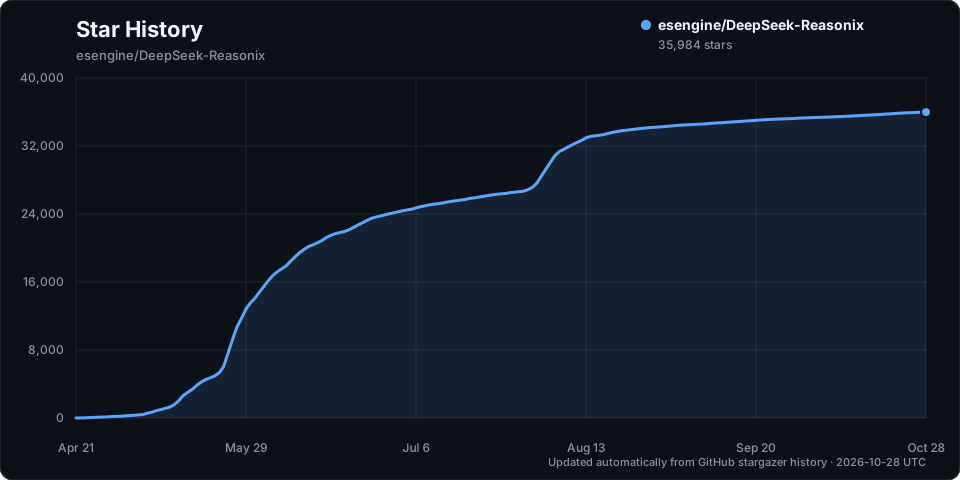
Star History
Acknowledgments
A small list of folks whose work has shaped Reasonix the most — the current top 20 contributors by commit count. The full contributor graph is on GitHub.
| Contributor | Contributor | Contributor | Contributor |
|---|---|---|---|
| SivanCola | esengine | ttmouse | lifu963 |
| reasonix | HUQIANTAO | GTC2080 | light-front-theory |
| merge-order-check | Li-Charles-One | eghrhegpe | wufengfan |
| CVEngineer66 | dependabot[bot] | lanshi17 | SuMuxi66 |
| CnsMaple | cyq1017 | JesonChou | XTLine |
Special thanks to Bernardxu123 for designing the project logo and intro video.
MIT — see LICENSE
Built by the community at esengine/DeepSeek-Reasonix
Support this project
If Reasonix has been useful and you'd like to say thanks, you can. It stays a coffee, not a contract — donations don't buy feature priority or change how issues get triaged.
- International — PayPal: paypal.me/yuhuahui
- 国内 — 微信支付(扫码)