DeepBI is a free, open source business intelligence & reporting project written in Python and released under MIT. It has 2,382 GitHub stars, 370 forks and 71 open issues, and was last pushed 21 days ago. On this registry it ranks #19 of 34 tracked projects in Business Intelligence & Reporting, with 5 head-to-head comparisons available.

What is DeepBI?

What it is

DeepBI is an open-source Python AI-native data analysis platform in the business intelligence and data analytics ecosystem. It uses large language models to help users explore, query, visualize, and share data from connected sources. The MIT-licensed project presents itself as a conversational data scientist for data-driven decisions.

The concrete problem it addresses is the gap between users who need answers from data and analysts who must translate questions into queries, charts, and dashboards. DeepBI aims to let users obtain data results and analysis results through dialogue, then turn those interactions into persistent queries and visualizations. It supports MySQL, PostgreSQL, Doris, StarRocks, MongoDB, and CSV or Excel imports, so it targets environments where data is spread across databases and local files.

Key capabilities

  • Conversational data analysis lets users request arbitrary data results and analysis results through dialogue.
  • Query generation creates persistent queries and visualizations from dialogue, not only chat answers.
  • Dashboards assemble persistent visualizations for ongoing review.
  • Supported sources include MySQL, PostgreSQL, Doris, StarRocks, MongoDB, CSV, and Excel.
  • Platforms include Windows, Linux, Mac, and Windows WSL, with tested Mac OS, Ubuntu, and WSL versions.
  • Interfaces support Chinese and English.
  • Automated analysis reports are listed as to be developed.

Who uses it and how

  • Operators can run DeepBI locally or on a server and access http://ip:8338 after starting services.
  • Teams can connect MySQL, PostgreSQL, Doris, StarRocks, or MongoDB, or import CSV and Excel files.
  • Users can save generated queries and charts as persistent visualizations and arrange them into dashboards.
  • Windows users can install an executable package, while Linux users can use Docker Compose or Ubuntu setup.
  • Self-hosters can plan capacity around the stated minimum of 1 core and 2 GB memory.

Getting started

Typical setup is to clone the GitHub repository and run ./Install.sh with Docker and docker-compose, or to run ubuntu_install.sh on Ubuntu after installing Redis, PostgreSQL-16, and Python 3.8.x. A Windows executable package is also provided, and the default web access port is 8338.

When to use it — and when not to

Use DeepBI when an open-source Python BI platform must combine LLM-driven conversation, query generation, visualization, and dashboard assembly across common database and file sources. Do not rely on it yet for fully automated analysis reports, because that capability is marked as to be developed. For the direct Ubuntu path, the self-hoster must also operate Redis and PostgreSQL-16.

project readme (upstream, from github) — read inline

DeepBI

DeepBI is an AI-native data analysis platform. DeepBI leverages the power of large language models to explore, query, visualize, and share data from any data source. Users can use DeepBI to gain data insight and make data-driven decisions.

Languages: English 中文
Developer:[email protected] Business:[email protected]

If you think DeepBI is helpful to you, please help by clicking here on the ⭐ Star and Fork in the upper right corner. Your support is the greatest driving force for DeepBI to become better.

Video example

https://github.com/DeepInsight-AI/DeepBI/assets/151519374/d1effbe1-5c11-4c77-86ef-e01b1ea7f2f6

user manual

DeepBI user manual

✨ Features

1 Conversational data analysis: Users can get arbitrary data results and analysis results through dialogues.
2 Conversational query generation: Generates persistent queries and visualizations through dialogues.
3 Dashboard : Assemble persistent visualizations into dashboards.
4 Automated data analysis reports (to be developed) : Complete data analysis reports automatically according to user instructions.
5 Support multiple data sources, including MySQL, PostgreSQL, Doris, StarRocks, CSV/Excel, etc.
6 Multi-platform support, support Windows-WSL,Windows, Linux, Mac.
7 International, support Chinese, English.

🚀 Supported Databases

The database connections supported by DeepBI are:

  • MySQL
  • PostgreSQL
  • csv/Excel Import
  • Doris
  • StarRocks
  • MongoDB

📦 Windows exe installation

  • Download window_install_exe_EN.zip from the tag list.The current test supports Win10 and Win11
  • Unzip the zip package and double-click the.exe file to run DeepBI
  • Local installation instructions Installl exe

📦 Docker build

  • The local environment needs to have docker and docker-compose.

  • Installl docker

  • Download project files by git:git clone https://github.com/DeepInsight-AI/DeepBI.git
    or drirect download zip file, unzip it.
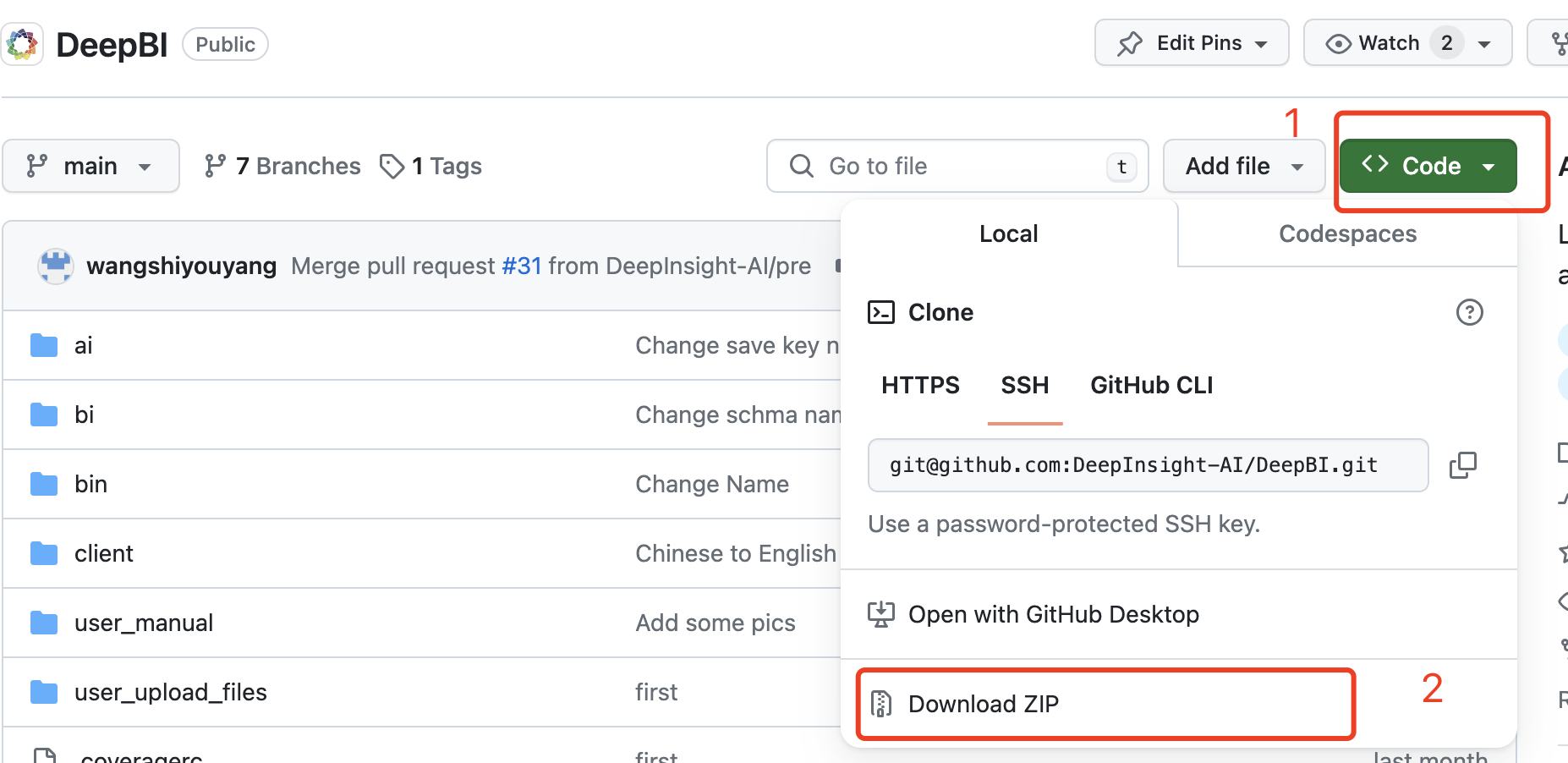
    download.png

  • Enter the project directory:cd DeepBI

  • Just run./Install.shdirectly

  • Default port: 8338 8339

  • Web access: http://ip:8338

DeepBI docker command
  • Enter project DeepBI dir:
    docker-compose start # start DeepBI servie
    docker-compose stop # stop DeepBI servie
    docker-compose ps # see DeepBI servie states
  • If it appears... PermissionError ... ' or ' Permission denied', please add 'sudo' before executing the command
    sudo docker-compose start # start DeepBI servie
    sudo docker-compose stop # stop DeepBI servie
    sudo docker-compose ps # see DeepBI servie states

Ubuntu build

Install directly on the ubuntu system, you need to install redis, postgresql python3.8.17 environment.

  • Redis can be accessed directly through the 127.0.0.1 password-free command line.

  • Require python version 3.8.x

  • Recommend using virtual environments such as pyenv coda

  • postgresql needs to install postgresql-16 version

  • Download the DeepBI code by the command

git clone https://github.com/DeepInsight-AI/DeepBI.git

If the download fails to replace the protocol, run the following code

git clone http://github.com/DeepInsight-AI/DeepBI.git
  • Just run . ubuntu_install.sh directly (note that you run . ubuntu_install.sh instead of sh xxx here, because you need to run the python virtual environment)
  • Default port is 8338 and 8339
  • Web access: http://ip:8338

Contact Us

📑 Other

  • We have tested on Mac OS 12.7/13.X /14.1.1, Ubuntu 20.04/22.04, and Windows11 WSL 22.04.
  • Windows 10 requires version 22H2 or higher to install WSL
  • The minimum memory requirement for server operation is 1 core 2G memory, and 2 core 4G memory is recommended
  • If you have any question, please contact us at [email protected]
  • Issue

Frequently asked questions

Is DeepBI free to use?

DeepBI is open source under the MIT licence. There is no licence fee and no seat count — you can self-host it or, where the project offers one, pay a vendor for a managed version instead.

What does DeepBI do?

LLM based data scientist, AI native data application. AI-driven infinite thinking redefines BI.

What is DeepBI written in?

DeepBI is primarily written in Python. Its source is publicly available at https://github.com/DeepInsight-AI/DeepBI, and it has 2,382 GitHub stars.