




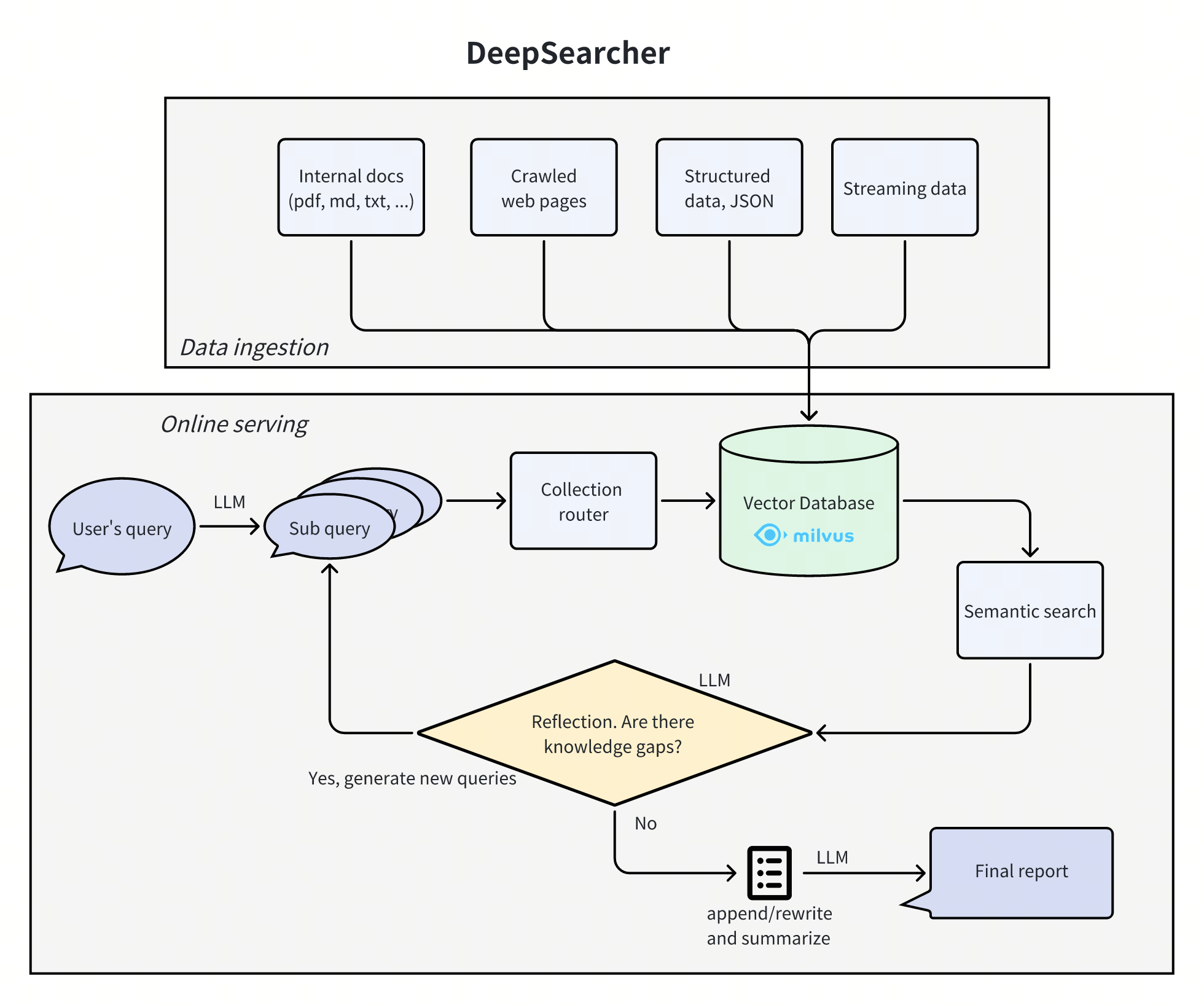
DeepSearcher combines cutting-edge LLMs (OpenAI o3, Qwen3, DeepSeek, Grok 4, Claude 4 Sonnet, Llama 4, QwQ, etc.) and Vector Databases (Milvus, Zilliz Cloud etc.) to perform search, evaluation, and reasoning based on private data, providing highly accurate answer and comprehensive report. This project is suitable for enterprise knowledge management, intelligent Q&A systems, and information retrieval scenarios.
🚀 Features
- Private Data Search: Maximizes the utilization of enterprise internal data while ensuring data security. When necessary, it can integrate online content for more accurate answers.
- Vector Database Management: Supports Milvus and other vector databases, allowing data partitioning for efficient retrieval.
- Flexible Embedding Options: Compatible with multiple embedding models for optimal selection.
- Multiple LLM Support: Supports DeepSeek, OpenAI, and other large models for intelligent Q&A and content generation.
- Document Loader: Supports local file loading, with web crawling capabilities under development.
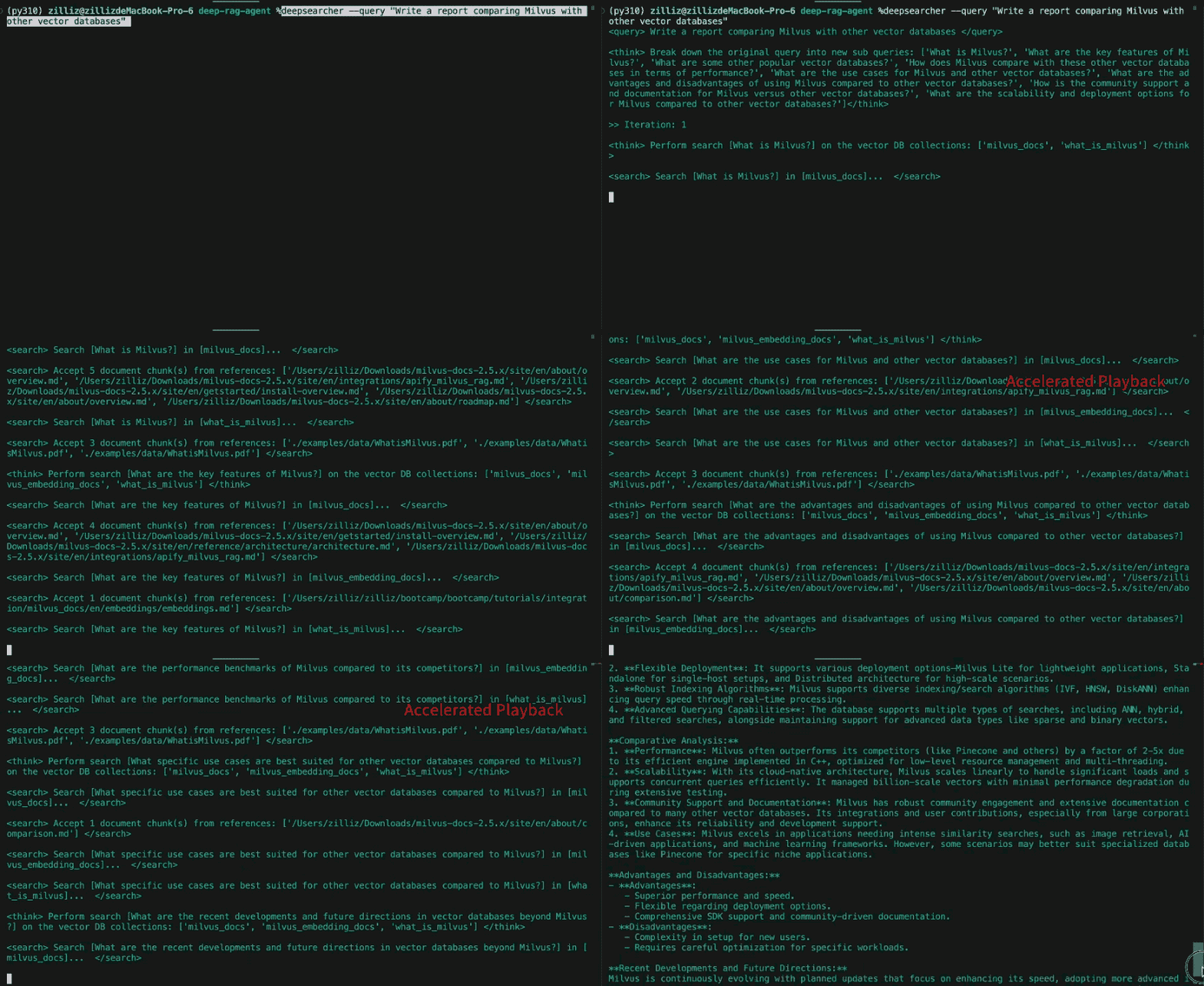
🎉 Demo
📖 Quick Start
Installation
Install DeepSearcher using one of the following methods:
Option 1: Using pip
Create and activate a virtual environment(Python 3.10 version is recommended).
python -m venv .venv
source .venv/bin/activate
Install DeepSearcher
pip install deepsearcher
For optional dependencies, e.g., ollama:
pip install "deepsearcher[ollama]"
Option 2: Install in Development Mode
We recommend using uv for faster and more reliable installation. Follow the offical installation instructions to install it.
Clone the repository and navigate to the project directory:
git clone https://github.com/zilliztech/deep-searcher.git && cd deep-searcher
Synchronize and install dependencies:
uv sync
source .venv/bin/activate
For more detailed development setup and optional dependency installation options, see CONTRIBUTING.md.
Quick start demo
To run this quick start demo, please prepare your OPENAI_API_KEY in your environment variables. If you change the LLM in the configuration, make sure to prepare the corresponding API key.
from deepsearcher.configuration import Configuration, init_config
from deepsearcher.online_query import query

config = Configuration()

# Customize your config here,
# more configuration see the Configuration Details section below.
config.set_provider_config("llm", "OpenAI", {"model": "o1-mini"})
config.set_provider_config("embedding", "OpenAIEmbedding", {"model": "text-embedding-ada-002"})
init_config(config = config)

# Load your local data
from deepsearcher.offline_loading import load_from_local_files
load_from_local_files(paths_or_directory=your_local_path)

# (Optional) Load from web crawling (`FIRECRAWL_API_KEY` env variable required)
from deepsearcher.offline_loading import load_from_website
load_from_website(urls=website_url)

# Query
result = query("Write a report about xxx.") # Your question here
Configuration Details:
LLM Configuration
config.set_provider_config("llm", "(LLMName)", "(Arguments dict)")The "LLMName" can be one of the following: ["DeepSeek", "OpenAI", "XAI", "SiliconFlow", "Aliyun", "PPIO", "TogetherAI", "Gemini", "Ollama", "Novita", "Jiekou.AI"]
The "Arguments dict" is a dictionary that contains the necessary arguments for the LLM class.
Example (OpenAI)
Make sure you have prepared your OPENAI API KEY as an env variable OPENAI_API_KEY.
config.set_provider_config("llm", "OpenAI", {"model": "o1-mini"})More details about OpenAI models: https://platform.openai.com/docs/models
Example (Qwen3 from Aliyun Bailian)
Make sure you have prepared your Bailian API KEY as an env variable DASHSCOPE_API_KEY.
config.set_provider_config("llm", "Aliyun", {"model": "qwen-plus-latest"})More details about Aliyun Bailian models: https://bailian.console.aliyun.com
Example (Qwen3 from OpenRouter)
config.set_provider_config("llm", "OpenAI", {"model": "qwen/qwen3-235b-a22b:free", "base_url": "https://openrouter.ai/api/v1", "api_key": "OPENROUTER_API_KEY"})More details about OpenRouter models: https://openrouter.ai/qwen/qwen3-235b-a22b:free
Example (DeepSeek from official)
Make sure you have prepared your DEEPSEEK API KEY as an env variable DEEPSEEK_API_KEY.
config.set_provider_config("llm", "DeepSeek", {"model": "deepseek-reasoner"})More details about DeepSeek: https://api-docs.deepseek.com/
Example (DeepSeek from SiliconFlow)
Make sure you have prepared your SILICONFLOW API KEY as an env variable SILICONFLOW_API_KEY.
config.set_provider_config("llm", "SiliconFlow", {"model": "deepseek-ai/DeepSeek-R1"})More details about SiliconFlow: https://docs.siliconflow.cn/quickstart
Example (DeepSeek from TogetherAI)
Make sure you have prepared your TOGETHER API KEY as an env variable TOGETHER_API_KEY.
config.set_provider_config("llm", "TogetherAI", {"model": "deepseek-ai/DeepSeek-R1"})config.set_provider_config("llm", "TogetherAI", {"model": "meta-llama/Llama-4-Scout-17B-16E-Instruct"}) You need to install together before running, execute: pip install together. More details about TogetherAI: https://www.together.ai/
Example (XAI Grok)
Make sure you have prepared your XAI API KEY as an env variable XAI_API_KEY.
config.set_provider_config("llm", "XAI", {"model": "grok-4-0709"})More details about XAI Grok: https://docs.x.ai/docs/overview#featured-models
Example (Claude)
Make sure you have prepared your ANTHROPIC API KEY as an env variable ANTHROPIC_API_KEY.
config.set_provider_config("llm", "Anthropic", {"model": "claude-sonnet-4-0"})More details about Anthropic Claude: https://docs.anthropic.com/en/home
Example (Google Gemini)
Make sure you have prepared your GEMINI API KEY as an env variable GEMINI_API_KEY.
config.set_provider_config('llm', 'Gemini', { 'model': 'gemini-2.0-flash' }) You need to install gemini before running, execute: pip install google-genai. More details about Gemini: https://ai.google.dev/gemini-api/docs
Example (DeepSeek from PPIO)
Make sure you have prepared your PPIO API KEY as an env variable PPIO_API_KEY. You can create an API Key here.
config.set_provider_config("llm", "PPIO", {"model": "deepseek/deepseek-r1-turbo"})More details about PPIO: https://ppinfra.com/docs/get-started/quickstart.html?utm_source=github_deep-searcher
Example (Claude Sonnet 4.5 from Jiekou.AI)
Make sure you have prepared your Jiekou.AI API KEY as an env variable JIEKOU_API_KEY. You can create an API Key here.
config.set_provider_config("llm", "JiekouAI", {"model": "claude-sonnet-4-5-20250929"})More details about Jiekou.AI: https://docs.jiekou.ai/docs/support/quickstart?utm_source=github_deep-searcher
Example (Ollama)
Follow these instructions to set up and run a local Ollama instance:
Download and install Ollama onto the available supported platforms (including Windows Subsystem for Linux).
View a list of available models via the model library.
Fetch available LLM models via ollama pull <name-of-model>
Example: ollama pull qwen3
To chat directly with a model from the command line, use ollama run <name-of-model>.
By default, Ollama has a REST API for running and managing models on http://localhost:11434.
config.set_provider_config("llm", "Ollama", {"model": "qwen3"})Example (Volcengine)
Make sure you have prepared your Volcengine API KEY as an env variable VOLCENGINE_API_KEY. You can create an API Key here.
config.set_provider_config("llm", "Volcengine", {"model": "deepseek-r1-250120"})More details about Volcengine: https://www.volcengine.com/docs/82379/1099455?utm_source=github_deep-searcher
Example (GLM)
Make sure you have prepared your GLM API KEY as an env variable GLM_API_KEY.
config.set_provider_config("llm", "GLM", {"model": "glm-4-plus"}) You need to install zhipuai before running, execute: pip install zhipuai. More details about GLM: https://bigmodel.cn/dev/welcome
Example (Amazon Bedrock)
Make sure you have prepared your Amazon Bedrock API KEY as an env variable AWS_ACCESS_KEY_ID and AWS_SECRET_ACCESS_KEY.
config.set_provider_config("llm", "Bedrock", {"model": "us.deepseek.r1-v1:0"}) You need to install boto3 before running, execute: pip install boto3. More details about Amazon Bedrock: https://docs.aws.amazon.com/bedrock/
Example (IBM watsonx.ai)
Make sure you have prepared your watsonx.ai credentials as env variables WATSONX_APIKEY, WATSONX_URL, and WATSONX_PROJECT_ID.
config.set_provider_config("llm", "watsonx", {"model": "us.deepseek.r1-v1:0"}) You need to install ibm-watsonx-ai before running, execute: pip install ibm-watsonx-ai. More details about IBM watsonx.ai: https://www.ibm.com/products/watsonx-ai/foundation-models
Embedding Model Configuration
config.set_provider_config("embedding", "(EmbeddingModelName)", "(Arguments dict)")The "EmbeddingModelName" can be one of the following: ["MilvusEmbedding", "OpenAIEmbedding", "VoyageEmbedding", "SiliconflowEmbedding", "PPIOEmbedding", "NovitaEmbedding", "JiekouAIEmbedding"]
The "Arguments dict" is a dictionary that contains the necessary arguments for the embedding model class.
Example (OpenAI embedding)
Make sure you have prepared your OpenAI API KEY as an env variable OPENAI_API_KEY.
config.set_provider_config("embedding", "OpenAIEmbedding", {"model": "text-embedding-3-small"})More details about OpenAI models: https://platform.openai.com/docs/guides/embeddings/use-cases
Example (OpenAI embedding Azure)
Make sure you have prepared your OpenAI API KEY as an env variable OPENAI_API_KEY.
config.set_provider_config("embedding", "OpenAIEmbedding", {
    "model": "text-embedding-ada-002",
    "azure_endpoint": "https://.openai.azure.com/",
    "api_version": "2023-05-15"
})
Example (Pymilvus built-in embedding model)
Use the built-in embedding model in Pymilvus, you can set the model name as "default", "BAAI/bge-base-en-v1.5", "BAAI/bge-large-en-v1.5", "jina-embeddings-v3", etc.
See [milvus_embedding.py](deepsearcher/embedding/milvus_embedding.py) for more details.
config.set_provider_config("embedding", "MilvusEmbedding", {"model": "BAAI/bge-base-en-v1.5"})config.set_provider_config("embedding", "MilvusEmbedding", {"model": "jina-embeddings-v3"}) For Jina's embedding model, you needJINAAI_API_KEY.
You need to install pymilvus model before running, execute: pip install pymilvus.model. More details about Pymilvus: https://milvus.io/docs/embeddings.md
Example (VoyageAI embedding)
Make sure you have prepared your VOYAGE API KEY as an env variable VOYAGE_API_KEY.
config.set_provider_config("embedding", "VoyageEmbedding", {"model": "voyage-3"}) You need to install voyageai before running, execute: pip install voyageai. More details about VoyageAI: https://docs.voyageai.com/embeddings/
Example (Amazon Bedrock embedding)
config.set_provider_config("embedding", "BedrockEmbedding", {"model": "amazon.titan-embed-text-v2:0"}) You need to install boto3 before running, execute: pip install boto3. More details about Amazon Bedrock: https://docs.aws.amazon.com/bedrock/
Example (Novita AI embedding)
Make sure you have prepared your Novita AI API KEY as an env variable NOVITA_API_KEY.
config.set_provider_config("embedding", "NovitaEmbedding", {"model": "baai/bge-m3"})More details about Novita AI: https://novita.ai/docs/api-reference/model-apis-llm-create-embeddings?utm_source=github_deep-searcher&utm_medium=github_readme&utm_campaign=link
Example (Siliconflow embedding)
Make sure you have prepared your Siliconflow API KEY as an env variable SILICONFLOW_API_KEY.
config.set_provider_config("embedding", "SiliconflowEmbedding", {"model": "BAAI/bge-m3"})More details about Siliconflow: https://docs.siliconflow.cn/en/api-reference/embeddings/create-embeddings
Example (Volcengine embedding)
Make sure you have prepared your Volcengine API KEY as an env variable VOLCENGINE_API_KEY.
config.set_provider_config("embedding", "VolcengineEmbedding", {"model": "doubao-embedding-text-240515"})More details about Volcengine: https://www.volcengine.com/docs/82379/1302003
Example (GLM embedding)
Make sure you have prepared your GLM API KEY as an env variable GLM_API_KEY.
config.set_provider_config("embedding", "GLMEmbedding", {"model": "embedding-3"}) You need to install zhipuai before running, execute: pip install zhipuai. More details about GLM: https://bigmodel.cn/dev/welcome
Example (Google Gemini embedding)
Make sure you have prepared your Gemini API KEY as an env variable GEMINI_API_KEY.
config.set_provider_config("embedding", "GeminiEmbedding", {"model": "text-embedding-004"}) You need to install gemini before running, execute: pip install google-genai. More details about Gemini: https://ai.google.dev/gemini-api/docs
Example (Ollama embedding)
config.set_provider_config("embedding", "OllamaEmbedding", {"model": "bge-m3"}) You need to install ollama before running, execute: pip install ollama. More details about Ollama Python SDK: https://github.com/ollama/ollama-python
Example (PPIO embedding)
Make sure you have prepared your PPIO API KEY as an env variable PPIO_API_KEY.
config.set_provider_config("embedding", "PPIOEmbedding", {"model": "baai/bge-m3"})More details about PPIO: https://ppinfra.com/docs/get-started/quickstart.html?utm_source=github_deep-searcher
Example (Jiekou.AI embedding)
Make sure you have prepared your Jiekou.AI API KEY as an env variable JIEKOU_API_KEY.
config.set_provider_config("embedding", "JiekouAIEmbedding", {"model": "qwen/qwen3-embedding-8b"})More details about Jiekou.AI: https://docs.jiekou.ai/docs/support/quickstart?utm_source=github_deep-searcher
Example (FastEmbed embedding)
config.set_provider_config("embedding", "FastEmbedEmbedding", {"model": "intfloat/multilingual-e5-large"}) You need to install fastembed before running, execute: pip install fastembed. More details about fastembed: https://github.com/qdrant/fastembed
Example (IBM watsonx.ai embedding)
Make sure you have prepared your WatsonX credentials as env variables WATSONX_APIKEY, WATSONX_URL, and WATSONX_PROJECT_ID.
config.set_provider_config("embedding", "WatsonXEmbedding", {"model": "ibm/slate-125m-english-rtrvr-v2"})config.set_provider_config("embedding", "WatsonXEmbedding", {"model": "sentence-transformers/all-minilm-l6-v2"}) You need to install ibm-watsonx-ai before running, execute: pip install ibm-watsonx-ai. More details about IBM watsonx.ai: https://www.ibm.com/products/watsonx-ai/foundation-models
Vector Database Configuration
config.set_provider_config("vector_db", "(VectorDBName)", "(Arguments dict)")The "VectorDBName" can be one of the following: ["Milvus"] (Under development)
The "Arguments dict" is a dictionary that contains the necessary arguments for the Vector Database class.
Example (Milvus)
config.set_provider_config("vector_db", "Milvus", {"uri": "./milvus.db", "token": ""})More details about Milvus Config:
-
Setting the
urias a local file, e.g../milvus.db, is the most convenient method, as it automatically utilizes Milvus Lite to store all data in this file.
-
If you have a large-scale dataset, you can set up a more performant Milvus server using
Docker or Kubernetes.
In this setup, use the server URI, e.g.,
http://localhost:19530, as youruri. You can also use any other connection parameters supported by Milvus such ashost,user,password, orsecure.
-
If you want to use Zilliz Cloud,
the fully managed cloud service for Milvus, adjust the
uriandtokenaccording to the Public Endpoint and API Key in Zilliz Cloud.
Example (AZURE AI Search)
config.set_provider_config("vector_db", "AzureSearch", {
    "endpoint": "https://.search.windows.net",
    "index_name": "",
    "api_key": "",
    "vector_field": ""
})
More details about Milvus Config:
File Loader Configuration
config.set_provider_config("file_loader", "(FileLoaderName)", "(Arguments dict)")The "FileLoaderName" can be one of the following: ["PDFLoader", "TextLoader", "UnstructuredLoader"]
The "Arguments dict" is a dictionary that contains the necessary arguments for the File Loader class.
Example (Unstructured)
You can use Unstructured in two ways:
- With API: Set environment variables
UNSTRUCTURED_API_KEYandUNSTRUCTURED_API_URL - Without API: Use the local processing mode by simply not setting these environment variables
config.set_provider_config("file_loader", "UnstructuredLoader", {})- Currently supported file types: ["pdf"] (Under development)
- Installation requirements:
- Install ingest pipeline:
pip install unstructured-ingest - For all document formats:
pip install "unstructured[all-docs]" - For specific formats (e.g., PDF only):
pip install "unstructured[pdf]"
- Install ingest pipeline:
- More information:
- Unstructured documentation: https://docs.unstructured.io/ingestion/overview
- Installation guide: https://docs.unstructured.io/open-source/installation/full-installation
Example (Docling)
config.set_provider_config("file_loader", "DoclingLoader", {})Currently supported file types: please refer to the Docling documentation: https://docling-project.github.io/docling/usage/supported_formats/#supported-output-formats
You need to install docling before running, execute: pip install docling. More details about Docling: https://docling-project.github.io/docling/
Web Crawler Configuration
config.set_provider_config("web_crawler", "(WebCrawlerName)", "(Arguments dict)")The "WebCrawlerName" can be one of the following: ["FireCrawlCrawler", "Crawl4AICrawler", "JinaCrawler"]
The "Arguments dict" is a dictionary that contains the necessary arguments for the Web Crawler class.
Example (FireCrawl)
Make sure you have prepared your FireCrawl API KEY as an env variable FIRECRAWL_API_KEY.
config.set_provider_config("web_crawler", "FireCrawlCrawler", {})More details about FireCrawl: https://docs.firecrawl.dev/introduction
Example (Crawl4AI)
Make sure you have run crawl4ai-setup in your environment.
config.set_provider_config("web_crawler", "Crawl4AICrawler", {"browser_config": {"headless": True, "verbose": True}}) You need to install crawl4ai before running, execute: pip install crawl4ai. More details about Crawl4AI: https://docs.crawl4ai.com/
Example (Jina Reader)
Make sure you have prepared your Jina Reader API KEY as an env variable JINA_API_TOKEN or JINAAI_API_KEY.
config.set_provider_config("web_crawler", "JinaCrawler", {})More details about Jina Reader: https://jina.ai/reader/
Example (Docling)
config.set_provider_config("web_crawler", "DoclingCrawler", {})Currently supported file types: please refer to the Docling documentation: https://docling-project.github.io/docling/usage/supported_formats/#supported-output-formats
You need to install docling before running, execute: pip install docling. More details about Docling: https://docling-project.github.io/docling/
Python CLI Mode
Load
deepsearcher load "your_local_path_or_url"
# load into a specific collection
deepsearcher load "your_local_path_or_url" --collection_name "your_collection_name" --collection_desc "your_collection_description"
Example loading from local file:
deepsearcher load "/path/to/your/local/file.pdf"
# or more files at once
deepsearcher load "/path/to/your/local/file1.pdf" "/path/to/your/local/file2.md"
Example loading from url (Set FIRECRAWL_API_KEY in your environment variables, see FireCrawl for more details):
deepsearcher load "https://www.wikiwand.com/en/articles/DeepSeek"
Query
deepsearcher query "Write a report about xxx."
More help information
deepsearcher --help
For more help information about a specific subcommand, you can use deepsearcher [subcommand] --help.
deepsearcher load --help
deepsearcher query --help
Deployment
Configure modules
You can configure all arguments by modifying config.yaml to set up your system with default modules.
For example, set your OPENAI_API_KEY in the llm section of the YAML file.
Start service
The main script will run a FastAPI service with default address localhost:8000.
$ python main.py
Access via browser
You can open url http://localhost:8000/docs in browser to access the web service. Click on the button "Try it out", it allows you to fill the parameters and directly interact with the API.
❓ Q&A
Q1: Why I failed to parse LLM output format / How to select the LLM?
A1: Small LLMs struggle to follow the prompt to generate a desired response, which usually cause the format parsing problem. A better practice is to use large reasoning models e.g. deepseek-r1 671b, OpenAI o-series, Claude 4 sonnet, etc. as your LLM.
Q2: OSError: We couldn't connect to 'https://huggingface.co' to load this file, couldn't find it in the cached files and it looks like GPTCache/paraphrase-albert-small-v2 is not the path to a directory containing a file named config.json. Checkout your internet connection or see how to run the library in offline mode at 'https://huggingface.co/docs/transformers/installation#offline-mode'.
A2: This is mainly due to abnormal access to huggingface, which may be a network or permission problem. You can try the following two methods:
- If there is a network problem, set up a proxy, try adding the following environment variable.
export HF_ENDPOINT=https://hf-mirror.com
- If there is a permission problem, set up a personal token, try adding the following environment variable.
export HUGGING_FACE_HUB_TOKEN=xxxx
Q3: DeepSearcher doesn't run in Jupyter notebook.
A3: Install nest_asyncio and then put this code block in front of your jupyter notebook.
pip install nest_asyncio
import nest_asyncio
nest_asyncio.apply()
🔧 Module Support
🔹 Embedding Models
- Open-source embedding models
- OpenAI (
OPENAI_API_KEYenv variable required) - VoyageAI (
VOYAGE_API_KEYenv variable required) - Amazon Bedrock (
AWS_ACCESS_KEY_IDandAWS_SECRET_ACCESS_KEYenv variable required) - FastEmbed
- PPIO (
PPIO_API_KEYenv variable required) - Novita AI (
NOVITA_API_KEYenv variable required) - IBM watsonx.ai (
WATSONX_APIKEY,WATSONX_URL,WATSONX_PROJECT_IDenv variables required) - Jiekou.AI (
JIEKOU_API_KEYenv variable required)
🔹 LLM Support
- OpenAI (
OPENAI_API_KEYenv variable required) - DeepSeek (
DEEPSEEK_API_KEYenv variable required) - XAI Grok (
XAI_API_KEYenv variable required) - Anthropic Claude (
ANTHROPIC_API_KEYenv variable required) - SiliconFlow Inference Service (
SILICONFLOW_API_KEYenv variable required) - PPIO (
PPIO_API_KEYenv variable required) - TogetherAI Inference Service (
TOGETHER_API_KEYenv variable required) - Google Gemini (
GEMINI_API_KEYenv variable required) - SambaNova Cloud Inference Service (
SAMBANOVA_API_KEYenv variable required) - Ollama
- Novita AI (
NOVITA_API_KEYenv variable required) - IBM watsonx.ai (
WATSONX_APIKEY,WATSONX_URL,WATSONX_PROJECT_IDenv variable required) - Jiekou.AI (
JIEKOU_API_KEYenv variable required)
🔹 Document Loader
- Local File
- PDF(with txt/md) loader
- Unstructured (under development) (
UNSTRUCTURED_API_KEYandUNSTRUCTURED_URLenv variables required)
- Web Crawler
- FireCrawl (
FIRECRAWL_API_KEYenv variable required) - Jina Reader (
JINA_API_TOKENenv variable required) - Crawl4AI (You should run command
crawl4ai-setupfor the first time)
- FireCrawl (
🔹 Vector Database Support
- Milvus and Zilliz Cloud (fully managed Milvus)
- Qdrant
📊 Evaluation
See the Evaluation directory for more details.
📌 Future Plans
- Enhance web crawling functionality
- Support more vector databases (e.g., FAISS...)
- Add support for additional large models
- Provide RESTful API interface (DONE)
We welcome contributions! Star & Fork the project and help us build a more powerful DeepSearcher! 🎯