What it is
DavMail is a Java gateway that connects standard mail, calendar, contact, and directory protocols to Exchange and Office 365. It presents itself to client software through POP, IMAP, SMTP, CalDAV, CardDAV, and LDAP, while communicating with the target service behind that interface. The project is distributed under GPL-2.0 and is packaged for macOS, Linux, and Windows.
The problem it solves is the dependence on Outlook for Exchange and Office 365 access. A user who wants to keep a preferred mail client, calendar application, or contacts client can point that software at a local DavMail instance instead of using Outlook. This makes it possible to use any mail client against an Exchange or Office 365 backend.
Key capabilities
- It acts as a protocol gateway for POP, IMAP, SMTP, CalDAV, CardDAV, and LDAP access to Exchange and Office 365.
- It enables mail clients to access and send messages through the gateway rather than requiring the Outlook client.
- It exposes calendar data through CalDAV and contact data through CardDAV.
- It exposes LDAP access, as listed in the project topics.
- It is packaged for macOS, Linux, and Windows, and it is also available as a Docker image.
- It has RPM packaging paths through OpenSuse build service and Fedora COPR, plus a Flatpak option when the distribution supports it.
- It keeps a GitHub repository synchronized with the main subversion repository to make contributions easier for GitHub users.
Who uses it and how
- Users who want to avoid Outlook on Exchange or Office 365 accounts can run DavMail locally and connect their preferred mail client.
- Desktop users on macOS, Linux, and Windows can install a package or use a platform independent package.
- Self-hosted or containerized deployments can use the Docker image from GitHub Container Registry.
- Fedora and OpenSuse build service users can install the gateway through the packaging channels mentioned in the README.
- Contributors can work from the GitHub mirror while the upstream project continues to use subversion.
Getting started
Typical installation methods include downloading a release from Sourceforge, using macOS, Linux, or Windows packages, installing RPMs from OpenSuse build service or Fedora COPR, using Flatpak where supported, or running the Docker image from GitHub Container Registry.
When to use it — and when not to
DavMail is useful when the goal is to keep an existing mail, calendar, or contact client while accessing Exchange or Office 365 through standard protocols. It is not a hosted replacement service; the README describes packages and a gateway, so the user must run the software themselves. The facts provided do not describe a hosted option, database, storage, SMTP backend, or feature comparison with Outlook, so those aspects must be evaluated before adoption.
project readme (upstream, from github) — read inline
DavMail POP/IMAP/SMTP/Caldav/Carddav/LDAP Exchange and Office 365 Gateway





Ever wanted to get rid of Outlook? DavMail is a POP/IMAP/SMTP/CalDAV/CardDAV/LDAP gateway allowing users to use any
mail client with Exchange and Office 365. Packages are available for macOS, Linux and Windows.
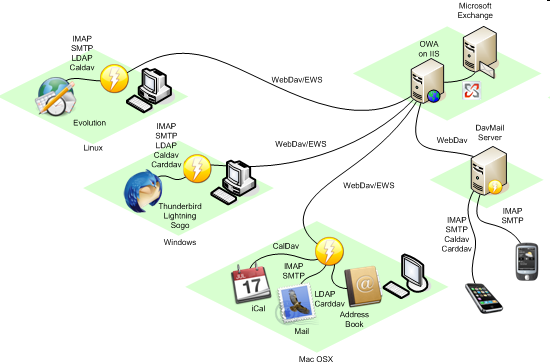
The main project site is still on Sourceforge at https://davmail.sourceforge.net/.
This git repository is synchronized with the subversion repository in order to make contributions easier for GitHub users.
Donate
Donations are welcome to help support DavMail development, in dollars
 or Euros
Download
Download latest DavMail release on Sourceforge

RPM packages are available from OpenSuse build service:

An alternative is COPR on Fedora:

If your distribution supports Flatpak:

Docker images are available on GitHub Container Registry:

Trunk builds
The latest working builds are now available on Appveyor:
Note: Windows packages have an embedded Java Runtime Environment, Debian package has a dependency on OpenJDK,
Azul JDK is preferred on macOS, see DavMail Setup on macOS.
Getting started
See Getting Started.
What's new
See RELEASE-NOTES.md.
Contribute
Contributions are welcome, you can either submit a patch or create a GitHub pull request.
In case you are looking for tasks to work on, please check our current
Backlog.
License
DavMail is licensed under the GNU General Public License v2.0.