
cyberapi is a free, open source api development & testing project written in Rust and released under Apache-2.0. It has 521 GitHub stars, 41 forks and 0 open issues, and was last pushed 5 days ago. On this registry it ranks #181 of 188 tracked projects in API Development & Testing, with 5 head-to-head comparisons available. It gained 1 stars over the last 2 tracked days.

What is cyberapi?

Cyber API is a native HTTP API client written in Rust and rendered with GPUI, the GPU-accelerated UI engine behind the Zed editor, aimed at developers and teams who test REST, GraphQL, gRPC, WebSocket and server-sent-event APIs and who want the same application on the desktop and as a self-hosted web version.

What it is

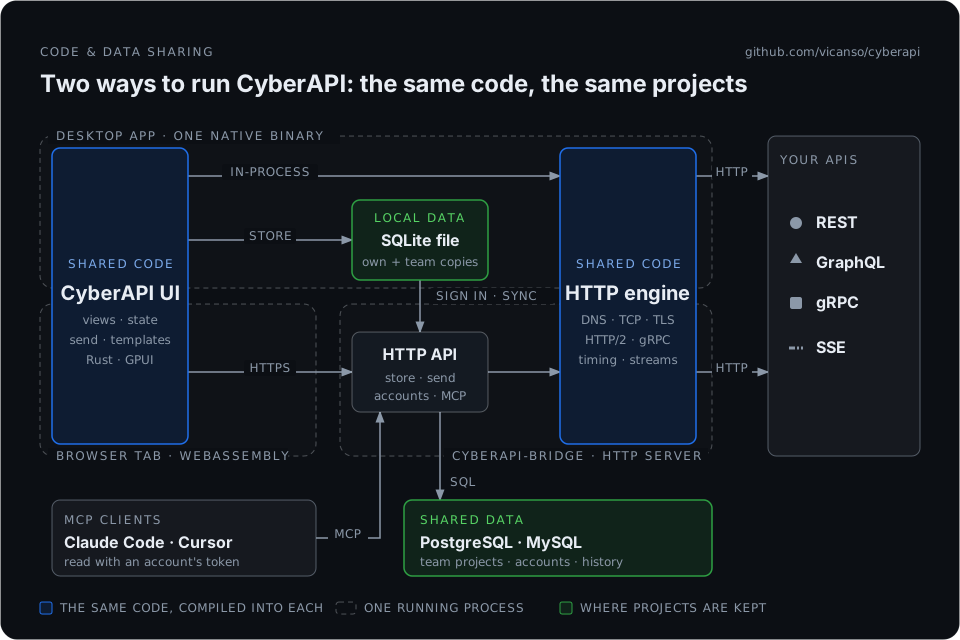
Cyber API is a desktop application for macOS, Windows and Linux that is built in Rust and drawn by GPUI, with no Electron and no web view. The same codebase also compiles to WebAssembly and is served by cyberapi-bridge, a single binary that keeps accounts and projects in PostgreSQL or MySQL and sends the page's requests on the user's behalf. That gives a team one application in two forms: a native client installed from Releases, and a web version running on its own infrastructure.

The concrete problem it addresses is the weight and the lock-in of collection-based API clients. Because GPUI draws on the GPU, a project containing thousands of APIs opens at once, and every kind of API a modern backend exposes — REST, GraphQL with schema completion, gRPC from server reflection or .proto files, WebSocket, event streams — is handled in the same window. It is positioned as a replacement rather than an addition: anyone coming from Postman, Insomnia, Hoppscotch, Bruno or Swagger can import the collection or paste a cURL command. The project lives in the Rust and GPUI ecosystem, and its topic list still records tauri, reflecting the earlier Tauri build that the install notes describe moving away from.

Key capabilities

  • Sends REST, GraphQL with schema completion, gRPC from server reflection or .proto files, WebSocket and server-sent event requests from one client.
  • Breaks a request down into DNS, TCP, TLS and server time, shows the request exactly as it went out, and renders JSON as a tree or queries it with JSONPath.
  • Runs the same checks from CI through cyberapi-cli, alongside the history kept in the application.
  • Switches environments next to the project name, inherits auth from a folder, chains a response with {{g(api, data.token)}}, and follows an OpenAPI source while the values and secrets already typed stay in place.
  • Serves a self-hosted web version from the same code, where the desktop app signs in, works offline and syncs when the user chooses.
  • Exposes APIs to MCP clients such as Claude Code and Cursor with secrets masked, sending them only when allowed.

Who uses it and how

  • Individual developers on macOS, Windows or Linux who download a build from Releases and let the app check for new versions itself.
  • Teams that run the web version behind nginx with HTTPS, point CYBERAPI_BRIDGE_STORE at PostgreSQL or MySQL, create the first administrator with the setup token printed in the log, and invite everyone else.
  • Projects large enough that opening thousands of APIs at once is the deciding factor, where GPU rendering replaces a web view.
  • Pipeline authors who reuse the application's checks from cyberapi-cli rather than reimplementing them.
  • Existing users of the Tauri build following the install notes to move across.

Getting started

Download the macOS, Windows or Linux build from Releases, or run the web version with docker run -p 7380:7380 -e CYBERAPI_BRIDGE_STORE=postgres://user:password@host:5432/cyberapi vicanso/cyberapi-web from Docker Hub for linux/amd64 and linux/arm64. The deployment guide covers Docker Compose, the binary under systemd, HTTPS behind nginx including a sub-path, upgrades and backups.

How it compares

Against the clients whose collections it imports — Postman, Insomnia, Hoppscotch, Bruno and Swagger — Cyber API is released under Apache-2.0 and can be self-hosted, so accounts and projects stay in the operator's own PostgreSQL or MySQL rather than in a vendor's service. The desktop and web versions come from one codebase, and the CLI reuses the same checks, so there is no separate server product to license or reconcile.

When to use it — and when not to

Choose it when a native client and an in-house web deployment are both wanted and the team is prepared to operate a database plus TLS, since the login cookie is Secure and only --insecure-cookie relaxes that for plain HTTP. Building the web version from source also requires the nightly toolchain with wasm32-unknown-unknown, wasm-pack and wasm-opt, which is a real cost for anyone who cannot use the published image. Teams without the appetite to run PostgreSQL or MySQL should stay with a hosted client.

project readme (upstream, from github) — read inline

中文 | English

Cyber API

A fast, native HTTP API client in Rust and GPUI: one codebase for the desktop and a self-hosted web version.

CI License Downloads Docker pulls

https://github.com/user-attachments/assets/47018134-b823-40e1-93f5-a2047711a9c2


Features · Install · All features · Web version · Deployment guide · Development


Features

Cyber API is a native API client for HTTP, GraphQL, gRPC and server-sent events. GPUI — the engine behind the Zed editor — draws it on the GPU, so a project with thousands of APIs opens at once.

  • ⚡ Native and instant — macOS, Windows and Linux; no Electron, no web view.
  • 🧩 Every kind of API — REST; GraphQL with schema completion; gRPC from server reflection or .proto files; WebSocket; event streams shown as they arrive.
  • 🔍 See what really happened — DNS, TCP, TLS and server time; the request as it went out; JSON as a tree or JSONPath; history, and the same checks from the app or cyberapi-cli in CI.
  • 🔗 Less copy and paste — switch environments beside the project's name, inherit auth from a folder, chain a response with {{g(api, data.token)}}, and follow an OpenAPI source while the values and secrets you typed stay.
  • 👥 Built for teams — a self-hosted web version from the same code; the desktop app signs in, works offline and syncs when you choose.
  • 🤖 Ready for AI assistants — Claude Code, Cursor and other MCP clients read your APIs, secrets masked, and send them when you allow.
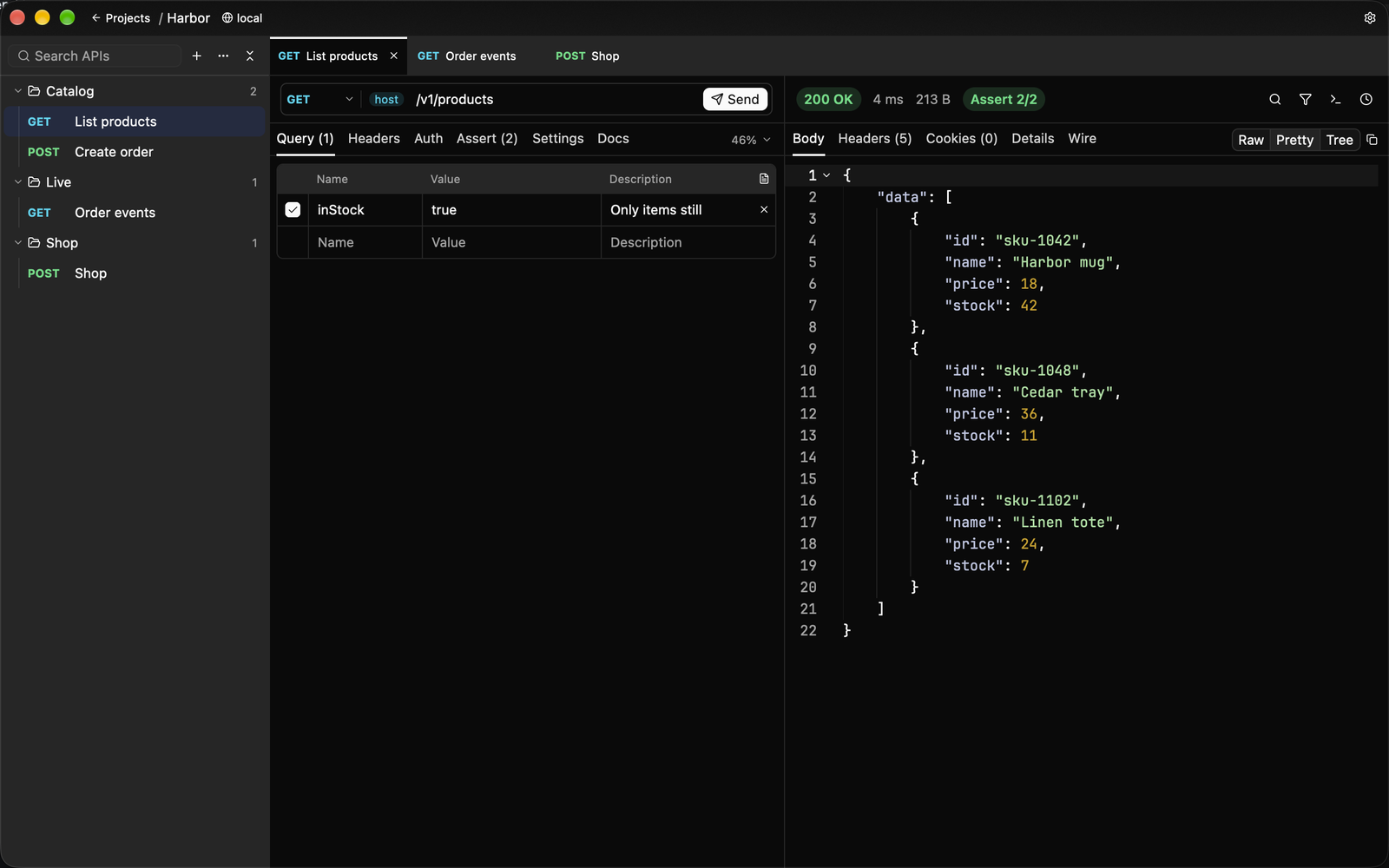
Sending a request, an event stream as it arrives, and syncing an OpenAPI document into the tree. GraphQL, the JSON tree, and the DNS / TCP / TLS timings are in the gallery.

Coming from Postman, Insomnia, Hoppscotch, Bruno or Swagger? Import the collection, or just paste a cURL command.

📖 Every feature in detail →

Install

Download for macOS, Windows or Linux from Releases; the app checks for new versions itself. Which file to pick, nightly builds, and moving over from the Tauri version: the install notes.

Web version (self-hosted)

Try the live demo at https://cyberapi.pingap.io/ — account cyberapi, password cyberapi123123 (demo account: read-only, password cannot be changed).

The web version is the same app compiled to WebAssembly and served by cyberapi-bridge, one binary that also keeps the accounts and projects in PostgreSQL or MySQL and sends the page's requests. It is an image on Docker Hub for linux/amd64 and linux/arm64, vicanso/cyberapi-web (latest, each version, and nightly from main), and a tarball on each release.
docker run -p 7380:7380 \
  -e CYBERAPI_BRIDGE_STORE=postgres://user:password@host:5432/cyberapi \
  vicanso/cyberapi-web

With no account yet the log shows a setup token; open the page and make the first administrator with it. The administrator invites everyone else. The login cookie is Secure, so put HTTPS in front of it, or add --insecure-cookie after the image name to try it over plain HTTP.

The deployment guide covers Docker Compose, the binary with systemd, HTTPS behind nginx (also under a sub-path), every option, which addresses requests may reach, accounts and invitations, signing in from the desktop, upgrades and backups.

Development

Rust (the version in rust-toolchain.toml is picked up by rustup). On Linux, first: libfontconfig1-dev libxcb-xfixes0-dev libxkbcommon-dev libxkbcommon-x11-dev libwayland-dev libssl-dev.

make dev            # run the desktop app (a debug build uses its own database)
make lint           # fmt check and clippy, as CI
make test           # every test
make desktop-dist   # package for this machine (cargo install --locked cargo-bundle@0.11.0)

The web version needs the nightly toolchain with the wasm32-unknown-unknown target (picked up from cyberapi-web/rust-toolchain.toml) and wasm-pack (cargo install wasm-pack); its release form also needs wasm-opt (binaryen).

make db-up          # PostgreSQL and MySQL in local containers (Apple's `container`)
make web-bundle     # build the page
make bridge         # http://127.0.0.1:7380/, setup token `dev`
make check-web      # the wasm build's check
make web-dist       # the deployment tarball; `make docker` builds the image

How the code is laid out, and why, is in docs/architecture.md; how server projects sync, in docs/server-sync.md (both in Chinese). Releases are cut with make version and a v* tag; see CHANGELOG.md.

License

Apache-2.0

Frequently asked questions

Is cyberapi free to use?

cyberapi is open source under the Apache-2.0 licence. There is no licence fee and no seat count — you can self-host it or, where the project offers one, pay a vendor for a managed version instead.

What does cyberapi do?

API tool based on gpui, it is smaller and faster.

What is cyberapi written in?

cyberapi is primarily written in Rust. Its source is publicly available at https://github.com/vicanso/cyberapi, and it has 521 GitHub stars.
