cve is a free, open source threat detection & response project written in HTML and released under MIT. It has 8,087 GitHub stars, 977 forks and 21 open issues, and was last pushed 23 hours ago. On this registry it ranks #12 of 29 tracked projects in Threat Detection & Response, with 5 head-to-head comparisons available.

What is cve?

cve is an automatically generated, MIT-licensed repository from Trickest that gathers almost every publicly available CVE Proof-of-Concept and publishes it as browsable markdown files, made for penetration testers, red teams and vulnerability researchers who need to find public exploits for a given identifier.

What it is

cve is a data repository rather than a scanner or a library to import. Its content is a set of markdown files organised by year, each named for a single CVE, such as 2022/CVE-2022-1388.md, and each collecting the public Proof-of-Concept material that the project's workflow could find for that identifier. The files are produced automatically by a Trickest workflow whose architecture is documented in workflow.png, and the repository sits in the Security and Privacy / Threat Detection and Response category with 8,087 stars, 977 forks and 21 open issues under an MIT licence.

The problem it addresses is dispersal. For any given CVE, a practitioner who wants to know whether a working exploit is public must read the CVE's own References, search GitHub for repositories that mention the identifier, and check whether the bug surfaced in a HackerOne report — three separate habits, repeated for every CVE of interest. This project replaces that manual, per-CVE hunt with a merged index. It collects CVE details from the CVEProject/cvelist dataset, splits them by year, and merges whatever PoC leads it finds into the corresponding markdown file, so searching for a product or version lands on collected pointers instead of a folder of browser tabs.

Key capabilities

  • Two independent PoC discovery techniques: scanning each CVE's References with ffuf against a case-insensitive keyword regex for "poc" and "proof of concept", and searching GitHub with find-gh-poc for repositories that mention the CVE ID.
  • Year-partitioned markdown output, with stable per-CVE paths such as 2022/CVE-2022-1388.md.
  • Aggregation of CVE-related HackerOne material through AllVideoPocsFromHackerOne.
  • False-positive control using blacklist.txt, with fresh automated results merged in without overwriting data that was committed manually.
  • Per-version shields.io badges generated for the affected software inside each entry.
  • A hot_cves.csv history file alongside the "Current hottest CVEs" table of the most active identifiers.
  • A summary_html template and script that build a searchable HTML table, plus a commit atom feed for monitoring changes.

Who uses it and how

  • Penetration testers and red teams browsing the repository to find a PoC and test against a target, which is the first use case the README lists.
  • Researchers and red teams who watch the repository, or follow its atom feed, to be notified as soon as a new PoC for a product they care about becomes public.
  • Vulnerability analysts searching by product and version to enumerate the public exploits tied to it.
  • Security teams using the summary_html template to produce a searchable CVE table for internal use; the README points to a live example at andrewmohawk.com/cve_summary.

Getting started

There is nothing to compile: the PoC index is consumed directly from the repository, and the summary_html directory already contains the template and script needed to render it as a searchable HTML table. The generating workflow itself runs on Trickest, so anyone wanting to customise it registers at trickest.io/auth/register or requests a Trickest demo.

How it compares

No list of paid products that this project replaces is given in the facts, and it does not compete with scanners so much as sit downstream of them. Its closest named relatives are the components it is built from: CVEProject/cvelist supplies the CVE records, ffuf and find-gh-poc perform the discovery, AllVideoPocsFromHackerOne adds the HackerOne angle, and shields.io supplies the badges.

When to use it — and when not to

Choose it when the need is discovery — finding whether public exploit material exists for a given CVE, product or version — and when a plain markdown file in git is an acceptable interface. Do not treat it as an authoritative, human-verified exploit feed: almost everything in the repository is generated automatically, and although blacklist.txt filters false positives, accuracy is described as a matter of careful workflow design rather than a guarantee, so every PoC should be verified before use. Self-hosting the collection pipeline is also not covered by the README, which documents the workflow rather than an installation path, and directs anyone wanting the underlying automation to Trickest itself.

project readme (upstream, from github) — read inline

CVE PoC Tweet

Almost every publicly available CVE PoC.

Current hottest CVEs

To see the complete history go here

How it works

Trickest Workflow Architecture
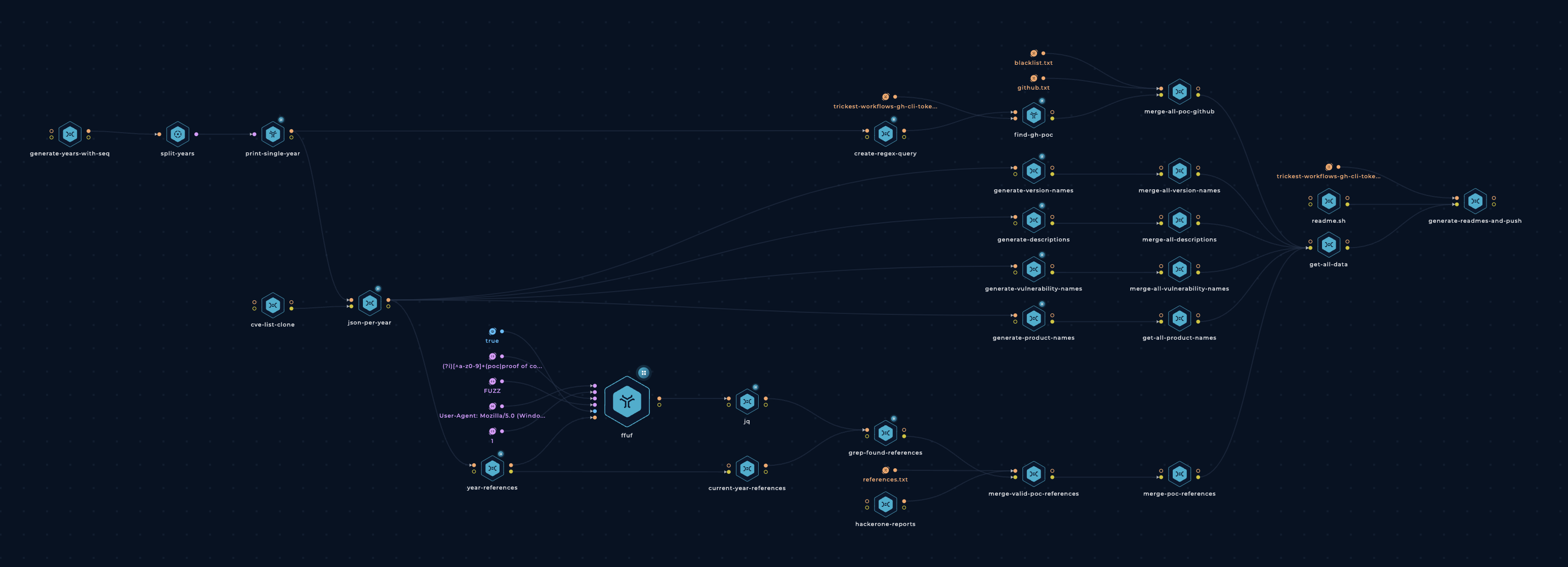
Trickest Workflow - PoC

TB; DZ (Too big; didn't zoom):

  • Collect CVE details from cvelist (Shout out to CVE Project!)
  • Split CVEs up by year.
  • Find PoCs for each CVE using 2 techniques:
    1. References

      • Gather each CVE's References.
      • Check if any of them points to a PoC using ffuf and a list of keywords

      Regex: (?i)[^a-z0-9]+(poc|proof of concept|proof[-_]of[-_]concept)[^a-z0-9]+

      (Thanks @joohoi!)

      Note: ffuf is awesome for more purposes than just content discovery.

      Get CVE referenced in HackerOne Reports - AllVideoPocsFromHackerOne (Thanks @zeroc00I!)

    2. Github

      Search GitHub for repositories with find-gh-poc that mention the CVE ID.

  • Merge the fresh results into the repository without overwriting the data that was committed manually.
  • Filter false positives using blacklist.txt.
  • Merge all of the found PoCs.
  • Generate GitHub badges for each affected software version using shields.io.
  • Write everything into easy-to-read markdown files.

As described, almost everything in this repository is generated automatically. We carefully designed the workflow (and continue to develop it) to ensure the results are as accurate as possible.

Use cases

  • Browse around, find a nice PoC, and test away!
  • Watch the repository to receive notifications about new PoCs as soon as they go public.
  • Search for a specific product(s) (and possibly version) to find all public exploits related to it.
  • Monitor the atom feed for a specific product(s).
  • Create a searchable HTML table using the template and script in summary_html

Contribution

All contribtutions/ideas/suggestions are welcome! Create a new ticket via GitHub issues or tweet at us @trick3st.

Build your own workflows

We believe in the value of tinkering; cookie-cutter solutions rarely cut it. Sign up for a Trickest demo to customize this workflow to your use case, get access to many more workflows, or build your own workflows from scratch!

Frequently asked questions

Is cve free to use?

cve is open source under the MIT licence. There is no licence fee and no seat count — you can self-host it or, where the project offers one, pay a vendor for a managed version instead.

What does cve do?

Gather and update all available and newest CVEs with their PoC.

What is cve written in?

cve is primarily written in HTML. Its source is publicly available at https://github.com/trickest/cve, and it has 8,087 GitHub stars.