CryptPad
CryptPad is a collaboration suite that is end-to-end encrypted and open-source. It is designed to facilitate collaboration by synchronizing changes to documents in real time. Since all the user data is encrypted, in the event of a breach, attackers have no way of accessing the stored content. Furthermore, if the administrators do not modify the code, they and the service also cannot access any information about the users' content.
Installation
For development
Our developer guide provides instructions for setting up a local instance without HTTPS or our more advanced security features.
For production
Configuring CryptPad for production requires additional steps. Refer to our admin installation guide for production-related instructions, customization, and maintenance details.
Current version
The most recent version and all past release notes can be found on the releases page on GitHub.
Setup using Docker
You can find Dockerfile, docker-compose.yml and docker-entrypoint.sh files at the root of this repository. We also publish every release on Docker Hub as AMD64 & ARM64 official images.
Previously, Docker images were community maintained, had their own repository and weren't official supported. We changed that with v5.4.0 during July 2023. Thanks to @promasu for all the work on the community images.
Privacy / Security
CryptPad offers a variety of collaborative tools that encrypt your data in your browser before it is sent to the server and your collaborators. In the event that the server is compromized, the database holds encrypted data that is not of much value to attackers.
The code which performs the encryption is still loaded from the host server like any other web page, so you still need to trust the administrator to keep their server secure and to send you the right code. An expert can download code from the server and check that it isn't doing anything malicious like leaking your encryption keys, which is why this is considered an active attack.
The platform is designed to minimize what data is exposed to its operators. User registration and account access are based on cryptographic keys that are derived from your username and password. Hence, the server never needs to see either, and you don't need to worry about whether they are being stored securely. It is impossible to verify whether a server's operators are logging your IP or other activity, so if you consider this information sensitive it is safest to assume it is being recorded and access your preferred instance via Tor browser.
A correctly configured instance has safeguards to prevent collaborators from doing some nasty things like injecting scripts into collaborative documents or uploads. The project is actively maintained and bugs that our safeguards don't catch tend to get fixed quickly. For this reason it is best to only use instances that are running the most recent version, which is currently on a three-month release cycle. It is difficult for a non-expert to determine whether an instance is otherwise configured correctly, so we are actively working on allowing administrators to opt in to a public directory of servers that meet our strict criteria for safety.
For end users, a guide is provided in our blog to help understand the security of CryptPad. This blog post also explains and show the best practices when using CryptPad and clarify what end-to-end encryption entails and not.
Translations
CryptPad can be translated with nothing more than a web browser via our Weblate instance. See the state of the translated languages:
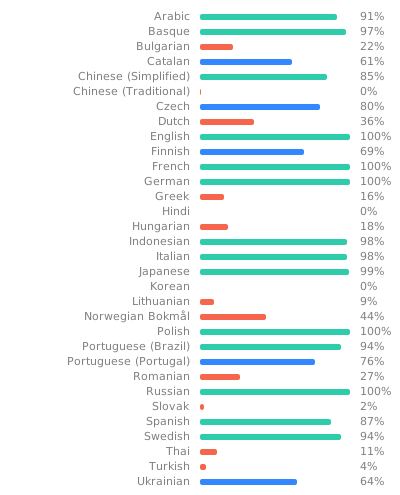
More information about this can be found in our translation guide.
Contacting Us
The best places to reach the development team and the community are the CryptPad Forum and the Matrix chat
The team is also on the fediverse: @cryptpad@xwiki.com
Team
CryptPad is actively developed by a team at XWiki SAS, a company that has been building Open-Source software since 2004 with contributors from around the world. Between 2015 and 2019 it was funded by a research grant from the French state through BPI France. In the years since we have been funded by NLnet PET, NGI TRUST, NGI DAPSI, subscribers of CryptPad.fr, and donations to our Open-Collective campaign.
Contributing
We love Open Source and we love contribution. Learn more about contributing.
If you have any questions or comments, or if you're interested in contributing to CryptPad, come say hi in our Matrix channel.
This project is tested with BrowserStack.
License

This software is and will always be available under the GNU Affero General Public License as published by the Free Software Foundation, either version 3 of the License, or (at your option) any later version. If you wish to use this technology in a proprietary product, please contact sales@cryptpad.org