
CRM
Comp AI CRM is an open source, CRM designed for AI agents.
Agentic-first CRM.
The agent · Stack · Quick start · Configuration · Deploying · Contributing



What this is
Most CRMs are a database with a form in front of it. The AI ones bolt a chat box onto the side of that form. Both leave the actual work — finding out what is true, and writing it down — to a human who has better things to do.
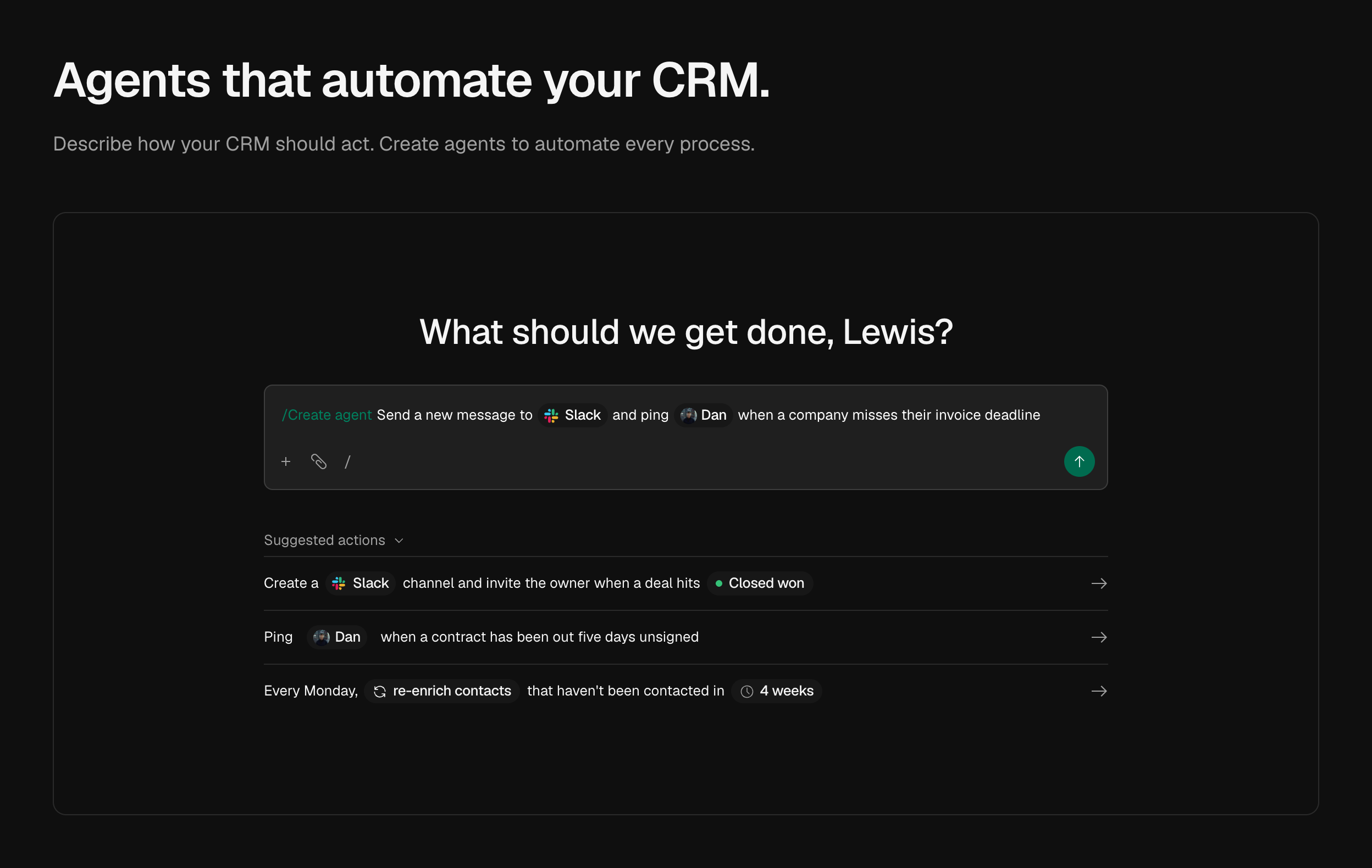
This is built the other way round. The agent is not a feature of the CRM; the CRM is where the agent keeps its notes. It runs on its own deployment, on its own schedule, against its own work queue. It decides what to look at next, books its own follow-ups, spends a research budget, and stops when the budget runs out. Nothing about it is request-response: close the browser and it keeps going.
The rule the agent itself never breaks: nothing about a person is guessed. No tool
accepts a confidence score, because a model asked to grade its own certainty will, and
it will be wrong in the direction that makes it look useful. Tools report what they
observed — crm.signature-block, github.account-identity — and a ledger prices the
evidence. Strong evidence writes to the record. Weak evidence becomes a suggestion a
human settles. A confidently wrong fact about a customer is worse than a blank field,
because nobody can tell it is wrong.
Screenshots
|
|
The agent
apps/agent is its own deployment, built on
eve — Vercel's filesystem-first framework for durable agents.
A tool is a file, a skill is a markdown file, a schedule is a file, and the runtime
handles the durable part: sessions that survive a redeploy, work that resumes where it
stopped.
| 18 authored tools | read_crm_history, search_crm, identify_contact, research_person, enrich_company, record_fact, schedule_recheck… |
| 4 skills | evidence.md, identity-matching.md, data-boundaries.md, writing-a-brief.md — prose the agent reads, versioned like code |
| 1 schedule | dispatch.ts, which decides nothing. It leases what is due and starts a session per row. |
| A sandbox | bash, grep, glob and a /workspace, with deny-all egress |
It runs itself. lib/tasks.ts is the work queue: claimDue leases rows with
FOR UPDATE SKIP LOCKED, so two dispatchers take disjoint work and a run that dies
frees its row when the lease expires. Anything that looks like "every N minutes, the
oldest ten contacts" belongs in a task's dueAt, not in a cron expression. When the
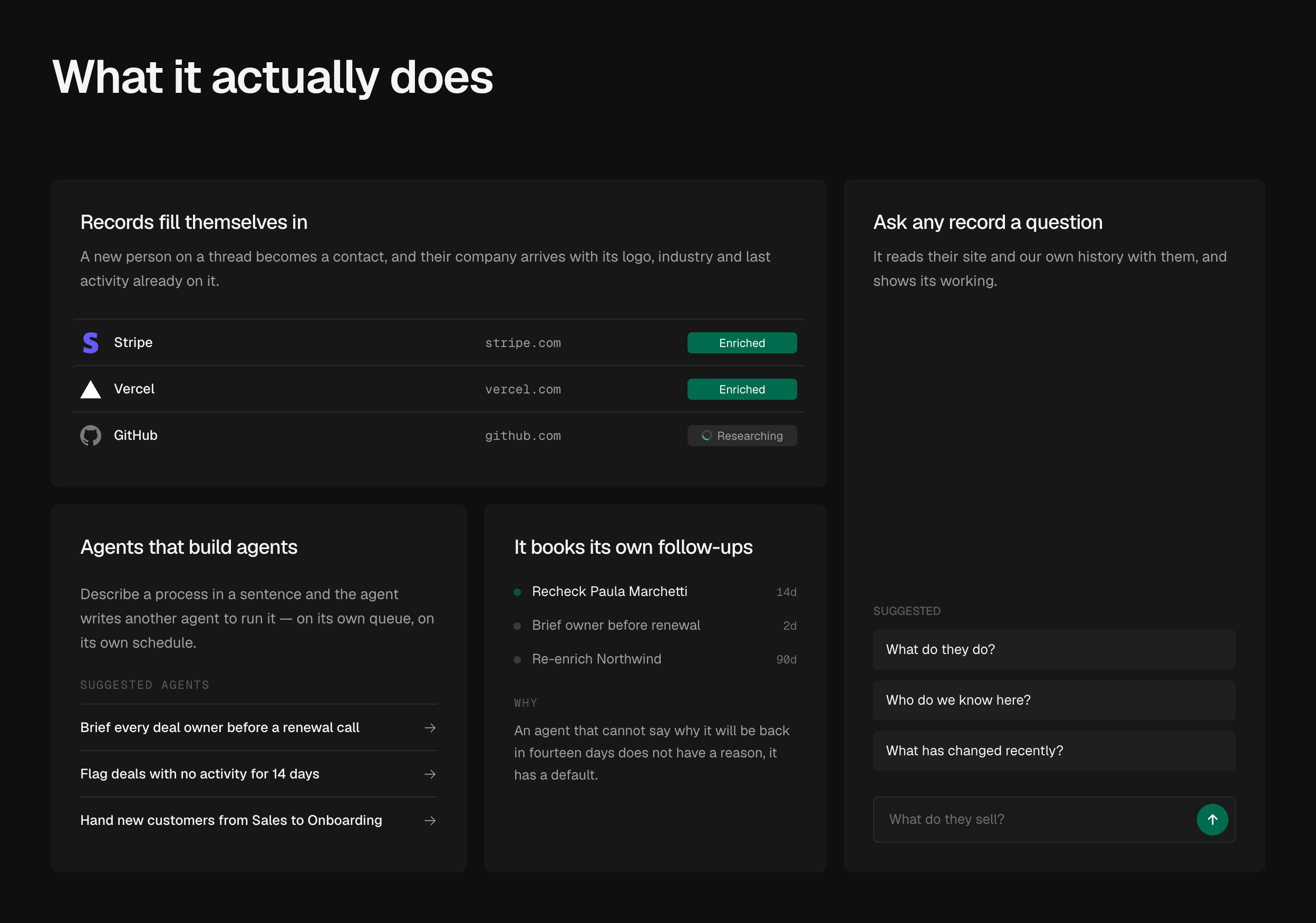
agent wants another look at somebody it calls schedule_recheck and says why — and
the reason is shown to the rep, because an agent that cannot say why it will be back
in fourteen days does not have a reason, it has a default.
Every outside source is optional, and it is designed to run with none of them.
With no API keys at all it still works: read_crm_history reads your own threads,
meetings and signature blocks, which is free and is the best evidence there is — no
data vendor can sell you a reply from the person's own address. Each key opens one
more place to look. It is told at the start of every session which ones this install
has, so it plans around what it actually has rather than discovering the gaps one
failed call at a time, and it prints the list at startup:
[agent] off  Web research (PERPLEXITY_API_KEY)
[agent] on   Company brand data (Settings → General)
[agent] on   LinkedIn (Settings → General)
Company brand data and LinkedIn are both Context, and both come from the same key. The first is the logo, the colours, the industry and the real name behind a domain, which is the difference between an account that arrives as itself and one that arrives as a grey square with its initials in it. The second reads a person back from a LinkedIn URL already on their record — their real name, current title, employer and every earlier role — which is what settles who an address belongs to. It is the one key that is asked for rather than configured: it lives in a row, the onboarding asks for it, and Settings → General changes it afterwards, because a self-hoster's admin cannot redeploy to set an environment variable.
The sandbox has no network and no database. Turning it on is what gives the model
a shell — the difference between a tool-caller and something that can keep a dossier,
diff this month's profile against last month's, and grep a thread for a signature
block. deny-all egress costs nothing, because web_fetch runs in the app runtime
and web_search at the model provider. What it removes is the only path by which a
customer's email body could leave through a shell command. The other half of that rule
is an absence: the sandbox is never given DATABASE_URL. A shell with credentials
and egress is exfiltration-shaped even in an internal tool; a shell with neither is a
text processor.
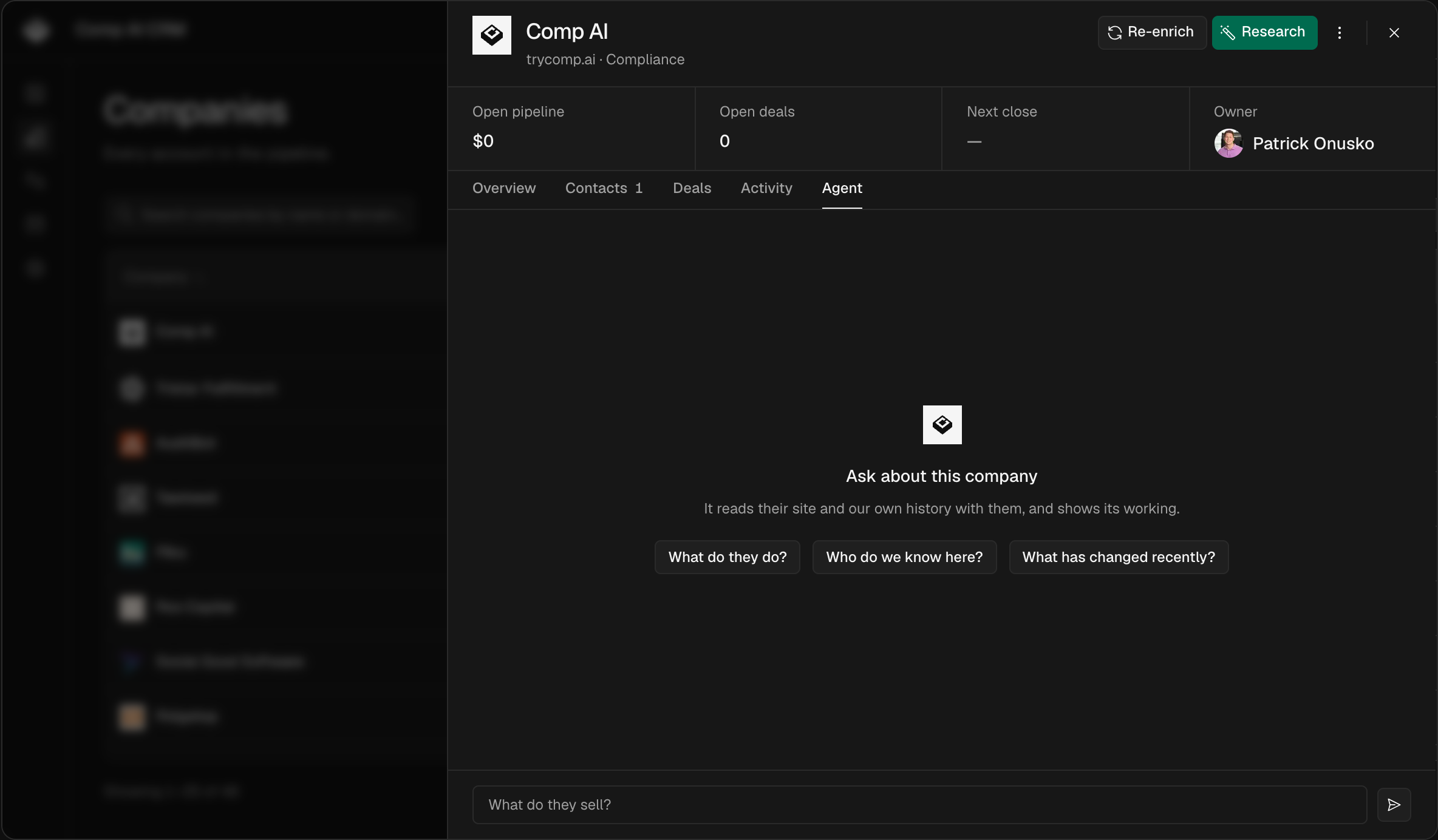
You can talk to it, and watch it work. Every contact, company and deal has an
Agent tab — the steps as it takes them, the leads it throws away and why, and its
questions answered in place when it cannot decide between two people. Conversations
are durable and survive a reload; the record travels in a signed token rather than
being bolted onto the front of your message. Set AGENT_BRIDGE_SECRET to the same
value in both processes to turn it on. Without it the tab reports that it is not
configured, and the agent carries on running its own schedule.
docs/agent.md is the full write-up.
The stack
A Turborepo monorepo on Bun, deployed on Vercel.
| Agent | eve — durable sessions, tools, skills, schedules, sandboxes |
| Model | Vercel AI Gateway — no provider SDK, and OIDC on Vercel means no key to manage |
| Sandbox | Vercel Sandbox in production, Docker or microsandbox locally |
| Front end | Next.js App Router · shadcn/ui · nuqs for URL state |
| API | NestJS with nestjs-trpc — HTTP, auth, tRPC, mailbox sync |
| Data | Prisma · Postgres (Neon) · optional Redis (Upstash) |
| Auth | Better Auth — Google, Microsoft, or your own IdP; one allow-list |
| Files | Vercel Blob — mirrors profile pictures so they survive the source going away |
| Tooling | Biome · TypeScript everywhere |
The app talks to the API over tRPC, and the router type is generated from the NestJS routers — so the front end is type-safe from the Prisma row to the table cell. List state (filters, sort, page) lives in the URL, so copying the address bar reproduces the view.
Layout
| Path | |
|---|---|
apps/agent |
The research agent — tools, skills, schedules, sandbox |
apps/app |
Next.js front end · :3000 |
apps/api |
NestJS API — HTTP, auth, tRPC, mailbox sync · :3001 |
packages/db |
Prisma schema, migrations, shared Postgres client |
packages/auth |
Better Auth config and the sign-in allow-list |
packages/ui |
shadcn/ui components, the Tailwind theme |
packages/env |
Finds and loads the root .env |
Three rules the codebase holds to
Written up where the work happens, not in a style guide:
- Intelligence never lives in the API (docs/api.md). Nest reports that something happened; the agent decides what it means. Two copies of an identity matcher once drifted until one matched every employer on earth.
packages/uiis the only source of UI (docs/design.md). No overriding styles at the call site.- There are no organizations. Single tenant, deliberately. An
organizationIdthat is always the same value is a column, an index and a permissions check that buys nothing and reads like a real one at review time.
Quick start
You need Bun and Docker.
git clone https://github.com/trycompai/crm.git && cd crm
cp .env.example .env          # then fill in the values below
bun install

docker compose up -d          # Postgres on :5432

bun run db:deploy             # apply migrations
bun run db:seed               # optional: a believable pipeline to look at
bun run dev
The app is on localhost:3000, the API on localhost:3001.
That clone gives you release, the default branch and the last tagged release — what you
want if you are running this. main is where unreleased work lands: green, but not cut
yet. If you are here to send a pull request, git switch main first and read
CONTRIBUTING.
The values to set
Open .env and set these. Everything else in the file is optional and commented out.
| Variable | What to put in it |
|---|---|
BETTER_AUTH_SECRET |
openssl rand -base64 32 |
ALLOWED_SIGN_IN |
Your email domain, e.g. acme.com. Or one address, e.g. you@gmail.com. |
GOOGLE_CLIENT_ID / GOOGLE_CLIENT_SECRET |
A Google OAuth client — 2 minutes, below. Both or neither. |
MICROSOFT_CLIENT_ID / MICROSOFT_CLIENT_SECRET |
A Microsoft Entra app registration — below. Both or neither. |
Pick at least one of Google and Microsoft, or add your own identity provider on Settings → SSO once you are in. Setting both is fine and common: the sign-in page offers both buttons, and each rep's mail is read from whichever they signed in with.
DATABASE_URL already matches the docker compose Postgres, so leave it alone unless
you brought your own.
Getting the Google OAuth client
- Google Cloud console → Credentials → Create credentials → OAuth client ID → Web application.
- Under Authorised redirect URIs, add
http://localhost:3001/api/auth/callback/google. - Enable the Gmail API and the Calendar API for the project.
- Copy the client ID and secret into
.env.
Google is the sign-in method a clone starts with, and the same client reads Gmail and Calendar — so most installs want it. The API will nonetheless boot without it: an install that signs in with Microsoft, or through its own identity provider added on Settings → SSO, leaves both empty and gets no Google button and no Gmail sync. Set them together or not at all; half a pair is a button that fails at Google. If your account is on a Google Workspace domain, set the consent screen to Internal and nobody outside your org can even reach the prompt.
Getting the Microsoft app registration
- Azure portal → Microsoft Entra ID → App registrations → New registration. Microsoft's own walkthrough is Register an application.
- Under Supported account types, pick Accounts in this organizational directory
only if everyone signing in is on your tenant. Anything wider is fine too —
ALLOWED_SIGN_INstill decides who gets an account — but the narrow choice turns outsiders away at Microsoft rather than at our door. - Set the Redirect URI to Web and
http://localhost:3001/api/auth/callback/microsoft. In production this ishttps:///api/auth/callback/microsoft— the API's origin, not the app's, because the API is what serves/api/auth/*. - API permissions → Add a permission → Microsoft Graph → Delegated
permissions → tick User.Read and Mail.Read.
offline_accessis requested at sign-in and needs no entry here. If your tenant requires admin consent, click Grant admin consent so reps are not each asked. - Certificates & secrets → New client secret. Copy the Value, not the Secret ID — the value is shown once and never again.
- Overview → copy the Application (client) ID.
- Put the two into
.envasMICROSOFT_CLIENT_IDandMICROSOFT_CLIENT_SECRET.
Mail.Read is read-only: the CRM can list and read messages and can never send,
reply, move or delete. Reading is forward-only — the first check records the current
time and imports nothing, so connecting an old mailbox does not dump years of mail into
the CRM.
To refuse other tenants at Microsoft rather than relying on ALLOWED_SIGN_IN, set
MICROSOFT_TENANT_ID to your tenant's GUID (Overview → Directory (tenant) ID).
It defaults to common, which accepts any work, school or personal Microsoft account
and leaves the allow-list to sort them out. organizations is the middle setting: any
work or school account, no personal ones.
Microsoft client secrets expire — 24 months at most, and 6 months by default. Note the expiry somewhere, because the symptom of a lapsed one is every rep's mail quietly failing to sync.
ALLOWED_SIGN_IN is the entire authorisation model — an unset value means nobody can
sign in, which is the safe direction to fail. It takes whole domains, individual
addresses, or a mix:
ALLOWED_SIGN_IN="acme.com"                       # everyone at your company
ALLOWED_SIGN_IN="acme.com,contractor@gmail.com"  # …plus one outsider
ALLOWED_SIGN_IN="you@gmail.com"                  # a one-person install
Configuration
There is one .env, at the root of the repo, read by all three processes. Real
environment variables always win, so on a hosting platform you configure it there and
the file is purely a local convenience.
Beyond the values above, everything is optional and the app runs without any
of it. .env.example is the full list with a note on each; the
short version:
API_URL / APP_URL |
Where the two halves are served. Only needed off localhost. |
PERPLEXITY_API_KEY |
Lets the agent search the open web, with citations. |
AGENT_BRIDGE_SECRET |
Lets a rep talk to the agent from a contact's Agent tab. |
REDIS_URL |
A shared cache. Without it, per-instance and in-memory. |
CRON_SECRET |
Guards the mailbox sync route. Required to use it. |
CRM_TELEMETRY_DISABLED |
Set to 1 and this install reports nothing. DO_NOT_TRACK too. |
Tasks
| Command | |
|---|---|
bun run dev |
Prepare the local database, then run everything in dependency-aware watch mode |
bun run build |
Build all apps and packages |
bun run test |
Run the test suite |
bun run check-types |
tsc --noEmit everywhere |
bun run lint / format |
Biome |
bun run db:migrate |
Create and apply a migration |
bun run db:seed |
Top up the demo pipeline (idempotent) |
bun run db:studio |
Prisma Studio |
bun run --filter=api trpc:generate |
Regenerate the AppRouter type |
bun run --filter=api dev:session |
Print a session cookie for a local user |
Scope any of them with a Turborepo filter: bun run dev --filter=api.
Because sign-in goes through an identity provider, there is no way to get a session from a terminal —
dev:session writes the rows Better Auth would have written and prints the cookie it
would have set. It refuses to run with NODE_ENV=production.
Deploying
Three deployments and a Postgres: the Next.js app, the NestJS API, and the agent.
They are independent, and the only thing they must agree on is DATABASE_URL and
BETTER_AUTH_SECRET — the API mints the session cookie and the app verifies it, so a
mismatch is a redirect loop rather than an error.
Set API_URL and APP_URL to the real origins, and if the two are on different
subdomains of one parent, set AUTH_COOKIE_DOMAIN to the parent so one cookie covers
both. Add http://your-api-host/api/auth/callback/google — and, if you use Microsoft,
http://your-api-host/api/auth/callback/microsoft — to the provider's
redirect URIs. Set CRON_SECRET and point a scheduler at
POST /internal/sync/mailboxes to keep the mailbox sync running.
apps/api/src/generated/server.ts is committed and build must never regenerate it —
the generator needs a newer GLIBC than most build images have. Regenerate locally and
commit it with the router change that caused it.
Contributing
We'd rather have a paragraph you wrote than a pull request an agent wrote. See CONTRIBUTING.md.
Security issues go through SECURITY.md, privately, not a public issue.
Licence
MIT.