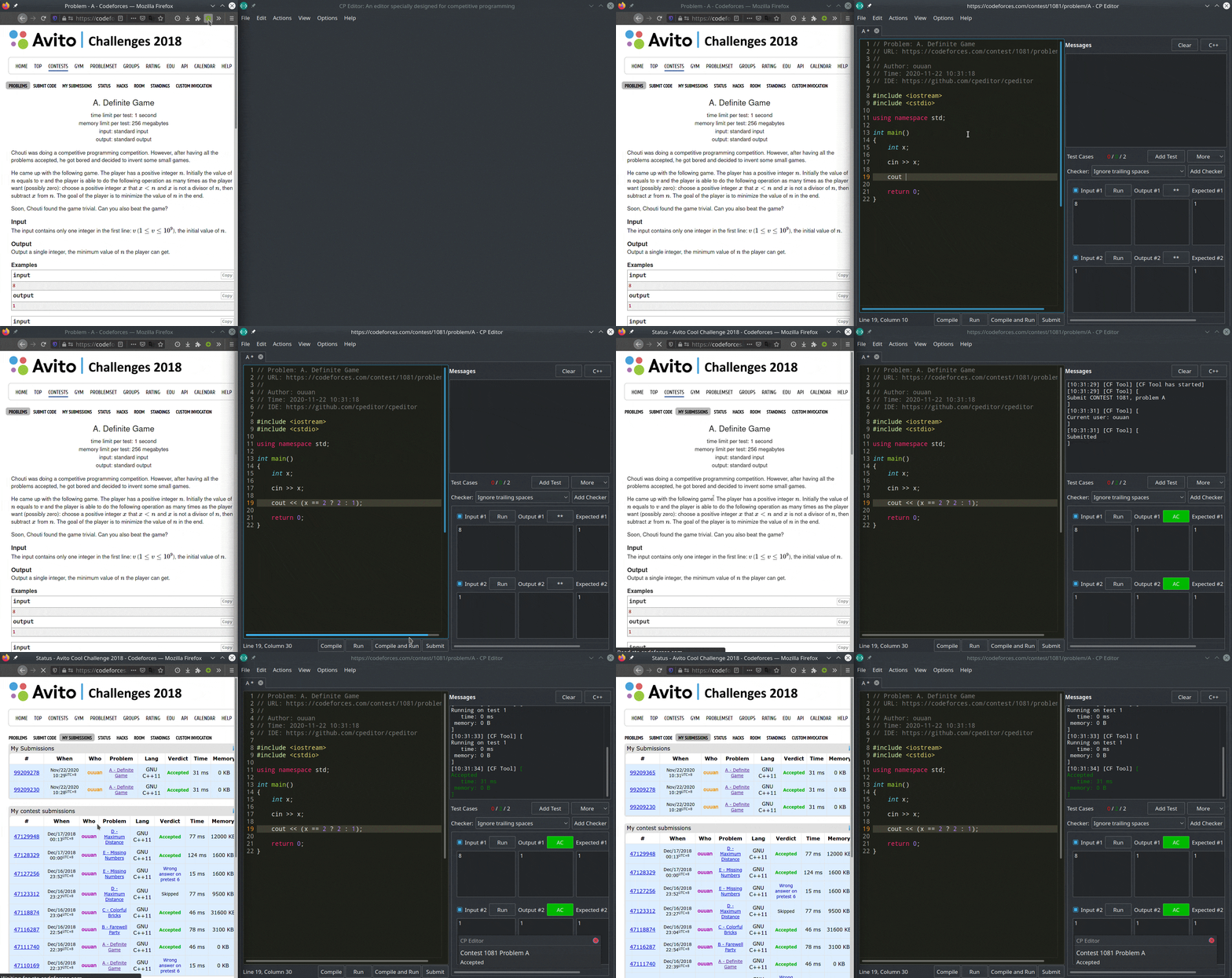
CP Editor is a free, open-source, cross-platform integrated development environment built specifically for competitive programming, licensed under GPL-3.0 and aimed at contestants in ACM-ICPC, Codeforces and OI-style competitions who want to fetch, code, compile, run, check and submit a solution without leaving one window.
What it is
CP Editor is a desktop IDE written in C++ and published on GitHub under the GPL-3.0 licence, with documentation, a changelog and an FAQ hosted at cpeditor.org. Its tagline states the workflow it covers end to end: Fetch, Code, Compile, Run, Check, Submit. The topic list places it firmly in the contest world, naming acm, acm-icpc, icpc, oi, algorithm-competitions, codeforces and competitive-programming, and it labels itself both a code-editor and an ide. The README is published in English alongside Greek, Japanese, Brazilian Portuguese, Russian, Simplified Chinese and Traditional Chinese editions, and the repository carries a CHANGELOG.md, a CONTRIBUTING.md and a link to the online FAQ.
The concrete problem it addresses is the fragmented contest workflow, in which a solver juggles a browser tab for the problem statement, a plain text editor for the solution, a terminal for compiling and running it, and a separate submission page. CP Editor folds those steps into a single application whose tagline maps them one to one, so C++ and Java solutions move from writing to submission inside the same tool. It targets individual competitors rather than general software teams, which is why the ecosystem it lives in is competitive programming and its vocabulary is contest vocabulary.
Key capabilities
- Covers the full contest loop named in the tagline: Fetch, Code, Compile, Run, Check, Submit.
- Cross-platform desktop application, distributed for Arch Linux through the AUR as the
cpeditor and cpeditor-git packages and for Linux through Snap at snapcraft.io/cpeditor.
- Targeted at ACM-ICPC, ICPC, OI and Codeforces contests, per the repository topic list.
- C++ is the primary implementation and solution language, with Java also listed among the project topics.
- English README plus translations into Greek, Japanese, Brazilian Portuguese, Russian, Simplified Chinese and Traditional Chinese.
- Repository documentation set that includes
CHANGELOG.md, CONTRIBUTING.md, DONATE.md, DONORS.md and links to setup, preferences and tips guides on the documentation site.
- Community intake through GitHub Discussions, split into a Q&A category and an Ideas category, with
good first issue and help wanted labels for contributors.
Who uses it and how
- Individual contestants preparing for ACM-ICPC, ICPC, OI and Codeforces rounds, who need compilation, testing and submission in one place.
- Linux users who prefer package-manager installation, using the AUR packages
cpeditor for stable builds and cpeditor-git for the development line, or the Snap channel.
- Users on other platforms who take binaries from the GitHub Releases page, where the 7.1.1 and 7.0.2 releases are published.
- Non-English-speaking competitors who work from the translated READMEs in the same repository.
- New contributors, who are directed to the contributor guidelines, the good first issue queue and the help wanted queue, and who file questions and ideas through GitHub Discussions.
Getting started
Download a build from the GitHub Releases page, or install from the AUR package cpeditor or the Snap package cpeditor. Step-by-step installation and initial setup instructions are at cpeditor.org/docs/installation/ and cpeditor.org/docs/setup/.
How it compares
No paid products and no comparable tools are named in the available facts, so CP Editor stands alone in this registry. Any comparison against other contest tooling would have to be made from sources outside the facts supplied here.
When to use it — and when not to
Choose CP Editor if the goal is a contest-focused desktop environment under a GPL-3.0 licence, and accept the copyleft terms that licence brings if the code is ever bundled into other work. The repository README is largely a hub of links, with the substantive feature detail living on cpeditor.org and in the documentation, so anyone evaluating it should read the website rather than the README alone; the tracker also carries 79 open issues, which is worth reviewing before adopting the beta 7.1 line. It is not a general-purpose IDE, and anyone wanting broad language support, project scaffolding or framework tooling for ordinary application development should look elsewhere.