Compodoc is an MIT-licensed TypeScript documentation generator that parses an Angular, Nest, or Stencil codebase and emits a searchable, browsable API reference site, aimed at development teams that own component, directive, pipe, module, injectable, guard, and interceptor APIs and do not want to hand-write those pages.
What it is
Compodoc lives in the JavaScript and TypeScript ecosystem, and specifically in the Angular tooling space. It reads a project's source, works over the resulting AST, and generates a static documentation site that covers components, directives, pipes, modules, injectables, guards, interceptors, classes, interfaces, and routes. Parsed elements drive the API navigation automatically, and the generated output can be a static offline site, a JSON export, or LLM-ready Markdown. The project ships with built-in themes and is promoted through compodoc.app and the official site at compodoc.github.io/website.
The concrete problem it solves is API drift between source and documentation. The alternative it removes is hand-maintained API reference pages with manually curated navigation and indexes: Compodoc builds the table of contents from the elements it finds while parsing, so new components, pipes, guards, or routes appear without an editor touching an index file. It also keeps pace with modern Angular surface area, including standalone APIs, signal inputs and their aliases, styleUrl, injectable metadata, and inheritance details, which hand-written references routinely lag behind.
Key capabilities
- Documents modern Angular constructs: standalone APIs, signal inputs and aliases,
styleUrl, injectable metadata, and inheritance details.
- Produces standalone-aware route and dependency graphs for
provideRouter, lazy routes, default-export route files, and classic NgModule routing.
- Covers the full element set found in parsing: components, directives, pipes, modules, injectables, guards, interceptors, classes, interfaces, and routes.
- Builds an automatic table of contents and API navigation from the elements discovered during parsing.
- Includes a search engine built on lunr.js for finding documented APIs.
- Ships built-in themes inspired by Gitbook, Read the Docs, Vagrant, Laravel, Postmark, and Stripe.
- Renders JSDoc and TypeScript documentation, including common JSDoc tags, complex types, inherited docs, examples, custom tags, and interface documentation.
- Generates documentation coverage reports and supports coverage checks for continuous integration workflows.
- Supports Angular CLI projects, static offline documentation, JSON export, and LLM-ready Markdown output.
Who uses it and how
- Angular teams running it against Angular CLI projects to publish an API reference alongside the application.
- Library and platform owners documenting components, directives, pipes, modules, injectables, guards, and interceptors for internal consumers.
- Continuous integration pipelines that run documentation coverage checks and fail or report when documented surface falls behind.
- Nest and Stencil projects, which the project's own tagline names as supported targets.
- Downstream consumers of the generated artefacts: static offline documentation for air-gapped reading, JSON export for tooling, and Markdown output shaped for LLM consumption.
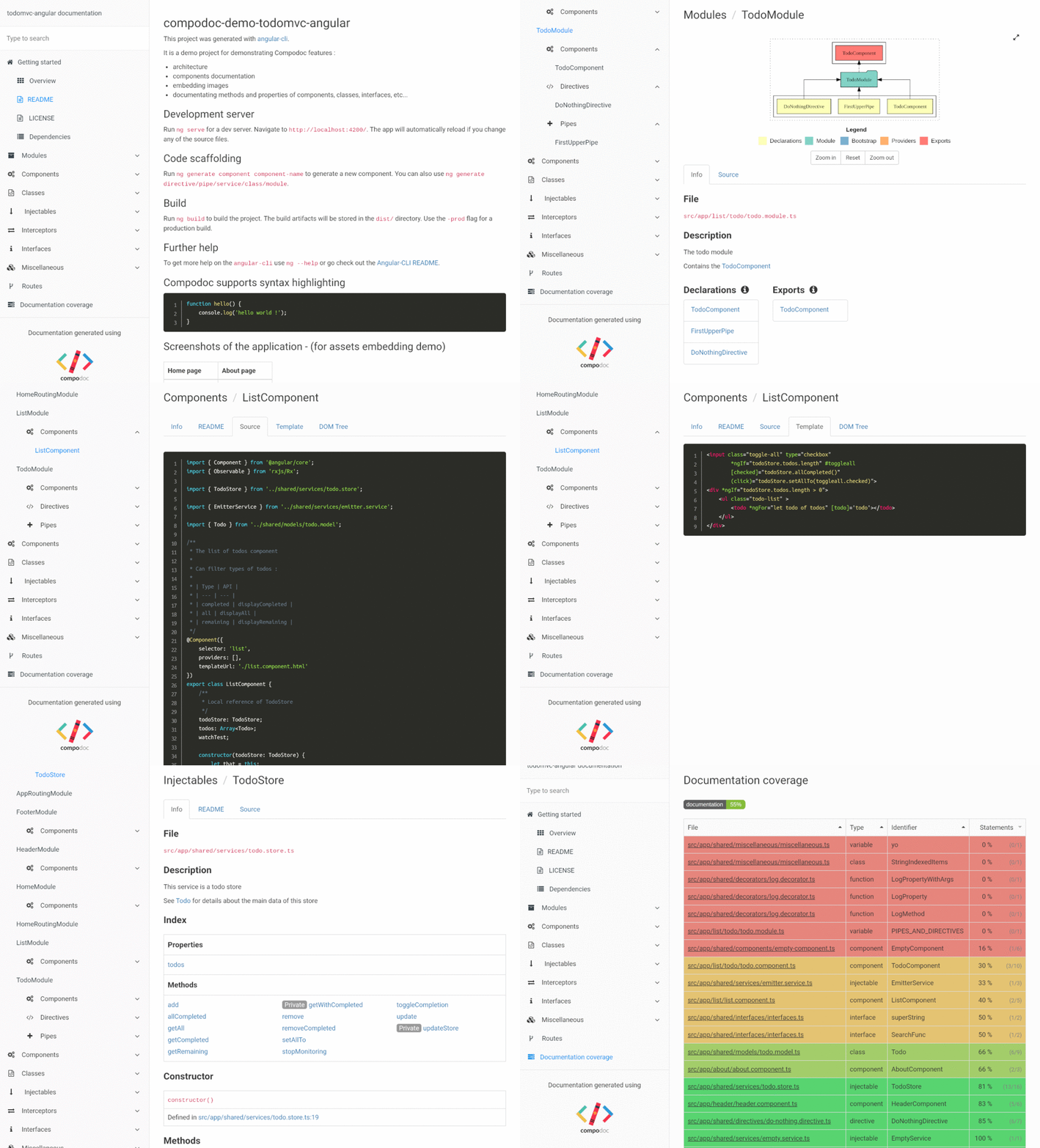
- Anyone evaluating output first can inspect the live demo generated for a simple TodoMVC application.
Getting started
Installation and run instructions are published in the official documentation at https://compodoc.github.io/website/guides/installation.html, with the general guide set at https://compodoc.github.io/website/. The README itself no longer carries the command; it points to that site.
How it compares
The facts list no paid products that Compodoc replaces, so no licence, hosting, or cost comparison can honestly be drawn here. Among the tools the facts do name, JSDoc appears as an input format rather than a rival: Compodoc consumes JSDoc tags and TypeScript types and renders them into a browsable site, while the listed theme inspirations such as Gitbook, Read the Docs, and Stripe describe visual styling, not competing documentation generators.
When to use it — and when not to
Choose it when the codebase is Angular, Nest, or Stencil and the goal is generated, always-current API documentation rather than prose guides. Be aware that operating it means running a generator over the project as part of the build or release process, and that the README excerpt is thin: installation detail has moved off the repository to an external site, so the external documentation should be checked before adoption. Teams outside the Angular, Nest, and Stencil ecosystems, or those wanting a hosted knowledge base rather than generated static output, should not pick it, and the 45 open issues suggest normal maintenance friction rather than a polished zero-rough-edges tool.