


Colanode
Open-source & local-first collaboration workspace that you can self-host
Colanode is an all-in-one platform for easy collaboration, built to prioritize your data privacy and control. Designed with a local-first approach, it helps teams communicate, organize, and manage projects—whether online or offline. With Colanode, you get the flexibility of modern collaboration tools, plus the peace of mind that comes from owning your data.
What can you do with Colanode?
- Real-Time Chat: Stay connected with instant messaging for teams and individuals.
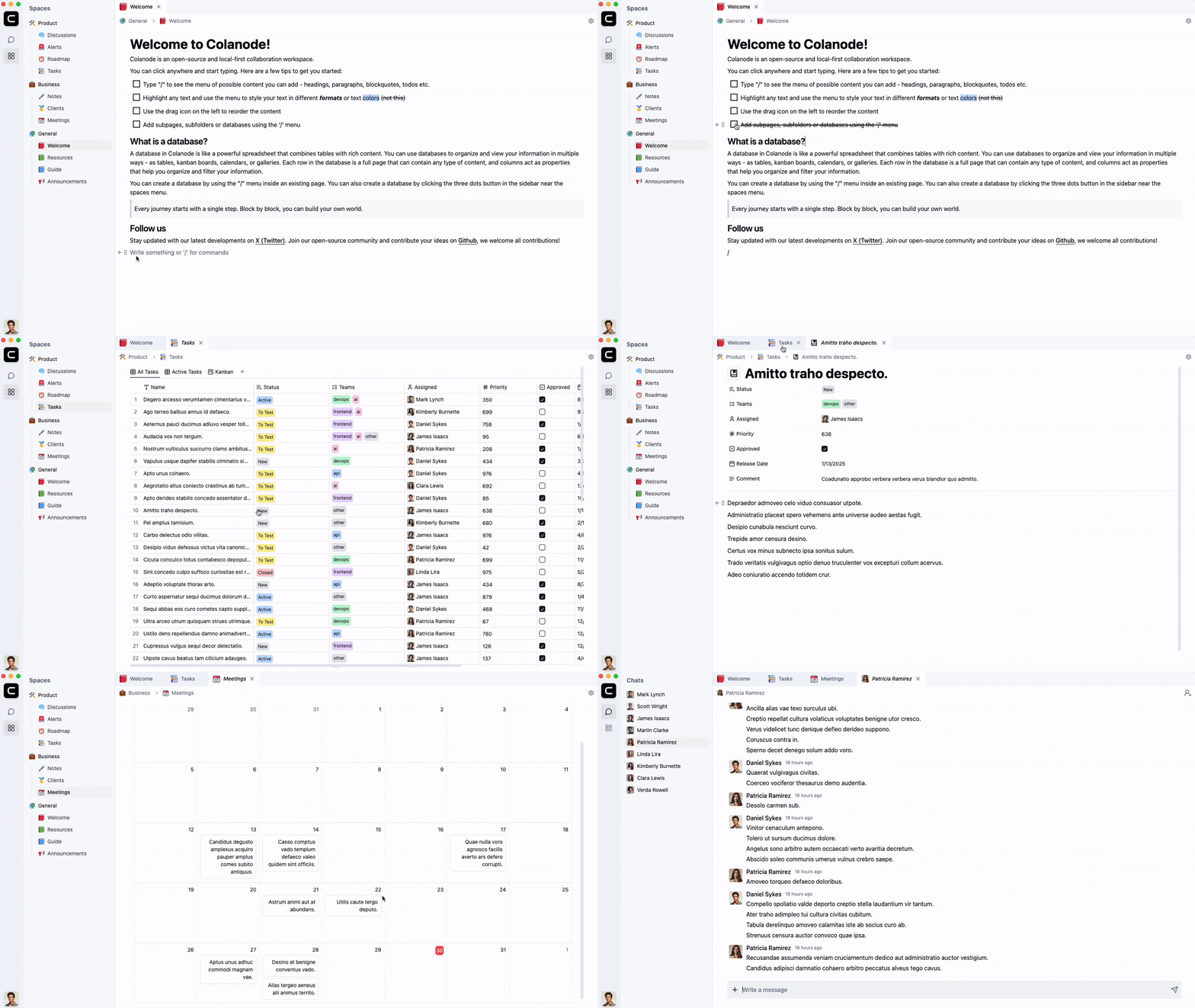
- Rich Text Pages: Create documents, wikis, and notes using an intuitive editor, similar to Notion.
- Customizable Databases: Organize information with structured data, custom fields and dynamic views (table, kanban, calendar).
- File Management: Store, share, and manage files effortlessly within secure workspaces.
Built for both individuals and teams, Colanode adapts to your needs, whether you're running a small project, managing a team, or collaborating across an entire organization. With its self-hosted model, you retain full control over your data while enjoying a polished, feature-rich experience.
How it works
Colanode includes a client app (web or desktop) and a self-hosted server. You can connect to multiple servers with a single app, each containing one or more workspaces for different teams or projects. After logging in, you pick a workspace to start collaborating—sending messages, editing pages, or updating database records.
Local-first workflow
All changes you make are saved to a local SQLite database first and then synced to the server. A background process handles this synchronization so you can keep working even if your computer or the server goes offline. Data reads also happen locally, ensuring immediate access to any content you have permissions to view.
Concurrent edits
Colanode relies on Conflict-free Replicated Data Types (CRDTs) - powered by Yjs - to allow real-time collaboration on entries like pages or database records. This means multiple people can edit at the same time, and the system gracefully merges everyone's updates. Deletions are also tracked as specialized transactions. Messages and file operations don't support concurrent edits and use simpler database tables.
Get started for free
The easiest way to start using Colanode is through our web app, accessible instantly at app.colanode.com. Simply log in to get started immediately, without any installation. Please note, the web app is currently in early preview and under testing; you may encounter bugs or compatibility issues in certain browsers.
For optimal performance, you can install our desktop app, available from our downloads page. Both the web and desktop apps allow you to connect to any of our free beta cloud servers:
- Colanode Cloud (EU) – hosted in Europe.
- Colanode Cloud (US) – hosted in the United States.
Both cloud servers are currently available in beta and free to use; pricing details will be announced soon.
Self-host
If you prefer to host your own Colanode server, check out the hosting/ folder which contains the Docker Compose file and deployment configurations. For Kubernetes deployments, see the hosting/kubernetes/ folder which includes Helm charts and additional documentation. Here's what you need to run Colanode yourself:
- Postgres with the pgvector extension.
- Redis (any Redis-compatible service will work, e.g., Valkey).
- Storage backend for user files. Colanode defaults to local filesystem storage, but you can switch to S3-compatible, Google Cloud Storage, or Azure Blob Storage backends by setting
STORAGE_TYPE. - Colanode server API, provided as a Docker image.
Configuration model
- The server image now ships with a full
config.json, so most defaults are ready to go without touching env vars. - The config file is the single source of truth. Use
env://VAR_NAMEto pull sensitive values from env vars, orfile://path/to/secret.pemto inline the contents of a mounted file (append?to make either optional). OnlyPOSTGRES_URLandREDIS_URLare required out of the box. - To customize settings:
- Copy
apps/server/config.json, edit it, and mount/bind it when using Docker Compose (seehosting/docker/docker-compose.yaml). - For Helm, enable
colanode.configFile.enabledand pass your file via--set-file colanode.configFile.data=./config.json(details inhosting/kubernetes/README.md). - Keep secrets as env vars so you don't have to bake them into JSON; the loader resolves
env://pointers at runtime.
- Copy
Environment variables no longer override regular config fields—only values explicitly tagged with env:// are read from the environment. Refer to hosting/docker/docker-compose.yaml and hosting/kubernetes/README.md for mounting instructions and the handful of required secrets.
Running locally
To run Colanode locally in development mode:
Clone the repository:
git clone https://github.com/colanode/colanode.git
cd colanode
Install dependencies at the project root:
npm installStart the apps you want to run locally:
Server
cd apps/server

# Copy the environment variable template and adjust values as needed
cp .env.example .env

npm run dev
To spin up the local dependencies (Postgres, Redis, and Mail server) with Docker Compose—using filesystem storage by default—run this from the project root:
docker compose -f hosting/docker/docker-compose.yaml up -dWhen you prefer an S3-compatible backend locally, enable the optional MinIO service with the
s3profile:docker compose -f hosting/docker/docker-compose.yaml --profile s3 up -dThe compose file includes a
serverservice. When you want to run the API locally withnpm run dev, comment out (or override) that service so only the supporting services are started.Web
cd apps/web
npm run dev
Desktop
cd apps/desktop
npm run dev
Testing
Colanode includes tests for both server and web.
Server tests
From apps/server:
npm run test
Server tests use Testcontainers for Postgres and Redis, so Docker must be running. See apps/server/README.md for details.
Web tests
From apps/web:
npm run test
License
Colanode is released under the Apache 2.0 License.