CodeZero is a free, open source automation project written in several languages and released under a custom open-source licence. It has 55 GitHub stars, 3 forks and 9 open issues, and was last pushed 13 days ago. On this registry it ranks #53 of 54 tracked projects in Automation, with 5 head-to-head comparisons available. It gained 1 stars over the last 6 tracked days.

What is CodeZero?

CodeZero is an open-source, self-hostable platform for building automations, integrations, and backend logic as visual flows on a canvas, aimed at teams that want AI-assisted no-code workflow building while keeping their data on infrastructure they control.

What it is

CodeZero is a no-code automation and workflow platform where logic is assembled as a graph of nodes on a visual canvas rather than written as source code. A flow can be an automation, an integration, or an entire piece of backend logic: a trigger is connected, logic is chained node by node, and the flow is run. Triggers come built in as HTTP/webhook and cron, and plugins extend the runtime with additional nodes, flow types, and triggers. The editor is assisted by AI, which generates a flow from a natural-language prompt or a smart template and can subsequently refine, extend, or rewrite any part of the graph directly on the canvas.

The concrete problem it solves is boilerplate. Instead of writing glue code to connect two services, exposing an internal HTTP endpoint, or scheduling a recurring job, the user models the same behaviour as a flow. CodeZero lives in the low-code and self-hosted automation ecosystem, and its own topic list places it explicitly as an n8n-alternative. It also carries the mcp topic, indicating participation in the Model Context Protocol tooling space. In short, it replaces hand-written integration and backend plumbing, and it is positioned as a substitute for hosted workflow tools that keep execution and data on the vendor's side.

Key capabilities

  • Visual flow editor that renders logic as a graph of nodes, intended to stay readable, debuggable, and shareable across a team.
  • AI-assisted building: describe the desired automation or select a smart template, and CodeZero generates the flow; any part of an existing flow can be rewritten with a single prompt on the canvas.
  • Bring your own model: connect OpenAI, OpenRouter, or any compatible provider, and choose which models power each workspace.
  • Built-in HTTP/webhook and cron triggers, with plugins adding further trigger types.
  • Expose any flow as an HTTP endpoint, allowing CodeZero to serve as a visual backend.
  • Deployment freedom: fully self-hostable, or hybrid with the IDE in the cloud and runtimes on your own hardware, so data never leaves your network.
  • Team structures: organizations, projects, roles, role templates, and fine-grained permissions; every runtime component scales independently from a single machine to a fleet.

Who uses it and how

  • Teams automating service-to-service integrations, for example posting a new GitHub issue to Discord or creating a DHL shipment from a new Shopify order.
  • Developers who need an internal or public HTTP API without writing backend boilerplate, by exposing a flow as an endpoint.
  • Operations groups running scheduled work on cron for reports, syncs, and cleanups.
  • Teams modelling multi-step business processes where branching, data control, and error handling must be explicit.
  • Organizations that need segregated projects, role-based access, and optionally a hybrid split between a cloud IDE and self-hosted runtimes.

Getting started

Docker is the only prerequisite. Clone https://github.com/code0-tech/codezero.git, move into the docker-compose directory, adjust secrets and settings such as ports, TLS, COMPOSE_PROFILES, and available AI models in .env, then run docker compose up -d and open http://localhost.

How it compares

The registry facts name no paid products that CodeZero replaces, but its own topics place it against hosted workflow automation tools such as n8n, in the same self-hosted, low-code lane. The contrast the project itself draws is deployment and ownership: self-hosting or hybrid execution keeps data inside the operator's network, and the runtime can scale component by component rather than as one managed service. Cost and data-ownership decisions therefore sit with the operator rather than with a vendor subscription.

When to use it — and when not to

A self-hoster must operate a Docker host and manage the .env configuration, including secrets, ports, TLS, and model-provider credentials; the README explicitly warns that the default credentials ([email protected] / root) and default secrets must be changed before anything is exposed publicly. The licence is reported as NOASSERTION, so the terms are unclear and should be verified before commercial reliance. The project is also small — 55 stars, 3 forks, and 9 open issues — so anyone needing a vendor SLA, a large plugin ecosystem, or clearly stated licensing should look elsewhere or proceed only after reviewing the repository.

project readme (upstream, from github) — read inline


Every great idea starts at zero.
Start with CodeZero.

The open-source platform for building automations visually.
Powered by AI, running wherever you want.

Website Docs Discord YouTube Instagram


What is CodeZero?

CodeZero lets you build flows on a visual canvas instead of writing boilerplate code. A flow can be an automation, an integration, or entire backend logic. Connect a trigger, chain your logic node by node, hit run. That's it.

Whether you want to glue two services together, expose your own API, or automate a whole business process: if you can sketch it, you can ship it.

Build flows with AI

Don't start from a blank canvas. Describe what you want or pick a smart template, and CodeZero builds the flow for you.
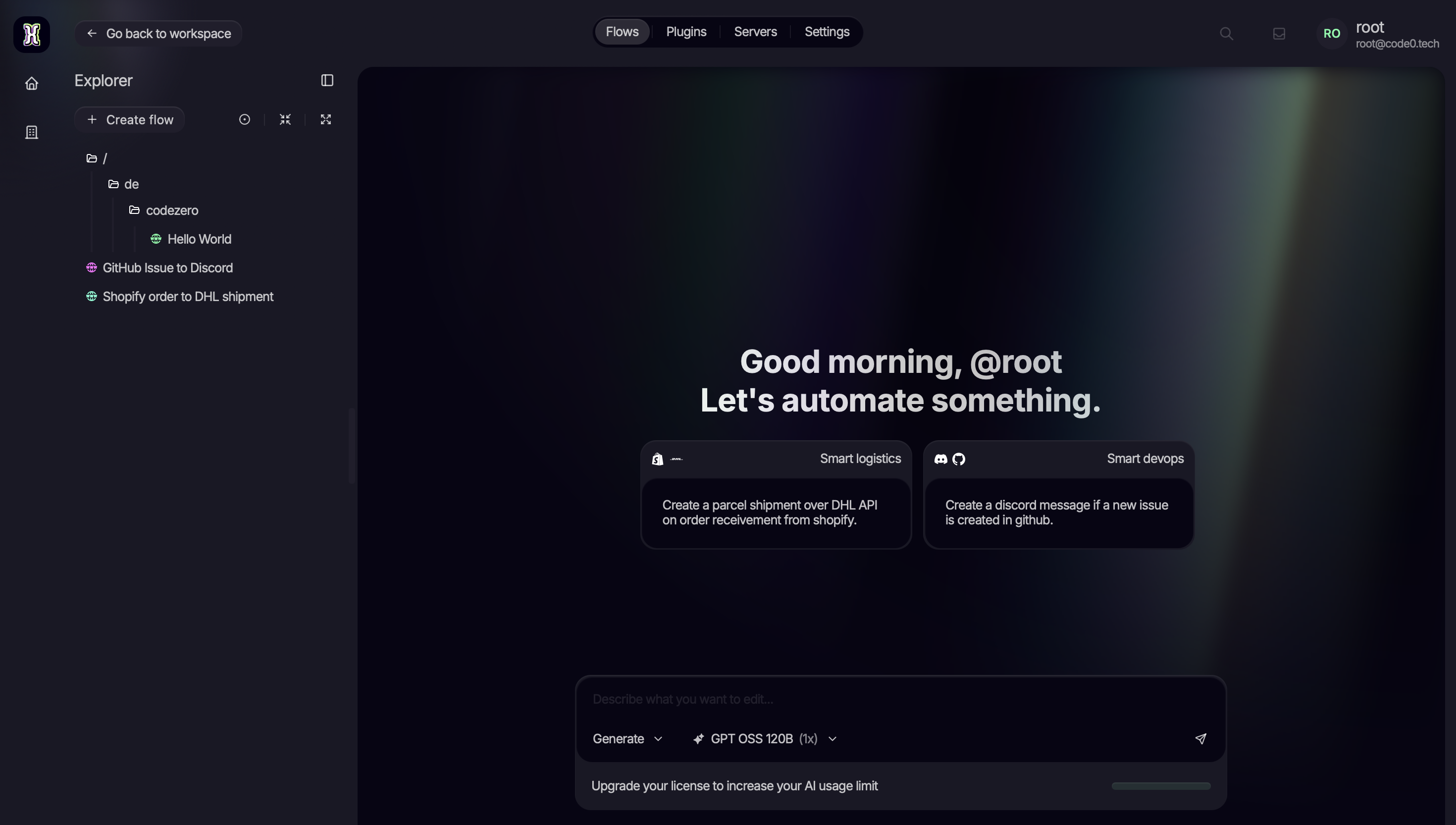
Start your automation with a prompt

And it doesn't stop at generation. You can refine, extend, or rewrite any part of your flow with a single prompt, right on the canvas.
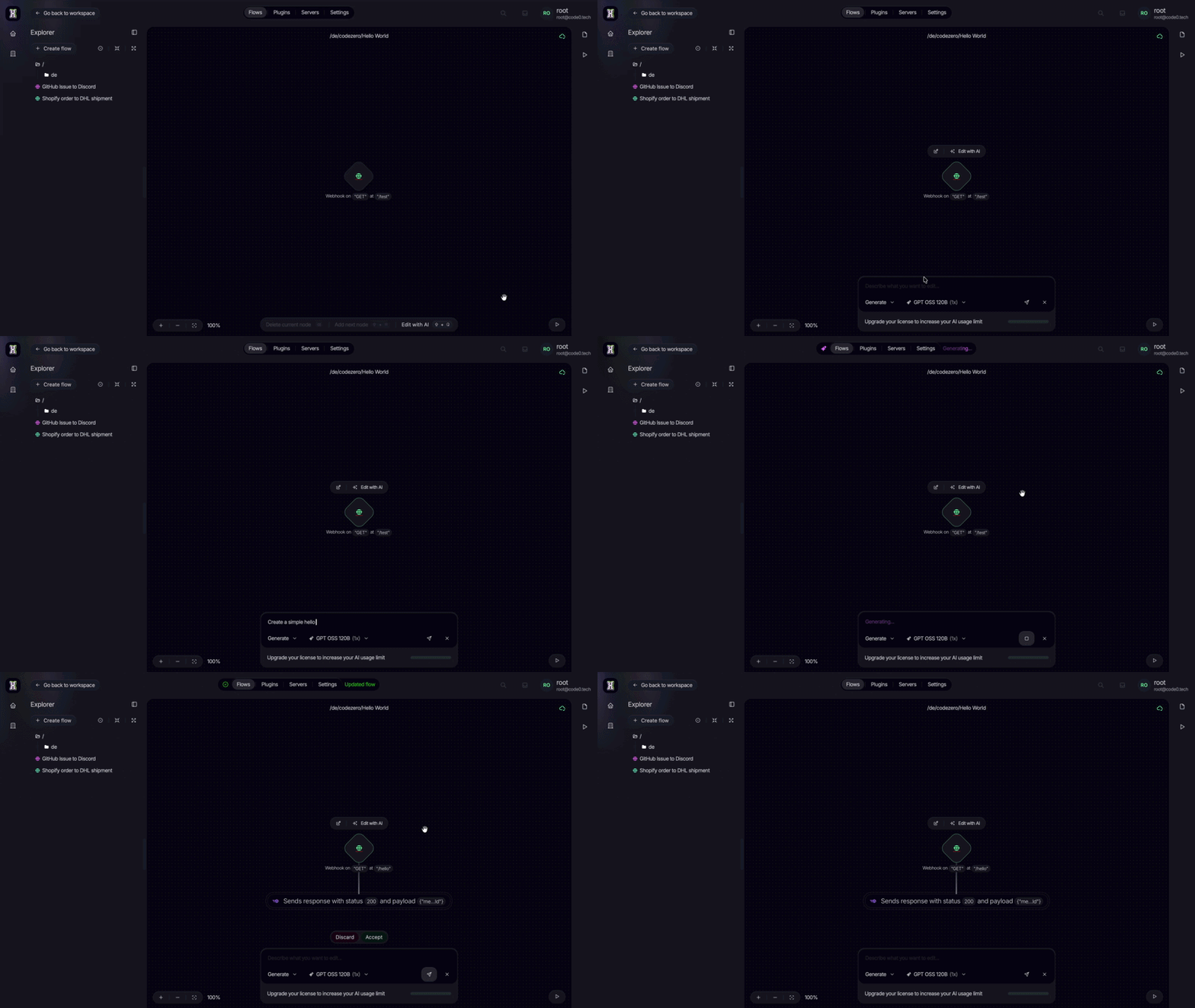
Editing a flow with AI

Bring your own model: plug in OpenAI, OpenRouter, or any compatible provider and choose which models power your workspace.

What can you build?

  • Integrations: New GitHub issue? Post it to Discord. New Shopify order? Create the DHL shipment automatically.
  • Your own APIs: Expose any flow as an HTTP endpoint and use CodeZero as a visual backend.
  • Scheduled jobs: Run flows on a cron schedule for reports, syncs, and cleanups.
  • Business processes: Model multi-step logic with full control over data, branching, and error handling.

Why CodeZero?

Visual flow editor Build logic as a graph of nodes that stays readable, debuggable, and shareable with your team.
AI-assisted building Generate and edit flows with natural language, directly on the canvas.
Triggers built in HTTP/webhook and cron triggers come out of the box. Plugins add more.
Your data, your infrastructure Fully self-hostable. Or run hybrid: IDE in the cloud, runtimes on your own hardware. Your data never leaves your network.
Scales with you Every runtime component scales independently, from a single box to a fleet.
Extensible Extend runtimes with plugins that add new nodes, flow types, and triggers.
Built for teams Organizations, projects, roles, and fine-grained permissions included.

Made for teams, not just tinkerers

Structure your work in projects and organizations, and invite your team into a shared workspace.
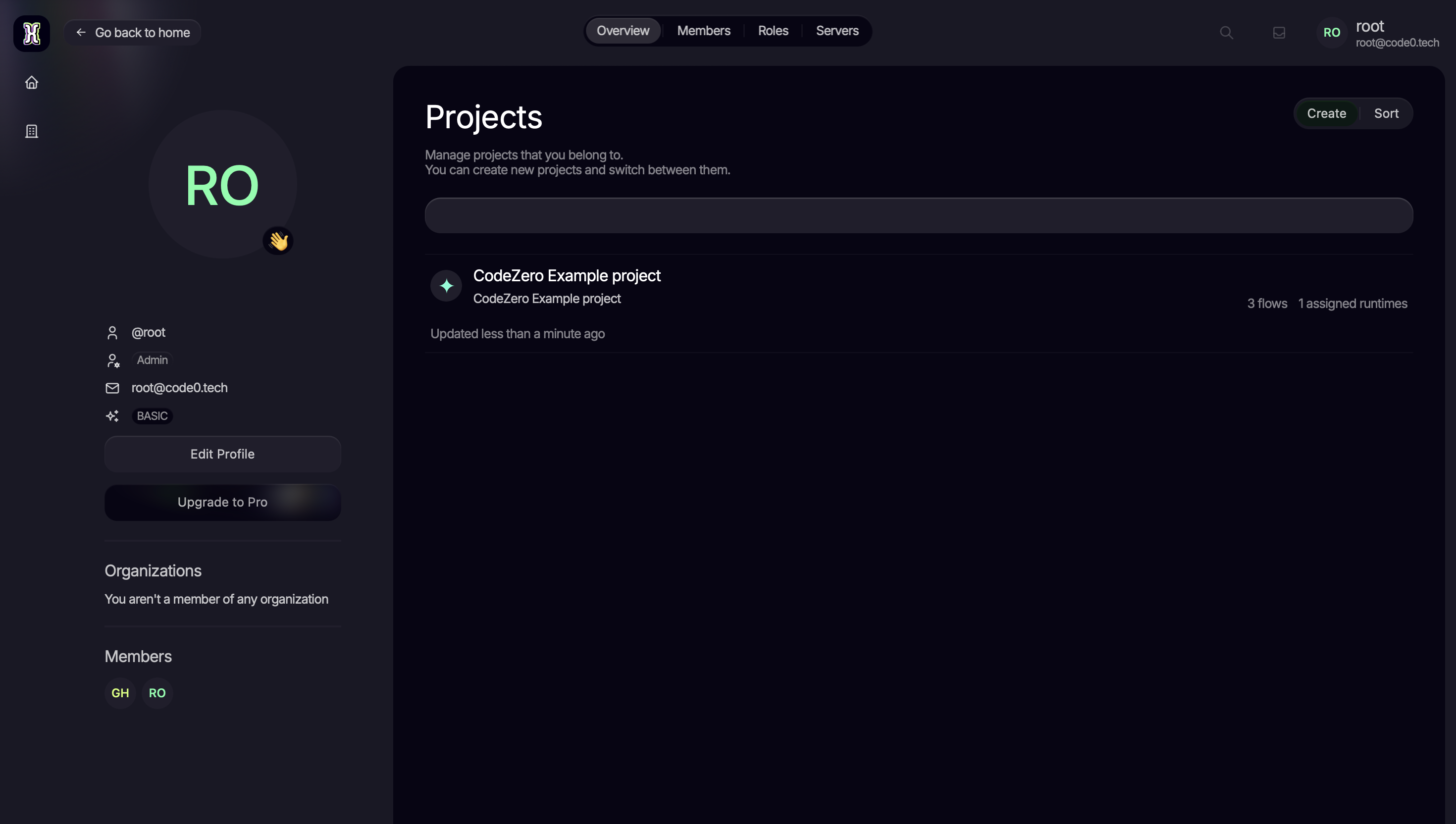
Workspace with projects and members

Control exactly who can do what. Role templates cover the common setups, and fine-grained permissions handle everything else.
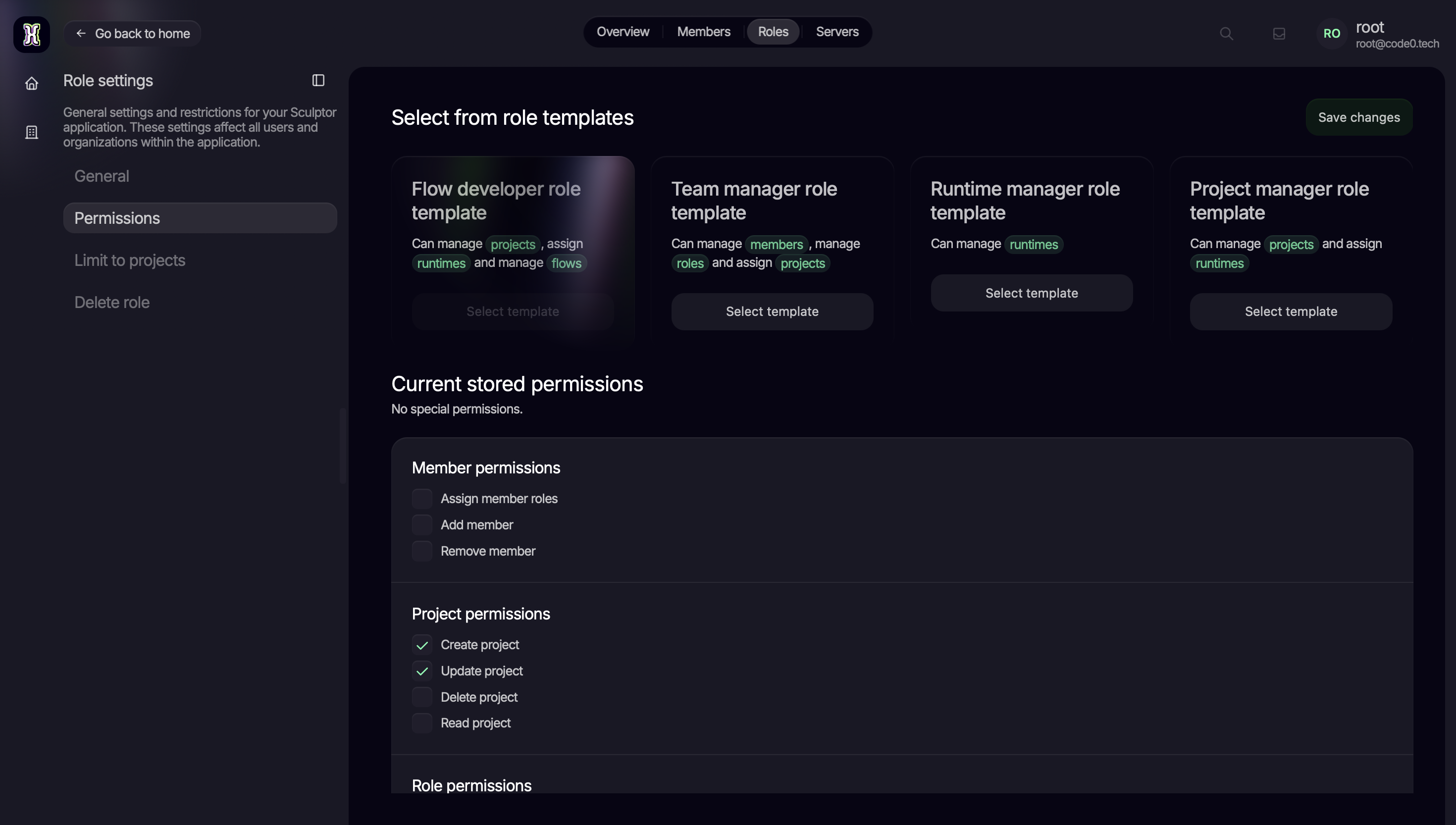
Role templates and fine-grained permissions

Getting started

All you need is Docker. This repository contains the official releases and the Docker Compose setup:

git clone https://github.com/code0-tech/codezero.git
cd codezero/docker-compose

# adjust secrets & settings (ports, AI models, ...) in .env, then:
docker compose up -d

Open http://localhost and log in with the initial credentials from your .env (default: [email protected] / root).

[!TIP] Everything is configured through docker-compose/.env: which components to run (COMPOSE_PROFILES), TLS, ports, and the AI models available in the editor. Change the default secrets before exposing anything publicly.

For detailed guides, head over to the documentation.

Community

CodeZero is open source and built in the open. Join us:

  • Discord: ask questions, share flows, talk to the team
  • Docs: guides and reference documentation
  • GitHub: all components, issues, and contributions
  • YouTube: devlogs and product updates

Contributions are welcome, from new plugins and nodes to docs and bug reports. The contributing guide shows you where to start.

License

Licensing varies per component. See the LICENSE file in this repository and in each subproject for details.


Made with ❤️ by the CodeZero community

Frequently asked questions

Is CodeZero free to use?

CodeZero is open source. There is no licence fee and no seat count — you can self-host it or, where the project offers one, pay a vendor for a managed version instead.

What does CodeZero do?

Build complex automations without code, deploy anywhere with full control

What is CodeZero written in?

CodeZero's source is publicly available at https://github.com/code0-tech/codezero, with 55 GitHub stars.