
Atlas CMMS
Atlas CMMS is a powerful, self-hosted maintenance management system designed for both web and mobile platforms using Docker. It simplifies and automates the management of maintenance activities, making it ideal for IT managers or developers looking to implement solutions that keep their organization's assets running smoothly. Think of it like Jira for technicians.
Example industries
- Facilities Managers (buildings, property, real estate)
- Manufacturing/Production Teams (machinery and equipment)
- Healthcare Facilities (medical equipment maintenance)
- Hospitality Managers (hotels and resorts)
- Public Sector (infrastructure and public buildings)
- Educational Institutions (campus maintenance)
- Utility Companies (power, water, and energy systems)
Demo website
Screenshots:
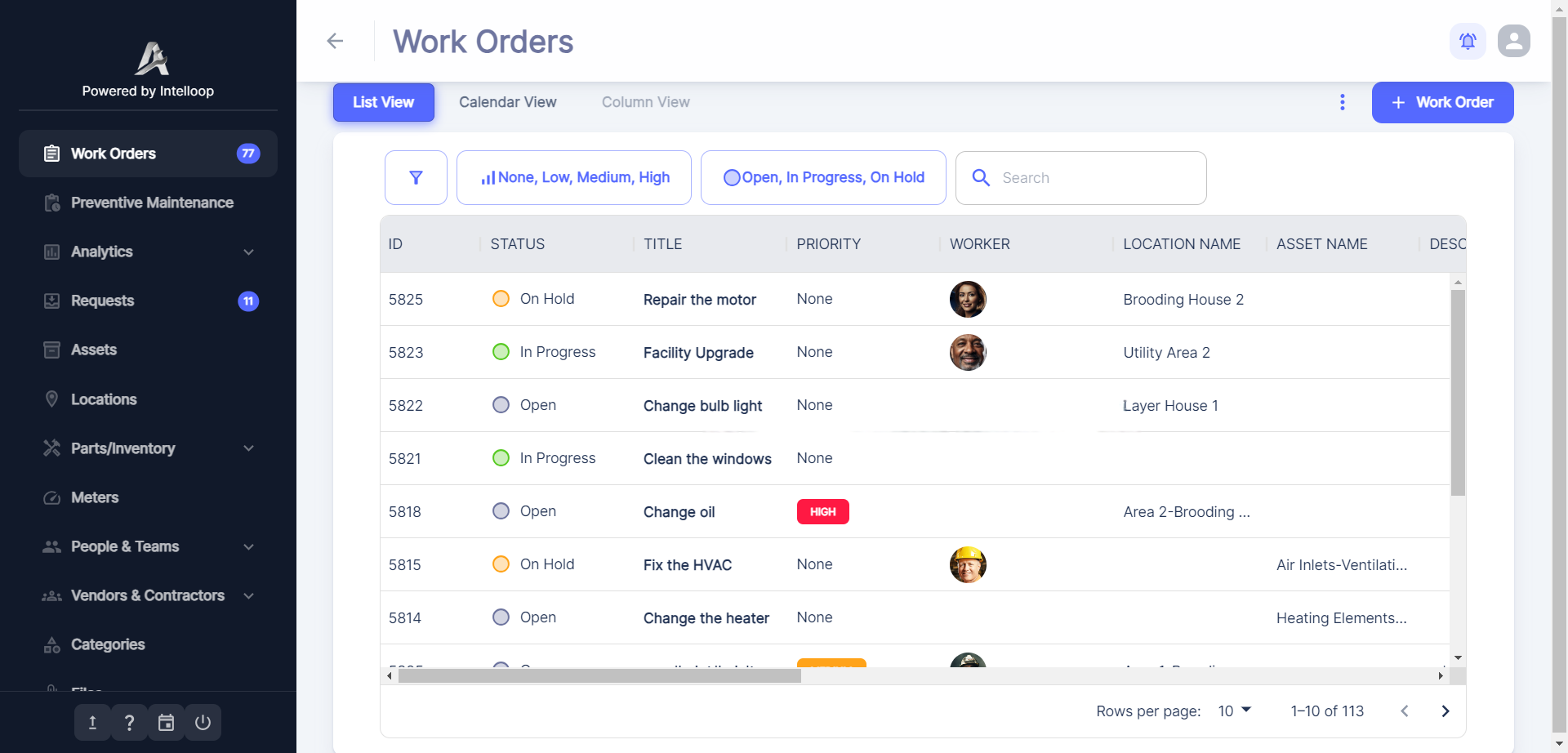


⚡ Features
Work Orders & Maintenance
- 📝 Create, assign, and track work orders.
- ⏱️ Log time, set priorities, and track history.
- 🤖 Automate work orders with triggers.
- 📊 Export reports and view analytics.
Analytics & Reporting
- 💼 Work order compliance and cost analysis.
- 🛠️ Equipment downtime and reliability insights.
- 💵 Cost trends and labor tracking.
Equipment & Inventory
- ⚙️ Track equipment, downtime, and maintenance costs.
- 📦 Manage inventory with stock alerts.
- 🛒 Automate purchase orders and approvals.
User & Workflow Management
- 👥 Assign tasks to teams or service providers.
- 🧑💼 Customizable user roles and permissions.
- 🔄 Define workflows with automation logic.
Locations & Requests
- 📍 Manage locations with Google Maps integration.
- 📑 Create and track service requests.
You can check out the complete list of features.
We'd love to have new contributors, so feel free to join us!
⭐ Star this repo to support us!
Self-Host / Run locally
⚡ Quick Start (2 minutes)
- Download:
- docker-compose.yml
- nginx.conf
- .env.example → rename to
.env
- Run:
docker-compose up -d
Go to http://localhost:3000 to access Atlas CMMS.
Need customization or production setup? Continue reading below ↓
Set environment variables
| Name | Required | Description | Default Value |
|---|---|---|---|
| POSTGRES_USER | Yes | Postgres user | rootUser |
| POSTGRES_PWD | Yes | Postgres password | mypassword |
| MINIO_USER | Yes | MiniO user | minio |
| MINIO_PWD | Yes | MiniO password | minio123 |
| JWT_SECRET_KEY | Yes | JWT secret key. Generate with openssl rand -base64 32 |
your_jwt_secret |
| PUBLIC_SERVER_URL | No | Website URL in this format http://your.public.ip |
http://localhost:3000 |
| ENABLE_EMAIL_NOTIFICATIONS | No | Enables or disables email notifications (true or false). Requires SMTP if enabled. |
false |
| INVITATION_VIA_EMAIL | No | Enables or disables user invitations via email (true or false). Requires SMTP and ENABLE_EMAIL_NOTIFICATIONS if enabled. |
false |
| MAIL_TYPE | No | Mail type: SMTP or SENDGRID |
smtp |
| SMTP_HOST | No | The SMTP host | smtp.gmail.com |
| SMTP_PORT | No | The SMTP port | 587 |
| SMTP_USER | No | The SMTP username. If using Gmail, Learn how to create an app password | (empty) |
| SMTP_PWD | No | The SMTP password. If using Gmail, Learn how to create an app password | (empty) |
| SMTP_FROM | No | The SMTP from address, if different from the username. | (empty) |
| SENDGRID_API_KEY | No | The Sendgrid API key | (empty) |
| SENDGRID_FROM_EMAIL | No | The Sendgrid sender email | (empty) |
| ALLOWED_ORGANIZATION_ADMINS | No | Comma separated email addresses allowed to sign up without being invited, hence allowed to create organizations. Empty means everyone can create an organization | (empty) |
| GOOGLE_KEY | No | Google Maps API key | (empty) |
| GOOGLE_TRACKING_ID | No | Google Analytics tracking ID | (empty) |
| STORAGE_TYPE | No | Type of storage either local MinIO or Google Cloud Storage gcp or minio |
minio |
| GCP_JSON | No | The Google Cloud JSON key after following these instructions. | (empty) |
| GCP_PROJECT_ID | No | The Google Cloud project ID, also found in the GCP_JSON file. |
(empty) |
| GCP_BUCKET_NAME | No | GCP Bucket Name | (empty) |
| MAIL_RECIPIENTS | No | Comma-separated email addresses of the super admins where to send information emails like new signups. You can provide your email address. | (empty) |
| LICENSE_KEY | No | Atlas CMMS license key to get access to advanced features. | (empty) |
| ENABLE_SSO | No | Enables or disables SSO. (true or false ) Requires OAUTH2_PROVIDER, OAUTH2_CLIENT_ID and OAUTH2_CLIENT_SECRET. Make sure to add PUBLIC_SERVER_URL as authorized origin and ${PUBLIC_SERVER_URL}/api/oauth2/callback/${OAUTH2_PROVIDER} as authorized redirection URI in your Oauth2 provider settings |
false |
| OAUTH2_PROVIDER | No | Oauth2 provider google or microsoft |
(empty) |
| OAUTH2_CLIENT_ID | No | Oauth2 Client ID | (empty) |
| OAUTH2_CLIENT_SECRET | No | Oauth2 client secret | (empty) |
| LOGO_PATHS | No | Logo names in this format. {"dark": "dark.png","white": "white.png", }. Add 2 logos in a folder named logo in the same folder as the docker-compose.yml. Needs a license. |
(empty) |
| CUSTOM_COLORS | No | Custom colors in JSON format. All colors should be in hexadecimal format. {"emailColors":"#00A0E3","primary":"#EE4B2B","secondary":"#6E759F","success":"#57CA22","warning":"#FFA319","error":"#FF1943","info":"#33C2FF","black":"#223354","white":"#ffffff","primaryAlt":"#000C57"} |
(empty) |
| BRAND_CONFIG | No | Brand config for white labeling. Requires license. In format { "name": "Quantum Labs", "shortName": "QL", "website": "https://example.io", mail: "contact@example.io" } |
(empty) |
| LDAP_ENABLED | No | Enables or disables LDAP. More variables are needed. You can get the full list here | false |
For production deployments, it’s strongly recommended to use unique credentials and not rely on defaults. You should also setup TLS
Mobile app
You can use the Android app
or iOS App and configure it with
your custom backend server url: ${PUBLIC_SERVER_URL}/api
Getting help
Docs
If you still have questions after reading the docs, concerns, bug reports, etc., please file an issue in this repository's Issue Tracker or email contact@atlas-cmms.com.
Supported languages
- English
- Spanish
- French
- German
- Turkish
- Polish
- Portuguese (Brazil)
- Arabic
- Swedish
- Italian
- Russian
- Dutch
- Chinese
- Hungarian
- Bosnian
- Japanese
🏗️ Tech Stack
Need Professional Help?
Don't want to handle the maintenance and management yourself? We offer a complete done-for-you service. Please reach out to us
🤝 Looking to contribute?
We welcome contributions! You can help by:
- ✅ Reporting bugs
- ✅ Suggesting new features
- ✅ Improving documentation
- ✅ Submitting pull requests
Check CONTRIBUTING.md inside each subproject for details.
You can also join our Discord server
Open source licensing info
Atlas CMMS is dual-licensed:
- AGPLv3 License — Free and open source.
- Commercial License — Required for white labeling, custom branding, and advanced features.
To enable commercial features, you must set a valid LICENSE_KEY.
For commercial licenses, visit atlas-cmms.com/pricing?type=selfhosted
or email us at contact@atlas-cmms.com.