cloud-in-a-bottle is a free, open source build & deployment project written in Python and released under AGPL-3.0. It has 1,166 GitHub stars, 75 forks and 17 open issues, and was last pushed 5 hours ago. On this registry it ranks #49 of 59 tracked projects in Build & Deployment, with 5 head-to-head comparisons available. It gained 14 stars over the last 3 tracked days.

What is cloud-in-a-bottle?

Cloud in a Bottle is an AGPL-3.0, Python-based platform that deploys, runs, and shares web apps on a server you control, so your apps, data, and infrastructure stay yours.

What it is

Cloud in a Bottle is a self-hosted platform-as-a-service for personal clouds and homeservers. It runs on your own hardware, a local virtual machine, or a cloud server, and its job is to make installing open source web software as easy as installing an app on your phone, while keeping the data on hardware you own. The project comes from Imbue and lives in the self-hosting and personal-server ecosystem, alongside containers, deployment tooling, and home lab practice. At its centre is a Python router that acts as the control plane for the instance: a dashboard and APIs that install apps from Git repositories, read their manifests, build their images, and manage updates, logs, and the container lifecycle.

The concrete problem it solves is the gap the README describes directly: open source web software exists in abundance, but running it somewhere means fighting infrastructure that most people do not want to touch, and mainstream cloud access is mediated by companies with different incentives. Cloud in a Bottle replaces the hand-rolled work of provisioning a server, wiring a container runtime, configuring a reverse proxy and DNS, and manually exposing routes. A repository with a Dockerfile and a cloudinabottle.toml manifest becomes a deployable app with a real URL, without the operator rebuilding that plumbing for each piece of software.

Key capabilities

  • Add a cloudinabottle.toml manifest to a repository that already has a Dockerfile, and the app becomes deployable.
  • The Python router installs apps from Git repositories, reads their cloudinabottle.toml manifests, builds their Dockerfiles with rootless Podman, and manages updates, logs, and the container lifecycle.
  • Each app's main HTTP port binds to the host's loopback interface by default, and the router proxies HTTP and WebSocket requests to the right container based on the app subdomain.
  • App routes require owner authentication by default, while the manifest can declare specific paths as public.
  • In the standard public deployment, Caddy handles HTTPS and CoreDNS provides wildcard DNS for app subdomains.
  • App storage is split into permanent data, temporary files, and archive storage, and the manifest controls which tiers the container may access.
  • Platform state and permanent app data stay on the instance, while archive data can remain local or use S3-compatible storage that the operator configures.

Who uses it and how

  • Individuals hosting personal tools: AI-generated apps, scripts, and utilities that have nowhere useful to live.
  • Operators running open source software such as Matrix, Minecraft servers, notes apps, and project management tools on their own hardware.
  • Developers and creative users running coding agents or image-making software, and anyone who built something and wants to share it at a real URL.
  • Anyone with a containerized web app who wants deployment to follow from a Dockerfile plus a manifest rather than manual server work.
  • Self-hosters and homeserver owners who prefer a local virtual machine or a cloud server they administer over a managed platform.

Getting started

Run Cloud in a Bottle on your own hardware, a local virtual machine, or a cloud server by following the deployment guide at https://cloudinabottle.org/docs/introduction.html. If you would rather not run a server, Imbue offers managed hosting that provisions an instance, configures it with your SSH key, and hands it over.

How it compares

The facts provided name no paid products that Cloud in a Bottle replaces, and they name no directly comparable tools, so it stands alone in this registry.

When to use it — and when not to

A self-hoster takes on real operational work: a rootless Podman runtime, Caddy for HTTPS, CoreDNS for wildcard DNS, and S3-compatible storage if archive data should leave the instance. Anyone who does not want to operate that stack should not self-host it, though managed hosting from Imbue is offered as an alternative. The licence is a moving target worth noting: the project ships under AGPL-3.0 today, and the README states it may move to something like a fair source licence, where personal use stays unrestricted but commercial use may be scoped, so commercial adopters should track that decision before building on it.

project readme (upstream, from github) — read inline

Cloud in a Bottle

Your corner of the cloud.

License: AGPL-3.0 Documentation Releases and changelogs

Deploy, use, and share web apps on a server you control.
Your apps, data, and infrastructure stay yours.
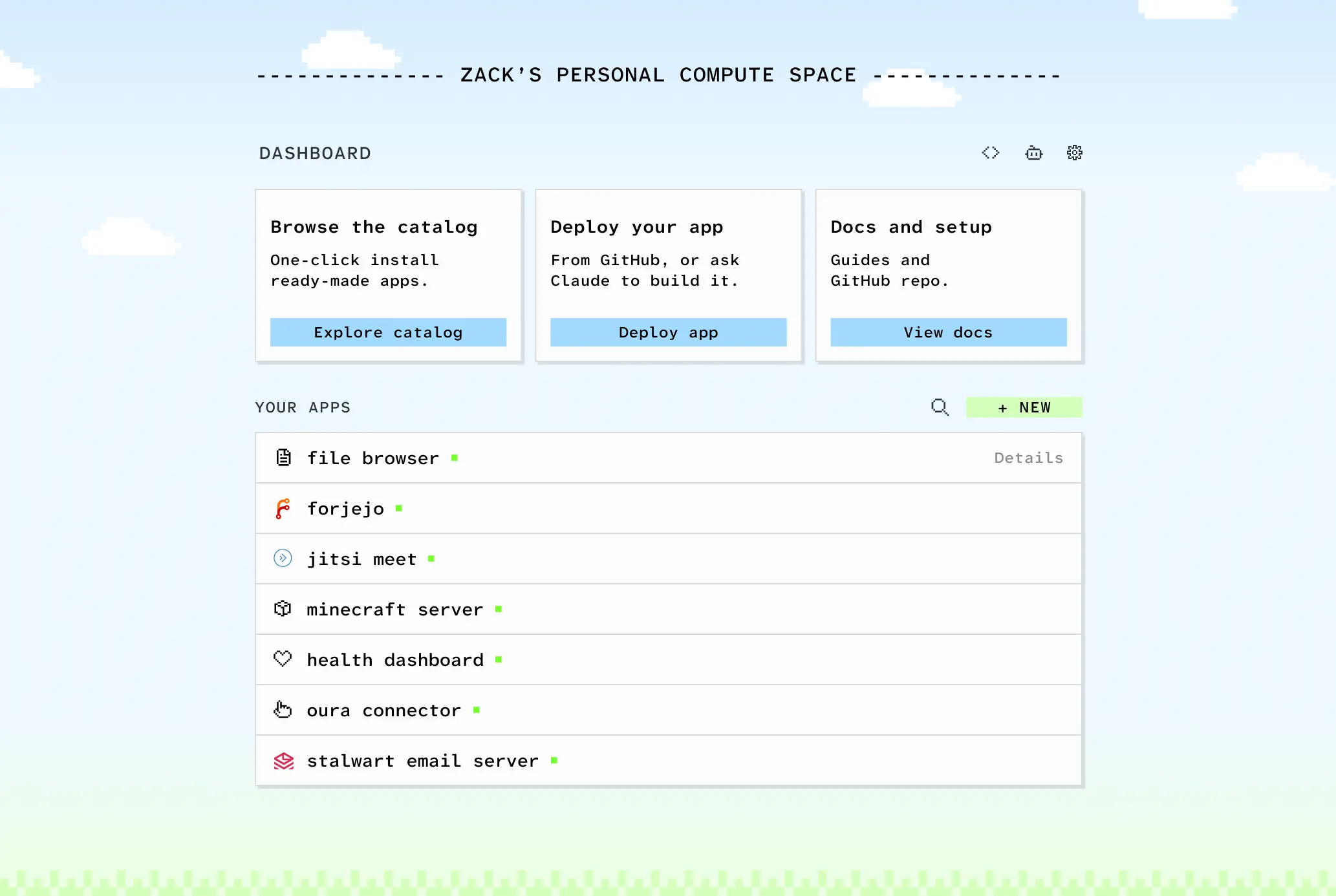
Why Cloud in a Bottle

Most people have no access to the cloud that isn't mediated by a company with different incentives than theirs. Open source web software exists but running it somewhere means fighting infrastructure that most people don't want to touch.

Cloud in a Bottle is the project our team needed and couldn't find: a corner of the cloud that's genuinely yours. Where apps install as easily as on your phone, and the data lives on hardware you control.

What people deploy

  • Personal tools: AI-generated apps, scripts, and utilities with nowhere useful to host them
  • Open source software: Matrix, Minecraft servers, notes apps, project management tools
  • Dev and creative tools: coding agents, image-making software, anything you built and want to share with a real URL
  • Containerized web apps: add a cloudinabottle.toml manifest to a repo with a Dockerfile and it's deployable

Get Cloud in a Bottle

Run it yourself

Cloud in a Bottle runs on your own hardware, a local virtual machine, or a cloud server. Follow the deployment guide to install it.

Managed hosting

If you'd rather not run your own server, Imbue can provision one for you. We configure it with your SSH key, then hand it over.

How it works

The Python router is the control plane for your instance. Its dashboard and APIs install apps from Git repositories, read their cloudinabottle.toml manifests, build their Dockerfiles with rootless Podman, and manage updates, logs, and the container lifecycle.

By default, each app's main HTTP port is bound to the host's loopback interface. The router proxies HTTP and WebSocket requests to the right container based on the app subdomain. App routes require owner authentication by default, while the manifest can declare paths that should be public. In the standard public deployment, Caddy handles HTTPS and CoreDNS provides wildcard DNS for app subdomains.

App storage is organized into permanent data, temporary files, and archive storage. The manifest controls which tiers the container can access. Platform state and permanent app data are stored on your instance. Archive data can stay local or use S3-compatible storage you configure.

Documentation

Read the Cloud in a Bottle manual for platform concepts, app development, and operating guides. Useful starting points include:


License

Cloud in a Bottle is provided under the AGPL-3.0 license.

We may move to a different license in the future, something like a fair source license, with the intent that personal use will always be unrestricted, while commercial use may be scoped to support a sustainable project.


Cloud in a Bottle is an Open Source project from Imbue.

Frequently asked questions

Is cloud-in-a-bottle free to use?

cloud-in-a-bottle is open source under the AGPL-3.0 licence. There is no licence fee and no seat count — you can self-host it or, where the project offers one, pay a vendor for a managed version instead.

What does cloud-in-a-bottle do?

Deploy, use, and share web apps on a server you control. Your apps, data, and infrastructure stay yours.

What is cloud-in-a-bottle written in?

cloud-in-a-bottle is primarily written in Python. Its source is publicly available at https://github.com/cloud-in-a-bottle/cloud-in-a-bottle, and it has 1,166 GitHub stars.