Claude Token Optimizer
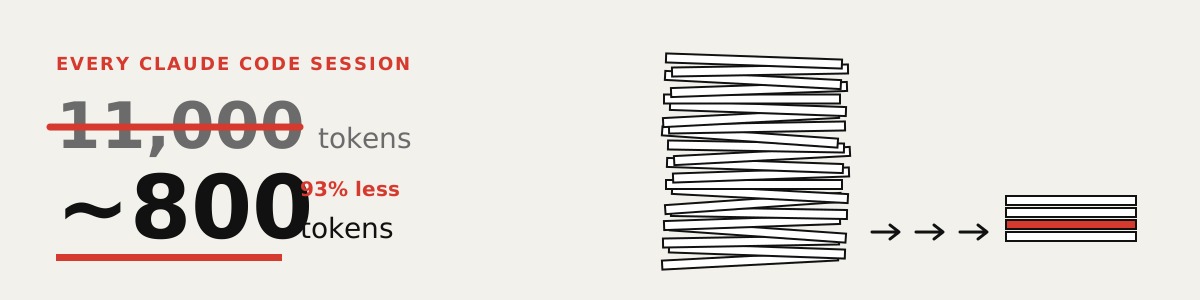
Claude rereads everything. Every session. You pay each time.
Mine was 11,000 tokens per session. Open 20 sessions a day and that is 220,000 tokens gone before you type a word. That is money, usage limits, and room Claude could have used for your code.

Open a terminal in your project folder and paste each line as is. Inside Claude Code, type ! first, then paste.
0. Keep a copy of your notes, just in case:
cp CLAUDE.md CLAUDE.md.mine
1. See what Claude rereads every session:
npx -y claude-token-optimizer measure
2. Shrink it:
npx -y claude-token-optimizer prune --yes
Old session notes and finished task lists move into side files Claude opens only when needed. You get a line like ✓ Saved ~3414 tokens. Run step 1 again to see your new total. Says "Nothing to prune"? Use the Claude Code prompt below instead.
Rather not type commands? Paste this into Claude Code:
Back up my CLAUDE.md, then set up github.com/nadimtuhin/claude-token-optimizer by following its AGENTS.md. Show me the token count before and after.

Claude reads in tokens. Small pieces of text. Before, every session reread all your project notes, piece by piece.
Now it gets a cheat sheet. A short file at the start. Everything else waits in files Claude opens only when it needs them.
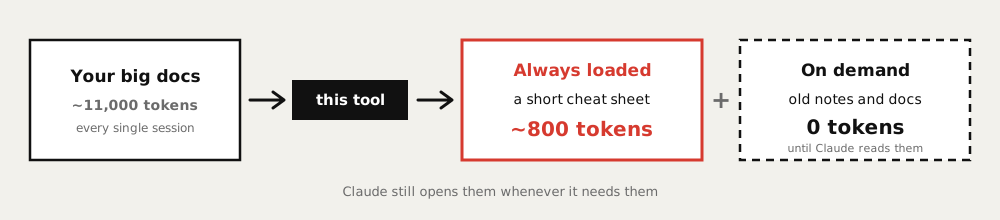
Nothing about how you use Claude changes. Each session just starts lighter.

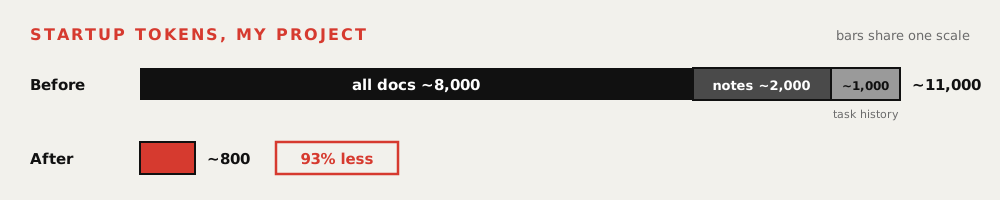
My project, before and after. Claude still finds the old notes when it needs them. It just stops rereading them every session.

"command not found" or an error about Node
You need Node 20 or newer. Run node -v to check, and install it from nodejs.org if the number is lower.
If it says cto: command not found, put npx -y claude-token-optimizer in front instead of cto.
Will it overwrite my files?
It rewrites CLAUDE.md and saves the old one as CLAUDE.md.bak. A second run replaces that .bak, so keep your own copy from step 0. cto init (for developers, below) can replace .claudeignore and .claude/*.md in a project with no CLAUDE.md. The exact list of files it writes is in What cto init creates.
How do I undo it?
Put back the copy you made: cp CLAUDE.md.mine CLAUDE.md. Using git? Run git restore CLAUDE.md, then git clean -n to list the new files, and git clean -fd once you have checked that list.

Everything below is reference. You don't need it to get started.
Install · For AI agents · The numbers · Commands · Hooks · FAQ
Install
The npx lines at the top need no install. Prefer a global cto command? Either of these works:
npm install -g claude-token-optimizer
# or
curl -fsSL https://raw.githubusercontent.com/nadimtuhin/claude-token-optimizer/main/install.sh | bash
Node 20 or newer. init detects your framework from package.json, requirements.txt, go.mod, composer.json, pom.xml, or Gemfile. Pass --framework nextjs, or any name in AGENTS.md, to override.
For AI coding agents
Hand your agent this repo link and one sentence:
Read https://raw.githubusercontent.com/nadimtuhin/claude-token-optimizer/main/AGENTS.md and set up cto in this project.
AGENTS.md lists the non-interactive commands and what each one writes. llms.txt indexes the docs for LLM tools. These run without a TTY and never wait for input:
npx -y claude-token-optimizer init --yes --framework express
npx -y claude-token-optimizer measure
npx -y claude-token-optimizer audit --json     # exits 1 on errors
npx -y claude-token-optimizer prune --yes
npx -y claude-token-optimizer compress --yes
The numbers
On my RedwoodJS project, every session opened by loading about 8,000 tokens of docs, 2,000 of old session notes, and 1,000 of finished task history. cto reduces Claude Code token usage by keeping a short CLAUDE.md and four small reference files loaded, and moving the rest to files read on demand.
The same numbers as a table
| Before | Tokens | After | Tokens |
|---|---|---|---|
| All docs | ~8,000 | CLAUDE.md |
~336 |
| Old session notes | ~2,000 | docs/INDEX.md |
~135 |
| Task history | ~1,000 | COMMON_MISTAKES.md |
~118 |
ARCHITECTURE_MAP.md |
~68 | ||
QUICK_START.md |
~49 | ||
| Startup total | ~11,000 | Fresh cto init |
~706 |
| Filled in with my project | ~800 |
The After rows are measured with cto measure right after cto init --yes on an empty project. Adding my own rules and mistakes brought it to about 800.
Measured on my RedwoodJS project. Counts come from the Claude 2 tokenizer, so treat them as estimates.
Everything that moved out is still in the repo. It costs 0 tokens until you ask Claude to read it.
You can do this split by hand. cto does it the same way every time, checks it in CI, and keeps a .bak so the last change can be undone.
What cto init creates
your-project/
  CLAUDE.md                   Claude reads this first
  .claudeignore               keeps old docs out of the session
  .claude/
    COMMON_MISTAKES.md        your top 5 bugs that cost over an hour
    QUICK_START.md            daily commands
    ARCHITECTURE_MAP.md       where things live
    completions/              finished tasks, never auto-loaded
    sessions/                 old session notes, never auto-loaded
  docs/
    INDEX.md
    learnings/                one file per topic, loaded on demand
    archive/                  old docs, never auto-loaded
Abridged. init also creates .claude/templates/ and .claude/sessions/{active,archive}/.
[!WARNING] If you already have a
CLAUDE.md,cto initappends the missing sections and leaves the support files alone. Without one, it writes every file above fresh, replacing any.claudeignoreor.claude/*.mdalready there.--forcereplaces everything with no backup.
Commands
| Command | What it does |
|---|---|
cto init |
Create the structure above, framework detected |
cto measure |
Show how many tokens load at session start, file by file |
cto audit |
19 structural checks. --json for CI, --fix creates missing files. Exits 1 on errors |
cto compress |
Shrink a markdown file with deterministic rules: blank lines, verbose fences, long lists, HTML comments, inline SVGs. --yes for CI |
cto prune |
Move completed tasks and old session notes out of a file into .claude/. --days N keeps recent notes. --yes for CI |
cto diff |
Token delta between a file and its .bak after compress or prune |
cto watch |
Live token dashboard that refreshes when watched files change |
cto hooks |
Install and manage the hook templates below |
cto companions |
List other token-saving tools for Claude Code and whether each is installed |
cto update |
Update the CLI. --content refreshes project templates without touching your text |
compress, prune, and diff work on CLAUDE.md by default. Point them at any markdown file with --file docs/learnings/testing.md.
[!NOTE]
compressandprunesupport--dry-runand write a.bakof the file as it was before that run. A second run replaces the.bak, so copy the file first if you chain them.compressis lossy: it truncates long lists and strips HTML comments.prunearchives completed tasks and session notes under.claude/; empty sections are dropped and come back from the.bak.
Hooks
Claude Code hooks run a script on an event. These templates turn cto from a one-time setup into ongoing enforcement.
cto hooks install --all    # copy templates into .claude/hooks/
cto hooks settings         # print the settings.json block to merge into ~/.claude/settings.json
All 12 hook templates
| Template | Event | Effect |
|---|---|---|
pre-tool-token-guard |
PreToolUse | Warn once per session when auto-loaded files pass a token threshold |
pre-tool-read-guard |
PreToolUse | Block reads of lock files, binaries, and very large files |
pre-tool-bash-guard |
PreToolUse | Block find /, cat node_modules, bare grep -r |
user-prompt-inject-context |
UserPromptSubmit | Match prompt keywords to docs/learnings/*.md and inject only those files |
user-prompt-inject-snapshot |
UserPromptSubmit | Inject the previous session snapshot for a warm restart |
user-prompt-validate-claude-md |
UserPromptSubmit | Validate CLAUDE.md structure once per session |
user-prompt-ghost-scanner |
UserPromptSubmit | Flag CLAUDE.md sections nothing references |
post-write-token-diff |
PostToolUse | Log the token cost of every Write and Edit |
session-end-token-report |
PostToolUse | Log session token totals |
stop-session-snapshot |
Stop | Write a session snapshot after each turn |
stop-path-guard |
Stop | Exit 2 if the reply mentions a path that does not exist |
notification-token-display |
Notification | Show the session token estimate on first notification |
Thresholds and paths are read from environment variables such as CTO_WARN_TOKENS, CTO_BLOCK_TOKENS, and CTO_LEARNINGS_DIR, or from a .ctorc file at the project root so a team can share them. The header comment of each script says what it reads.
Framework patterns
examples/ has a COMMON_MISTAKES.md starter for each of these, with the mistakes that usually cost the most time (N+1 queries, auth gaps, and so on):
Express · Next.js · Vue · Nuxt · Angular · Django · Rails · NestJS · Laravel · FastAPI/Flask · Go (Gin/chi) · Spring Boot · Svelte/SvelteKit
Other stacks work too. Detection just falls back to the generic template. For a guided setup, paste UNIVERSAL_SETUP.md into Claude Code and answer its questions.
Companion tools
cto only trims what loads at startup. These independent projects trim the other token sinks. cto companions checks which ones you have and prints the install command for the rest. Savings figures are each project's own claims, not ours.
| Tool | Cuts | Install |
|---|---|---|
| rtk | Shell output. A PreToolUse hook rewrites Bash calls so results arrive filtered and compressed | brew install rtk && rtk init -g |
| lean-ctx | File reads, searches, and shell output, through an MCP server with caching | curl -fsSL https://leanctx.com/install.sh | sh && lean-ctx init --agent claude |
| caveman | Reply length. A plugin that makes Claude answer tersely | /plugin marketplace add JuliusBrussee/caveman then /plugin install caveman@caveman |
| ponytail | Code volume. A ruleset for the simplest code that works, so fewer lines get written | /plugin marketplace add DietrichGebert/ponytail then /plugin install ponytail@ponytail |
Plugins add their rules to every turn, so compare your own usage before and after enabling one.
Keeping it small
- Add a bug to
.claude/COMMON_MISTAKES.mdonly if it cost more than an hour. - Put new knowledge in
docs/learnings/.md, one topic per file. - Run
cto auditin CI so drift fails the build. - Run
cto compressandcto prunewhencto measurecreeps up.
FAQ
How do I reduce Claude Code token usage?
Shrink what loads before your first prompt. Keep CLAUDE.md short, move history and old docs into files Claude reads on demand, and list the rest in .claudeignore. cto init sets this up and cto measure shows the result.
Does it work with Cursor, Codex, or other agents?
The output is plain markdown, so any agent can read it. The token counting and the .claudeignore rules target Claude Code.
Will init break my existing setup?
Not if you already have a CLAUDE.md: it only appends missing sections. In a project without one, it replaces any existing .claudeignore and .claude/*.md files, so commit or back them up first. Never pass --force unless you mean to start over.
Does it change how Claude Code works?
No. It is markdown files and a .claudeignore. You can edit or delete any of it.
Why are the token counts marked as estimates?
The counter uses the Claude 2 tokenizer. Current models tokenize differently, so use the numbers to compare before and after, not as billing figures.
Related
claude-workflows covers the other half: this repo shapes what Claude knows at startup, that one shapes what Claude does with slash commands. Both follow the same rule, 0 tokens until you need them.
Contributing
Framework templates for Rust (Actix/Axum), Phoenix, and ASP.NET Core are open requests. Copy an existing file in examples/, try it on a real project, and open a PR. See CONTRIBUTING.md.
Bugs and questions go to issues. Report vulnerabilities through SECURITY.md.