The Citus database is 100% open source. Learn what's new in the Citus 13.0 release blog and the Citus Updates page. |
|---|








What is Citus?
Citus is a PostgreSQL extension that transforms Postgres into a distributed database—so you can achieve high performance at any scale.
With Citus, you extend your PostgreSQL database with new superpowers:
- Distributed tables are sharded across a cluster of PostgreSQL nodes to combine their CPU, memory, storage and I/O capacity.
- Reference tables are replicated to all nodes for joins and foreign keys from distributed tables and to maximize read performance.
- Distributed query engine routes and parallelizes SELECT, DML, and other operations on distributed tables across the cluster.
- Columnar storage compresses data, speeds up scans, and supports fast projections, both on regular and distributed tables.
- Query from any node enables you to utilize the full capacity of your cluster for distributed queries
You can use these Citus superpowers to make your Postgres database scale-out ready on a single Citus node. Or you can build a large cluster capable of handling high transaction throughputs, especially in multi-tenant apps, run fast analytical queries, and process large amounts of time series or IoT data for real-time analytics. When your data size and volume grow, you can easily add more worker nodes to the cluster and rebalance the shards.
Our SIGMOD '21 paper Citus: Distributed PostgreSQL for Data-Intensive Applications gives a more detailed look into what Citus is, how it works, and why it works that way.

Since Citus is an extension to Postgres, you can use Citus with the latest Postgres versions. And Citus works seamlessly with the PostgreSQL tools and extensions you are already familiar with.
- Why Citus?
- Getting Started
- Using Citus
- Schema-based sharding
- Setting up with High Availability
- Documentation
- Architecture
- When to Use Citus
- Need Help?
- Contributing
- Stay Connected
Why Citus?
Developers choose Citus for two reasons:
Your application is outgrowing a single PostgreSQL node
If the size and volume of your data increases over time, you may start seeing any number of performance and scalability problems on a single PostgreSQL node. For example: High CPU utilization and I/O wait times slow down your queries, SQL queries return out of memory errors, autovacuum cannot keep up and increases table bloat, etc.
With Citus you can distribute and optionally compress your tables to always have enough memory, CPU, and I/O capacity to achieve high performance at scale. The distributed query engine can efficiently route transactions across the cluster, while parallelizing analytical queries and batch operations across all cores. Moreover, you can still use the PostgreSQL features and tools you know and love.
PostgreSQL can do things other systems can’t
There are many data processing systems that are built to scale out, but few have as many powerful capabilities as PostgreSQL, including: Advanced joins and subqueries, user-defined functions, update/delete/upsert, constraints and foreign keys, powerful extensions (e.g. PostGIS, HyperLogLog), many types of indexes, time-partitioning, and sophisticated JSON support.
Citus makes PostgreSQL’s most powerful capabilities work at any scale, allowing you to handle complex data-intensive workloads on a single database system.
Getting Started
The quickest way to get started with Citus is to use the Azure Cosmos DB for PostgreSQL managed service in the cloud—or set up Citus locally.
Citus Managed Service on Azure
You can get a fully-managed Citus cluster in minutes through the Azure Cosmos DB for PostgreSQL portal. Azure will manage your backups, high availability through auto-failover, software updates, monitoring, and more for all of your servers. To get started with Citus on Azure, use the Azure Cosmos DB for PostgreSQL Quickstart.
Running Citus using Docker
The smallest possible Citus cluster is a single PostgreSQL node with the Citus extension, which means you can try out Citus by running a single Docker container.
# run PostgreSQL with Citus on port 5500
docker run -d --name citus -p 5500:5432 -e POSTGRES_PASSWORD=mypassword citusdata/citus

# connect using psql within the Docker container
docker exec -it citus psql -U postgres

# or, connect using local psql
psql -U postgres -d postgres -h localhost -p 5500
Install Citus locally
If you already have a local PostgreSQL installation, the easiest way to install Citus is to use our packaging repo
Install packages on Ubuntu / Debian:
curl https://install.citusdata.com/community/deb.sh > add-citus-repo.sh
sudo bash add-citus-repo.sh
sudo apt-get -y install postgresql-17-citus-13.0
Install packages on Red Hat:
curl https://install.citusdata.com/community/rpm.sh > add-citus-repo.sh
sudo bash add-citus-repo.sh
sudo yum install -y citus130_17
To add Citus to your local PostgreSQL database, add the following to postgresql.conf:
shared_preload_libraries = 'citus'
After restarting PostgreSQL, connect using psql and run:
CREATE EXTENSION citus;
You’re now ready to get started and use Citus tables on a single node.
Install Citus on multiple nodes
If you want to set up a multi-node cluster, you can also set up additional PostgreSQL nodes with the Citus extensions and add them to form a Citus cluster:
-- before adding the first worker node, tell future worker nodes how to reach the coordinator
SELECT citus_set_coordinator_host('10.0.0.1', 5432);

-- add worker nodes
SELECT citus_add_node('10.0.0.2', 5432);
SELECT citus_add_node('10.0.0.3', 5432);

-- rebalance the shards over the new worker nodes
SELECT rebalance_table_shards();
For more details, see our documentation on how to set up a multi-node Citus cluster on various operating systems.
Using Citus
Once you have your Citus cluster, you can start creating distributed tables, reference tables and use columnar storage.
Creating Distributed Tables
The create_distributed_table UDF will transparently shard your table locally or across the worker nodes:
CREATE TABLE events (
  device_id bigint,
  event_id bigserial,
  event_time timestamptz default now(),
  data jsonb not null,
  PRIMARY KEY (device_id, event_id)
);

-- distribute the events table across shards placed locally or on the worker nodes
SELECT create_distributed_table('events', 'device_id');
After this operation, queries for a specific device ID will be efficiently routed to a single worker node, while queries across device IDs will be parallelized across the cluster.
-- insert some events
INSERT INTO events (device_id, data)
SELECT s % 100, ('{"measurement":'||random()||'}')::jsonb FROM generate_series(1,1000000) s;

-- get the last 3 events for device 1, routed to a single node
SELECT * FROM events WHERE device_id = 1 ORDER BY event_time DESC, event_id DESC LIMIT 3;
┌───────────┬──────────┬───────────────────────────────┬───────────────────────────────────────┐
│ device_id │ event_id │          event_time           │                 data                  │
├───────────┼──────────┼───────────────────────────────┼───────────────────────────────────────┤
│         1 │  1999901 │ 2021-03-04 16:00:31.189963+00 │ {"measurement": 0.88722643925054}     │
│         1 │  1999801 │ 2021-03-04 16:00:31.189963+00 │ {"measurement": 0.6512231304621992}   │
│         1 │  1999701 │ 2021-03-04 16:00:31.189963+00 │ {"measurement": 0.019368766051897524} │
└───────────┴──────────┴───────────────────────────────┴───────────────────────────────────────┘
(3 rows)

Time: 4.588 ms

-- explain plan for a query that is parallelized across shards, which shows the plan for
-- a query one of the shards and how the aggregation across shards is done
EXPLAIN (VERBOSE ON) SELECT count(*) FROM events;
┌────────────────────────────────────────────────────────────────────────────────────┐
│                                     QUERY PLAN                                     │
├────────────────────────────────────────────────────────────────────────────────────┤
│ Aggregate                                                                          │
│   Output: COALESCE((pg_catalog.sum(remote_scan.count))::bigint, '0'::bigint)       │
│   ->  Custom Scan (Citus Adaptive)                                                 │
│         ...                                                                        │
│         ->  Task                                                                   │
│               Query: SELECT count(*) AS count FROM events_102008 events WHERE true │
│               Node: host=localhost port=5432 dbname=postgres                       │
│               ->  Aggregate                                                        │
│                     ->  Seq Scan on public.events_102008 events                    │
└────────────────────────────────────────────────────────────────────────────────────┘
Creating Distributed Tables with Co-location
Distributed tables that have the same distribution column can be co-located to enable high performance distributed joins and foreign keys between distributed tables.
By default, distributed tables will be co-located based on the type of the distribution column, but you define co-location explicitly with the colocate_with argument in create_distributed_table.
CREATE TABLE devices (
  device_id bigint primary key,
  device_name text,
  device_type_id int
);
CREATE INDEX ON devices (device_type_id);

-- co-locate the devices table with the events table
SELECT create_distributed_table('devices', 'device_id', colocate_with := 'events');

-- insert device metadata
INSERT INTO devices (device_id, device_name, device_type_id)
SELECT s, 'device-'||s, 55 FROM generate_series(0, 99) s;

-- optionally: make sure the application can only insert events for a known device
ALTER TABLE events ADD CONSTRAINT device_id_fk
FOREIGN KEY (device_id) REFERENCES devices (device_id);

-- get the average measurement across all devices of type 55, parallelized across shards
SELECT avg((data->>'measurement')::double precision)
FROM events JOIN devices USING (device_id)
WHERE device_type_id = 55;

┌────────────────────┐
│        avg         │
├────────────────────┤
│ 0.5000191877513974 │
└────────────────────┘
(1 row)

Time: 209.961 ms
Co-location also helps you scale INSERT..SELECT, stored procedures, and distributed transactions.
Distributing Tables without interrupting the application
Some of you may start with Postgres and decide to distribute tables later while your application is already using the tables. In that case, you want to avoid downtime for both reads and writes. create_distributed_table command block writes (e.g., DML commands) on the table until the command is finished. Instead, with create_distributed_table_concurrently command, your application can continue to read and write the data even during the command.
CREATE TABLE device_logs (
  device_id bigint primary key,
  log text
);

-- insert device logs
INSERT INTO device_logs (device_id, log)
SELECT s, 'device log:'||s FROM generate_series(0, 99) s;

-- convert device_logs into a distributed table without interrupting the application
SELECT create_distributed_table_concurrently('device_logs', 'device_id', colocate_with := 'devices');


-- get the count of the logs, parallelized across shards
SELECT count(*) FROM device_logs;

┌───────┐
│ count │
├───────┤
│   100 │
└───────┘
(1 row)

Time: 48.734 ms
Creating Reference Tables
When you need fast joins or foreign keys that do not include the distribution column, you can use create_reference_table to replicate a table across all nodes in the cluster.
CREATE TABLE device_types (
  device_type_id int primary key,
  device_type_name text not null unique
);

-- replicate the table across all nodes to enable foreign keys and joins on any column
SELECT create_reference_table('device_types');

-- insert a device type
INSERT INTO device_types (device_type_id, device_type_name) VALUES (55, 'laptop');

-- optionally: make sure the application can only insert devices with known types
ALTER TABLE devices ADD CONSTRAINT device_type_fk
FOREIGN KEY (device_type_id) REFERENCES device_types (device_type_id);

-- get the last 3 events for devices whose type name starts with laptop, parallelized across shards
SELECT device_id, event_time, data->>'measurement' AS value, device_name, device_type_name
FROM events JOIN devices USING (device_id) JOIN device_types USING (device_type_id)
WHERE device_type_name LIKE 'laptop%' ORDER BY event_time DESC LIMIT 3;

┌───────────┬───────────────────────────────┬─────────────────────┬─────────────┬──────────────────┐
│ device_id │          event_time           │        value        │ device_name │ device_type_name │
├───────────┼───────────────────────────────┼─────────────────────┼─────────────┼──────────────────┤
│        60 │ 2021-03-04 16:00:31.189963+00 │ 0.28902084163415864 │ device-60   │ laptop           │
│         8 │ 2021-03-04 16:00:31.189963+00 │ 0.8723803076285073  │ device-8    │ laptop           │
│        20 │ 2021-03-04 16:00:31.189963+00 │ 0.8177634801548557  │ device-20   │ laptop           │
└───────────┴───────────────────────────────┴─────────────────────┴─────────────┴──────────────────┘
(3 rows)

Time: 146.063 ms
Reference tables enable you to scale out complex data models and take full advantage of relational database features.
Creating Tables with Columnar Storage
To use columnar storage in your PostgreSQL database, all you need to do is add USING columnar to your CREATE TABLE statements and your data will be automatically compressed using the columnar access method.
CREATE TABLE events_columnar (
  device_id bigint,
  event_id bigserial,
  event_time timestamptz default now(),
  data jsonb not null
)
USING columnar;

-- insert some data
INSERT INTO events_columnar (device_id, data)
SELECT d, '{"hello":"columnar"}' FROM generate_series(1,10000000) d;

-- create a row-based table to compare
CREATE TABLE events_row AS SELECT * FROM events_columnar;

-- see the huge size difference!
\d+
                                          List of relations
┌────────┬──────────────────────────────┬──────────┬───────┬─────────────┬────────────┬─────────────┐
│ Schema │             Name             │   Type   │ Owner │ Persistence │    Size    │ Description │
├────────┼──────────────────────────────┼──────────┼───────┼─────────────┼────────────┼─────────────┤
│ public │ events_columnar              │ table    │ marco │ permanent   │ 25 MB      │             │
│ public │ events_row                   │ table    │ marco │ permanent   │ 651 MB     │             │
└────────┴──────────────────────────────┴──────────┴───────┴─────────────┴────────────┴─────────────┘
(2 rows)
You can use columnar storage by itself, or in a distributed table to combine the benefits of compression and the distributed query engine.
When using columnar storage, you should only load data in batch using COPY or INSERT..SELECT to achieve good compression. Update, delete, and foreign keys are currently unsupported on columnar tables. However, you can use partitioned tables in which newer partitions use row-based storage, and older partitions are compressed using columnar storage.
To learn more about columnar storage, check out the columnar storage README.
Schema-based sharding
Available since Citus 12.0, schema-based sharding is the shared database, separate schema model, the schema becomes a logical shard within the database. Multi-tenant apps can use a schema per tenant to easily shard along the tenant dimension. Query changes are not required and the application usually only needs a small modification to set the proper search_path when switching tenants. Schema-based sharding is an ideal solution for microservices, and for ISVs deploying applications that cannot undergo the changes required to onboard row-based sharding.
Creating distributed schemas
You can turn an existing schema into a distributed schema by calling citus_schema_distribute:
SELECT citus_schema_distribute('user_service');
Alternatively, you can set citus.enable_schema_based_sharding to have all newly created schemas be automatically converted into distributed schemas:
SET citus.enable_schema_based_sharding TO ON;

CREATE SCHEMA AUTHORIZATION user_service;
CREATE SCHEMA AUTHORIZATION time_service;
CREATE SCHEMA AUTHORIZATION ping_service;
Running queries
Queries will be properly routed to schemas based on search_path or by explicitly using the schema name in the query.
For microservices you would create a USER per service matching the schema name, hence the default search_path would contain the schema name. When connected the user queries would be automatically routed and no changes to the microservice would be required.
CREATE USER user_service;
CREATE SCHEMA AUTHORIZATION user_service;
For typical multi-tenant applications, you would set the search path to the tenant schema name in your application:
SET search_path = tenant_name, public;
Setting up with High Availability
One of the most popular high availability solutions for PostgreSQL, Patroni 3.0, has first class support for Citus 10.0 and above, additionally since Citus 11.2 ships with improvements for smoother node switchover in Patroni.
An example of patronictl list output for the Citus cluster:
postgres@coord1:~$ patronictl list demo
+ Citus cluster: demo ----------+--------------+---------+----+-----------+
| Group | Member  | Host        | Role         | State   | TL | Lag in MB |
+-------+---------+-------------+--------------+---------+----+-----------+
|     0 | coord1  | 172.27.0.10 | Replica      | running |  1 |         0 |
|     0 | coord2  | 172.27.0.6  | Sync Standby | running |  1 |         0 |
|     0 | coord3  | 172.27.0.4  | Leader       | running |  1 |           |
|     1 | work1-1 | 172.27.0.8  | Sync Standby | running |  1 |         0 |
|     1 | work1-2 | 172.27.0.2  | Leader       | running |  1 |           |
|     2 | work2-1 | 172.27.0.5  | Sync Standby | running |  1 |         0 |
|     2 | work2-2 | 172.27.0.7  | Leader       | running |  1 |           |
+-------+---------+-------------+--------------+---------+----+-----------+
Documentation
If you’re ready to get started with Citus or want to know more, we recommend reading the Citus open source documentation. Or, if you are using Citus on Azure, then the Azure Cosmos DB for PostgreSQL is the place to start.
Our Citus docs contain comprehensive use case guides on how to build a multi-tenant SaaS application, real-time analytics dashboard, or work with time series data.
Architecture
A Citus database cluster grows from a single PostgreSQL node into a cluster by adding worker nodes. In a Citus cluster, the original node to which the application connects is referred to as the coordinator node. The Citus coordinator contains both the metadata of distributed tables and reference tables, as well as regular (local) tables, sequences, and other database objects (e.g. foreign tables).
Data in distributed tables is stored in “shards”, which are actually just regular PostgreSQL tables on the worker nodes. When querying a distributed table on the coordinator node, Citus will send regular SQL queries to the worker nodes. That way, all the usual PostgreSQL optimizations and extensions can automatically be used with Citus.
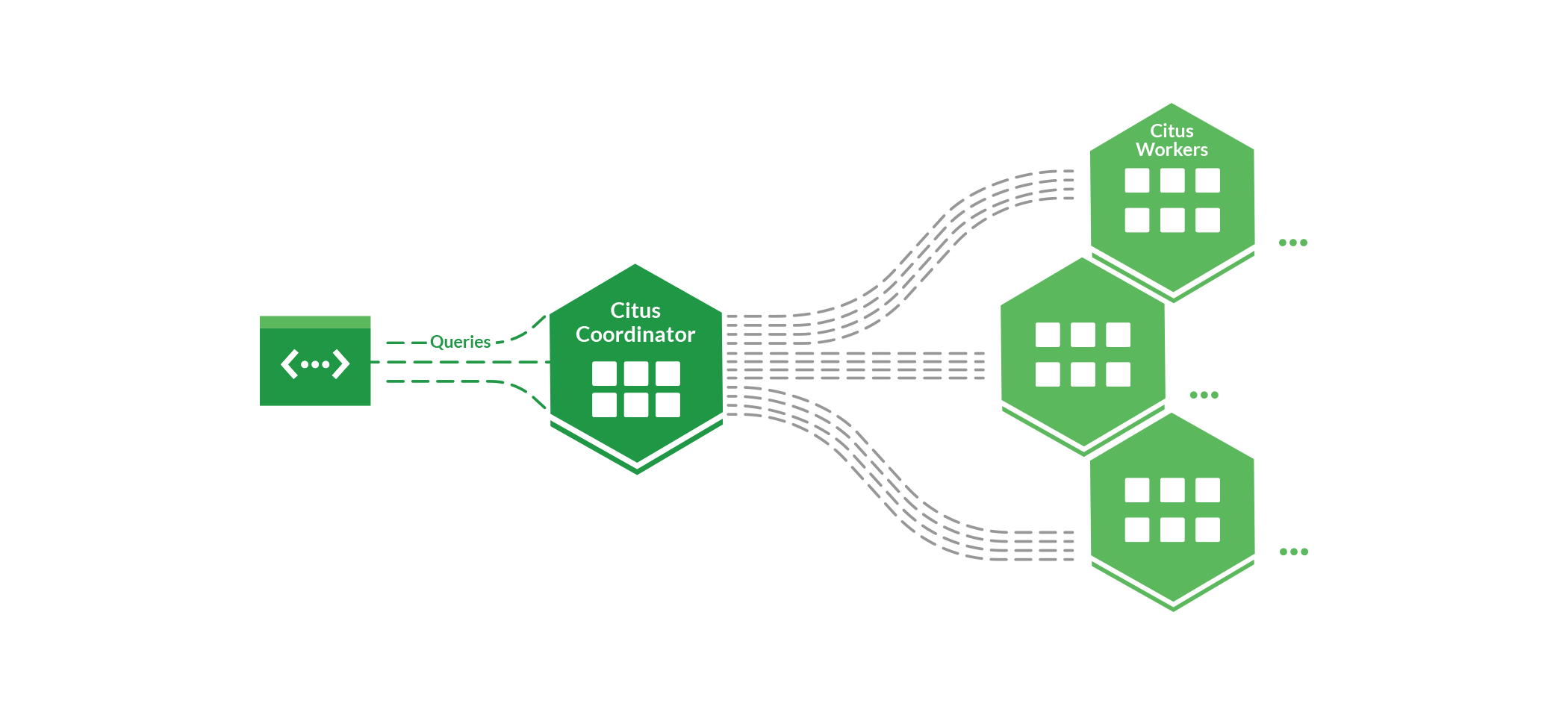
When you send a query in which all (co-located) distributed tables have the same filter on the distribution column, Citus will automatically detect that and send the whole query to the worker node that stores the data. That way, arbitrarily complex queries are supported with minimal routing overhead, which is especially useful for scaling transactional workloads. If queries do not have a specific filter, each shard is queried in parallel, which is especially useful in analytical workloads. The Citus distributed executor is adaptive and is designed to handle both query types at the same time on the same system under high concurrency, which enables large-scale mixed workloads.
The schema and metadata of distributed tables and reference tables are automatically synchronized to all the nodes in the cluster. That way, you can connect to any node to run distributed queries. Schema changes and cluster administration still need to go through the coordinator.
Detailed descriptions of the implementation for Citus developers are provided in the Citus Technical Documentation.
When to use Citus
Citus is uniquely capable of scaling both analytical and transactional workloads with up to petabytes of data. Use cases in which Citus is commonly used:
Customer-facing analytics dashboards: Citus enables you to build analytics dashboards that simultaneously ingest and process large amounts of data in the database and give sub-second response times even with a large number of concurrent users.
The advanced parallel, distributed query engine in Citus combined with PostgreSQL features such as array types, JSONB, lateral joins, and extensions like HyperLogLog and TopN allow you to build responsive analytics dashboards no matter how many customers or how much data you have.
Example real-time analytics users: Algolia
Time series data: Citus enables you to process and analyze very large amounts of time series data. The biggest Citus clusters store well over a petabyte of time series data and ingest terabytes per day.
Citus integrates seamlessly with Postgres table partitioning and has built-in functions for partitioning by time, which can speed up queries and writes on time series tables. You can take advantage of Citus’s parallel, distributed query engine for fast analytical queries, and use the built-in columnar storage to compress old partitions.
Example users: MixRank
Software-as-a-service (SaaS) applications: SaaS and other multi-tenant applications need to be able to scale their database as the number of tenants/customers grows. Citus enables you to transparently shard a complex data model by the tenant dimension, so your database can grow along with your business.
By distributing tables along a tenant ID column and co-locating data for the same tenant, Citus can horizontally scale complex (tenant-scoped) queries, transactions, and foreign key graphs. Reference tables and distributed DDL commands make database management a breeze compared to manual sharding. On top of that, you have a built-in distributed query engine for doing cross-tenant analytics inside the database.
Example multi-tenant SaaS users: Salesloft, ConvertFlow
Microservices: Citus supports schema based sharding, which allows distributing regular database schemas across many machines. This sharding methodology fits nicely with typical Microservices architecture, where storage is fully owned by the service hence can’t share the same schema definition with other tenants. Citus allows distributing horizontally scalable state across services, solving one of the main problems of microservices.
Geospatial: Because of the powerful PostGIS extension to Postgres that adds support for geographic objects into Postgres, many people run spatial/GIS applications on top of Postgres. And since spatial location information has become part of our daily life, well, there are more geospatial applications than ever. When your Postgres database needs to scale out to handle an increased workload, Citus is a good fit.
Example geospatial users: Helsinki Regional Transportation Authority (HSL), MobilityDB.
Need Help?
- Slack: Ask questions in our Citus community Slack channel.
- GitHub issues: Please submit issues via GitHub issues.
- Documentation: Our Citus docs have a wealth of resources, including sections on query performance tuning, useful diagnostic queries, and common error messages.
- Docs issues: You can also submit documentation issues via GitHub issues for our Citus docs.
- Updates & Release Notes: Learn about what's new in each Citus version on the Citus Updates page.
Contributing
Citus is built on and of open source, and we welcome your contributions. The CONTRIBUTING.md file explains how to get started developing the Citus extension itself and our code quality guidelines.
Code of Conduct
This project has adopted the Microsoft Open Source Code of Conduct. For more information see the Code of Conduct FAQ or contact opencode@microsoft.com with any additional questions or comments.
Stay Connected
- Twitter: Follow us @citusdata to track the latest posts & updates on what’s happening.
- Citus Blog: Read our popular Citus Open Source Blog for posts about PostgreSQL and Citus.
- Citus Newsletter: Subscribe to our monthly technical Citus Newsletter to get a curated collection of our favorite posts, videos, docs, talks, & other Postgres goodies.
- Slack: Our Citus Public slack is a good way to stay connected, not just with us but with other Citus users.
- Sister Blog: Read the PostgreSQL posts on the Azure Cosmos DB for PostgreSQL blog about our managed service on Azure.
- Videos: Check out this YouTube playlist of some of our favorite Citus videos and demos. If you want to deep dive into how Citus extends PostgreSQL, you might want to check out Marco Slot’s talk at Carnegie Mellon titled Citus: Distributed PostgreSQL as an Extension that was part of Andy Pavlo’s Vaccination Database Talks series at CMUDB.
- Our other Postgres projects: Our team also works on other awesome PostgreSQL open source extensions & projects, including: pg_cron, HyperLogLog, TopN, pg_auto_failover, activerecord-multi-tenant, and django-multitenant.
Copyright © Citus Data, Inc.