










Checkov is a static code analysis tool for infrastructure as code (IaC) and also a software composition analysis (SCA) tool for images and open source packages.
It scans cloud infrastructure provisioned using Terraform, Terraform plan, Cloudformation, AWS SAM, Kubernetes, Helm charts, Kustomize, Dockerfile, Serverless, Bicep, OpenAPI, ARM Templates, or OpenTofu and detects security and compliance misconfigurations using graph-based scanning.
It performs Software Composition Analysis (SCA) scanning which is a scan of open source packages and images for Common Vulnerabilities and Exposures (CVEs).
Checkov also powers Prisma Cloud Application Security, the developer-first platform that codifies and streamlines cloud security throughout the development lifecycle. Prisma Cloud identifies, fixes, and prevents misconfigurations in cloud resources and infrastructure-as-code files.


Table of contents
Features
- Over 1000 built-in policies cover security and compliance best practices for AWS, Azure and Google Cloud.
- Scans Terraform, Terraform Plan, Terraform JSON, CloudFormation, AWS SAM, Kubernetes, Helm, Kustomize, Dockerfile, Serverless framework, Ansible, Bicep, ARM, and OpenTofu template files.
- Scans Argo Workflows, Azure Pipelines, BitBucket Pipelines, Circle CI Pipelines, GitHub Actions and GitLab CI workflow files
- Supports Context-awareness policies based on in-memory graph-based scanning.
- Supports Python format for attribute policies and YAML format for both attribute and composite policies.
- Detects AWS credentials in EC2 Userdata, Lambda environment variables and Terraform providers.
- Identifies secrets using regular expressions, keywords, and entropy based detection.
- Evaluates Terraform Provider settings to regulate the creation, management, and updates of IaaS, PaaS or SaaS managed through Terraform.
- Policies support evaluation of variables to their optional default value.
- Supports in-line suppression of accepted risks or false-positives to reduce recurring scan failures. Also supports global skip from using CLI.
- Output currently available as CLI, CycloneDX, JSON, JUnit XML, CSV, SARIF and github markdown and link to remediation guides.
Screenshots
Scan results in CLI

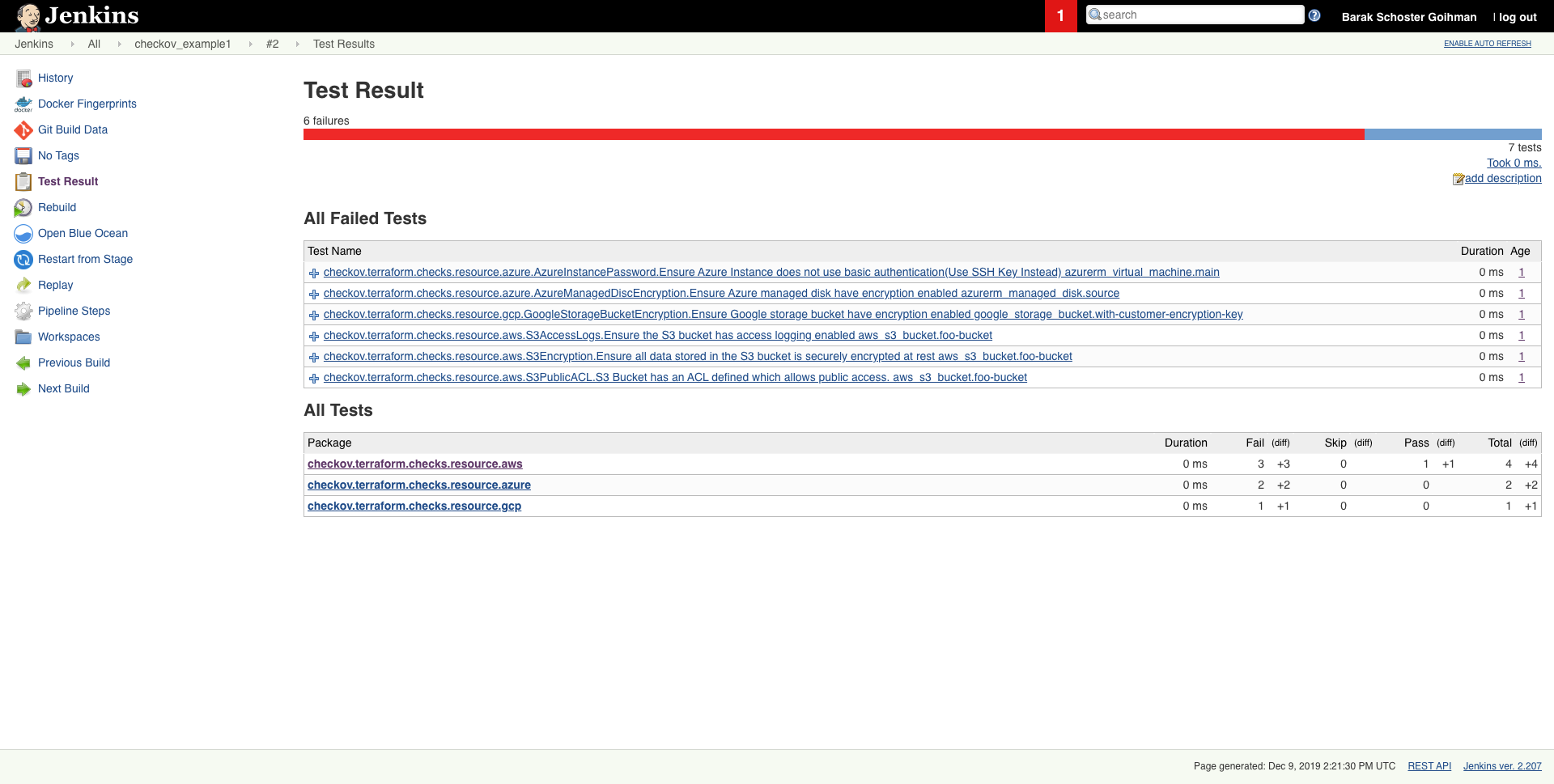
Scheduled scan result in Jenkins
Getting started
Requirements
- Python >= 3.9, = 0.12
Installation
To install pip follow the official docs
pip3 install checkov
Certain environments (e.g., Debian 12) may require you to install Checkov in a virtual environment
# Create and activate a virtual environment
python3 -m venv /path/to/venv/checkov
cd /path/to/venv/checkov
source ./bin/activate

# Install Checkov with pip
pip install checkov

# Optional: Create a symlink for easy access
sudo ln -s /path/to/venv/checkov/bin/checkov /usr/local/bin/checkov
or with Homebrew (macOS or Linux)
brew install checkov
Enabling bash autocomplete
source <(register-python-argcomplete checkov)
Upgrade
if you installed checkov with pip3
pip3 install -U checkov
or with Homebrew
brew upgrade checkov
Configure an input folder or file
checkov --directory /user/path/to/iac/code
Or a specific file or files
checkov --file /user/tf/example.tf
Or
checkov -f /user/cloudformation/example1.yml -f /user/cloudformation/example2.yml
Or a terraform plan file in json format
terraform init
terraform plan -out tf.plan
terraform show -json tf.plan  > tf.json
checkov -f tf.json
Note: terraform show output file tf.json will be a single line.
For that reason all findings will be reported line number 0 by Checkov
check: CKV_AWS_21: "Ensure all data stored in the S3 bucket have versioning enabled"
	FAILED for resource: aws_s3_bucket.customer
	File: /tf/tf.json:0-0
	Guide: https://docs.prismacloud.io/en/enterprise-edition/policy-reference/aws-policies/s3-policies/s3-16-enable-versioning
If you have installed jq you can convert json file into multiple lines with the following command:
terraform show -json tf.plan | jq '.' > tf.json
Scan result would be much user friendly.
checkov -f tf.json
Check: CKV_AWS_21: "Ensure all data stored in the S3 bucket have versioning enabled"
	FAILED for resource: aws_s3_bucket.customer
	File: /tf/tf1.json:224-268
	Guide: https://docs.prismacloud.io/en/enterprise-edition/policy-reference/aws-policies/s3-policies/s3-16-enable-versioning

		225 |               "values": {
		226 |                 "acceleration_status": "",
		227 |                 "acl": "private",
		228 |                 "arn": "arn:aws:s3:::mybucket",
Alternatively, specify the repo root of the hcl files used to generate the plan file, using the --repo-root-for-plan-enrichment flag, to enrich the output with the appropriate file path, line numbers, and codeblock of the resource(s). An added benefit is that check suppressions will be handled accordingly.
checkov -f tf.json --repo-root-for-plan-enrichment /user/path/to/iac/code
Scan result sample (CLI)
Passed Checks: 1, Failed Checks: 1, Suppressed Checks: 0
Check: "Ensure all data stored in the S3 bucket is securely encrypted at rest"
/main.tf:
	 Passed for resource: aws_s3_bucket.template_bucket
Check: "Ensure all data stored in the S3 bucket is securely encrypted at rest"
/../regionStack/main.tf:
	 Failed for resource: aws_s3_bucket.sls_deployment_bucket_name
Start using Checkov by reading the Getting Started page.
Using Docker
docker pull bridgecrew/checkov
docker run --tty --rm --volume /user/tf:/tf --workdir /tf bridgecrew/checkov --directory /tf
Note: if you are using Python 3.6(Default version in Ubuntu 18.04) checkov will not work, and it will fail with ModuleNotFoundError: No module named 'dataclasses' error message. In this case, you can use the docker version instead.
Note that there are certain cases where redirecting docker run --tty output to a file - for example, if you want to save the Checkov JUnit output to a file - will cause extra control characters to be printed. This can break file parsing. If you encounter this, remove the --tty flag.
The --workdir /tf flag is optional to change the working directory to the mounted volume. If you are using the SARIF output -o sarif this will output the results.sarif file to the mounted volume (/user/tf in the example above). If you do not include that flag, the working directory will be "/".
Running or skipping checks
By using command line flags, you can specify to run only named checks (allow list) or run all checks except those listed (deny list). If you are using the platform integration via API key, you can also specify a severity threshold to skip and / or include. Moreover, as json files can't contain comments, one can pass regex pattern to skip json file secret scan.
See the docs for more detailed information about how these flags work together.
Examples
Allow only the two specified checks to run:
checkov --directory . --check CKV_AWS_20,CKV_AWS_57
Run all checks except the one specified:
checkov -d . --skip-check CKV_AWS_20
Run all checks except checks with specified patterns:
checkov -d . --skip-check CKV_AWS*
Run all checks that are MEDIUM severity or higher (requires API key):
checkov -d . --check MEDIUM --bc-api-key ...
Run all checks that are MEDIUM severity or higher, as well as check CKV_123 (assume this is a LOW severity check):
checkov -d . --check MEDIUM,CKV_123 --bc-api-key ...
Skip all checks that are MEDIUM severity or lower:
checkov -d . --skip-check MEDIUM --bc-api-key ...
Skip all checks that are MEDIUM severity or lower, as well as check CKV_789 (assume this is a high severity check):
checkov -d . --skip-check MEDIUM,CKV_789 --bc-api-key ...
Run all checks that are MEDIUM severity or higher, but skip check CKV_123 (assume this is a medium or higher severity check):
checkov -d . --check MEDIUM --skip-check CKV_123 --bc-api-key ...
Run check CKV_789, but skip it if it is a medium severity (the --check logic is always applied before --skip-check)
checkov -d . --skip-check MEDIUM --check CKV_789 --bc-api-key ...
For Kubernetes workloads, you can also use allow/deny namespaces. For example, do not report any results for the kube-system namespace:
checkov -d . --skip-check kube-system
Run a scan of a container image. First pull or build the image then refer to it by the hash, ID, or name:tag:
checkov --framework sca_image --docker-image sha256:1234example --dockerfile-path /Users/path/to/Dockerfile --repo-id ... --bc-api-key ...

checkov --docker-image <image-name>:tag --dockerfile-path /User/path/to/Dockerfile --repo-id ... --bc-api-key ...
You can use --image flag also to scan container image instead of --docker-image for shortener:
checkov --image <image-name>:tag --dockerfile-path /User/path/to/Dockerfile --repo-id ... --bc-api-key ...
Run an SCA scan of packages in a repo:
checkov -d . --framework sca_package --bc-api-key ... --repo-id <repo_id(arbitrary)>
Run a scan of a directory with environment variables removing buffering, adding debug level logs:
PYTHONUNBUFFERED=1 LOG_LEVEL=DEBUG checkov -d .
OR enable the environment variables for multiple runs
export PYTHONUNBUFFERED=1 LOG_LEVEL=DEBUG
checkov -d .
Run secrets scanning on all files in MyDirectory. Skip CKV_SECRET_6 check on json files that their suffix is DontScan
checkov -d /MyDirectory --framework secrets --repo-id ... --bc-api-key ... --skip-check CKV_SECRET_6:.*DontScan.json$
Run secrets scanning on all files in MyDirectory. Skip CKV_SECRET_6 check on json files that contains "skip_test" in path
checkov -d /MyDirectory --framework secrets --repo-id ... --bc-api-key ... --skip-check CKV_SECRET_6:.*skip_test.*json$
One can mask values from scanning results by supplying a configuration file (using --config-file flag) with mask entry. The masking can apply on resource & value (or multiple values, separated with a comma). Examples:
mask:
- aws_instance:user_data
- azurerm_key_vault_secret:admin_password,user_passwords
In the example above, the following values will be masked:
- user_data for aws_instance resource
- both admin_password &user_passwords for azurerm_key_vault_secret
Suppressing/Ignoring a check
Like any static-analysis tool it is limited by its analysis scope. For example, if a resource is managed manually, or using subsequent configuration management tooling, suppression can be inserted as a simple code annotation.
Suppression comment format
To skip a check on a given Terraform definition block or CloudFormation resource, apply the following comment pattern inside it's scope:
checkov:skip=:
- `` is one of the [available check scanners](docs/5.Policy Index/all.md)
- `` is an optional suppression reason to be included in the output
Example
The following comment skips the CKV_AWS_20 check on the resource identified by foo-bucket, where the scan checks if an AWS S3 bucket is private.
In the example, the bucket is configured with public read access; Adding the suppress comment would skip the appropriate check instead of the check to fail.
resource "aws_s3_bucket" "foo-bucket" {
  region        = var.region
    #checkov:skip=CKV_AWS_20:The bucket is a public static content host
  bucket        = local.bucket_name
  force_destroy = true
  acl           = "public-read"
}
The output would now contain a SKIPPED check result entry:
...
...
Check: "S3 Bucket has an ACL defined which allows public access."
	SKIPPED for resource: aws_s3_bucket.foo-bucket
	Suppress comment: The bucket is a public static content host
	File: /example_skip_acl.tf:1-25

...
To skip multiple checks, add each as a new line.
  #checkov:skip=CKV2_AWS_6
  #checkov:skip=CKV_AWS_20:The bucket is a public static content host
To suppress checks in Kubernetes manifests, annotations are used with the following format:
checkov.io/skip#: =
For example:
apiVersion: v1
kind: Pod
metadata:
  name: mypod
  annotations:
    checkov.io/skip1: CKV_K8S_20=I don't care about Privilege Escalation :-O
    checkov.io/skip2: CKV_K8S_14
    checkov.io/skip3: CKV_K8S_11=I have not set CPU limits as I want BestEffort QoS
spec:
  containers:
...
Logging
For detailed logging to stdout set up the environment variable LOG_LEVEL to DEBUG.
Default is LOG_LEVEL=WARNING.
Skipping directories
To skip files or directories, use the argument --skip-path, which can be specified multiple times. This argument accepts regular expressions for paths relative to the current working directory. You can use it to skip entire directories and / or specific files.
By default, all directories named node_modules, .terraform, and .serverless will be skipped, in addition to any files or directories beginning with ..
To cancel skipping directories beginning with . override CKV_IGNORE_HIDDEN_DIRECTORIES environment variable export CKV_IGNORE_HIDDEN_DIRECTORIES=false
You can override the default set of directories to skip by setting the environment variable CKV_IGNORED_DIRECTORIES.
Note that if you want to preserve this list and add to it, you must include these values. For example, CKV_IGNORED_DIRECTORIES=mynewdir will skip only that directory, but not the others mentioned above. This variable is legacy functionality; we recommend using the --skip-file flag.
Console Output
The console output is in colour by default, to switch to a monochrome output, set the environment variable:
ANSI_COLORS_DISABLED
VS Code Extension
If you want to use Checkov within VS Code, give the Prisma Cloud extension a try.
Configuration using a config file
Checkov can be configured using a YAML configuration file. By default, checkov looks for a .checkov.yaml or .checkov.yml file in the following places in order of precedence:
- Directory against which checkov is run. (
--directory) - Current working directory where checkov is called.
- User's home directory.
Attention: it is a best practice for checkov configuration file to be loaded from a trusted source composed by a verified identity, so that scanned files, check ids and loaded custom checks are as desired.
Users can also pass in the path to a config file via the command line. In this case, the other config files will be ignored. For example:
checkov --config-file path/to/config.yaml
Users can also create a config file using the --create-config command, which takes the current command line args and writes them out to a given path. For example:
checkov --compact --directory test-dir --docker-image sample-image --dockerfile-path Dockerfile --download-external-modules True --external-checks-dir sample-dir --quiet --repo-id prisma-cloud/sample-repo --skip-check CKV_DOCKER_3,CKV_DOCKER_2 --skip-framework dockerfile secrets --soft-fail --branch develop --check CKV_DOCKER_1 --create-config /Users/sample/config.yml
Will create a config.yaml file which looks like this:
branch: develop
check:
  - CKV_DOCKER_1
compact: true
directory:
  - test-dir
docker-image: sample-image
dockerfile-path: Dockerfile
download-external-modules: true
evaluate-variables: true
external-checks-dir:
  - sample-dir
external-modules-download-path: .external_modules
framework:
  - all
output: cli
quiet: true
repo-id: prisma-cloud/sample-repo
skip-check:
  - CKV_DOCKER_3
  - CKV_DOCKER_2
skip-framework:
  - dockerfile
  - secrets
soft-fail: true
Users can also use the --show-config flag to view all the args and settings and where they came from i.e. commandline, config file, environment variable or default. For example:
checkov --show-config
Will display:
Command Line Args:   --show-config
Environment Variables:
  BC_API_KEY:        your-api-key
Config File (/Users/sample/.checkov.yml):
  soft-fail:         False
  branch:            master
  skip-check:        ['CKV_DOCKER_3', 'CKV_DOCKER_2']
Defaults:
  --output:          cli
  --framework:       ['all']
  --download-external-modules:False
  --external-modules-download-path:.external_modules
  --evaluate-variables:True
Contributing
Contribution is welcomed!
Start by reviewing the contribution guidelines. After that, take a look at a good first issue.
You can even start this with one-click dev in your browser through Gitpod at the following link:

Looking to contribute new checks? Learn how to write a new check (AKA policy) here.
Disclaimer
checkov does not save, publish or share with anyone any identifiable customer information.
No identifiable customer information is used to query Prisma Cloud's publicly accessible guides.
checkov uses Prisma Cloud's API to enrich the results with links to remediation guides.
To skip this API call use the flag --skip-download.
Support
Prisma Cloud builds and maintains Checkov to make policy-as-code simple and accessible.
Start with our Documentation for quick tutorials and examples.
Python Version Support
We follow the official support cycle of Python, and we use automated tests for supported versions of Python. This means we currently support Python 3.9 - 3.13, inclusive. Note that Python 3.8 reached EOL on October 2024 and Python 3.9 will reach EOL in October 2025. If you run into any issues with any non-EOL Python version, please open an Issue.