cheat is a free, open source documentation & knowledge base project written in Go and released under MIT. It has 13,456 GitHub stars, 853 forks and 34 open issues, and was last pushed 4 months ago. On this registry it ranks #13 of 40 tracked projects in Documentation & Knowledge Base, with 5 head-to-head comparisons available.

What is cheat?

cheat is an MIT-licensed, Go-written command-line tool for *nix system administrators that creates and displays interactive cheatsheets, so that options for commands used frequently but not frequently enough to remember stay one command away.

What it is

cheat is a command-line utility written in Go and released under the MIT licence. Its registry entry carries 13,456 stars, 853 forks and 34 open issues, with topics covering bash, cheatsheets, documentation, help, interactive cheatsheets and man-page. The last push recorded is 2026-05-19. The executable is invoked as cheat and is documented around plain-text cheatsheet files rather than any hosted service.

The concrete problem it solves is recall under time pressure. An administrator who needs the correct flags for tar can run cheat tar and receive a sheet such as # To extract an uncompressed archive: followed by tar -xvf '/path/to/foo.tar', rather than paging through a full man page or searching the web — the README frames this as disarming a nuclear weapon "without consulting Google". It lives in the *nix command-line ecosystem and stands in for the man-page-and-search-Google workflow. Cheatsheets are plain-text files with no file extension, named according to the command used to view them: cheat tar reads a file named tar, and cheat foo/bar reads a file named bar in a foo subdirectory.

Key capabilities

  • Views top-level and nested cheatsheets with cheat tar and cheat foo/bar.
  • Edits an existing sheet or creates one that does not exist with cheat -e tar and cheat -e foo/bar.
  • Lists every available sheet with cheat -l, or lists names and tags only with cheat -b.
  • Filters listings by tag (cheat -l -t networking) or by cheatpath (cheat -l -p personal).
  • Searches sheet contents by phrase (cheat -s ssh) or by regex (cheat -r -s '(?:[0-9]{1,3}\.){3}[0-9]{1,3}'), and combines flags such as cheat -p personal -t networking --regex -s '...'.
  • Reads cheatpaths from conf.yml, where each entry declares name, path, tags and readonly; a readonly: true path prevents editing, and attempting an edit there transparently copies the sheet to a writeable directory first.
  • Supports YAML frontmatter setting tags: [ array, map ] and syntax:, with highlighting provided by Chroma using any lexer name Chroma supports.

Who uses it and how

  • *nix system administrators, the group the README names as the intended audience, who need flag reminders for commands they use often but not often enough to memorise.
  • Teams that store cheatsheets from multiple repositories on individual cheatpaths, marking upstream collections readonly: true so that merge conflicts do not arise on those repositories.
  • Users who want content out of the box: the executable includes no cheatsheets, so on first run it asks whether to install the community-sourced cheatsheets.
  • Users who organise sheets by tag and path, for example listing only the personal path or only sheets tagged networking, using the filters above.

Getting started

The README does not give an install command inline; it states that installation and configuration instructions are in INSTALLING.md. No package name, Docker image, or compose file appears in the supplied facts, and because the executable ships with no cheatsheets, the first run prompts to install the community-sourced set.

How it compares

The facts provide no list of paid products this project replaces, and they name no similar tool in this registry. cheat therefore stands alone in this registry; the only adjacent names in the material are Chroma, the syntax-highlighting library it depends on, and man-page, which appears as a topic tag.

When to use it — and when not to

A self-hoster must run the cheat binary, create and maintain a conf.yml defining cheatpaths, and manage the directories or repositories those paths point at; no database, object storage, or SMTP service is mentioned, so none should be assumed. Anyone who wants documentation bundled with the tool should look elsewhere, because the executable includes no cheatsheets and depends on community-sourced or personal sheets for content. The README excerpt is also sparse on installation, deferring entirely to INSTALLING.md.

project readme (upstream, from github) — read inline

Workflow status

cheat

cheat allows you to create and view interactive cheatsheets on the command-line. It was designed to help remind *nix system administrators of options for commands that they use frequently, but not frequently enough to remember.
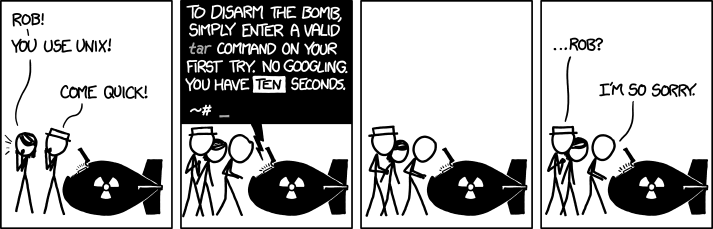
The obligatory xkcd

Use cheat with cheatsheets.

Example

The next time you're forced to disarm a nuclear weapon without consulting Google, you may run:

cheat tar

You will be presented with a cheatsheet resembling the following:

# To extract an uncompressed archive:
tar -xvf '/path/to/foo.tar'

# To extract a .gz archive:
tar -xzvf '/path/to/foo.tgz'

# To create a .gz archive:
tar -czvf '/path/to/foo.tgz' '/path/to/foo/'

# To extract a .bz2 archive:
tar -xjvf '/path/to/foo.tgz'

# To create a .bz2 archive:
tar -cjvf '/path/to/foo.tgz' '/path/to/foo/'

Installing

For installation and configuration instructions, see INSTALLING.md.

Usage

To view a cheatsheet:

cheat tar      # a "top-level" cheatsheet
cheat foo/bar  # a "nested" cheatsheet

To edit a cheatsheet:

cheat -e tar     # opens the "tar" cheatsheet for editing, or creates it if it does not exist
cheat -e foo/bar # nested cheatsheets are accessed like this

To view the configured cheatpaths:

cheat -d

To list all available cheatsheets:

cheat -l

To briefly list all cheatsheets (names and tags only):

cheat -b

To list all cheatsheets that are tagged with "networking":

cheat -l -t networking

To list all cheatsheets on the "personal" path:

cheat -l -p personal

To search for the phrase "ssh" among cheatsheets:

cheat -s ssh

To search (by regex) for cheatsheets that contain an IP address:

cheat -r -s '(?:[0-9]{1,3}\.){3}[0-9]{1,3}'

Flags may be combined in intuitive ways. Example: to search sheets on the "personal" cheatpath that are tagged with "networking" and match a regex:

cheat -p personal -t networking --regex -s '(?:[0-9]{1,3}\.){3}[0-9]{1,3}'

Cheatsheets

Cheatsheets are plain-text files with no file extension, and are named according to the command used to view them:

cheat tar     # file is named "tar"
cheat foo/bar # file is named "bar", in a "foo" subdirectory

Cheatsheet text may optionally be preceded by a YAML frontmatter header that assigns tags and specifies syntax:

---
syntax: javascript
tags: [ array, map ]
---
// To map over an array:
const squares = [1, 2, 3, 4].map(x => x * x);

Syntax highlighting is provided by Chroma, and the syntax value may be set to any lexer name that Chroma supports. See Chroma's supported languages for a complete list.

The cheat executable includes no cheatsheets, but community-sourced cheatsheets are available. You will be asked if you would like to install the community-sourced cheatsheets the first time you run cheat.

Cheatpaths

Cheatsheets are stored on "cheatpaths", which are directories that contain cheatsheets. Cheatpaths are specified in the conf.yml file.

It can be useful to configure cheat against multiple cheatpaths. A common pattern is to store cheatsheets from multiple repositories on individual cheatpaths:

# conf.yml:
# ...
cheatpaths:
  - name: community                   # a name for the cheatpath
    path: ~/documents/cheat/community # the path's location on the filesystem
    tags: [ community ]               # these tags will be applied to all sheets on the path
    readonly: true                    # if true, `cheat` will not create new cheatsheets here

  - name: personal
    path: ~/documents/cheat/personal  # this is a separate directory and repository than above
    tags: [ personal ]
    readonly: false                   # new sheets may be written here
# ...

The readonly option instructs cheat not to edit (or create) any cheatsheets on the path. This is useful to prevent merge-conflicts from arising on upstream cheatsheet repositories.

If a user attempts to edit a cheatsheet on a read-only cheatpath, cheat will transparently copy that sheet to a writeable directory before opening it for editing.

Directory-scoped Cheatpaths

At times, it can be useful to closely associate cheatsheets with a directory on your filesystem. cheat facilitates this by searching for a .cheat directory in the current working directory and its ancestors (similar to how git locates .git directories). The nearest .cheat directory found will (temporarily) be added to the cheatpaths. This means you can place a .cheat directory at your project root and it will be available from any subdirectory within that project.

Autocompletion

cheat can generate shell completion scripts for bash, zsh, fish, and powershell via the --completion flag:

cheat --completion bash
cheat --completion zsh
cheat --completion fish
cheat --completion powershell

Pipe the output to the appropriate location for your shell. For example:

# bash (user-local)
mkdir -p ~/.local/share/bash-completion/completions
cheat --completion bash > ~/.local/share/bash-completion/completions/cheat

# bash (system-wide)
cheat --completion bash > /etc/bash_completion.d/cheat

# zsh (ensure the directory is on your fpath)
cheat --completion zsh > "${fpath[1]}/_cheat"

# fish
cheat --completion fish > ~/.config/fish/completions/cheat.fish

Completions are dynamically generated and include cheatsheet names, tags, and cheatpath names.

Frequently asked questions

Is cheat free to use?

cheat is open source under the MIT licence. There is no licence fee and no seat count — you can self-host it or, where the project offers one, pay a vendor for a managed version instead.

What does cheat do?

cheat allows you to create and view interactive cheatsheets on the command-line. It was designed to help remind *nix system administrators of options for comman

What is cheat written in?

cheat is primarily written in Go. Its source is publicly available at https://github.com/cheat/cheat, and it has 13,456 GitHub stars.