ChatALL is a free, open source ai interaction & interfaces project written in JavaScript and released under Apache-2.0. It has 16,496 GitHub stars, 1,723 forks and 234 open issues, and was last pushed 6 days ago. On this registry it ranks #33 of 76 tracked projects in AI Interaction & Interfaces, with 5 head-to-head comparisons available. It gained 3 stars over the last 3 tracked days.

What is ChatALL?

ChatALL is an open-source desktop application that sends one prompt to many AI bots concurrently so users can compare answers and discover the best result, and it is built for LLM gurus, LLM researchers, and developers of LLM applications.

What it is

ChatALL is a JavaScript desktop application built with Electron and Vue.js 3, and it runs on Linux and macOS. It lives in the generative AI ecosystem as an AI interaction interface. It replaces the practice of trying large language models one by one; instead, it sends a prompt to several AI bots at once and presents results for comparison. The project supports ChatGPT, Bing Chat, Bard, Alpaca, Vicuna, Claude, ChatGLM, MOSS, 讯飞星火, 文心一言, and more, and its Chinese name is 齐叨.

The concrete problem is that LLM behavior can be random and different bots excel at different tasks. ChatALL removes the sequential trial of each bot, which is slow and produces fragmented comparisons. It lets a user issue one prompt and see many answers side by side, so the best answer or creation is easier to find. The supported bot table distinguishes Web Access from API access, and some bots require no login, such as ChatGLM2 6B & 130B and Vicuna 13B & 33B.

Key capabilities

  • Send one prompt concurrently to many AI bots, including ChatGPT, Claude, Gemini, Copilot, Perplexity, Phind, and others, to discover the best results.
  • Compare bots that have Web Access, API access, or both; the supported bot table marks each bot with its access mode.
  • Use ChatGPT through its web interface or API, including the Azure OpenAI service.
  • Connect to Gradio endpoints for Hugging Face spaces or self-deployed models.
  • Run the app as an Electron desktop application on Linux and macOS, with a Vue.js 3 front end.
  • Open the project in GitHub Codespaces for a cloud development environment.
  • Read documentation in multiple languages, including Deutsch, Español, Français, Italian, 日本語, 한국어, Русский, Tiếng Việt, and 简体中文.

Who uses it and how

  • LLM gurus use ChatALL to find the best answers or creations from LLMs, because the tool runs several bots at once.
  • LLM researchers use it to compare strengths and weaknesses of various LLMs in different fields, using the concurrent response view.
  • Developers of LLM applications use it to debug prompts quickly and to find the best-performing foundation models.
  • Desktop users on Linux and macOS run the Electron app locally, and they can test certain bots without login, including ChatGLM2 6B & 130B and Vicuna 13B & 33B.
  • Users who want to evaluate web-accessible bots can send prompts to services such as Bing Chat, Bard, Character.AI, HuggingChat, Kimi, and Poe.

Getting started

Download and install ChatALL from the GitHub Releases page or from chatall.ai, then ask a prompt. The README states that all a user needs to do is download, install, and ask.

How it compares

The facts name no comparable multi-bot chat clients or paid products that ChatALL replaces. ChatALL stands alone in this registry.

When to use it — and when not to

ChatALL is appropriate when the goal is concurrent comparison of many AI bots, especially for prompt debugging or model selection. A user who needs stable, production-grade API integrations should not rely on the web-connected bots in ChatALL, because those connections rely on reverse engineering and face frequent stability issues when service providers update their web interfaces and security measures; many bots also offer web access only. The project describes a desktop application, and the facts mention no database, storage, or SMTP service to operate, but the README itself warns that web-connected bots are inherently less reliable and difficult to maintain.

project readme (upstream, from github) — read inline

Chat with ALL AI Bots Concurrently, Discover the Best

Deutsch | English | Español | Français | Italian | 日本語 | 한국어 | Русский | Tiếng Việt | 简体中文

Open in GitHub Codespaces

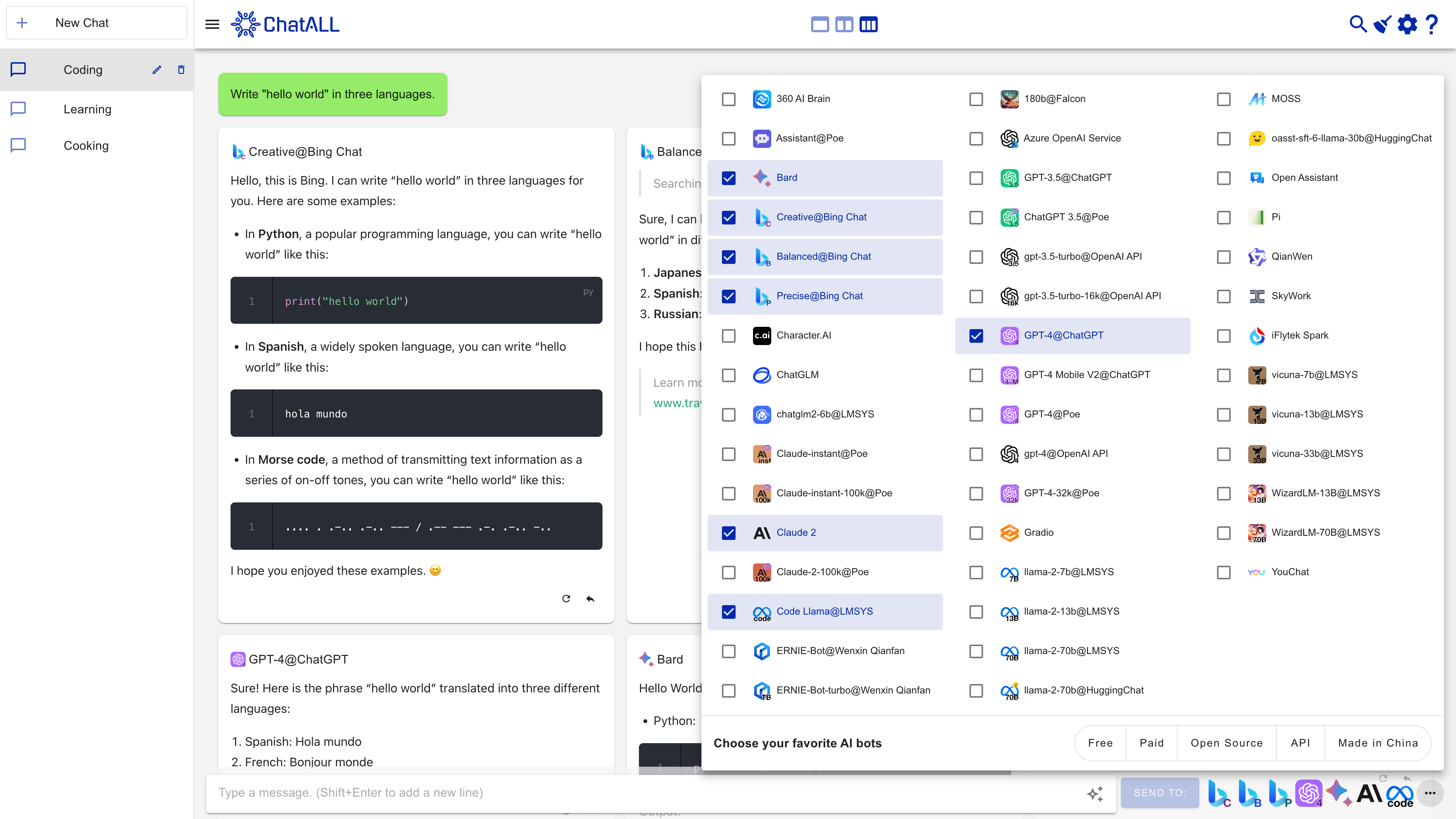
Screenshots

Screenshot

Features

Large Language Models (LLMs) based AI bots are amazing. However, their behavior can be random and different bots excel at different tasks. If you want the best experience, don't try them one by one. ChatALL (Chinese name: 齐叨) can send prompt to several AI bots concurrently, help you to discover the best results. All you need to do is download, install and ask.

Is this you?

Typical users of ChatALL are:

  • 🤠Gurus of LLMs, who want to find the best answers or creations from LLMs.
  • 🤓Researchers of LLMs, who want to intuitively compare the strengths and weaknesses of various LLMs in different fields.
  • 😎Developers of LLM applications, who want to quickly debug prompts and find the best-performing foundation models.

Supported bots

AI Bots Web Access API Notes
360 AI Brain Yes No API
Baidu ERNIE No Yes
Character.AI Yes No API
ChatGLM2 6B & 130B Yes No API No Login required
ChatGPT Yes Yes Web Browsing, Azure OpenAI service included
Claude Yes Yes
Code Llama Yes No API
Cohere Aya 23 No Yes
Cohere Command R Models No Yes
Copilot Yes No API
Dedao Learning Assistant Coming soon No API
Falcon 180B Yes No API
Gemini Yes Yes
Gemma 2B & 7B Yes No API
Gradio Yes No API For Hugging Face space/self-deployed models
Groq Cloud No Yes
HuggingChat Yes No API
iFLYTEK SPARK Yes Coming soon
Kimi Yes No API
Llama 2 13B & 70B Yes No API
MOSS Yes No API
Perplexity Yes No API
Phind Yes No API
Pi Yes No API
Poe Yes Coming soon
SkyWork Yes Coming soon
Tongyi Qianwen Yes Coming soon
Vicuna 13B & 33B Yes No API No Login required
WizardLM 70B Yes No API
xAI Grok No Yes
YouChat Yes No API
You Yes No API
Zephyr Yes No API

More is coming. Upvote your favorite bots in these issues.

Note on Web-connected Bot Reliability

Web-connected AI bots (those marked with "Web Access") are inherently less reliable and frequently face stability issues, as service providers regularly update their web interfaces and security measures. These web-based connections rely on reverse engineering and are difficult to maintain, often breaking unexpectedly. For a dependable experience, we strongly recommend using bots that offer API access whenever possible.

Other features

  • Quick-prompt mode: send the next prompt without waiting for the previous request to complete
  • Save chat history locally, protect your privacy
  • Highlight the response you like, delete the bad
  • Enable/disable any bots at any time
  • Switch between one, two, or three-column view
  • Auto update to the latest version
  • Dark mode (contributed by @tanchekwei)
  • Short keys. Press Ctrl + / to know all of them (contributed by @tanchekwei)
  • Multiple chats (contributed by @tanchekwei)
  • Proxy setting (contributed by @msaong)
  • Prompt management (contributed by @tanchekwei)
  • Supports multiple languages (Chinese, English, German, French, Russian, Vietnamese, Korean, Japanese, Spanish, Italian)
  • Supports Windows, macOS and Linux

Planned features:

You are welcome to contribute to these features.

  • Deploy front-end to GitHub Pages

Privacy

All chat history, settings and login data are saved locally on your computer.

ChatALL collects anonymous usage data to help us improve the product. Including:

  • Which AI bots are prompted and how long the prompt is. Not including the prompt content.
  • How long the response is, and which response is deleted/highlighted. Not including the response content.

Prerequisites

ChatALL is a client, not a proxy. Therefore, you must:

  1. Have working accounts and/or API tokens for the bots.
  2. Have reliable network connections to the bots.

Download / Install

Download from https://gith

readme truncated — read the full docs on github

Frequently asked questions

Is ChatALL free to use?

ChatALL is open source under the Apache-2.0 licence. There is no licence fee and no seat count — you can self-host it or, where the project offers one, pay a vendor for a managed version instead.

What does ChatALL do?

Concurrently chat with ChatGPT, Bing Chat, Bard, Alpaca, Vicuna, Claude, ChatGLM, MOSS, 讯飞星火, 文心一言 and more, discover the best answers

What is ChatALL written in?

ChatALL is primarily written in JavaScript. Its source is publicly available at https://github.com/ai-shifu/ChatALL, and it has 16,496 GitHub stars.