calcure is a free, open source project & work management project written in Python and released under MIT. It has 2,359 GitHub stars, 73 forks and 6 open issues, and was last pushed 20 days ago. On this registry it ranks #33 of 62 tracked projects in Project & Work Management, with 5 head-to-head comparisons available. It gained 3 stars over the last 3 tracked days.

What is calcure?

What it is

Calcure is a modern terminal user interface calendar and task manager written in Python under the MIT license. It runs in a terminal on Linux, macOS, or Windows, and it presents events, tasks, birthdays, and reminders in a customizable text-based interface.

The problem it addresses is managing personal schedules without depending on a hosted calendar application. Calcure keeps data in a plain text database in the user folder, which can be synced with cloud storage. It also displays events and tasks from .ics files synchronized with external calendars, including Nextcloud and Google.

Key capabilities

  • It provides a terminal interface for viewing and managing calendar events and tasks with a minimal layout.
  • It supports Vim-style key bindings, and users can customize them through a keybindings.ini file.
  • It manages a todo list with subtasks, deadlines, and timers.
  • It displays birthdays from abook contacts, allowing users to see personal dates alongside scheduled events.
  • It can import events and tasks from calcurse, helping users move existing terminal-based schedule data into Calcure.
  • It supports customizable colors, icons, settings, resize behavior, mobile-friendly operation, current weather, and the Persian calendar.

Who uses it and how

  • Terminal users install Calcure as a Python application and run it from the command line to manage daily events and tasks.
  • People who use cloud calendars sync events and tasks into local .ics files and configure Calcure to display them in read-only mode.
  • Users who already manage birthdays in abook can keep that contact data and view birthday entries inside the calendar.
  • Users migrating from calcurse can import existing events and tasks into Calcure instead of starting from an empty database.

Getting started

Typical installation uses pipx install calcure on Linux and macOS, or the AUR package with yay -S calcure, and Calcure is also available as a NixOS package. On Windows, users install Windows Terminal and Python 3, run pip install windows-curses calcure, then start the program with python -m calcure.

When to use it — and when not to

Calcure is useful when you want a local, customizable, terminal-based calendar and task manager that can sync with .ics files and keep plain text data. It is less suitable when you need a hosted service or automatic cloud account management, because the README shows manual terminal installation, local configuration, and cloud syncing through exported calendar files. Its limitations are the need for Python, terminal access, and user-managed synchronization.

project readme (upstream, from github) — read inline

Calcure

Modern TUI calendar and task manager with customizable interface. Manages your events and tasks, displays birthdays from your abook, and can import events and tasks from calcurse.

See documentation for more information.
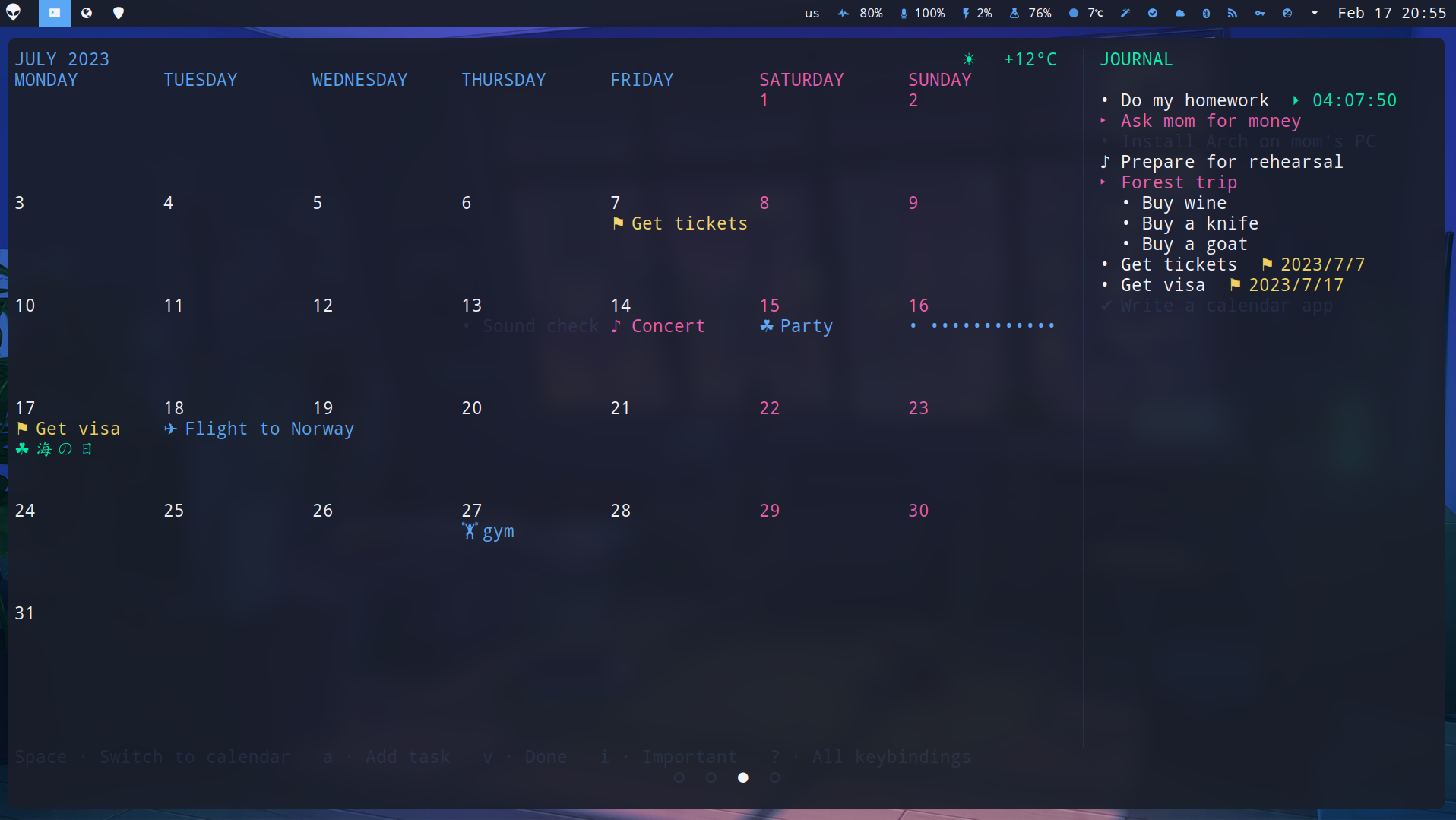
screenshot

Features

  • Vim keys
  • View tasks and events from .ics files synced with clouds
  • Operation with fewest key presses possible
  • Todo list with subtasks, deadlines, and timers
  • Birthdays of your abook contacts
  • Import of events and tasks from calcurse
  • Icons according to the name ✈ ⛷ ⛱
  • Private events and tasks •••••
  • Plain text database in your folder for cloud sync
  • Customizable colors, icons, and other features
  • Resize and mobile friendly
  • Current weather ⛅
  • Support for Persian calendar

Installation

Linux and Mac OS

There are several ways to install:

pipx install calcure - the up-to-date version from PyPi. You may need to install pipx first.

yay -S calcure - AUR package is available. Upvote to support the project!

calcure is also available as NixOS package.

Windows

  1. Install Windows Terminal app from the Microsoft Store.
  2. Install Python 3.x also from the Microsoft Store (if you just type python in the Windows Terminal app it will offer you to install)
  3. Install the program and libraries by typing in the Windows Terminal pip install windows-curses calcure
  4. Now you can finally run it by typing in the Windows Terminal python -m calcure

Upgrade to the most recent version

pipx upgrade calcure

Dependencies

  • python 3.10 and higher (usually already installed)
  • holidays and icalendar python libraries (should be installed automatically with the calcure).
  • windows-curses on Windows

Usage

Run calcure in your terminal. You may need to restart your terminal after the install.

Syncing with cloud calendars

This page in documentation shows examples how to sync and display in read-only mode events and tasks from Nextcloud, Google, and other calendars.

User arguments

Various user arguments can be added started in special mods add tasks and events etc.

Key bindings

List of all key bindings can be accessed in the wiki and via ? key in the program. The keys can be customized by creating keybindings.ini file, as explained in documentation.

Settings

Example of config.ini file and explanations of all settings are available in the documentation. On the first run, program will create a config.ini file where you can edit parameters, colors, and icons at ~/.config/calcure/config.ini.

Setting daily reminders

You can try this project to receive daily reminders of events in your Calcure.

Troubleshooting

Typical problems and solutions are described in documentation. If you faced a new problem, don't hesitate to open an issue.

Contribution

Full information about contribution is available in the documentation.

Support

I am not a professional developer and work on open-source projects in my free time. If you'd like to support the development, consider donations via buymeacoffee or cryptocurrencies:

  • BTC bc1qpkzmutdqfxkce34skt09vll97s5smpa0r2tyzj
  • ETH 0x6f1Ce9cA181458Fc153a5f7cBF88044736C3b00C
  • BNB 0x40f22c372758E35C905458cAF8BB17f51ac133d1
  • LTC ltc1qtu33qyv2xlzxda5mmrmk943zpksq8q75tuh85p
  • XMR 4AHRhpNYUZcPVN78rbUWAzBuvMKQdpwStS5L3kjunnBMWWW2pjYBko1RUF6nQVpgQPdfAkM3jrEWrWKDHz1h4Ucd4gFCZ9j

Frequently asked questions

Is calcure free to use?

calcure is open source under the MIT licence. There is no licence fee and no seat count — you can self-host it or, where the project offers one, pay a vendor for a managed version instead.

What does calcure do?

Modern TUI calendar and task manager with minimal and customizable UI.

What is calcure written in?

calcure is primarily written in Python. Its source is publicly available at https://github.com/anufrievroman/calcure, and it has 2,359 GitHub stars.