The Open Source AI Agent Application Framework
Connect LLMs to your existing application focused on your business





"Conversation as a platform (CaaP) is the future, so it's perfect that we're already offering the whole toolkits to our .NET developers using the BotSharp AI BOT Platform Builder to build a CaaP. It opens up as much learning power as possible for your own robots and precisely control every step of the AI processing pipeline."
BotSharp is an open source machine learning framework for AI Bot platform builder. This project involves natural language understanding, computer vision and audio processing technologies, and aims to promote the development and application of intelligent robot assistants in information systems. Out-of-the-box machine learning algorithms allow ordinary programmers to develop artificial intelligence applications faster and easier.
It's written in C# running on .Net Core that is full cross-platform framework, the plug-in and pipeline flow execution design is adopted to completely decouple the plug-ins. C# is a enterprise grade programming language which is widely used to code business logic in information management related system. More friendly to corporate developers. BotSharp adopts machine learning algorithm in C# directly. That will facilitate the feature of the typed language C#, and be more easier when refactoring code in system scope.
BotSharp is in accordance with components principle strictly, decouples every part that is needed in the platform builder. So you can choose different UI/UX, or pick up a different LLM providers. They are all modularized based on unified interfaces. BotSharp provides an advanced Agent abstraction layer to efficiently manage complex application scenarios in enterprises, allowing enterprise developers to efficiently integrate AI into business systems.
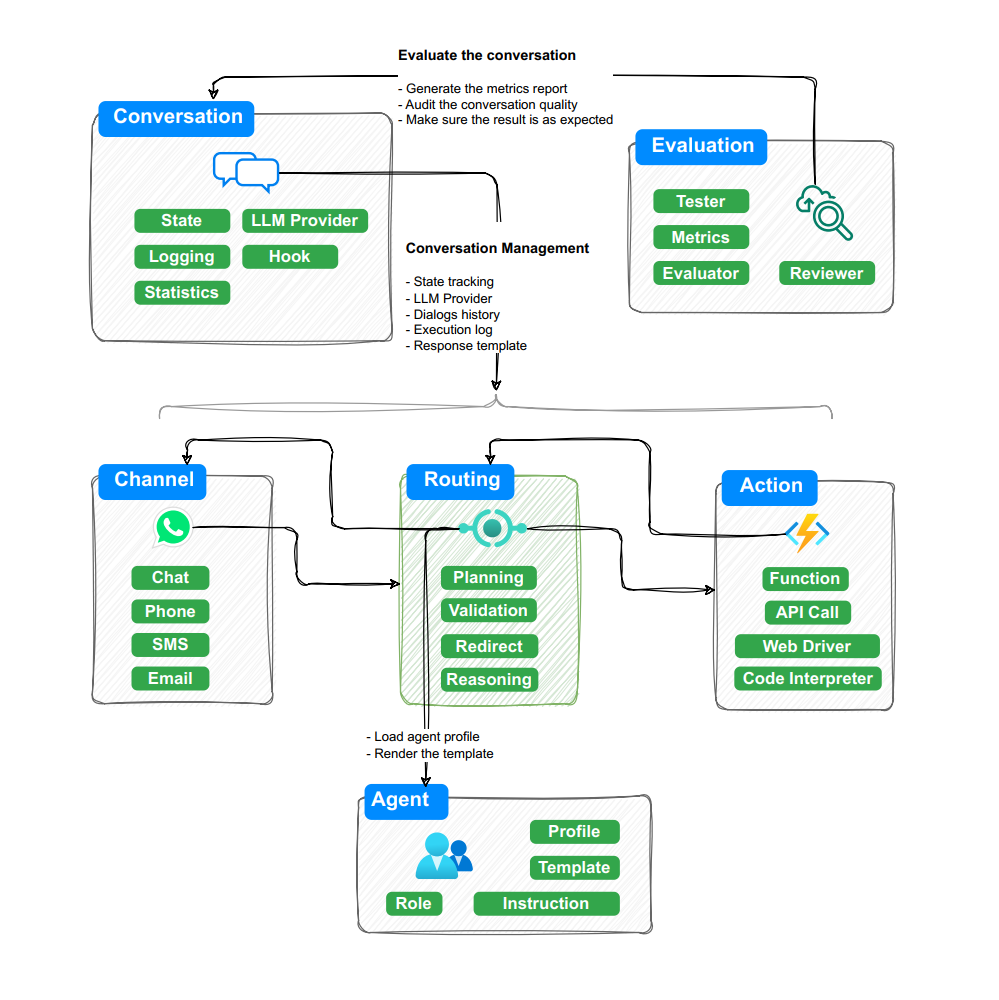
Some Features
- Built-in multi-agents and conversation with state management.
- Support multiple LLM Planning approaches to handle different tasks from simple to complex.
- Built-in RAG related interfaces, Memory based vector searching.
- Support multiple AI platforms (ChatGPT 3.5/ 4o/ o1, Gemini 2, LLaMA 3, Claude Sonnet 3.5,DeepSeek V3, HuggingFace).
- Allow multiple agents with different responsibilities cooperate to complete complex tasks.
- Build, test, evaluate and audit your LLM agent in one place.
- Build-in
BotSharp UIwritten in SvelteKit. - Abstract standard Rich Content data structure. Integrate with popular message channels like Facebook Messenger, Slack and Telegram.
- Provide RESTful Open API and WebSocket real-time communication.
- Built-in MCP Integration: Visual management of MCP, enabling large model calls to Tools. Supports mainstream services like mcp.so
Quick Started
- Run backend service
 PS D:\> git clone https://github.com/dotnetcore/BotSharp
 PS D:\> cd BotSharp
 # For Windows
 PS D:\BotSharp\> dotnet run --project .\src\WebStarter\WebStarter.csproj -p SolutionName=BotSharp
 # For Linux
 $ dotnet run --project ./src/WebStarter/WebStarter.csproj -p SolutionName=BotSharp
- Run Admin UI project, reference to BotSharp UI.
PS D:\> git clone https://github.com/SciSharp/BotSharp-UI
PS D:\> cd BotSharp-UI
PS D:\> npm install
PS D:\> npm run dev
Access http://localhost:5015/
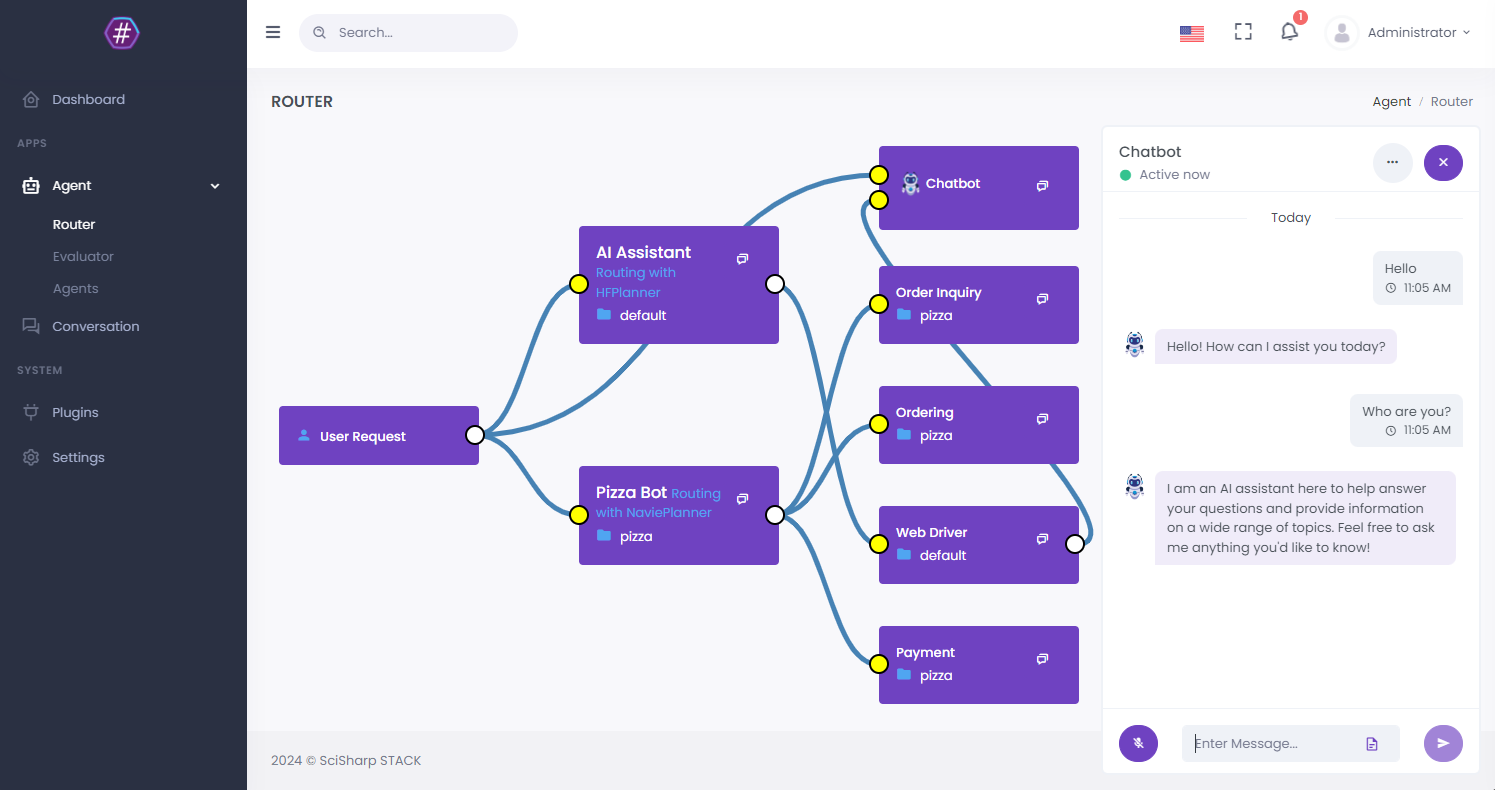
Core Modules
The core module is mainly composed of abstraction and framework function implementation, combined with some common tools.
- Plugin Loader
- Hooking
- Authentication
- Agent Profile
- Conversation & State
- Routing & Planning
- Templating
- File Repository
- Caching
- Rich Content
- LLM Provider
Plugins
BotSharp uses component design, the kernel is kept to a minimum, and business functions are implemented by external components. The modular design also allows contributors to better participate. Below are the built-in plugins:
Data Storages
- BotSharp.Core.Repository
- BotSharp.Plugin.MongoStorage
- BotSharp.Plugin.LiteDBStorage
- BotSharp.Plugin.TencentCos
LLMs
- BotSharp.Plugin.Planner
- BotSharp.Plugin.AzureOpenAI
- BotSharp.Plugin.OpenAI
- BotSharp.Plugin.AnthropicAI
- BotSharp.Plugin.DeepSeekAI
- BotSharp.Plugin.GoogleAI
- BotSharp.Plugin.MetaAI
- BotSharp.Plugin.HuggingFace
- BotSharp.Plugin.LLamaSharp
- BotSharp.Plugin.SemanticKernel
- BotSharp.Plugin.SparkDesk
Messaging / Channel
- BotSharp.OpenAPI
- BotSharp.Plugin.ChatHub
- BotSharp.Plugin.MetaMessenger
- BotSharp.Plugin.Twilio
- BotSharp.Plugin.TelegramBots
- BotSharp.Plugin.WeChat
RAGs
- BotSharp.Plugin.KnowledgeBase
- BotSharp.Plugin.Qdrant
Visions
- BotSharp.Plugin.PaddleSharp
Tools
- BotSharp.Plugin.Dashboard
- BotSharp.Plugin.RoutingSpeeder
- BotSharp.Plugin.AudioHandler
- BotSharp.Plugin.ChartHandler
- BotSharp.Plugin.EmailHandler
- BotSharp.Plugin.ExcelHandler
- BotSharp.Plugin.FileHandler
- BotSharp.Plugin.ImageHandler
- BotSharp.Plugin.HttpHandler
- BotSharp.Plugin.SqlDriver
- BotSharp.Plugin.WebDriver
- BotSharp.Plugin.PythonInterpreter
UIs
- BotSharp.Plugin.ChatbotUI
Roadmap
- A2A
- MCP
- Realtime
- Computer Use
- Browser Use
- Database Assistant
- Code Interpreter
- Conversation Management
- Multi-Agent Routing
- Knowledge Base
FAQ
General Questions
What is BotSharp? BotSharp is an open-source .NET machine learning framework for building AI Bot platforms. It provides out-of-the-box components for natural language understanding, computer vision, and audio processing, enabling enterprise developers to integrate AI into business systems efficiently.
What .NET versions are supported? BotSharp runs on .NET Core, which is fully cross-platform. It supports .NET 6+ and works on Windows, Linux, and macOS.
Is BotSharp free to use? Yes, BotSharp is licensed under Apache 2.0, allowing free use in both personal and commercial projects.
LLM Provider Configuration
Which LLM providers are supported? BotSharp supports multiple AI platforms including ChatGPT (3.5/4o/o1), Gemini 2, LLaMA 3, Claude Sonnet 3.5, DeepSeek V3, HuggingFace, and more through its modular plugin system.
How do I configure a custom LLM provider?
Create a plugin that implements the LLM provider interface, or use one of the built-in plugins like BotSharp.Plugin.OpenAI or BotSharp.Plugin.AnthropicAI. Configure the API keys in your appsettings.json.
Agent Development
How do I create a custom agent? Define an agent profile with its responsibilities, then implement the required hooks and plugins. BotSharp's advanced Agent abstraction layer handles the complex orchestration automatically.
Can multiple agents cooperate on a task? Yes, BotSharp supports multi-agent scenarios where agents with different responsibilities can cooperate to complete complex tasks. The routing and planning system handles agent coordination.
MCP Integration
What is MCP and how does BotSharp support it? MCP (Model Context Protocol) enables large model calls to external tools. BotSharp has built-in MCP integration with visual management capabilities, supporting mainstream services like mcp.so.
Deployment
How do I deploy BotSharp in production?
Run the backend service using dotnet run and deploy it behind a reverse proxy (Nginx/IIS). The Admin UI (built with SvelteKit) can be deployed separately. See the documentation for detailed deployment guides.
Can I use BotSharp without the UI? Yes, BotSharp provides RESTful Open API and WebSocket real-time communication. You can integrate it directly with your own frontend or messaging channels.
Troubleshooting
BotSharp fails to start with dependency errors
Ensure you have .NET 6+ SDK installed and all NuGet packages are restored. Run dotnet restore before dotnet run.
LLM calls are timing out
Check your API key configuration in appsettings.json, verify network connectivity to the LLM provider, and ensure the model name is correct.
Documents
Read the docs: https://botsharp.readthedocs.io?wt.mc_id=AI-MVP-5005183
New documentation website: https://botsharp.verdure-hiro.cn
If you feel that this project is helpful to you, please Star the project, we would be very grateful.
Member project of SciSharp STACK which is the .NET based ecosystem of open-source software for mathematics, science, and engineering.