BookmarkHub is a TypeScript browser extension, released under the Apache-2.0 licence, that synchronizes bookmarks between different browsers by keeping them in a GitHub Gist, and it is aimed at people who work across more than one browser or machine and already hold a GitHub account.
What it is
BookmarkHub is a browser plug-in that synchronizes browser bookmarks between different browsers. It installs into Chrome, Firefox, Microsoft Edge, and other browsers built on the Chromium kernel, and it uses GitHub's Gist records as the storage layer for those bookmarks, so the bookmark data lives in the user's own GitHub account rather than on a vendor-run sync service. The project is written in TypeScript, carries the topics bookmarks, browser-extension, chrome-extension, gist, and sync-bookmarks, and has accumulated 2555 stars and 231 forks on GitHub, with 67 open issues.
The concrete problem it solves is browser-bound bookmark silos. Native bookmark sync ties a user to one vendor's ecosystem, so a Firefox profile and a Chrome profile do not share a bookmark list, and moving between machines means exporting and importing by hand. BookmarkHub replaces that manual export-and-import workflow, and the vendor-locked alternative of a single browser's built-in account sync, with a one-click upload and download against a Gist. Because the Gist is the interchange point, the same set of bookmarks can be pulled down on a second browser on the same machine or on a different machine entirely.
Key capabilities
- No registration with the project itself is required; the extension authenticates against the user's own GitHub account using a personal access token and a Gist.
- One-click upload and one-click download of bookmarks, with clear-all-local-bookmarks also available in a single click.
- Cross-machine and cross-browser synchronization of bookmarks through the shared Gist record.
- Display of the number of local and remote bookmarks, so a user can tell whether the two sides are in step before syncing.
- Bookmark storage in a GitHub Gist rather than a proprietary backend, which keeps the data under the user's GitHub credentials.
- Distribution as a published extension for Chrome, Firefox, Microsoft Edge, and other Chromium-kernel browsers.
Who uses it and how
- People who run Chrome, Firefox, and Microsoft Edge side by side and want one bookmark list available in all of them.
- People who work on more than one machine and want the same bookmarks on each, without exporting and importing a file by hand.
- Users who already have a GitHub account and are comfortable creating a personal access token and a Gist for storage.
- Chromium-kernel browser users, who install the same extension package as the Chrome build.
- Anyone who wants bookmark data held in an account they control rather than in a browser vendor's sync service.
Getting started
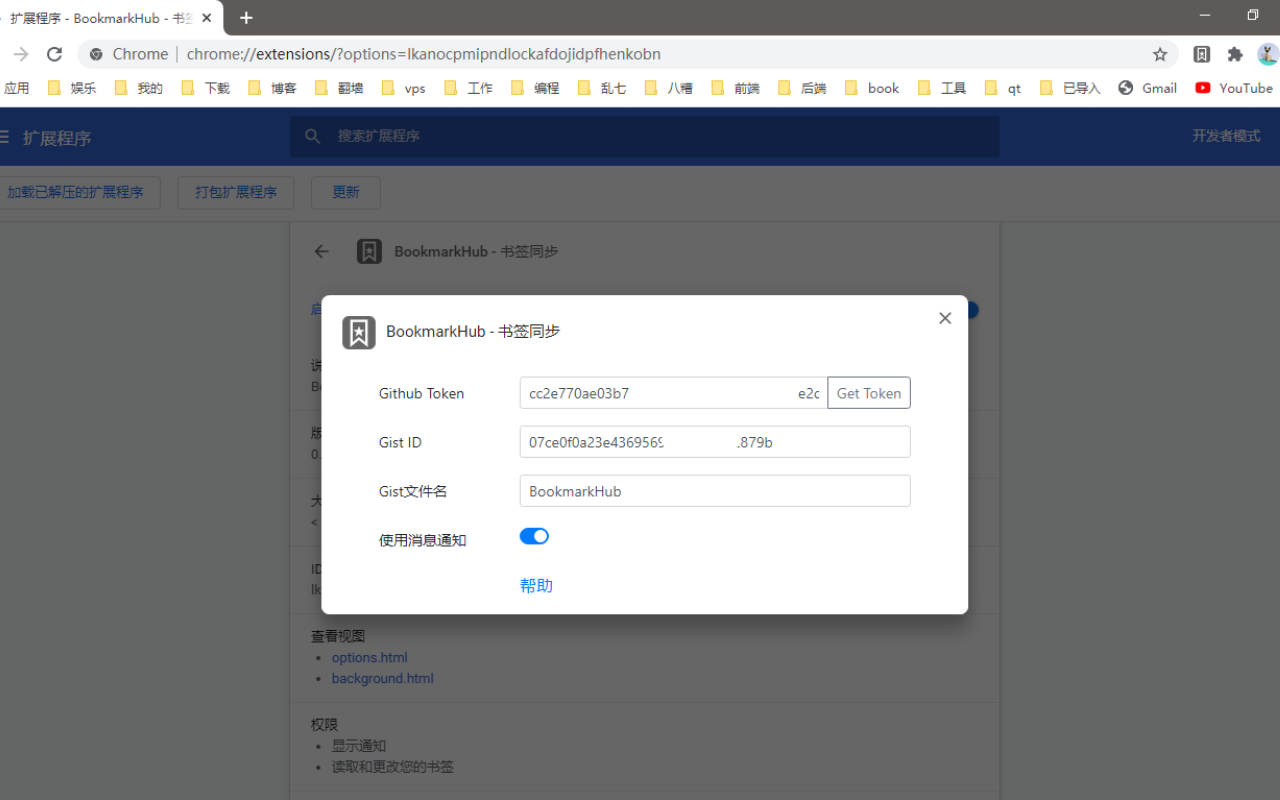
The extension is installed from the Chrome Web Store, Firefox Add-ons, or the Microsoft Edge Add-ons listing, depending on the browser. After installation, the user creates a GitHub personal access token that manages gists, creates a secret gist, then opens the extension's settings popup and fills in the token and the gist ID.
How it compares
The accompanying facts do not name any paid products that BookmarkHub replaces, and they do not name any comparable open-source tools either. On the evidence available here, BookmarkHub stands alone in this registry.
When to use it — and when not to
A self-hoster, or rather a self-syncer, must operate a GitHub account, a personal access token with gist permissions, and a gist to hold the data; there is no server component to run, but there is also no option to point the extension at a self-hosted backend. Synchronization is manual rather than automatic, since automatic sync, WebDAV support, a mobile app, import and export, and bookmark sharing all sit unchecked on the roadmap, so anyone who expects bookmarks to move between browsers without pressing a button should not pick this. The README also warns that a public gist exposes bookmarks to search, which makes the choice of a secret gist a requirement rather than a preference, and the project carries 67 open issues, so prospective users should weigh an active but non-trivial bug and request queue.