



bomber is an application that scans SBOMs for security vulnerabilities.
Overview
So you've asked a vendor for an Software Bill of Materials (SBOM) for one of their closed source products, and they provided one to you in a JSON file... now what?
The first thing you're going to want to do is see if any of the components listed inside the SBOM have security vulnerabilities, and what kind of licenses these components have. This will help you identify what kind of risk you will be taking on by using the product.
Finding security vulnerabilities and license information for components identified in a SBOM is exactly what bomber is meant to do. bomber can read any JSON or XML based CycloneDX format, or a JSON SPDX or Syft formatted SBOM, and tell you pretty quickly if there are any vulnerabilities.
Table of Contents
- Open vs. Closed Source
- Purpose
- Supported SBOM formats
- Providers
- Installation
- Using bomber
- Output Formats
- Ignoring Vulnerabilities
- Filtering Output
- Data Enrichment
- Advanced stuff
- Experimental Features
- Messing around
- Notes
- Contributing
- Software Bill of Materials
- Sponsors
- Credits
Open vs. Closed Source
Software can either be open or closed source. You can look at third party components you'll find in Github, or any public source repository as open source. Technically, the software you create internally at your own company is open source as well - it's not public, but your internal teams can see it. Closed source software can also be internal, but usually this is software that you purchase from external vendors.
Companies can use SCA tools provided by vendors such as Github, Sonatype, Snyk, etc. to scan any kind of open source and provide vulnerability data - and even generate SBOMs in some cases. What they can't do (yet...) is scan closed source software that you don't have visibility into. This is where SBOMs and bomber come into play. SBOMs provide the composition of software that you can't access, and bomber determines if anything in the SBOM has vulnerabilities.
Purpose
We created bomber to scan the closed source SBOMs that are provided when you receive them from vendors. It can scan open source SBOMs too, and technically you could use bomber as an open source SCA tool if you wanted to.
Supported SBOM formats
There are quite a few SBOM formats available today. bomber supports the following:
Providers

bomber supports multiple sources for vulnerability information. We call these providers. Currently, bomber uses OSV as the default provider, but you can also use the Github Advisory Database, the Sonatype OSS Index, or Snyk.
At this time, please note that OSV is free and does not require any credentials to use, Sonatype OSS Index is free but requires you to register and obtain a token, and Snyk support requires a Snyk license.
In addition to data bomber collects from Providers, it also enriches vulnerability data with extra information such as exploitation probabilities.
Provider Support
Please note that each provider supports different ecosystems, so if you're not seeing any vulnerabilities in one, try another. An ecosystem is simply the package manager, or type of package. Examples include rpm, npm, gems, etc. It is important to understand that each provider may report different vulnerabilities. If in doubt, look at a few of them.
If bomber does not find any vulnerabilities, it doesn't mean that there aren't any. All it means is that the provider being used didn't detect any, or it doesn't support the ecosystem. Some providers have vulnerabilities that come back with no Severity information. In this case, the Severity will be listed as "UNDEFINED"
Provider Documentation
Provider documentation for bomber can be found:
Installation
Mac
You can use Homebrew to install bomber using the following:
brew tap devops-kung-fu/homebrew-tap
brew install devops-kung-fu/homebrew-tap/bomber
If you do not have Homebrew, you can still download the latest release (ex: bomber_0.4.1_darwin_all.tar.gz), extract the files from the archive, and use the bomber binary.
If you wish, you can move the bomber binary to your /usr/local/bin directory or anywhere on your path.
Linux
To install bomber, download the latest release for your platform and install locally. For example, install bomber on Ubuntu:
dpkg -i bomber_0.5.0_linux_arm64.deb
Using bomber
You can scan either an entire folder of SBOMs or an individual SBOM with bomber. bomber doesn't care if you have multiple formats in a single folder. It'll sort everything out for you.
Note that the default output for bomber is to STDOUT. Options to output in HTML or JSON are described later in this document.
Single SBOM scan
# Using OSV (the default provider) which does not require any credentials
bomber scan cyclonedx.sbom.json

# Using a provider that requires credentials (ossindex)
bomber scan --provider=xxx --username=xxx --token=xxx [sbom.json]
If the provider finds vulnerabilities you'll see an output similar to the following:
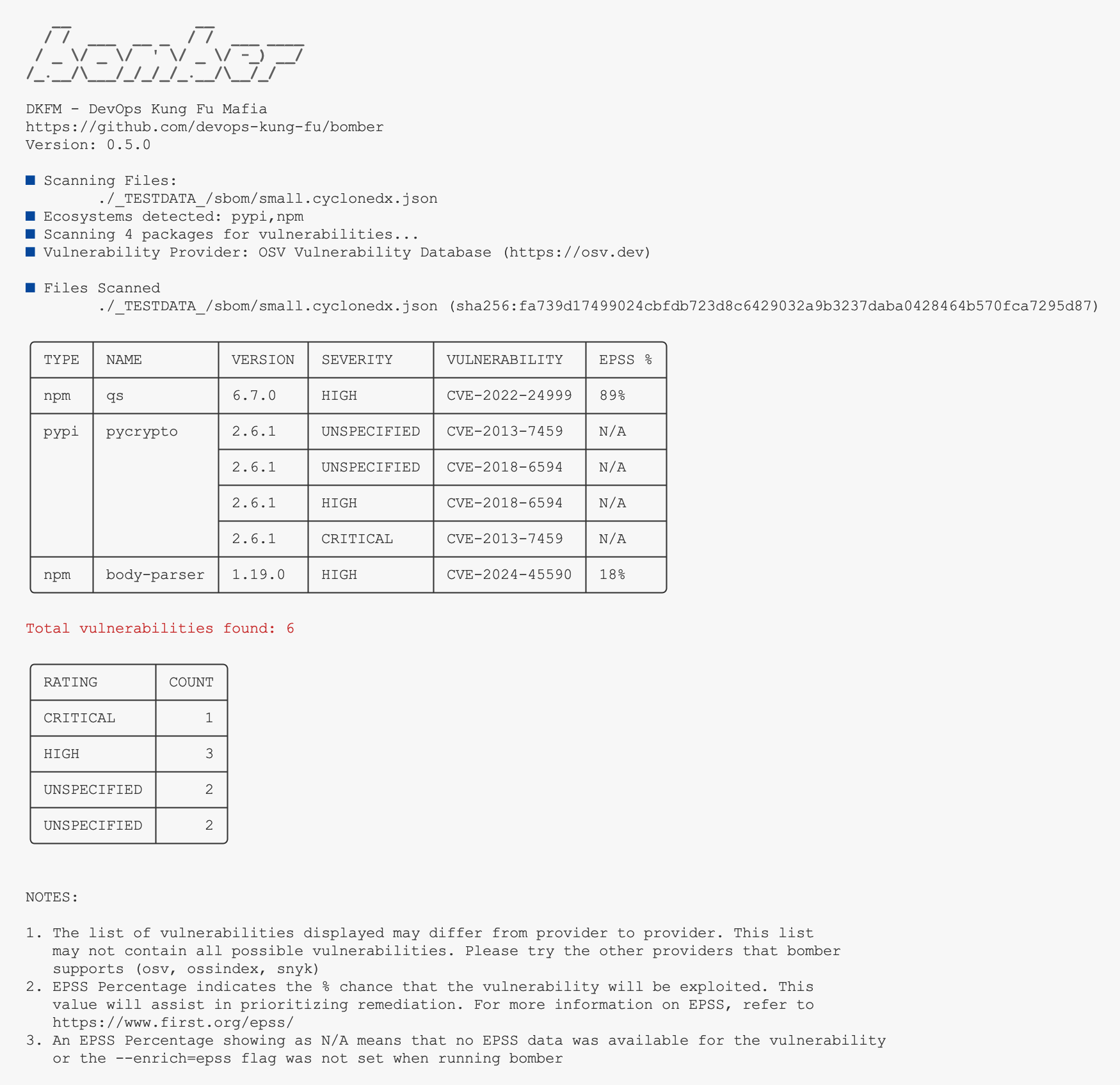
If the provider doesn't return any vulnerabilities you'll see a message saying no vulnerabilities were found.
NOTE: Just because may not have found any vulnerabilities using a specified provider doesn't mean there are no vulnerabilities. Please try the other providers that bomber supports.
Entire folder scan
This is good for when you receive multiple SBOMs from a vendor for the same product. Or, maybe you want to find out what vulnerabilities you have in your entire organization. A folder scan will find all components, de-duplicate them, and then scan them for vulnerabilities.
# scan a folder of SBOMs (the following command will scan a folder in your current folder named "sboms")
bomber scan --provider=xxx --username=xxx --token=xxx ./sboms
You'll see a similar result to what a Single SBOM scan will provide.
Output Formats
bomber outputs data into three useful formats. By default, output is rendered to the command line. For enhanced reporting, you can output to HTML using the --output=html flag. To output to JSON, utilize the --output=json flag. Use comma separated output specification to get output in multiple formats --output=html,stdout,json.
HTML Output
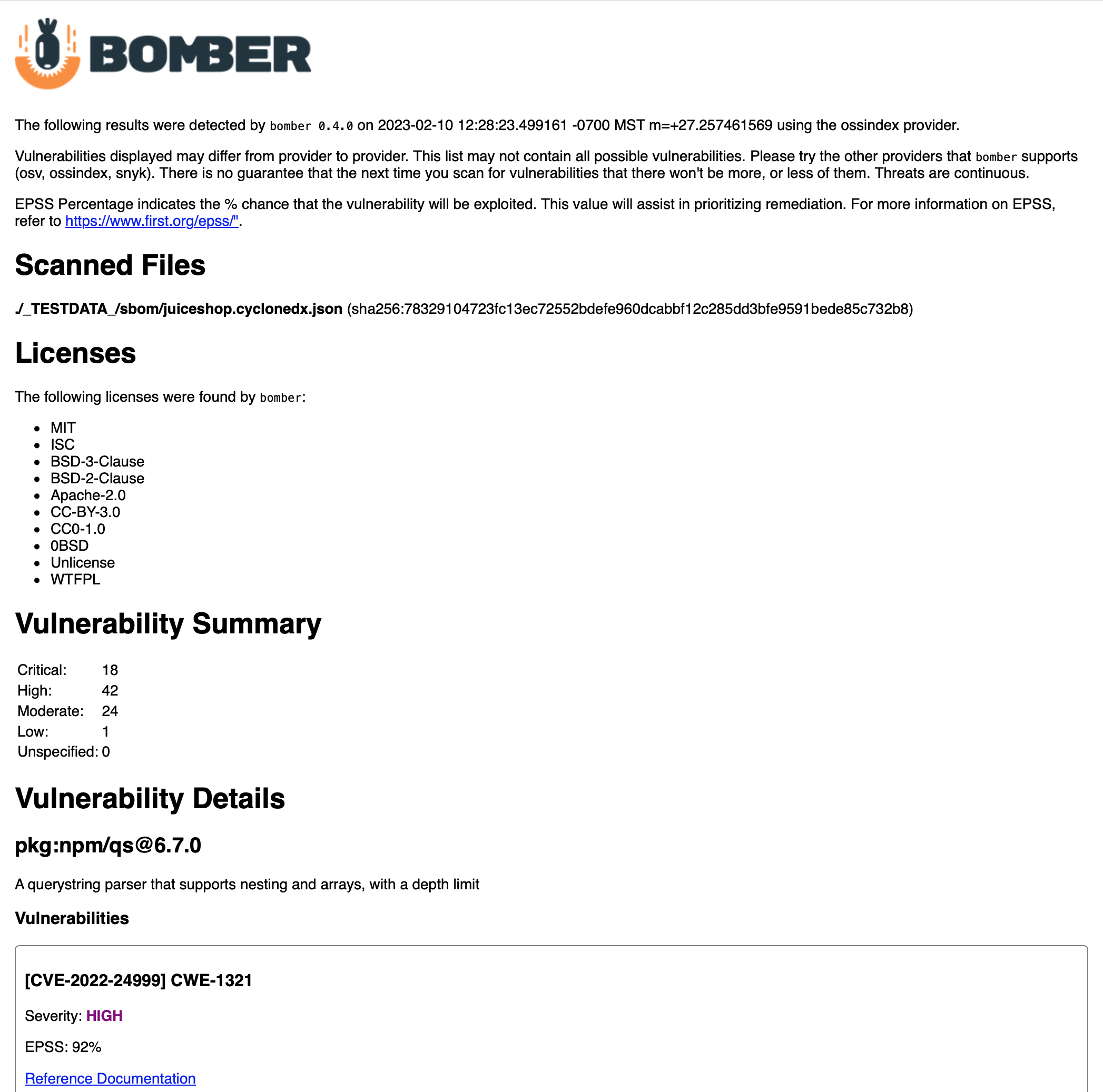
If you would like a readable report generated with detailed vulnerability information, you can utilized the --output flag to save a report to an HTML file.
Example command:
bomber scan bad-bom.json --output=html
This will save a file in your current folder in the format "YYYY-MM-DD-HH-MM-SS-bomber-results.html". If you open this file in a web browser, you'll see output like the following:
JSON Output
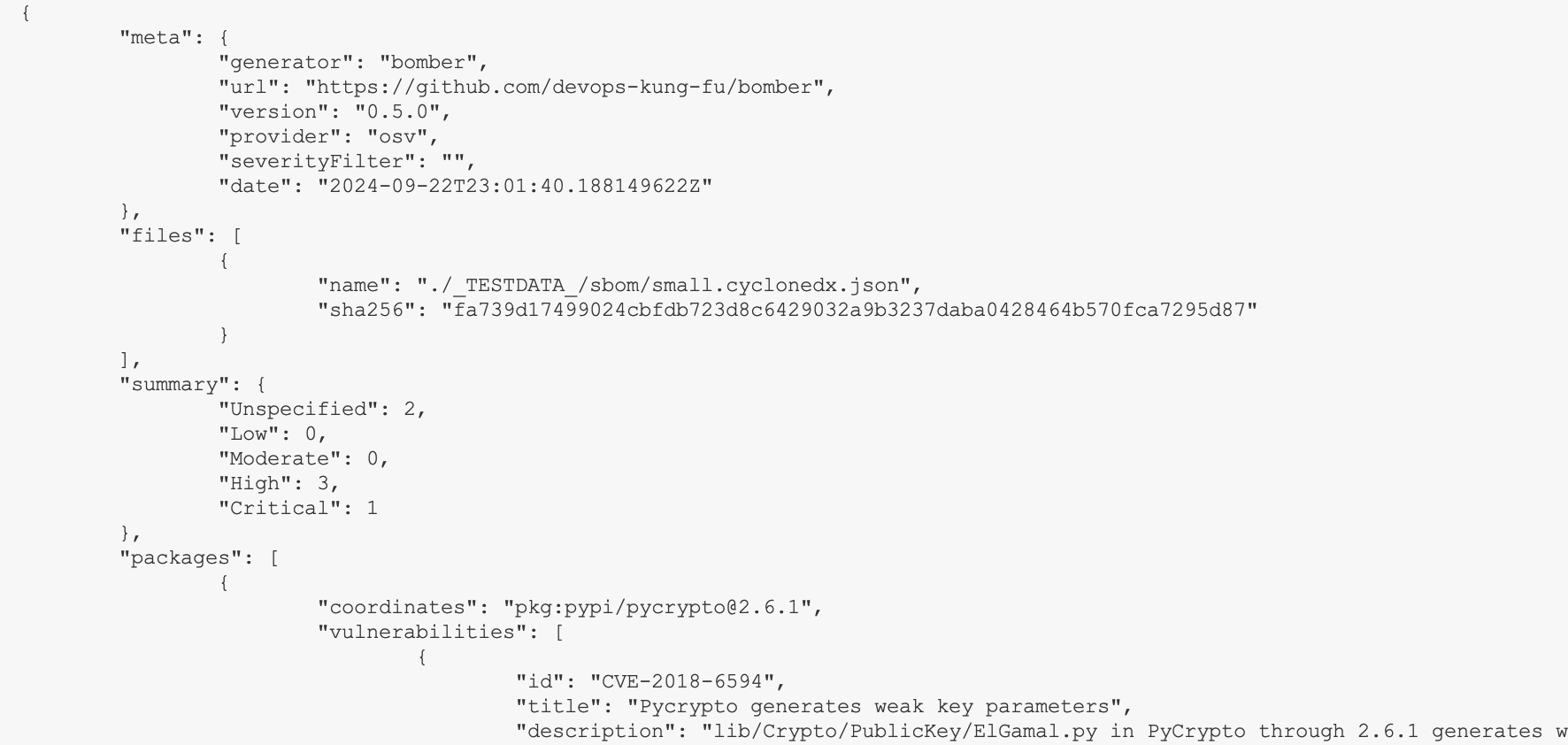
bomber can output vulnerability data in JSON format using the --output flag. The default output is to STDOUT. There is a ton of more information in the JSON output than what gets displayed in the terminal. You'll be able to see a package description and what it's purpose is, what the vulnerability name is, a summary of the vulnerability, and more.
Example command:
bomber scan bad-bom.json --output=json > filename.json
Markdown Output
bomber also supports output in Markdown format. This is very similar to the HTML output, but offloads styling to the Markdown renderer, such as GitHub. The output is saved to a file in the format "YYYY-MM-DD-HH-MM-SS-bomber-results.md".
Example command:
bomber scan bad-bom.json --output=md
Ignoring Vulnerabilities
If needed, you can use the --ignore-file flag to load a list of CVEs to ignore in the vulnerability output. This list needs to be in a specific format where each CVE to ignore is entered on a separate line similar to the following:
CVE-2022-31163
CVE-2022-23520
There is an example bomber.ignore file here
To use the bomber.ignore file, use the syntax as follows:
bomber --ignore-file=bomber.ignore scan bom.json
Filtering Output
You may set the severity level with the --severity flag in order to return specific vulnerability severities. For example, if you set --severity=moderate only vulnerabilities with a severity of MODERATE or above will be returned.
For example, the following command will return only high and critical vulnerabilities.
bomber --severity=high scan bom.json
Data Enrichment
bomber has the ability to enrich vulnerability data it obtains from the Providers. The first "enricher" we have implemented for is for EPSS
NOTE: EPSS scoring is no longer default in bomber 0.5.0 and above. to show EPSS scores, ensure you use the --enrich=epss flag.
Exploit Prediction Scoring System (EPSS)
EPSS stands for Exploit Prediction Scoring System and is framework that predicts the probability of a vulnerability being exploited. EPSS is often used to help in identifying high risk vulnerabilities to prioritize for remediation.
EPSS uses a percentage for probability. So if you see 94, the score is that is trying to say that vulnerability has a 94% probability of exploitation. And it stands to reason that a vulnerability with a score like 94, is something that deserves immediate attention, where a vulnerability with a score of like say 20 deserves to take a lower priority.
Advanced stuff
If you wish, you can set two environment variables to store your credentials, and not have to type them on the command line. Check out the Environment Variables information later in this README.
Scanning SBOMs from STDIN
If you're using bomber in your CI/CD pipelines, you can do an all in one command with Syft to generate and scan a SBOM for vulnerabilities. To do this, you can do something like the following command:
# Make sure you include the - character at the end of the command. This triggers bomber to read from STDIN
syft packages . -o cyclonedx-json | bomber scan --provider ossindex --output json -
This command creates a SBOM, pipes it into bomber, and generates results in JSON format.
Environment Variables
If you don't want to enter credentials all the time, you can add the following to your .bashrc or .bash_profile
export BOMBER_PROVIDER_USERNAME={{your OSS Index user name}}
export BOMBER_PROVIDER_TOKEN={{your OSS Index API Token}}
Experimantal Features
Highest Severity Return Codes (Experimental)
Using the flag --exitcode, will return with an exit code representing the highest vulnerability severity found. Without this flag you can expect an exit code of 0 for success, or 1 if an error was encountered.
Assuming there is no error, the following values will be returned by bomber when --exitcode
| Severity | Return Code |
|---|---|
| UNSPECIFIED (This is a status where the provider gives us something wacky, or no info) | 10 |
| LOW | 11 |
| MODERATE | 12 |
| HIGH | 13 |
| CRITICAL | 14 |
OpenAI AI Enriched HTML Report Output
bomber now contains an experimental feature that enriches the description of vulnerabilities in a html output. This feature takes a vulnerability and changes the description into something more understandable for a non-technical user.
NOTE: This feature is in a major alpha state at this time. It is extremely slow, and the output isn't formatted very well.
To use this feature, you will need to provide an OpenAI API key. You can either pass this key into the CLI using the --openai-api-key={{your OpenAI API Key}} or add an environment variable:
export OPENAI_API_KEY={{your OpenAI API Key}}
After setting your OpenAI API Key, you can set the output flag as such:
bomber scan --output ai [sbom.json]
Messing around
If you want to kick the tires on bomber you'll find a selection of test SBOMs in the test folder.
Notes
- It's pretty rare to see SBOMs with license information. Most of the time, the generators like Syft need a flag like
--license. If you need license info, make sure you ask for it with the SBOM. - OSV. It's great, but the API is also wonky. They have a batch endpoint that would make it a ton quicker to get information back, but at the time of writing it doesn't work as expected.
bomberneeds to send one PURL at a time to get vulnerabilities back, so in a big SBOM it will take some time. We'll keep an eye on that.
Contributing
If you would like to contribute to the development of bomber please refer to the CONTRIBUTING.md file in this repository. Please read the CODE_OF_CONDUCT.md file before contributing.
Software Bill of Materials
bomber uses Syft to generate a Software Bill of Materials every time a developer commits code to this repository (as long as Hookz is being used and is has been initialized in the working directory). More information for CycloneDX is available here.
The current CycloneDX SBOM for bomber is available here.
Sponsors
Thank you to the sponsors and supporters of bomber

Credits
A big thank-you to our friends at ZERO for the bomber logo.
Thank you to Sonatype for providing a wicked tool like the Sonatype OSS Index.
Many thanks to our friends and fellow bomber contributors at Snyk for creating a provider, and coding up processing a SBOM from STDIN. You guys rock.
EPSS description comes from the team at Nucleus. Thank you!