BleachBit is a free, open source system cleanup & optimization project written in Python and released under GPL-3.0. It has 6,930 GitHub stars, 455 forks and 313 open issues, and was last pushed 19 hours ago. On this registry it ranks #3 of 3 tracked projects in System Cleanup & Optimization, with 5 head-to-head comparisons available. It gained 51 stars over the last 6 tracked days.

What is BleachBit?

BleachBit is a free, GPL-3.0 system cleaner written in Python that deletes files on Windows and Linux to free disk space and protect privacy, made for desktop users and administrators who want a cross-platform alternative to commercial cleanup tools.

What it is

BleachBit is a desktop application that removes files from Windows and Linux machines to reclaim disk space and reduce traces left on the system. It is written in Python under the GNU General Public License version 3 or later, and offers both a graphical interface and a command line interface reached through python3 bleachbit.py --help. Cleaner definitions, licensed under the same GPL-3.0 terms, live in companion repositories: CleanerML, winapp2.ini, and the BleachBit Miscellaneous Repository. Translations run through Weblate at hosted.weblate.org/projects/bleachbit/, with documentation at docs.bleachbit.org and the home page at bleachbit.org.

The problem is the pile of caches, temporary files, and logs that fills disks and holds personal data, with no easy way for most users to inspect them first. BleachBit replaces CCleaner, the commercial utility it is tagged as an alternative to, for users who want a free program they can read and change. Its method is cautious: adjust preferences, select options, click Preview, review the file list, toggle options, and only then click Delete. The antiforensics topic reflects use by people clearing local traces rather than simply saving space.

Key capabilities

  • Preview-then-delete workflow: select options, click Preview, review files, toggle options, then click Delete.
  • Cross-platform desktop application for Windows and Linux, with a GUI as the primary interface.
  • Command line interface, invoked as python3 bleachbit.py --help, for scripting and headless use.
  • Cleaner definitions in CleanerML format, plus a repository of winapp2.ini definitions.
  • Localization through Weblate at hosted.weblate.org/projects/bleachbit/.
  • Docker-based packaging: docker/build.sh sets up a container, runs make tests, and builds packages for debian, fedora, or opensuse, copying artifacts to ./docker-artifacts/.
  • Developer targets: make install-deps-dev, make tests, make lint for .py and .sh files, and make pretty for .py and .xml files.

Who uses it and how

  • Linux desktop users reclaiming space on a full home partition, relying on Preview to confirm what will go.
  • Windows users wanting a free CCleaner alternative, installing the desktop build instead of running from source.
  • Privacy and antiforensics users clearing caches, logs, and temporary files from a local machine.
  • Translators contributing through Weblate, and packagers driving docker/build.sh to produce debian, fedora, or opensuse builds.
  • Developers writing cleaner definitions in CleanerML or winapp2.ini format, running make tests and make lint first.

Getting started

Run from source with make install-deps, then make -C po local to build translations, then python3 bleachbit.py; many Linux systems already have the basic dependencies.

How it compares

The registry tags BleachBit as a ccleaner-alternative, pitting it against CCleaner, the commercial utility it substitutes for. BleachBit is free and licensed GPL-3.0, with cleaner definitions under the same terms, so both the program and the rules deciding what it deletes stay open to reading, modification, and redistribution. It is also cross-platform across Windows and Linux.

When to use it — and when not to

Source users must supply the Python runtime and system dependencies and build translations, and there is no hosted version, since BleachBit is a local desktop application. Deletion is irreversible and Preview is the only guard between a selected option and removed files. The README is thin for end users, covering the source build and developer commands while pointing elsewhere for a manual, and 313 open issues suggest modest expectations around packaging polish and fix speed.

project readme (upstream, from github) — read inline

BleachBit

BleachBit cleans files to free disk space and to maintain privacy.

Running from source

To run BleachBit without installation, first install the system dependencies, then build the translations and run it:

make install-deps       # runtime deps (auto-detects Debian/Fedora/openSUSE/Arch)
make -C po local        # build translations
python3 bleachbit.py

Many Linux systems have the basic dependencies: you may skip installation, but in case of any issues, please check for missing dependencies.

Then, review the preferences.

Then, select some options, and click Preview. Review the files, toggle options accordingly, and click Delete.

For information regarding the command line interface, run:

python3 bleachbit.py --help

Read more about running from source.

Links

Localization

Read translation documentation or translate now in Weblate, a web-based translation platform.
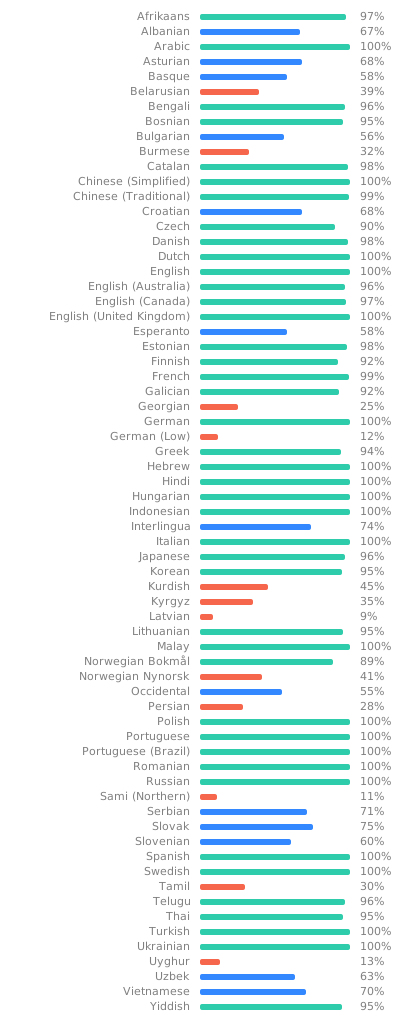
Translation status

Licenses

BleachBit itself, including source code and cleaner definitions, is licensed under the GNU General Public License version 3, or at your option, any later version.

markovify is licensed under the MIT License.

Development

To develop, run the test suite, or build packages, install the extra build/test/lint/packaging tools too:

make install-deps-dev

Common commands include:

make tests   # run tests
make lint    # check .py and .sh files for issues
make pretty  # format .py and .xml files

More resources:

Docker-based Linux builds

The docker/build.sh script sets up a container, runs make tests, and builds packages for a selected distribution. Usage:

./docker/build.sh <distro> # distro is one of {debian, fedora, opensuse}

Artifacts are copied to ./docker-artifacts/ on the host.

Frequently asked questions

Is BleachBit free to use?

BleachBit is open source under the GPL-3.0 licence. There is no licence fee and no seat count — you can self-host it or, where the project offers one, pay a vendor for a managed version instead.

What does BleachBit do?

Clean your system and free disk space

What is BleachBit written in?

BleachBit is primarily written in Python. Its source is publicly available at https://github.com/bleachbit/bleachbit, and it has 6,930 GitHub stars.