Beginner DE Project - Batch Edition is an MIT-licensed teaching repository that stands up a complete batch data pipeline — Airflow orchestration, Postgres, DuckDB warehouse, Apache Spark, and MinIO storage — so that new data engineers can run a real end-to-end ETL workflow on a laptop or in a GitHub codespace.
What it is
Beginner DE Project - Batch Edition is the reference code for the blog post "Data Engineering Project for Beginners" on startdataengineering.com. The repository packages a working batch pipeline into a single reproducible environment so that a learner does not have to assemble Docker, orchestration, storage, and a warehouse by hand before writing the first line of transformation logic. Everything is driven by a small set of make targets, and the whole stack is meant to be started, observed, and torn down within one sitting.
The concrete problem it solves is the gap between tutorial snippets and a running system. Most introductory material shows a script in isolation, with no scheduler, no upstream database, no object storage, and no reporting layer. This project replaces that fragmented approach by wiring the pieces together in the open: Airflow schedules and orchestrates DAGs, Postgres holds Airflow's own metadata and also carries a schema representing upstream databases, DuckDB acts as the warehouse, MinIO provides an S3-compatible open source storage system, and Apache Spark processes data, specifically to run a classification algorithm. Quarto with Plotly converts code written in markdown format to HTML files that can be embedded in an app or served as is. The ecosystem it lives in is the Docker-based local development stack common to batch ETL work, and the artifact it replaces is the ad hoc collection of shell scripts and manual setup that a beginner would otherwise need to write before seeing a pipeline run.
Key capabilities
- Runs orchestration through Airflow, exposing the
user_analytics_dag DAG in the Airflow UI on port 8080.
- Boots the entire environment with
make up and runs checks and tests with make ci.
- Bundles Airflow, Postgres, DuckDB, Quarto with Plotly, and Apache Spark into one container defined at
./containers/airflow/Dockerfile.
- Adds MinIO as an S3-compatible object store for pipeline data.
- Uses Postgres both for Airflow metadata and for a schema that represents upstream databases.
- Executes a classification algorithm on Apache Spark as the processing step.
- Renders results as HTML at
./dags/scripts/dashboard/dashboard.html, built from markdown via Quarto with Plotly.
- Ships topics spanning
airflow, database, docker, emr, etl, python, redshift, and spark.
Who uses it and how
- Learners working through the companion blog post who want a pipeline they can start, inspect, and break without cloud cost.
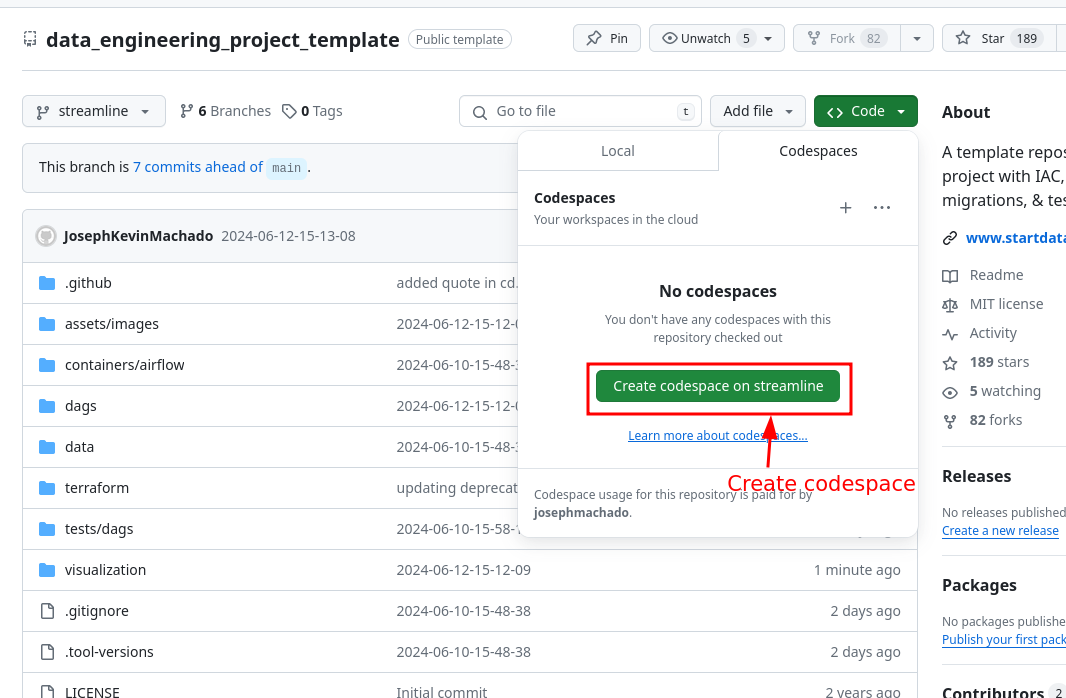
- GitHub Codespaces users, who clone the repository, choose
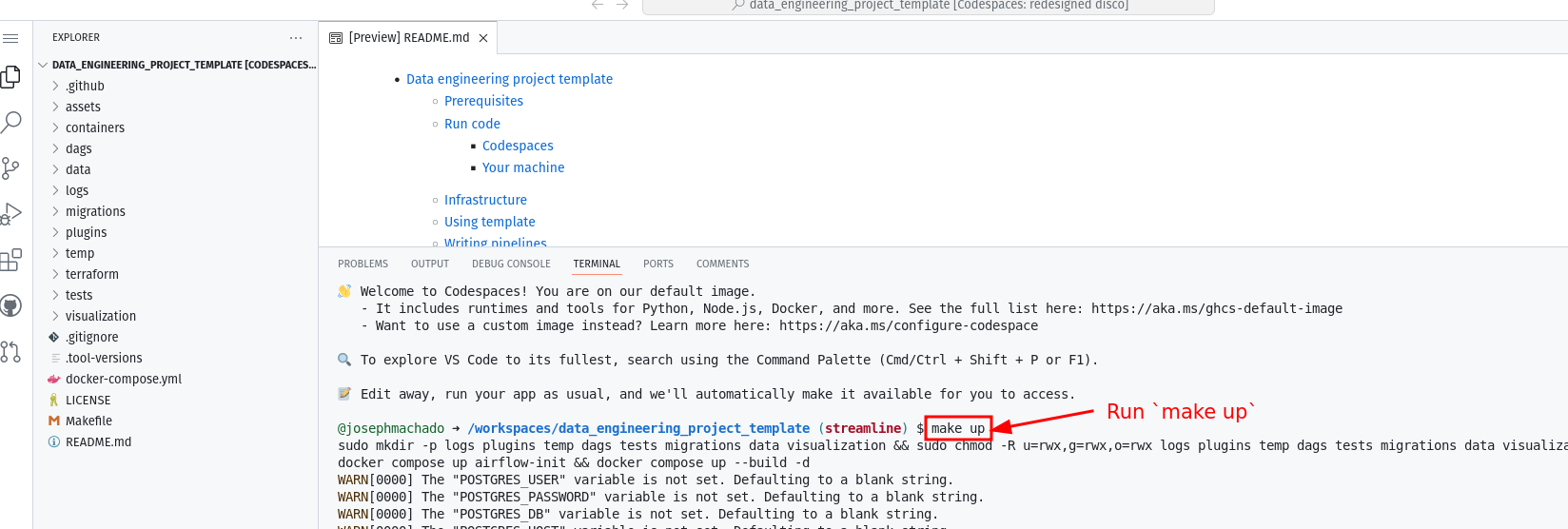
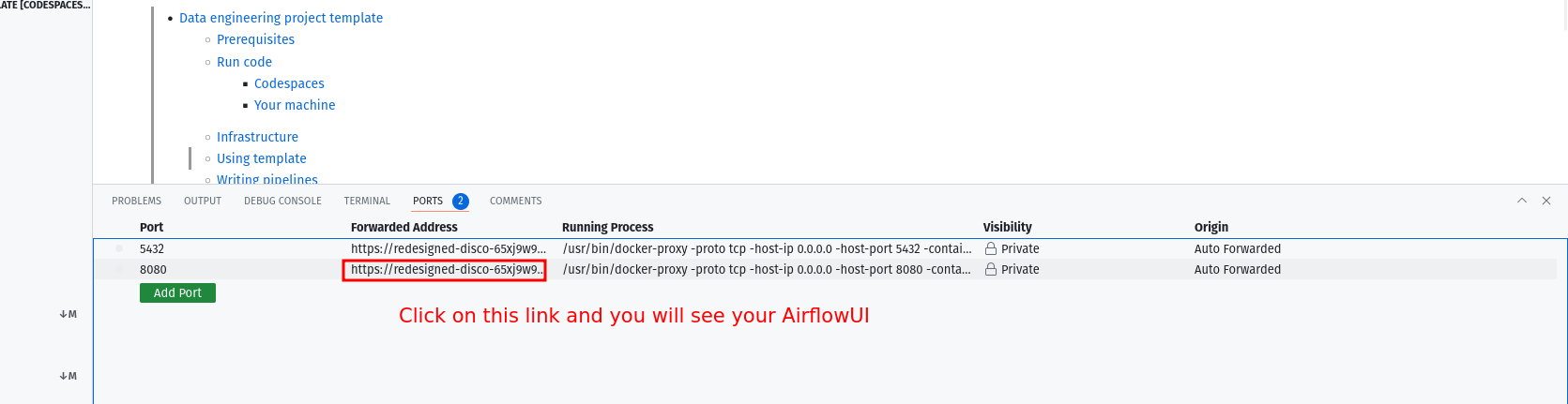
Create codespaces on main, run make up, wait roughly 30 seconds for Airflow to start, and open the forwarded port 8080.
- Local developers running Docker with at least 4GB of RAM and Docker Compose v1.27.0 or later, using the same
make up and make ci targets.
- Engineers reading the architecture as a template for wiring scheduling, object storage, a warehouse, and reporting together.
- Teams studying the companion post on CI/CD, Terraform-based infrastructure as code,
make commands, and automated testing to see how those practices attach to a working pipeline.
Getting started
Clone https://github.com/josephmachado/beginner_de_project.git, then run make up followed by sleep 30 and make ci, and open http://localhost:8080 with the username and password both set to airflow. The same pipeline can be launched in a GitHub codespace, with the caveat noted in the README that codespace usage is limited and the instance should be switched off when finished.
How it compares
The facts provided name no paid products this project replaces, and no comparable project is named among its topics or README content. It stands alone in this registry as a self-contained beginner batch ETL template rather than a component of a larger tool family.
When to use it — and when not to
Use it when the goal is to learn or demonstrate batch pipeline mechanics end to end, accepting that the self-hoster must run Docker with at least 4GB of RAM and Docker Compose v1.27.0 or later, and that services 1-5 are deliberately collapsed into a single container for simplicity rather than production isolation. Do not pick it as a production deployment or as a streaming solution — it is explicitly the batch edition, built as companion code for a blog post. Note also that the topics list names redshift, redshift-cluster, and emr, while the documented architecture uses DuckDB as the warehouse and MinIO for storage, so anyone expecting the AWS services should read the README rather than the tags.
project readme (upstream, from github) — read inline
Beginner DE Project - Batch Edition
Code for blog at Data Engineering Project for Beginners.
Run Data Pipeline
Code available at beginner_de_project repository.
Run on codespaces
You can run this data pipeline using GitHub codespaces. Follow the instructions below.
- Create codespaces by going to the beginner_de_project repository, cloning it(or click
Use this template button) and then clicking on Create codespaces on main button.
- Wait for codespaces to start, then in the terminal type
make up.
- Wait for
make up to complete, and then wait for 30s (for Airflow to start).
- After 30s go to the
ports tab and click on the link exposing port 8080 to access Airflow UI (username and password is airflow).
Note Make sure to switch off codespaces instance, you only have limited free usage; see docs here.
Run locally
To run locally, you need:
- git
- Github account
- Docker with at least 4GB of RAM and Docker Compose v1.27.0 or later
Clone the repo and run the following commands to start the data pipeline:
git clone https://github.com/josephmachado/beginner_de_project.git
cd beginner_de_project
make up
sleep 30 # wait for Airflow to start
make ci # run checks and tests
Go to http:localhost:8080 to see the Airflow UI. Username and password are both airflow.
Architecture
This data engineering project, includes the following:
Airflow: To schedule and orchestrate DAGs.Postgres: To store Airflow's details (which you can see via Airflow UI) and also has a schema to represent upstream databases.DuckDB: To act as our warehouseQuarto with Plotly: To convert code in markdown format to html files that can be embedded in your app or servered as is.Apache Spark: To process our data, specifically to run a classification algorithm.minio: To provide an S3 compatible open source storage system.
For simplicity services 1-5 of the above are installed and run in one container defined here.
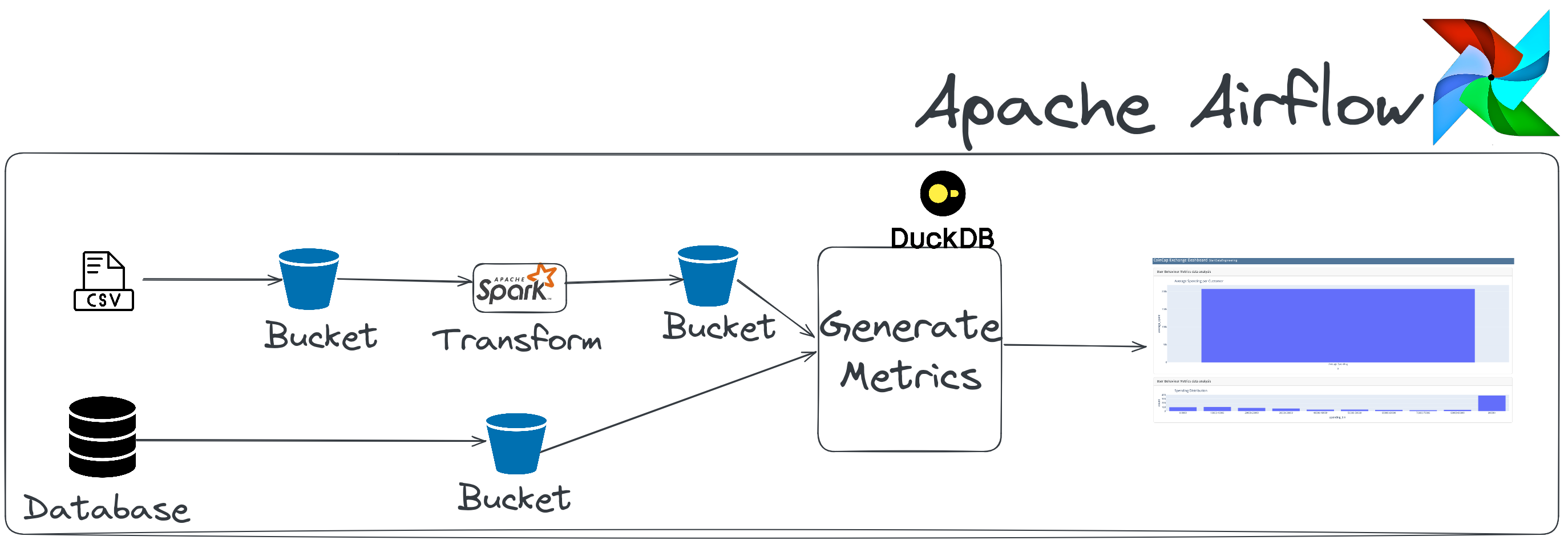
The user_analytics_dag DAG in the Airflow UI will look like the below image:
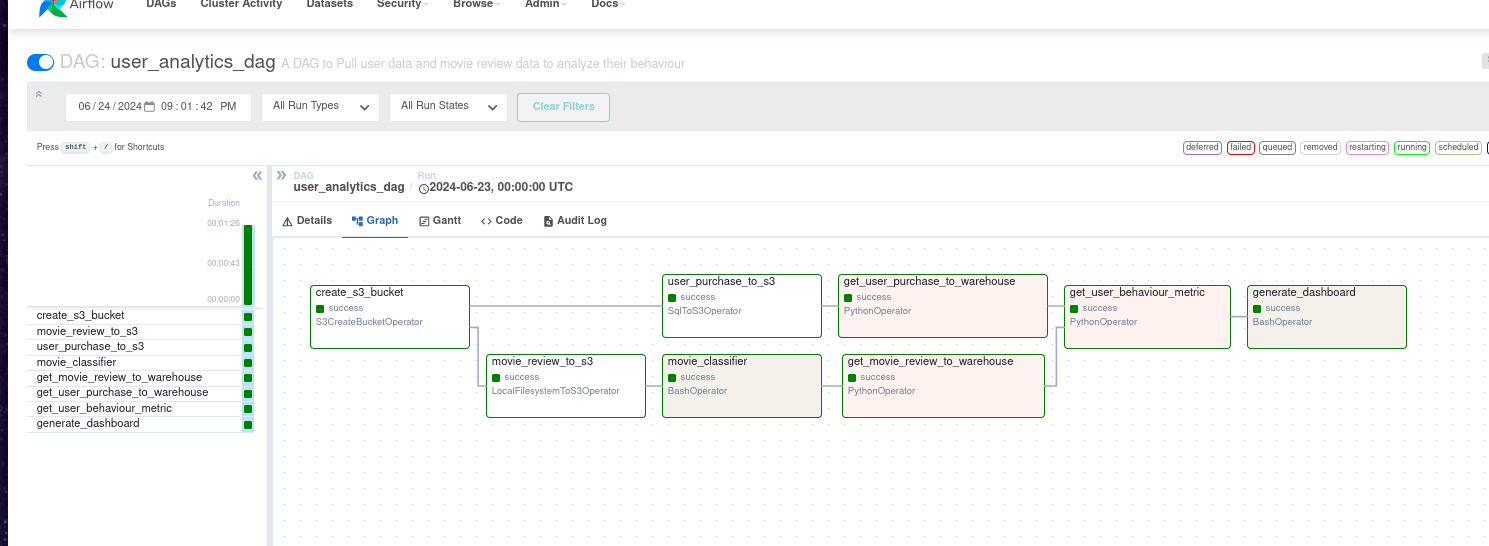
On completion, you can see the dashboard html rendered at./dags/scripts/dashboard/dashboard.html.
Read this post, for information on setting up CI/CD, IAC(terraform), "make" commands and automated testing.