Backlog.md
Markdown‑native Task Manager & Kanban visualizer for any Git repository
AI agents write the code. You review the tasks: before, during, and after.




npm i -g backlog.md

Backlog.md turns any folder into a self‑contained project board powered by plain Markdown files and a zero‑config CLI.
Why Backlog.md in the AI era
AI agents can now produce more plausible code in an hour than you can carefully read in a day. The bottleneck is no longer writing code. It's your attention. You can't meaningfully review 15,000 generated lines in one sitting, but you can read a screenful of task specs with acceptance criteria before any code exists, and push back while a misunderstanding is still one sentence, not a rebuilt feature.
Backlog.md structures agent work around three review checkpoints:
- Review the spec: the agent decomposes your idea into tasks with descriptions, acceptance criteria, and milestones before implementation starts.
- Review the plan: the agent researches your codebase and writes its implementation plan into the task. Approve it or steer before any code is written.
- Review the code: one task = one context window = one PR. Diffs stay a size a human can actually read.
Afterwards, the completed tasks remain in Git as a permanent record of what was attempted and why, legible to you, your team, and the next agent.
Dogfooded: nearly all of Backlog.md's own code is written by AI agents working through Backlog.md itself. The full task ledger lives in this repo's backlog folder.
📺 See it in action: Devoxx Belgium 2025 · AI Engineer Code Summit 2025
Features
🤖 AI-ready -- works with Claude Code, Gemini CLI, Codex, Kiro & any other MCP or CLI compatible AI assistant
📝 Markdown-native tasks -- every task is a plain
.mdfile in your repo✅ Acceptance criteria & Definition of Done -- verifiable scope per task, plus a reusable DoD checklist for every new task
🎯 Milestones & dependencies -- structure bigger efforts and make execution order reviewable, with task detail showing what a task waits on and what waits on it
📊 Terminal Kanban --
backlog boardpaints a live board in your shell;backlog board exportcreates shareable markdown reports🌐 Web UI --
backlog browserserves a local Kanban board with drag-and-drop and task editing forms🔍 Search -- fuzzy search across tasks, docs & decisions with
backlog search🔒 Local-first -- no server, no account, no telemetry; tasks are plain files in your repo, and remote Git operations are optional
💻 Cross-platform (macOS, Linux, Windows) · 🆓 MIT-licensed & open-source
 Getting started
# Install
npm i -g backlog.md
# or: bun add -g backlog.md
# or: brew install backlog-md
# or: nix run github:MrLesk/Backlog.md

# Initialize in any Git repo
backlog init "My Awesome Project"

# Or initialize without Git for local/non-code projects
backlog init "Personal Planning" --no-git
[!TIP] Running one-off with
npx? This tool's npm package is namedbacklog.md, so use the full name:npx backlog.md init "My Project",npx backlog.md board. Without an install,npx backlogresolves to an unrelated third-party npm package — not this tool. (Withbacklog.mdinstalled as a project dependency,npx backlogruns the local binary as usual.)
Run with Nix
Run Backlog.md directly from the repository flake:
nix run github:MrLesk/Backlog.md -- --version
Or install the named package into your Nix profile:
nix profile install github:MrLesk/Backlog.md#backlog-md
The Nix flake supports x86_64-linux, aarch64-linux, and
aarch64-darwin. The x86_64 Linux package uses Bun's baseline runtime so it
also works on pre-AVX2 processors with AVX support. Intel macOS users can use
the npm, Bun, or Homebrew installation instead.
The init wizard will ask how you want to connect AI tools:
- CLI instructions (recommended): creates a short instruction file that tells agents to run
backlog instructions overview. - MCP connector: optionally auto-configures Claude Code, Codex, Gemini CLI, Kiro or Cursor for teams that prefer MCP.
- Skip: no AI setup; use Backlog.md purely as a task manager.
For Cursor with CLI instructions, select AGENTS.md or pass --agent-instructions cursor; both use the same AGENTS.md target. Backlog.md preserves existing AGENTS.md content and does not migrate or remove unrelated user-managed .cursor/rules files.
Everything is stored as human-readable Markdown in a project-local backlog folder such as backlog/, .backlog/, or a custom project-relative path configured through backlog.config.yml (e.g. backlog_directory: my-backlog). Task IDs use a configurable prefix (backlog init --task-prefix): the default produces TASK-1-style IDs, while this repository uses back, so examples below show BACK-1-style IDs. Git is optional: backlog init --no-git creates a filesystem-only project.
Working with AI agents
This is the recommended flow for Claude Code, Codex, Gemini CLI, Kiro and similar tools, following the spec‑driven AI development approach.
After running backlog init, agents should start by running backlog instructions overview. Work in this loop:
Step 1: Describe your idea. Tell the agent what you want to build and ask it to split the work into small tasks with clear descriptions and acceptance criteria.
🤖 Ask your AI Agent:
I want to add a search feature to the web view that searches tasks, docs, and decisions. Please decompose this into small Backlog.md tasks.
[!NOTE] Review checkpoint #1: read the task descriptions and acceptance criteria.
Step 2: One task at a time. Work on a single task per agent session, one PR per task. Good task splitting means each session can work independently without conflicts. Make sure each task is small enough to complete in a single conversation. You want to avoid running out of context window.
Step 3: Plan before coding. Ask the agent to research and write an implementation plan in the task. Do this right before implementation so the plan reflects the current state of the codebase.
🤖 Ask your AI Agent:
Work on BACK-10 only. Research the codebase and write an implementation plan in the task. Wait for my approval before coding.
[!NOTE] Review checkpoint #2: read the plan. Does the approach make sense? Approve it or ask the agent to revise.
Step 4: Implement and verify. Let the agent implement the task.
[!NOTE] Review checkpoint #3: review the code, run tests, check linting, and verify the results match your expectations.
If the output is not good enough: clear the plan/notes/final summary, refine the task description and acceptance criteria, and run the task again in a fresh session.
Working without AI agents
Use Backlog.md as a standalone task manager from the terminal or browser.
# Create and refine tasks
backlog task create "Render markdown as kanban"
backlog task edit BACK-1 -d "Detailed context" --ac "Clear acceptance criteria"

# Track work
backlog task list -s "To Do"
backlog task list --json | jq '.tasks[] | .id'
backlog task edit BACK-1 --comment "Can we split the UI work into a separate PR?" --comment-author @sara
backlog search "kanban"
backlog board

# Work visually in the browser
backlog browser
You can switch between AI-assisted and manual workflows at any time; both operate on the same Markdown task files. Just prefer Backlog.md commands (CLI/MCP/Web) over hand-editing task files, so field types and metadata stay consistent.
Read commands support stable, versioned JSON for scripts and integrations. Use --json with task list, task view, the task shorthand, and search. JSON mode is noninteractive and keeps successful stdout machine-readable. Add --watch to task list --json for an initial full list followed by changed full replacements, using the exact same JSON format. Read successive complete JSON values; each response replaces the previous list.
Learn more: CLI reference | Advanced configuration
 Web Interface
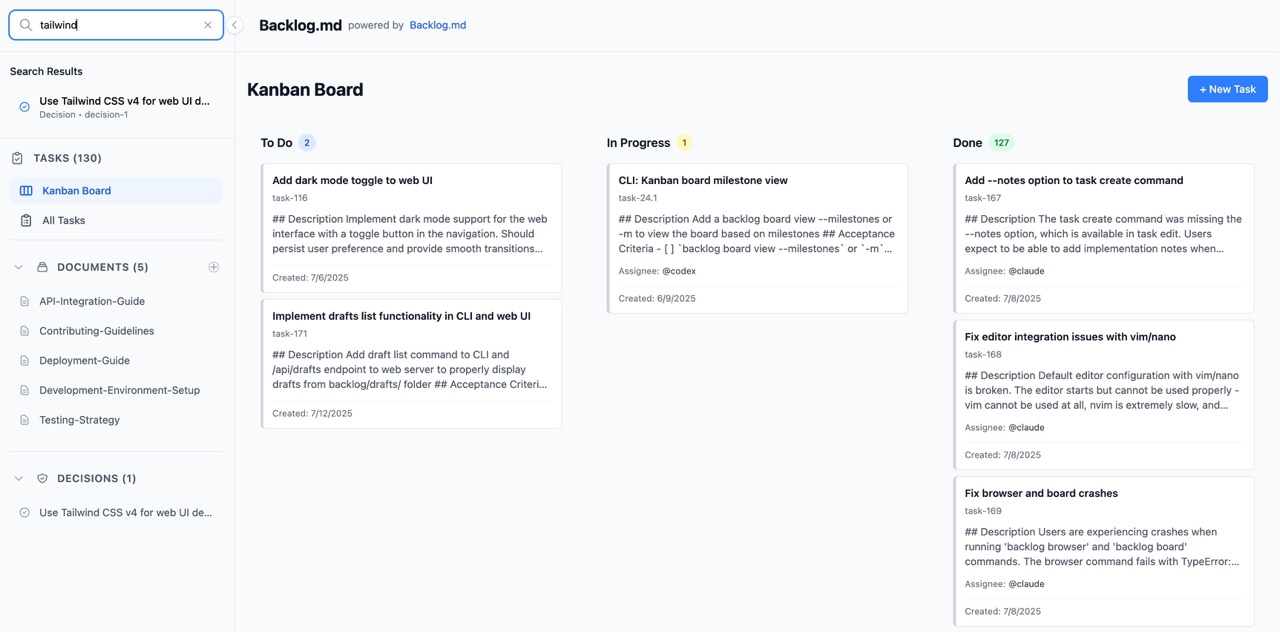
Launch a web interface for visual task management on the local machine. The server listens on 127.0.0.1 and is not
reachable from other devices on the LAN or VPN:
# Start the web server (opens browser automatically)
backlog browser

# Custom port
backlog browser --port 8080

# Don't open browser automatically
backlog browser --no-open
Features:
- Interactive Kanban board with drag-and-drop
- Multi-select cards to move several tasks to one column
- Task creation and editing with forms
- Interactive acceptance criteria editor with checklists
- Real-time updates across all views
- Responsive design for desktop and mobile
- Task archiving with confirmation dialogs
- Seamless CLI integration - all changes sync with markdown files
To keep the Web UI running as an auto-starting local service, see Running Backlog.md as a Service.
🔧 MCP Integration (Model Context Protocol)
CLI instructions are the default AI setup. MCP remains supported for AI coding assistants like Claude Code, Codex, Gemini CLI and Kiro when you explicitly prefer an MCP connector.
You can run backlog init (even if you already initialized Backlog.md) and choose MCP integration, or follow the manual steps below.
Client guides
Claude Code
claude mcp add backlog --scope user -- backlog mcp start
Codex
codex mcp add backlog -- backlog mcp start
Gemini CLI
gemini mcp add backlog -s user backlog mcp start
Kiro
kiro-cli mcp add --scope global --name backlog --command backlog --args mcp,start
Cursor / other MCP clients
Use the manual JSON config below in your client's MCP settings.
Use the shared backlog server name everywhere. The server finds the active project from your client's MCP roots, and re-resolves when you switch workspace or worktree. A single user-scope server covers every repo.
Manual config
{
  "mcpServers": {
    "backlog": {
      "command": "backlog",
      "args": ["mcp", "start"],
      "env": {
        "BACKLOG_CWD": "/absolute/path/to/your/project"
      }
    }
  }
}
Set BACKLOG_CWD to pin the server to one project and stop workspace following. Use it to always target the same backlog, or when your client can't report MCP roots.
If your IDE supports custom args but not env vars, you can also use ["mcp", "start", "--cwd", "/absolute/path/to/your/project"].
Until the server finds an initialized project, it serves backlog://init-required.
[!IMPORTANT] When adding the MCP server manually, add a short instruction to your CLAUDE.md/AGENTS.md files telling agents to read
backlog://workflow/overview. This step is not required when usingbacklog initas it adds these instructions automatically. For CLI-based setups, usebacklog instructions overviewto fetch the current workflow guidance.
Once connected, agents can read the Backlog.md workflow instructions via backlog://workflow/overview, with detailed guides at backlog://workflow/task-creation, backlog://workflow/task-execution, and backlog://workflow/task-finalization.
Use /mcp command in your AI tool (Claude Code, Codex, Kiro) to verify if the connection is working.
 CLI reference
Full command reference covering task management, search, board, docs, decisions, and more: CLI-INSTRUCTIONS.md
Quick examples: backlog, backlog instructions, backlog task create, backlog task list, backlog task edit, backlog milestone add, backlog milestone rename, backlog milestone remove, backlog search, backlog board, backlog browser.
Full help: backlog --help
 Configuration
Backlog.md works with zero configuration. Settings merge from CLI flags, then the project config file (backlog.config.yml when present, otherwise backlog/config.yml or .backlog/config.yml), then built‑in defaults.
Run backlog config with no arguments to launch the interactive wizard (the same experience triggered from backlog init advanced setup). It walks through cross-branch accuracy (checkActiveBranches, remoteOperations, activeBranchDays), Git workflow (autoCommit, bypassGitHooks), ID formatting (zeroPaddedIds), editor integration (defaultEditor), Definition of Done defaults, and Web UI defaults (defaultPort, autoOpenBrowser). Skipping the wizard applies the safe built-in defaults, and rerunning backlog init or backlog config pre-populates prompts with your current values.
For filesystem-only projects (backlog init --no-git), the saved config forces checkActiveBranches=false, remoteOperations=false, and autoCommit=false so CLI, Web, and MCP local-file workflows do not depend on a Git repository.
Definition of Done defaults
Set project-wide DoD items with backlog config (or during backlog init advanced setup), in the Web UI (Settings → Definition of Done Defaults), or by editing the project config file directly:
definition_of_done:
  - Tests pass
  - Documentation updated
  - No regressions introduced
When a project uses root config discovery, edit backlog.config.yml instead of backlog/config.yml.
These items are added to every new task by default. You can add more on create with --dod, or disable defaults per task with --no-dod-defaults.
For the full configuration reference (all options, default values, commands, and detailed notes), see ADVANCED-CONFIG.md.
Troubleshooting
Apple Silicon (macOS)
On M-series Macs, backlog can fail with illegal hardware instruction or Binary package not installed for darwin-... when Node, Bun, or Homebrew run under Rosetta (x64 emulation) and install the Intel binary instead of the arm64 one — or the other way around. The launcher runs whichever darwin variant (arm64 or x64) is actually installed, but a clean native-arch install is the reliable fix.
Check what your tools report:
uname -m                            # arm64 = Apple Silicon hardware; x86_64 = Intel or a Rosetta shell
node -p process.arch                # architecture of your Node/Bun runtime
sysctl -in sysctl.proc_translated   # 1 = current shell runs under Rosetta
which brew                          # /opt/homebrew = arm64 brew, /usr/local = Intel brew
If the architectures disagree, reinstall with the native one:
# Homebrew: make sure `which brew` prints /opt/homebrew, then
brew reinstall backlog-md

# npm
arch -arm64 npm i -g backlog.md

# Bun
arch -arm64 bun add -g backlog.md
Running an x64 Node under Rosetta on purpose also works: backlog falls back to whichever backlog.md-darwin-* package is present.
📺 Talks & Community
Watch Backlog.md in action:
- Devoxx Belgium 2025: the spec-driven agent workflow behind Backlog.md, live on stage
- AI Engineer Code Summit 2025: Backlog.md: task management for AI agents
- Slides from these and more talks: mrlesk.com/talks
Community tools
- vscode-backlog-md - VS Code extension with issues panel, kanban view, and editing. (ysamlan/vscode-backlog-md)
License
Backlog.md is released under the MIT License: do anything, just give credit. See LICENSE.