AutoSocial Studio


AutoSocial Studio is a local, multi-account automation dashboard for short-form video workflows across TikTok, Instagram, and YouTube. It combines a local Express dashboard, Playwright-powered upload flows, per-account queues, schedulers, yt-dlp downloader utilities, and an FFmpeg-based video uniquifier.
This project is built for a local workstation. It is not a hosted SaaS app and does not include user authentication.
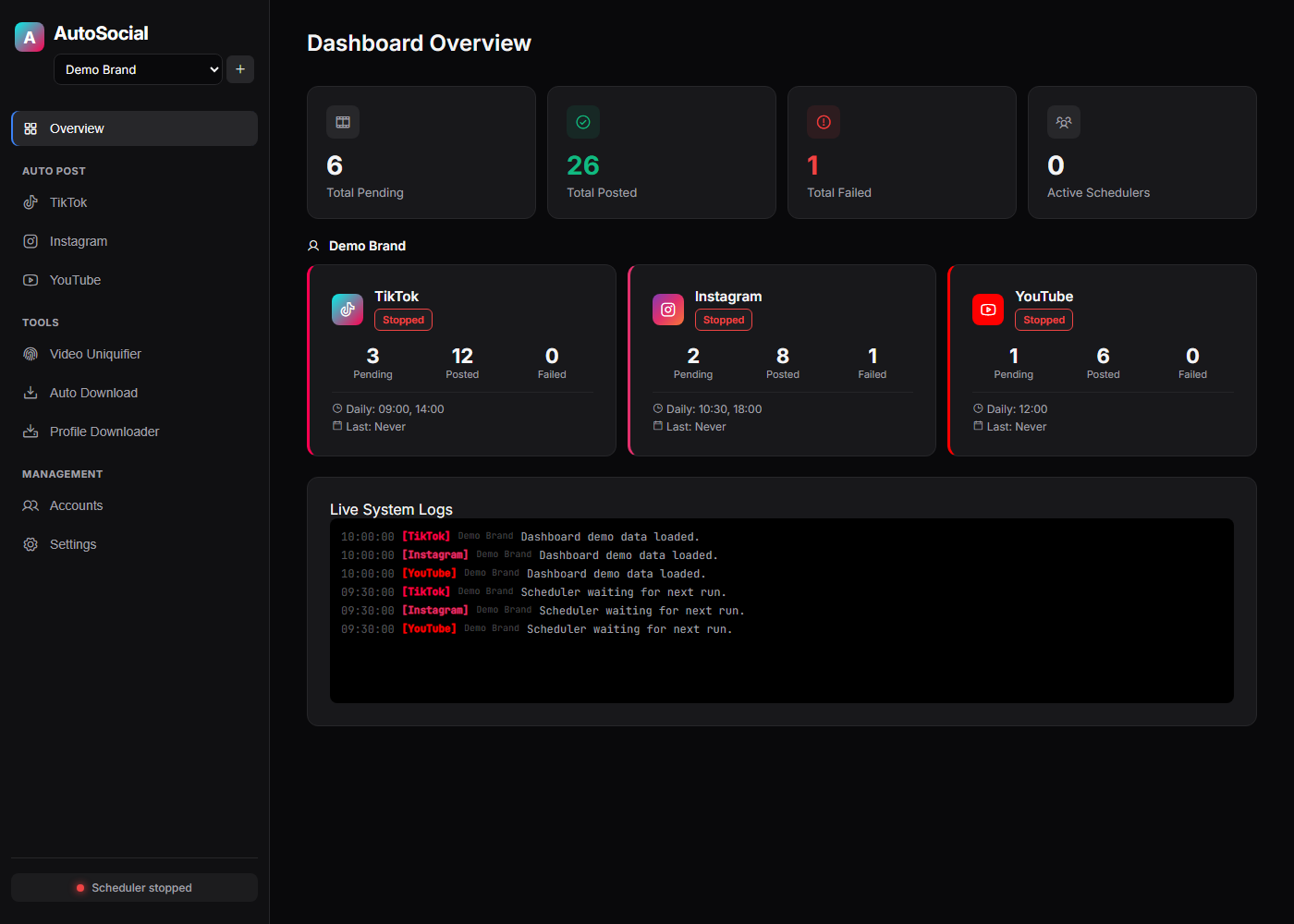
Why This Exists
AI coding tools make it easier than ever for indie builders to ship products. Distribution is still the hard part. AutoSocial Studio helps builders turn launch clips, demos, product updates, and short-form experiments into a repeatable local marketing workflow without handing account sessions to a hosted service.
The goal is not mass posting or engagement spam. The goal is a practical creator operations dashboard: organize accounts, prepare queues, schedule posts, reuse captions, download reference material, and process videos from one local control plane.
Who It Helps
- Indie hackers launching multiple products.
- AI builders who need a repeatable content workflow after shipping with AI coding tools.
- Small teams that want local browser sessions instead of a hosted service storing account credentials.
- Maintainers and contributors experimenting with responsible automation around product updates, demos, and community content.
Features
- Manage multiple brands/accounts with isolated queues and browser sessions.
- Use the First-Run Setup page to verify local dependencies, login sessions, and queue folders.
- Post queued videos to TikTok, Instagram, and YouTube.
- Persist Playwright login sessions under
.profiles//. - Schedule posts with cron expressions, daily times, or instant-post mode.
- Download recent TikTok videos with yt-dlp and fan them out into queues.
- Scan/download TikTok profiles into
autodownload/profile_downloads. - Run FFmpeg-based video uniquification from the dashboard or CLI, with an optional user-provided logo overlay.
Requirements
- Node.js 18+
- npm
- Playwright Chromium
- FFmpeg and ffprobe in
PATH - Optional:
yt-dlp.exeinautodownload/for downloader features
Windows is the primary target for the bundled yt-dlp.exe workflow, but the
dashboard and core Node services are ordinary Node.js.
Quick Start
npm ci
npx playwright install chromium
npm run doctor
Create your local environment file:
Copy-Item .env.example .env
Start the dashboard:
npm run dashboard
Open http://127.0.0.1:3000.
Start with the Setup view. It checks local dependencies and shows the exact
pending folders where videos should be dropped for each platform.
Configuration
Copy .env.example to .env and review the values that matter for your
workflow.
Common settings:
CRON_EXPRESSION,INSTAGRAM_CRON_EXPRESSION,YOUTUBE_CRON_EXPRESSIONTZ,BROWSER_LOCALEHEADLESSPOST_DELAY_MS,POST_PUBLISH_HOLD_MS,FAILURE_HOLD_MSAUTO_ADD_SOUND,DEFAULT_SOUND_QUERYRANDOM_QUEUE_ORDERDEFAULT_CAPTIONUNIQUIFY_LOGO_IMAGEWATCH_CHANNEL,WATCH_INTERVAL,WATCH_MAX_VIDEOS,WATCH_MIN_VIEWSAUTO_POST_PLATFORMSDASHBOARD_HOST,DASHBOARD_PORT
Hashtag captions in .env should be quoted:
DEFAULT_CAPTION="#mybrand #shorts"
The sample config ships without a default caption, watch channel, logo, or
sound query. Set those in .env or in the dashboard for your own workflow.
Dashboard Security
The dashboard binds to 127.0.0.1 by default and has no authentication layer.
Keep it local.
Mutating dashboard requests include a same-origin guard so random websites cannot blindly trigger local dashboard actions through the browser.
Binding to a non-local address is blocked unless DASHBOARD_ALLOW_REMOTE=true
is set. Only use that on a trusted network and only if you understand that
anyone who can reach the dashboard can operate the local automation controls.
See SECURITY.md for more details.
First-Time Login
Open the dashboard, go to Accounts, and start a login session for each
platform you want to use. Sessions are stored on disk and reused between runs.
The CLI login command is still TikTok-specific:
npm run login
Queue Layout
Queues are account-aware:
queue/<account>/tiktok/pending
queue/<account>/instagram/pending
queue/<account>/youtube/pending
Successful uploads move into posted; failed uploads move into failed.
Supported video extensions:
.mp4.mov.webm.avi.mkv
Caption sidecars can use the same base filename:
.description.txt
Commands
npm run dashboard
npm run clean:debug
npm run doctor
npm run check
npm run login
npm run post
npm run daemon
npm run uniquify
npm run video-info -- --video "C:\path\video.mp4"
npm run autodownload
Notes:
- The dashboard is the preferred workflow.
clean:debugremoves local debug screenshots and dashboard logs only.login,post, anddaemonare TikTok CLI flows.- Instagram and YouTube posting are managed through the dashboard.
uniquifyandvideo-inforequire FFmpeg and ffprobe.autodownloadrequires yt-dlp.
Development
Run the local checks:
npm run check
npm audit --omit=dev
The test suite focuses on local logic that does not require live social platform access: queue handling, sidecars, filesystem archiving, scheduler time logic, and config parsing.
Runtime Data
Do not commit local runtime data. The .gitignore covers known generated paths,
including:
.env.profiles/.scheduler-state/*-state.jsonqueue/downloads/user-assets/autodownload/downloads/autodownload/profile_downloads/autodownload/info.jsonlast-*.png
Before publishing a fork, inspect git status --short and git status --ignored.
Responsible Use
Users are responsible for complying with platform terms, account policies, rate limits, local law, and content rights. This project does not grant permission to post content you do not own or have permission to use.
Prefer official platform APIs where they are available for your workflow. Avoid spam, deceptive behavior, unauthorized scraping, and posting without consent. Keep sessions local, rotate credentials if they are exposed, and review platform limits before enabling scheduled automation.
Roadmap
See ROADMAP.md for planned work around safer automation controls, official API integrations, creator workflow templates, and maintainer tooling.
License
MIT. See LICENSE.