athas is a free, open source frameworks & platforms project written in TypeScript and released under AGPL-3.0. It has 3,111 GitHub stars, 258 forks and 1 open issues, and was last pushed 35 hours ago. On this registry it ranks #76 of 125 tracked projects in Frameworks & Platforms, with 5 head-to-head comparisons available.

What is athas?

Athas is a lightweight, cross-platform code editor built with Tauri, Rust and React that bundles Git integration, AI agents and Vim keybindings for developers working on macOS, Windows and Linux.

What it is

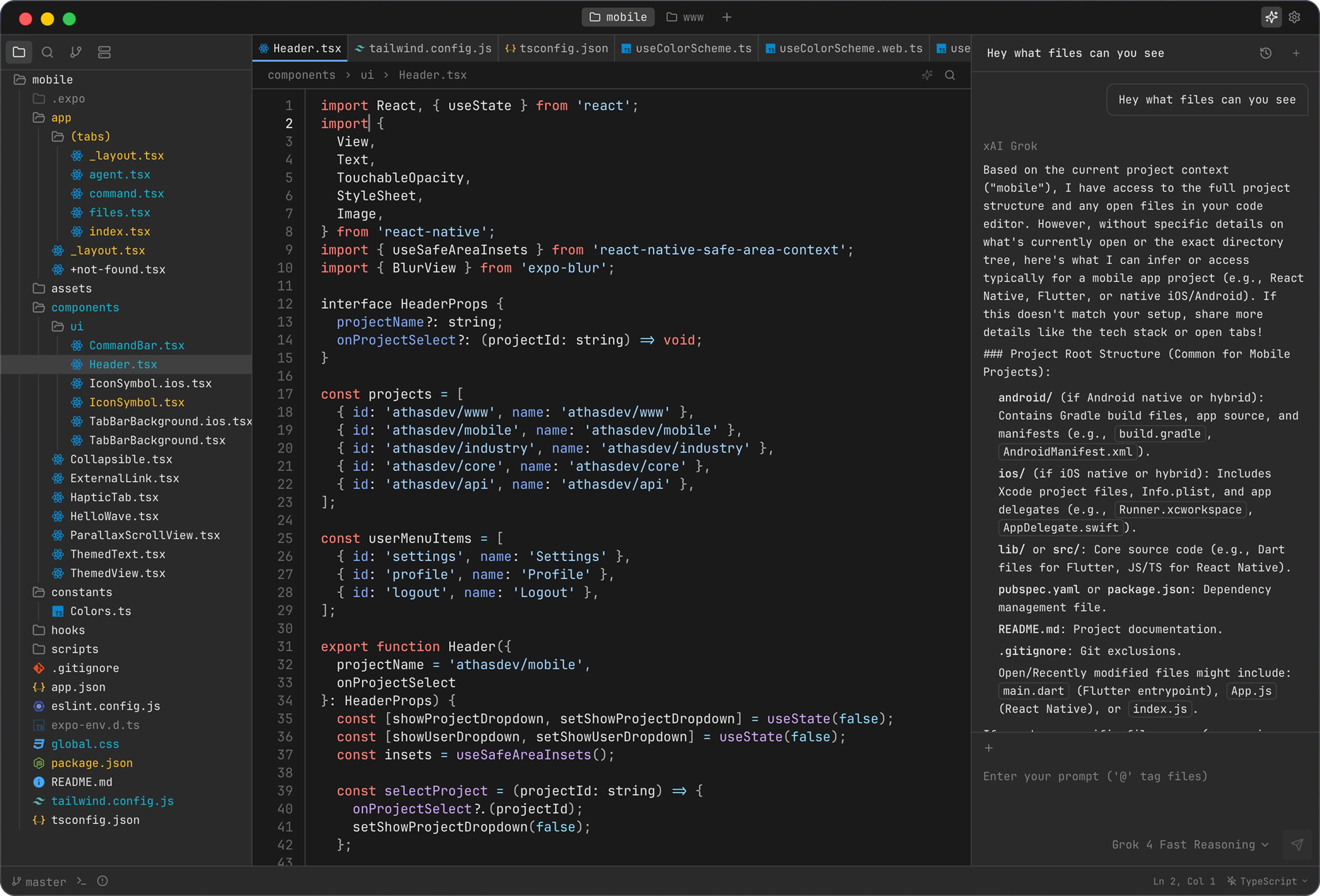
Athas is a desktop code editor written primarily in TypeScript, with a Rust and React core delivered through the Tauri framework. It is distributed as a native application for macOS, Windows and Linux, and its registry topics place it in the Tauri, Rust, React and WebAssembly ecosystem rather than in the browser-based or Electron-style camp. The editor arrives with Git integration, syntax highlighting, LSP support, Vim keybindings, an integrated terminal, database viewers, collaboration features and AI agents, with enterprise policy controls exposed through a managed mode and an extension allowlist.

The concrete problem it addresses is consolidation on the developer desktop. Instead of pairing a plain text editor with separate applications for version control, terminal sessions and database inspection, Athas folds those capabilities into a single cross-platform editor, and it adds policy tooling that lets an organisation restrict which extensions are permitted. Linux builds reflect that same self-contained approach: the project publishes native .deb and .rpm packages, an AppImage and a portable .tar.gz bundle that uses the system WebKitGTK 4.1 rather than expecting users to assemble a toolchain.

Key capabilities

  • AI agents that operate inside the editor alongside the code.
  • Git integration for version control without switching applications.
  • Syntax highlighting and LSP support for language-aware editing.
  • Vim keybindings for modal editing workflows.
  • An integrated terminal and database viewers within the same window.
  • Collaboration features for working with others in the editor.
  • Enterprise policy controls through managed mode and an extension allowlist.

Who uses it and how

  • Individual developers on macOS, Linux and Windows who install through the curl and PowerShell install scripts or the Homebrew cask.
  • Organisations with policy requirements that use managed mode and the extension allowlist to constrain what runs on developer machines.
  • Contributors who build from source with Node.js 24, Bun 1.3.14 and Rust, running bun setup followed by bun dev.
  • Linux users who prefer distribution packages and keep the editor current through apt upgrade or dnf upgrade.

Getting started

Installation is a single command: curl -fsSL https://athas.dev/install.sh | sh on macOS and Linux, or the equivalent PowerShell invocation on Windows, with the script detecting the operating system and architecture, downloading the latest stable release and verifying its SHA256 checksum when one is available. Package manager routes include brew install --cask athas on macOS and the APT and DNF repositories for Debian, Ubuntu, Fedora and RHEL, while prebuilt .deb, .rpm, AppImage and .tar.gz packages are published on the GitHub Releases page.

How it compares

The facts for this entry name no competing or comparable editors, so Athas stands alone in this registry and no side-by-side contrast can be drawn from the information available. What the record does establish is its Tauri, Rust and React foundation and its AGPL-3.0 licence.

When to use it — and when not to

Athas is a desktop application, so a self-hoster has no database, object storage or SMTP service to operate; the operational burden falls on contributors, who must install Node.js 24, Bun 1.3.14 and Rust to build from source. Developers who cannot accept the AGPL-3.0 terms, or who object to the Contributor License and Feedback Agreement granting the project relicensing rights for contributions made on or after 2026-10-15, should look elsewhere. The repository README is short and defers detail to the documentation site, so anyone who needs guidance to live inside the repository will find it thin.

project readme (upstream, from github) — read inline

Athas

A lightweight, cross-platform code editor, built with Tauri (Rust and React) with Git support, AI agents, vim keybindings.
Features

  • AI agents
  • Git integration
  • Syntax highlighting
  • LSP support
  • Vim keybindings
  • Integrated terminal
  • Database viewers
  • Collaboration
  • Enterprise policy controls (managed mode + extension allowlist)

Installation

Quick install

macOS and Linux:

curl -fsSL https://athas.dev/install.sh | sh

Windows (PowerShell):

powershell -ExecutionPolicy ByPass -c "irm https://athas.dev/install.ps1 | iex"

The install scripts detect your operating system and architecture, download the latest stable release, and verify its SHA256 checksum when one is available. You can review the macOS and Linux script or Windows script before running it.

Package managers

Homebrew on macOS:

brew install --cask athas

APT on Debian and Ubuntu:

sudo install -d -m 0755 /etc/apt/keyrings
curl -fsSL https://athas.dev/apt/athas.gpg | sudo tee /etc/apt/keyrings/athas.gpg > /dev/null
echo "deb [arch=amd64,arm64 signed-by=/etc/apt/keyrings/athas.gpg] https://athas.dev/apt stable main" \
  | sudo tee /etc/apt/sources.list.d/athas.list > /dev/null
sudo apt update && sudo apt install athas

DNF on Fedora and RHEL:

sudo curl -fsSL https://athas.dev/rpm/athas.repo -o /etc/yum.repos.d/athas.repo
sudo dnf install athas

Installs from the APT and DNF repositories update with apt upgrade and dnf upgrade.

Manual download

Prebuilt packages for macOS, Windows, and Linux are available on the GitHub Releases page. Linux releases include native .deb and .rpm packages, an AppImage, and a portable .tar.gz bundle that uses the system WebKitGTK 4.1.

See the installation guide for detailed platform steps, install locations, and uninstall instructions.

Development

To build Athas from source, install Node.js 24, Bun 1.3.14, and Rust, then run:

git clone https://github.com/athasdev/athas.git
cd athas
bun setup
bun dev

bun setup installs the project dependencies and checks the native requirements for your platform. See the contributing guide for validation commands and contribution guidelines.

Documentation

See the documentation.

Contributing

Contributions are welcome! See the contributing guide. Pull requests need agreement to the Contributor License and Feedback Agreement.

Support

License

Copyright (C) 2022-2026 Athas

Athas is free software: you can redistribute it and/or modify it under the terms of the GNU Affero General Public License as published by the Free Software Foundation, either version 3 of the License, or (at your option) any later version.

Athas is distributed in the hope that it will be useful, but WITHOUT ANY WARRANTY; without even the implied warranty of MERCHANTABILITY or FITNESS FOR A PARTICULAR PURPOSE. See the GNU Affero General Public License for more details.

Athas may also be distributed under other terms, such as through the Mac App Store or in commercial editions. The Contributor License and Feedback Agreement gives the project the rights to do so for code contributed on or after 2026-10-15.

Frequently asked questions

Is athas free to use?

athas is open source under the AGPL-3.0 licence. There is no licence fee and no seat count — you can self-host it or, where the project offers one, pay a vendor for a managed version instead.

What does athas do?

A lightweight, cross-platform code editor, built with Tauri (Rust and React) with Git support, AI agents, vim keybindings.

What is athas written in?

athas is primarily written in TypeScript. Its source is publicly available at https://github.com/athasdev/athas, and it has 3,111 GitHub stars.