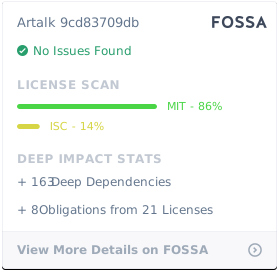
What it is
Artalk is an open-source, self-hosted comment system written in Go and released under the MIT license. It is intended for blogs, websites, and web applications that need a comment widget under the site owner’s control. The project is categorized as community and social software, and its topics include blog, comment-system, comments-widget, go, golang, messenger, react, and self-hosted.
It solves the problem of adding a portable commenting layer without depending on a third-party service. The README describes a client of about forty kilobytes, built with pure Vanilla JavaScript and framework-agnostic, plus a Golang server for lightweight cross-platform operation. This makes Artalk a self-hosted option for teams that want moderation, notifications, and site isolation on their own infrastructure.
Key capabilities
- The client can be embedded in pages without requiring a specific frontend framework, because the README states that it is pure Vanilla JavaScript and framework-agnostic.
- The server is written in Go, which the README presents as an efficient and lightweight cross-platform backend for comment operations.
- It supports social login, email notification, and diverse push methods, so commenters and administrators can use configured authentication and update channels.
- It includes captcha, comment moderation, and spam interception, giving operators tools to control abusive or automated submissions.
- It supports image upload, Markdown, emoji packs, comment voting, sorting, search, pinning, and nested paginated lists with infinite scroll.
- It offers multi-site management, site isolation, centralized administration, page management, page view statistics, and IP region display.
Who uses it and how
- Blog operators can place the Artalk widget on a page and let readers leave nested comments, vote, search, and view author-only content without sending traffic through a third-party comment platform.
- Site administrators can use the sidebar to manage comments, browse recent activity, pin important messages, jump to quoted comments, and inspect page titles and view statistics.
- Multi-site owners can run one Artalk server while keeping sites isolated, because the README lists multi-site support with site isolation and centralized management.
- Operators who need outbound alerts can configure email notification and diverse push methods, while captcha and moderation can filter suspicious submissions.
Getting started
The README highlights one-click deployment via Docker, and the project has an npm package named artalk, so the typical path is to run the artalk/artalk-go image and install or embed the client through the Node.js package ecosystem.
When to use it — and when not to
Artalk is suitable when a team wants a self-hosted comment system with privacy as a priority, a lightweight Go backend, and a small framework-agnostic client. Self-hosting requires operating the server, image storage, email delivery, and notification or moderation integrations. The README does not list paid products that Artalk replaces, and the facts do not describe hosted service features, so organizations needing vendor-managed comments should evaluate separately.
project readme (upstream, from github) — read inline

Artalk








Homepage • Documentation • Latest Release • Changelog • 简体中文 • 日本語
Artalk is an intuitive yet feature-rich comment system, ready for immediate deployment into any blog, website, or web application.
- 🍃 Client ~40KB, crafted with pure Vanilla JS, framework-agnostic
- 🍱 Server powered by Golang, offering efficient and lightweight cross-platform performance
- 🐳 One-click deployment via Docker, ensuring ease and speed
- 🌈 Open-source software, self-hosted with privacy as a priority
Features
- Sidebar: Quick management, intuitive browsing
- Social Login: Fast login via social accounts
- Email Notification: Various sending methods, email templates
- Diverse Push: Multiple push methods, notification templates
- Site Notification: Red dot marks, mention list
- Captcha: Various verification types, frequency limits
- Comment Moderation: Content detection, spam interception
- Image Upload: Custom upload, supports image hosting
- Markdown: Supports Markdown syntax
- Emoji Pack: Compatible with OwO, quick integration
- Multi-Site: Site isolation, centralized management
- Admin: Password verification, badge identification
- Page Management: Quick view, one-click title navigation
- Page View Statistics: Easily track page views
- Hierarchical Structure: Nested paginated list, infinite scroll
- Comment Voting: Upvote or downvote comments
- Comment Sorting: Various sorting options, freely selectable
- Comment Search: Quick comment content search
- Comment Pinning: Pin important messages
- View Author Only: Show only the author's comments
- Comment Jump: Quickly jump to quoted comment
- Auto Save: Content loss prevention
- IP Region: Display user's IP region
- Data Migration: Free migration, quick backup
- Image Lightbox: Quick integration of image lightbox
- Image Lazy Load: Lazy load images, optimize experience
- Latex: Integrate Latex formula parsing
- Night Mode: Switch to night mode
- Extension Plugin: Create more possibilities
- Multi-Language: Switch between multiple languages
- Command Line: Command line operation management
- API Documentation: Provides OpenAPI format documentation
- Program Upgrade: Version check, one-click upgrade
Installation
Deploy Artalk Server with Docker in one step:
docker run -d \
    --name artalk \
    -p 8080:23366 \
    -v $(pwd)/data:/data \
    -e "TZ=America/New_York" \
    -e "ATK_LOCALE=en" \
    -e "ATK_SITE_DEFAULT=Artalk Blog" \
    -e "ATK_SITE_URL=https://example.com" \
    artalk/artalk-go
Integrate Artalk Client into your webpage:
Artalk.init({
  el:      '#Comments',
  site:    'Artalk Blog',
  server:  'https://artalk.example.com',
  pageKey: '/2018/10/02/hello-world.html'
})
We offer various installation methods, including binary files, go install, and package managers for Linux distributions.
Learn More →
For Developers
Pull requests are welcome!
See Development and Contributing for information on working with the codebase, getting a local development setup, and contributing changes.
Contributors
Your contributions enrich the open-source community, fostering learning, inspiration, and innovation. We deeply value your involvement. Thank you for being a vital part of our community! 🥰

Supporters

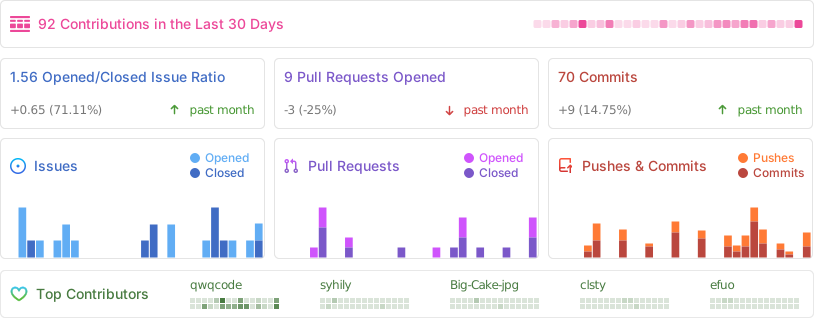
Repobeats Analytics
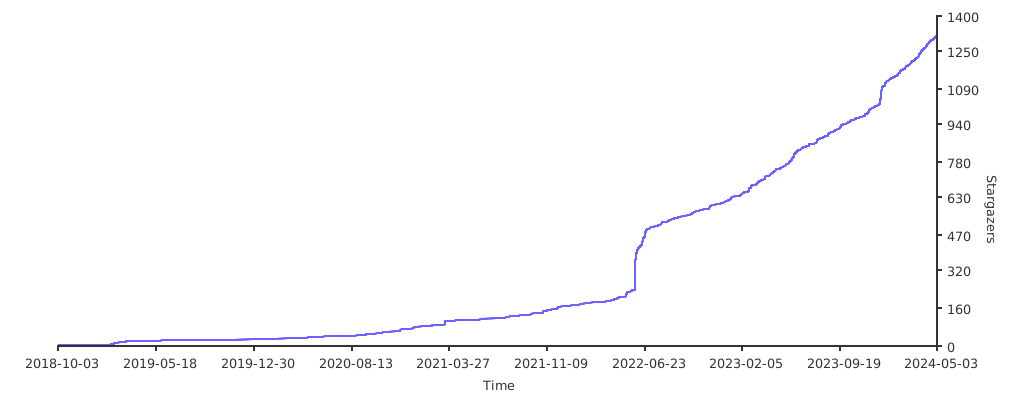
Stargazers over time

License
MIT