ArcReel is a self-hosted, AGPL-3.0 AI video production workspace that turns novels, finished scripts, or product material into character-consistent short videos — characters, scenes, props, storyboards, clips and Jianying drafts — aimed at creators, small studios and technical teams willing to run their own Docker deployment.
What it is
ArcReel is an open-source, self-hostable workbench for AI video production, written in Python and published under AGPL-3.0 with additional terms in NOTICE. It organizes content analysis, asset management, storyboarding, media generation, cost tracking and export into one auditable production pipeline that can be paused and resumed. The repository lists 4,976 stars, 982 forks and 97 open issues, with the last push on 2026-09-18, and the project maintains a documentation site at docs.arc-reel.com alongside a homepage at arc-reel.com.
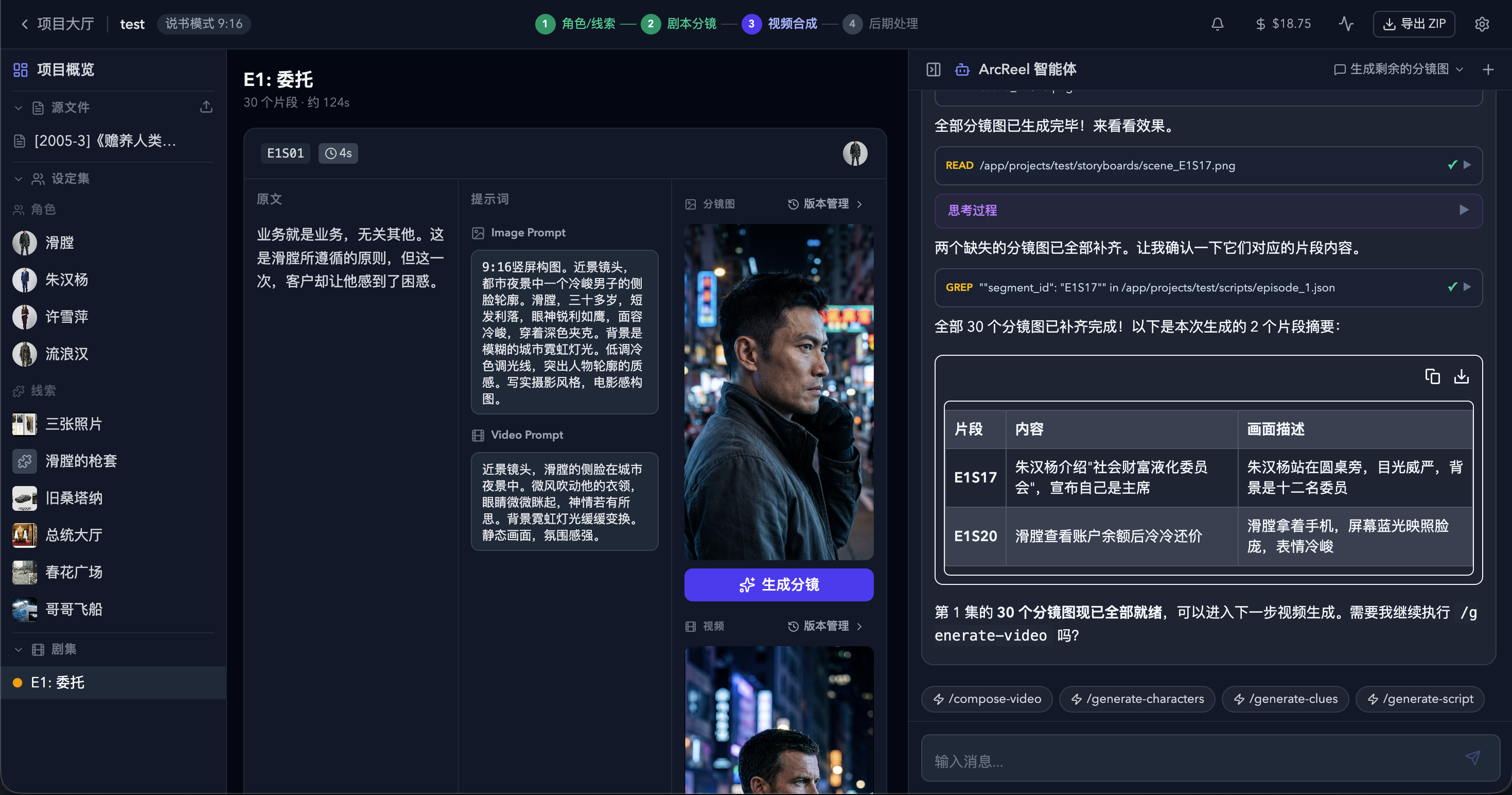
The concrete problem it solves is the gap between raw source material and an editable draft. It replaces the manual, tool-hopping step of reading a novel or script, hand-drawing or re-prompting characters, assembling shot lists, generating clips and then rebuilding everything inside a video editor. ArcReel takes novel, finished script or product material through content analysis and project planning, character/scene/prop assets, episodes and a structured script, storyboard images or multi-grid storyboards, video clips and voiceover audio, then out to final composition or a Jianying draft. Because asset images and other reference images are reused across storyboards, characters stay visually consistent from shot to shot, and because the export lands as a Jianying draft, the result remains editable rather than locked into a render.
Key capabilities
- Unified production chain from novel, finished script or product material through to characters, scenes, props, storyboards, video clips and a finished film.
- Cross-shot consistency by reusing asset images and similar reference images across storyboards.
- Human review at key stages: any single asset can be regenerated and historical versions can be rolled back.
- Agent-orchestrated or user-driven execution, with each stage available for review, adjustment or regeneration in the workbench.
- Unified configuration of Agent, text, image, video and TTS providers from the Settings page.
- Cost visibility, showing projected cost and actual usage before and after generation.
- Jianying draft export targeting the mainland China version of Jianying, for continued work on subtitles, dubbing, pacing and transitions; CapCut compatibility has not been verified.
Who uses it and how
- Creators working on AI comic-drama and novel adaptations, where one source text must yield consistent characters across many shots.
- Producers of narration or commentary short videos, and of advertising or product-selling clips built from product material.
- Operators running the default Docker Compose stack on SQLite, who can later follow the documented migration path to PostgreSQL for production loads.
- Teams with a review stage, where an operator approves key stages, regenerates individual assets and rolls back versions rather than accepting a single blind render.
- Developers extending provider adapters, tests and documentation, installing the project pre-commit hooks with
uv run pre-commit install.
Getting started
Docker and Docker Compose are the only prerequisites: clone https://github.com/ArcReel/ArcReel.git, change into ArcReel/deploy, copy .env.example to .env, and run docker compose up -d. The workbench is then reachable on port 1241 with the default username admin; when AUTH_PASSWORD is left empty, the first startup generates a password and writes it back into deploy/.env.
How it compares
This registry's facts name no paid products that ArcReel replaces, and no direct peer project either, so it stands alone here. Jianying and CapCut appear only as export destinations, not as alternatives. The nearest practical contrast the facts support is with the closed editing workflow it feeds into, which is commercial software and not self-hosted.
When to use it — and when not to
A self-hoster must operate the application stack plus its data layer — SQLite by default, PostgreSQL optionally, with documented upgrade, backup and reverse-proxy procedures — and must arrange authentication and TLS before any remote access. Note that the default Compose file publishes port 1241 on all host network interfaces; do not expose the service directly to the public internet. Configure authentication first, and reach it remotely only over HTTPS, a VPN or a secure tunnel. Organizations that cannot accept AGPL-3.0, or that want commercial deployment, white-labeling or redistribution without the AGPL obligations, should not adopt it as-is and should contact support@arc-reel.com instead. It is also a weaker fit for teams that need CapCut output, since only mainland-China Jianying export is verified, and for anyone who will not accept a Chinese-language README.
project readme (upstream, from github) — read inline

ArcReel
开源、自托管的 AI 视频生产工作台
将小说、成品剧本或商品素材转化为角色一致、过程可控、成本可追踪、可继续编辑的短视频。







快速开始
·
入门教程
·
完整文档
·
加入社区
赞助商
想出现在这里?
ArcReel 是什么
ArcReel 是面向 AI 漫剧与小说改编、旁白/解说短视频、广告与带货短片的开源自托管工作台。它把内容分析、资产管理、分镜、媒体生成、费用追踪和导出组织成一条可审核、可中断恢复的生产流水线。
- 统一生产链路:小说、成品剧本或商品素材都能逐步转化为角色、场景、道具、分镜、视频片段和最终成片。
- 视觉一致、人工可控:跨分镜复用资产图等参考图,关键阶段可确认,单个素材可重做,历史版本可回滚。
- 模型与成本可管理:统一配置文本、图像、视频和 TTS 能力,并在生成前后查看费用与实际用量。
- 交付可继续编辑:既可直接合成视频,也可导出剪映草稿继续调整字幕、配音、节奏和转场。导出面向中国大陆版剪映,与 CapCut 的兼容性尚未验证。
从输入到成片
flowchart LR
    A["小说 / 成品剧本 / 商品素材"] --> B["内容分析与项目规划"]
    B --> C["角色 / 场景 / 道具资产"]
    C --> D["分集与结构化剧本"]
    D --> E["分镜图 / 多宫格分镜"]
    E --> F["视频片段 / 旁白音轨"]
    F --> G["成片合成"]
    F --> H["剪映草稿导出"]
每个阶段都可以由 Agent(智能体)编排,也可以由用户在工作台中审核、调整或重新生成。详细模式选择见 创作流程与模式。
快速开始
准备好 Docker 和 Docker Compose,然后运行:
git clone https://github.com/ArcReel/ArcReel.git
cd ArcReel/deploy

cp .env.example .env
docker compose up -d
访问 。默认用户名为 admin;AUTH_PASSWORD 留空时,首次启动会自动生成密码并回写到 deploy/.env。
默认 Compose 会将 1241 端口发布到宿主机所有网络接口。请勿将服务直接暴露到公网;远程访问前请配置认证,并使用 HTTPS、VPN 或安全隧道,详见 反向代理与 HTTPS。
登录后进入 设置 页面,配置 ArcReel Agent 以及文本、图像、视频等生成能力,再创建项目开始制作。
完整的首次使用流程见 完整入门教程;生产部署、升级、备份和反向代理见 部署与运维。
文档
交流群
扫码加入飞书交流群,获取使用帮助、版本动态和创作经验:

遇到可以复现的 Bug 或明确的功能需求,也可以直接提交 GitHub Issue。
贡献
欢迎贡献代码、文档、测试、供应商适配和问题复现。
开始开发前请阅读 CONTRIBUTING.md。本地克隆后建议立即安装项目的 pre-commit 钩子:
uv run pre-commit install
许可证与商业使用
ArcReel 采用 GNU Affero General Public License v3.0,附加条款见 NOTICE。
如果你的组织无法采用 AGPL-3.0,或者希望在不承担 AGPL 开源义务的情况下进行商业部署、白标或再分发,请联系:
support@arc-reel.com
Copyright © 2026 Pollo3470 and ArcReel contributors
如果 ArcReel 对你有帮助,欢迎点亮一个 ⭐ Star。