ARA Records Ansible
ARA Records Ansible and makes it easier to understand and troubleshoot.

It is another recursive acronym with a focus on simplicity.
About ara
ara provides Ansible reporting by recording ansible and ansible-playbook commands regardless of how and where they run:
- from most Linux distributions and even on Mac OS (as long as
python >= 3.10is available) - from tools that run Ansible like ansible-(pull|test|runner|navigator), AWX & Automation Controller (Tower), Molecule and Semaphore
- from a terminal, a script or by hand
- from a laptop, desktop, server, virtual machine, container or execution environment
- from CI/CD platforms such as Jenkins, Rundeck and Zuul
- from git forges like GitHub, GitLab, Gitea & Forgejo
The recorded results are available via an included CLI, a REST API as well as a self-hosted, local-first web reporting interface.
A recorded demo of the web interface is included in the documentation.
How it works
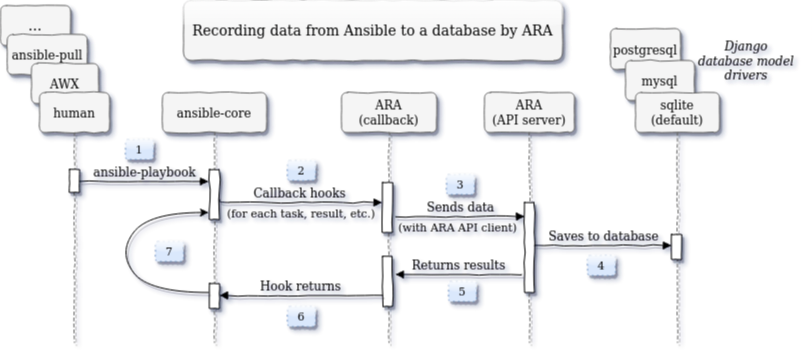
ARA Records Ansible results to SQLite, MySQL and PostgreSQL databases with a standard callback plugin.
This plugin gathers data as Ansible runs and sends it to a Django REST API server:
Requirements
- Any recent Linux distribution or Mac OS with python >=3.10 available
- The ara package (containing the Ansible plugins) must be installed for the same python interpreter as Ansible itself
Getting started
For production use, consider learning about best practices, enabling authentication and ignoring what doesn't need to be recorded.
Recording playbooks without an API server
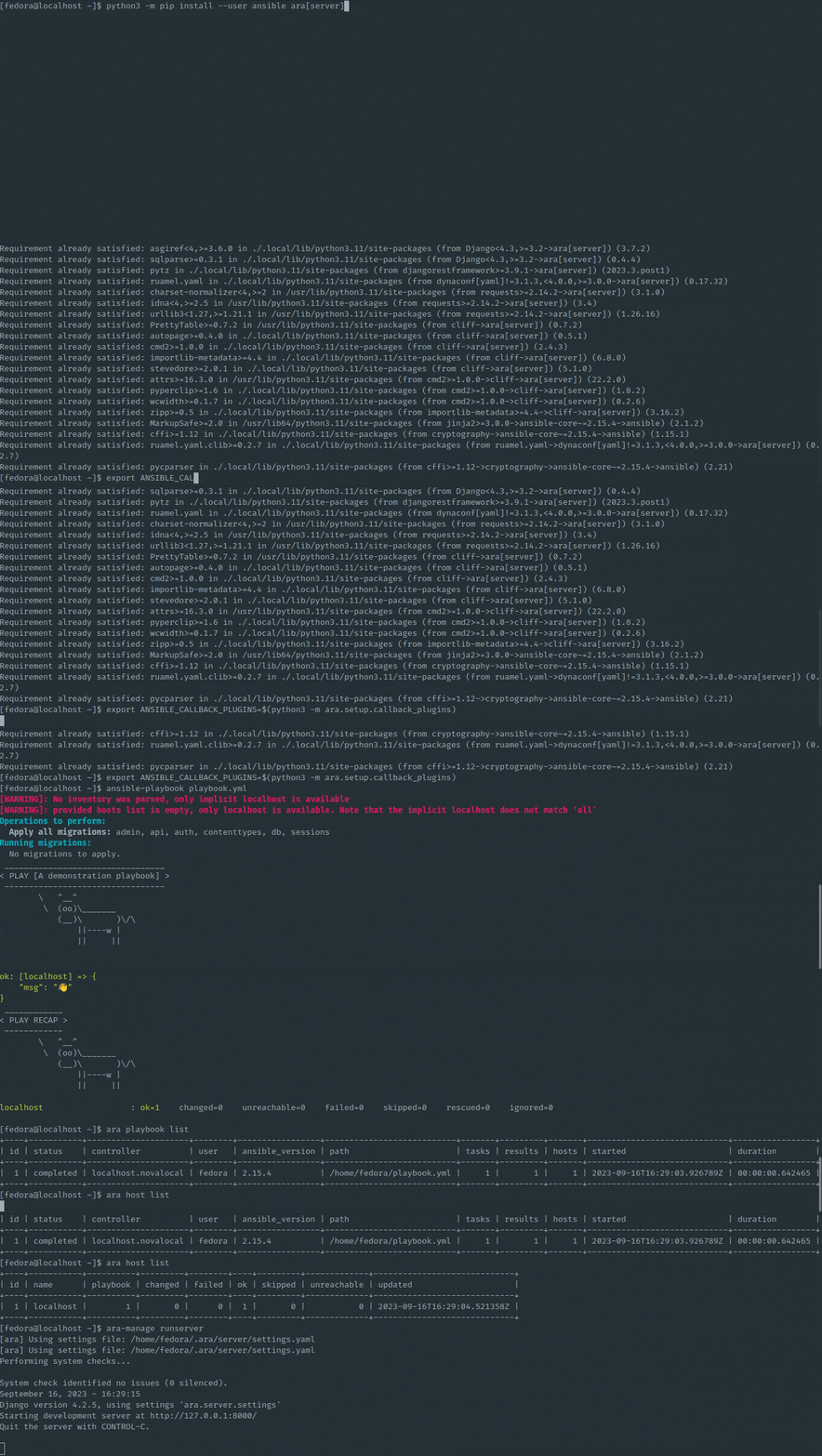
ara records to a local sqlite database by default and does not require a persistent server:
# Install ansible (or ansible-core) with ara (including API server dependencies)
python3 -m pip install --user ansible "ara[server]"

# Configure Ansible to enable ara
export ANSIBLE_CALLBACK_PLUGINS="$(python3 -m ara.setup.callback_plugins)"

# Run an Ansible playbook as usual
ansible-playbook playbook.yml

# Check out the CLI
ara playbook list
ara host list

# or the UI at http://127.0.0.1:8000
ara-manage runserver
Recording playbooks with an API server
The server includes a REST API as well a web reporting interface.
Consider running one to aggregate playbook runs from different tools, jobs or servers into a single dashboard that can be shared with friends.
Get started with the ara_api role or with the container images published by the project on DockerHub and quay.io:
# Create a directory for a volume to store settings and a sqlite database
mkdir -p ~/.ara/server

# Start an API server with docker from the image on DockerHub:
docker run --name ara-api --detach --tty \
  --volume ~/.ara/server:/opt/ara -p 8000:8000 \
  docker.io/recordsansible/ara-api:latest

# or with podman from the image on quay.io:
podman run --name ara-api --detach --tty \
  --volume ~/.ara/server:/opt/ara -p 8000:8000 \
  quay.io/recordsansible/ara-api:latest
Once the server is running, ara must be installed and configured to send data to it:
# Install ansible (or ansible-core) with ara (excluding API server dependencies)
python3 -m pip install --user ansible ara

# Configure Ansible to enable ara
export ANSIBLE_CALLBACK_PLUGINS="$(python3 -m ara.setup.callback_plugins)"

# Set up the ara callback to know where the API server is located
export ARA_API_CLIENT="http"
export ARA_API_SERVER="http://127.0.0.1:8000"

# Run an Ansible playbook as usual
ansible-playbook playbook.yml

# Check out the CLI
ara playbook list
ara host list

# Or browse http://127.0.0.1:8000 (running from the container)
Live demo
A live demo is deployed with the ara Ansible collection from Ansible Galaxy.
It is available at https://demo.recordsansible.org.
Documentation and changelog
Documentation for installing, configuring, running and using ara is available on ara.readthedocs.io.
Common issues may be resolved by reading the troubleshooting guide.
Changelog and release notes are available within the repository's git tags as well as the documentation.
Community and getting help
- Bugs, issues and enhancements: https://codeberg.org/ansible-community/ara/issues
- IRC: #ara on Libera.chat
- Matrix: Bridged from IRC via #ara:libera.chat
- Slack: Bridged from IRC via https://arecordsansible.slack.com
- Website and blog: https://ara.recordsansible.org
Twitter: https://twitter.com/recordsansible- Mastodon: https://fosstodon.org/@ara
Contributing
Contributions to the project are welcome and appreciated !
Get started with the contributor's documentation.
ara is a non-commercial project but it still incurs expenses like hosting, development, maintenance, testing & CI. If ara has been helpful or useful to you, consider ordering stickers or leaving a tip: https://ko-fi.com/rfc2549
Authors
Code contributions to the project can be viewed from the git log or on Codeberg.
The ara parrot logo was designed and contributed by Jason E. Rist.
Copyright
Copyright (c) 2026 The ARA Records Ansible authors

ARA Records Ansible is free software: you can redistribute it and/or modify
it under the terms of the GNU General Public License as published by
the Free Software Foundation, either version 3 of the License, or
(at your option) any later version.

ARA Records Ansible is distributed in the hope that it will be useful,
but WITHOUT ANY WARRANTY; without even the implied warranty of
MERCHANTABILITY or FITNESS FOR A PARTICULAR PURPOSE.  See the
GNU General Public License for more details.

You should have received a copy of the GNU General Public License
along with ARA Records Ansible.  If not, see <http://www.gnu.org/licenses/>.