APK Studio is an open-source, cross-platform Qt6 desktop IDE for reverse-engineering Android application packages, built for security researchers, malware analysts and Android developers who need to decompile, inspect, edit, rebuild, sign and install APKs from one graphical workspace instead of a chain of command-line tools.
What it is
APK Studio is a C++ application built on the Qt6 framework (Qt5 also appears among its topics) and released under the LGPL-3.0 licence. It presents a familiar IDE-like layout: a project tree, a built-in code editor with syntax highlighting for *.smali files and other text formats, docked tool windows and native Qt 6 theming with dark and light variants. The README states its headline goal plainly — it runs on Linux, Mac OS X and Windows — and the repository carries roughly 4,665 stars, 739 forks and 4 open issues, indicating an actively used tool rather than an abandoned experiment.
The problem it solves is one of assembly. Reverse-engineering an Android package normally means juggling four or five separate utilities: Apktool to decode resources and smali and to rebuild the package, JADX for Java decompilation, Uber APK Signer for signing, and ADB to push the result to a device. Each has its own argument syntax, and each must be invoked in the right order for every APK examined. APK Studio lives in that Android reverse-engineering ecosystem and replaces the manual command-line choreography with a single desktop front end that drives those tools from one interface, so a decompile–edit–recompile–sign–install cycle happens in one window. It also removes the setup burden, since it can download and install Java, Apktool, JADX, ADB and Uber APK Signer automatically.
Key capabilities
- Decompiles, recompiles, signs and installs APKs from within the IDE.
- Automatically downloads and installs required tools (Java, Apktool, JADX, ADB, Uber APK Signer) on first launch, with Settings available for users who prefer their own installations.
- Framework support for manufacturer-specific framework files such as HTC, LG and Samsung, with optional tagging for decompiling and recompiling APKs.
- Built-in code editor with syntax highlighting for
*.java, *.smali, *.xml and *.yml files, plus quick search in open files and the project tree.
- Built-in viewers for images (
*.gif, *.jpg, *.jpeg, *.png) and a hex editor for binary files.
- Extra apktool argument passthrough for both decompile and recompile operations, for example
--force-all and --no-res.
- Opens APK files directly from the file system through an "Open with" context menu entry or command-line arguments, with the decompile dialog opening automatically.
Who uses it and how
- Mobile security researchers and penetration testers who need to unpack and modify third-party APKs, including packages built against OEM frameworks such as HTC, LG or Samsung.
- Malware analysts who want to read smali, inspect embedded resources as images and examine binary blobs in the hex editor without leaving one application.
- Android developers auditing their own release builds, using the decompile/recompile/sign/install loop to verify what actually shipped.
- Users who want file-manager integration: an
.apk file can be right-clicked and opened with the APK Studio executable, or its path passed as a command-line argument, after which the decompile dialog appears with that file selected.
- Builders and packagers producing their own binaries, using CMake with Qt6 6.10.1 or higher, a C++17 compiler and Git, then deploying dependencies with
windeployqt, linuxdeploy or macdeployqt; GitHub Actions produces builds for Windows, Linux and macOS.
Getting started
Download a build from the project's Releases page, or clone the repository recursively and build from source with CMake 3.16 or higher against Qt6 6.10.1 or higher (Core, Gui, Network and Widgets), configuring with cmake -B build -S . -DCMAKE_BUILD_TYPE=Release and building with cmake --build build --config Release. On first launch the required tools can be downloaded and installed automatically, or pointed at existing installations in Settings.
How it compares
APK Studio does not compete with the utilities named in its own credits — Apktool, JADX and Uber APK Signer — but orchestrates them, presenting a Qt6 graphical layer over tools that otherwise require separate invocations. Where those projects are libraries and command-line programs, APK Studio is the workspace that installs and drives them, so it sits above them in the stack rather than replacing them.
When to use it — and when not
APK Studio is a desktop application, so there is nothing server-side to operate, but self-builders must supply a Qt6 6.10.1-or-higher toolchain, CMake and a C++17 compiler, and distribute the Qt dependencies themselves if they are not using the official release artifacts. Teams needing unattended, batch or headless processing of many packages should look directly at apktool and JADX, because the README describes only interactive use plus command-line opening of a single file. The documentation is also thin beyond the feature list, downloads and build steps, so users who need extensive troubleshooting guidance or detailed configuration reference will find little of it here.
project readme (upstream, from github) — read inline

APK Studio
Open-source, cross platform Qt6 based IDE for reverse-engineering Android application packages. It features a friendly IDE-like layout including code editor with syntax highlighting support for *.smali code files.
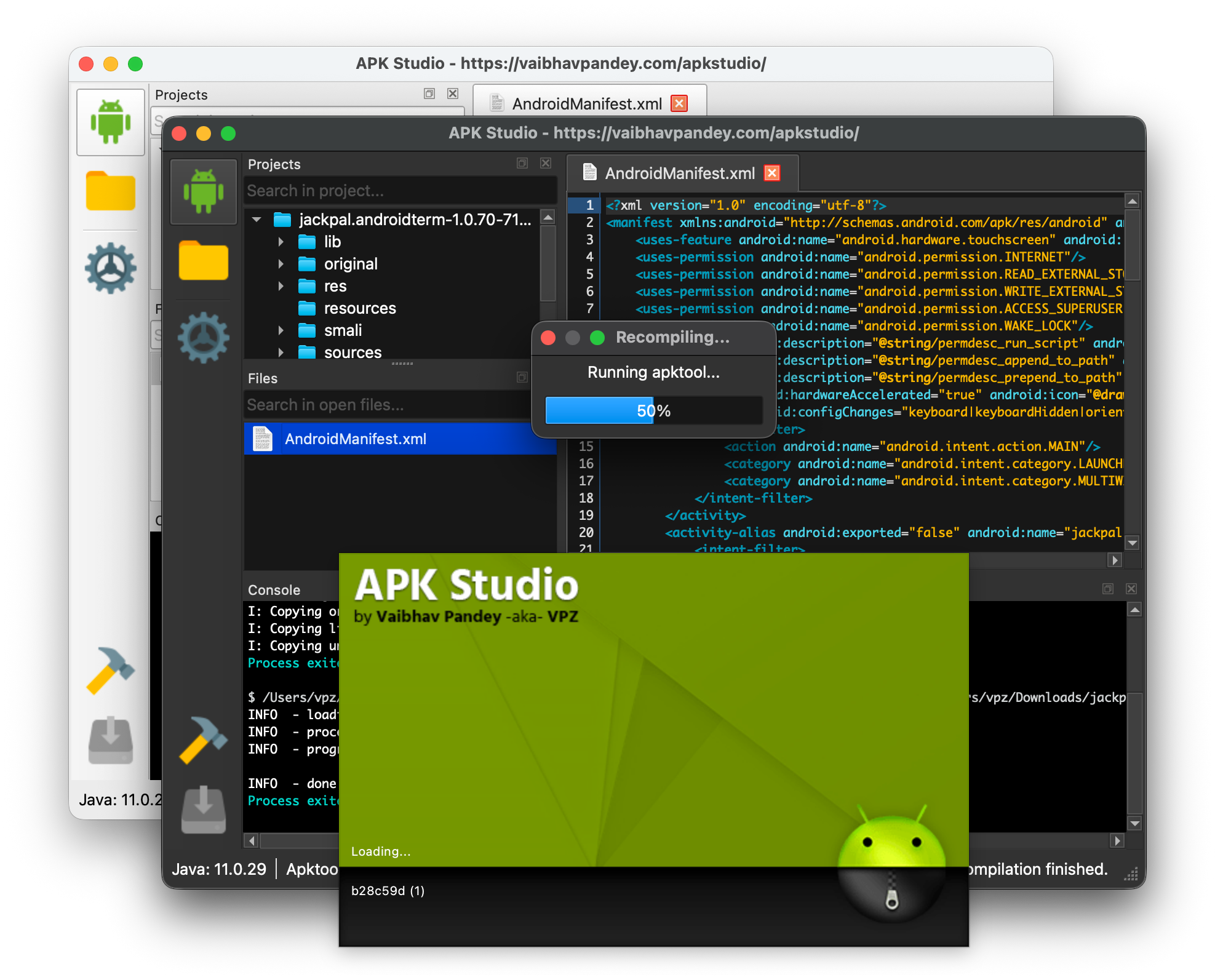




Features
- Cross platform, run on Linux, Mac OS X & Windows
- Decompile/recompile/sign & install APKs
- Automatic tool download & installation - APK Studio can automatically download and install required tools (Java, Apktool, JADX, ADB, Uber APK Signer)
- Framework support - Install and use manufacturer-specific framework files (e.g., HTC, LG, Samsung) with optional tagging for decompiling and recompiling APKs
- Command-line APK opening - Open APK files directly from the file system via "Open with" context menu or command-line arguments
- Extra apktool arguments - Provide additional command-line arguments (e.g.,
--force-all, --no-res) for decompile and recompile operations
- Search functionality - Quick search in open files and project tree to find items by name
- Built-in code editor (*.java; *.smali; *.xml; *.yml) w/ syntax highlighting
- Built-in viewer for image (*.gif; *.jpg; *.jpeg; *.png) files
- Built-in hex editor for binary files
- Dark/Light theme support - Native Qt 6 theming with system integration
Downloads
Please head over to Releases page for downloading.
Note: APK Studio can automatically download and install required tools (Java, Apktool, JADX, ADB, Uber APK Signer) on first launch. If you prefer to use your own installations, you can configure them in Settings.
Tip: You can open APK files directly from your file system by right-clicking an .apk file, selecting "Open with" → "Choose an app on your PC" (or "Choose another app"), then browsing to the APK Studio executable. Alternatively, you can pass the APK file path as a command-line argument. The decompile dialog will automatically open with the selected file.
Building
Requirements
- CMake 3.16 or higher
- Qt6 6.10.1 or higher (Core, Gui, Network, Widgets components)
- C++17 compatible compiler
- Git (for version information)
Build Instructions
Clone the repository (including submodules):
git clone --recursive https://github.com/vaibhavpandeyvpz/apkstudio.git
cd apkstudio
Configure the build:
cmake -B build -S . -DCMAKE_BUILD_TYPE=Release
On macOS, you may need to specify the Qt path:
cmake -B build -DCMAKE_BUILD_TYPE=Release -DCMAKE_PREFIX_PATH=/path/to/Qt/6.10.1/clang_64
Build the project:
cmake --build build --config Release
Deploy Qt dependencies (optional, for distribution):
- Windows: Use
windeployqt from Qt installation
- Linux: Use
linuxdeploy with Qt plugin to create AppImage
- macOS: Use
macdeployqt to bundle Qt frameworks
The executable will be located at:
- Windows:
build/bin/Release/ApkStudio.exe
- Linux/macOS:
build/bin/ApkStudio (or build/bin/ApkStudio.app on macOS)
CI/CD
The project uses GitHub Actions for automated builds on Windows, Linux, and macOS. Build artifacts are automatically created and uploaded on every push, pull request, and release.
Credits
Note: If you encounter any problems, make sure to check Console output at the bottom of the IDE to get the output of command which was actually executed by program. Report any issues related to APK Studio here on Github. Please note, an issue with apktool is not an issue with APK Studio. Please verify the context of issue before opening a ticket.
Disclaimer
Same as apktool, APK Studio is neither intended for piracy nor other non-legal uses. It could be used for localizing, adding some features or support for custom platforms, analyzing applications & much more.
