

跑在你自己电脑上的 AI 机器人。任意模型,按量付费。
官网 | 下载 | 简体中文 | English | Modelflare | 价格 | 开发文档 | 问题反馈






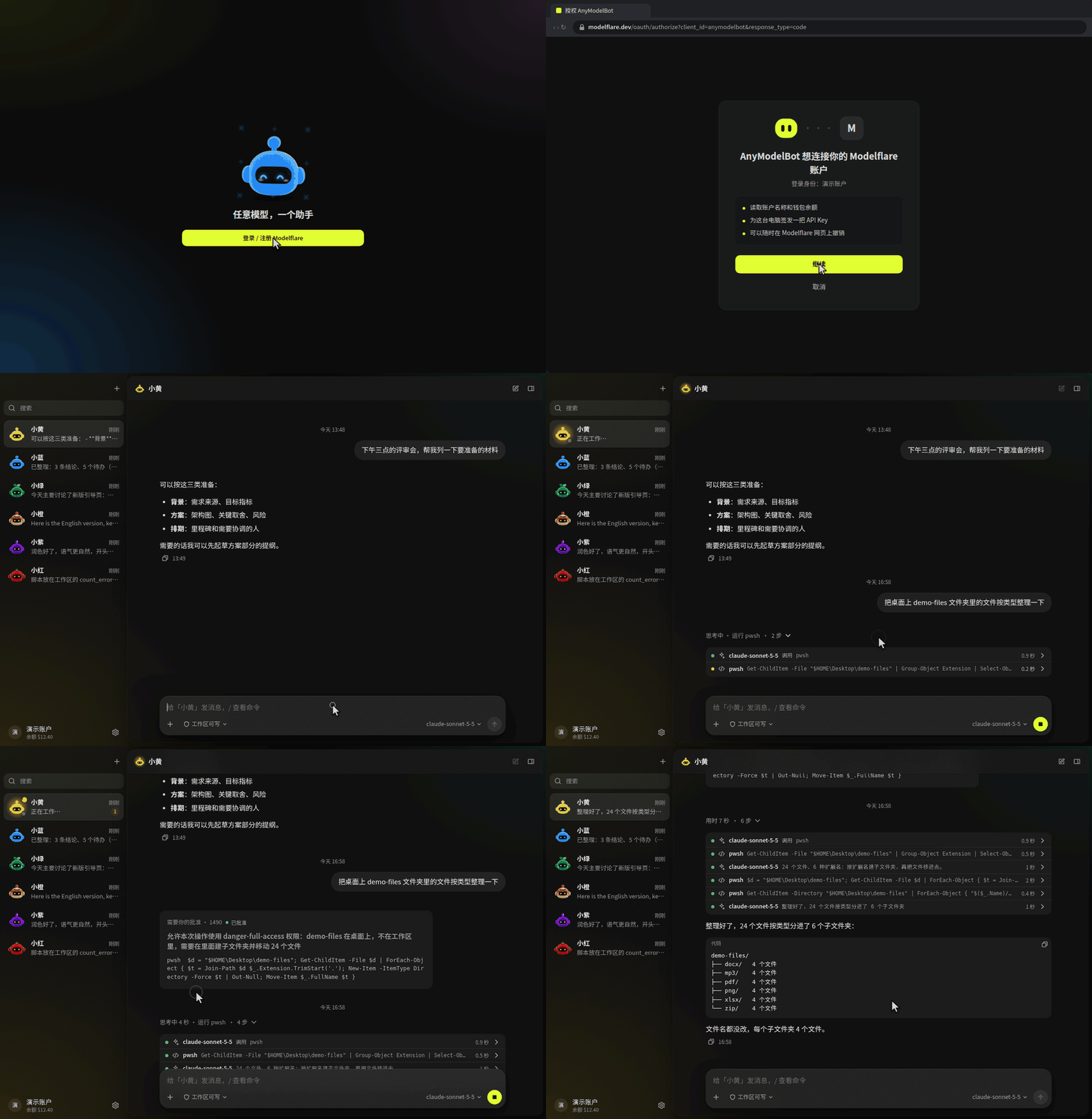
🤖 AnyModelBot
AnyModelBot 是一个本地优先的 AI 智能体应用,支持 Windows、macOS 和 Linux。一个机器人就是一个人设,带着自己的默认模型、工作区和记忆。你可以在应用里和它聊天,也可以在微信、飞书、Telegram、Slack、Discord 里找它。它能读写文件、执行命令、操作你的桌面,一旦要越出自己的工作区,就会先问你。
对话、记忆、文件和 API Key 都留在你的设备上。模型来自 Modelflare:一个账户,任意模型,按 token 计费。AnyModelBot 本身没有订阅。
和 xAI 的 Grok Bot、OpenAI 的 dots、Anthropic 的 Claude Duet 一样,它是一个常驻的个人 AI 智能体:在后台替你干活,需要你拍板时再来问你。不同的是,AnyModelBot 开源(MIT),跑在你自己的电脑或服务器上,GPT、Claude、Gemini、Grok 等任意模型都能用,按量付费,不绑定某一家的订阅(详细对比)。
装好就是一个开箱即用的 Super Agent:后台任务、定时规则和「需要你」都不用另外配置。它的设计参考了 DeepSeek 的 Super Agent 原型,智能体运行在 DeepSeek Harness 上(详细介绍)。
📥 下载 · 🌠 截图 · 🌟 核心功能 · 🆚 对比 · 🔐 工作原理与隐私
⭐ 喜欢 AnyModelBot?点个 Star,第一时间收到新版本。
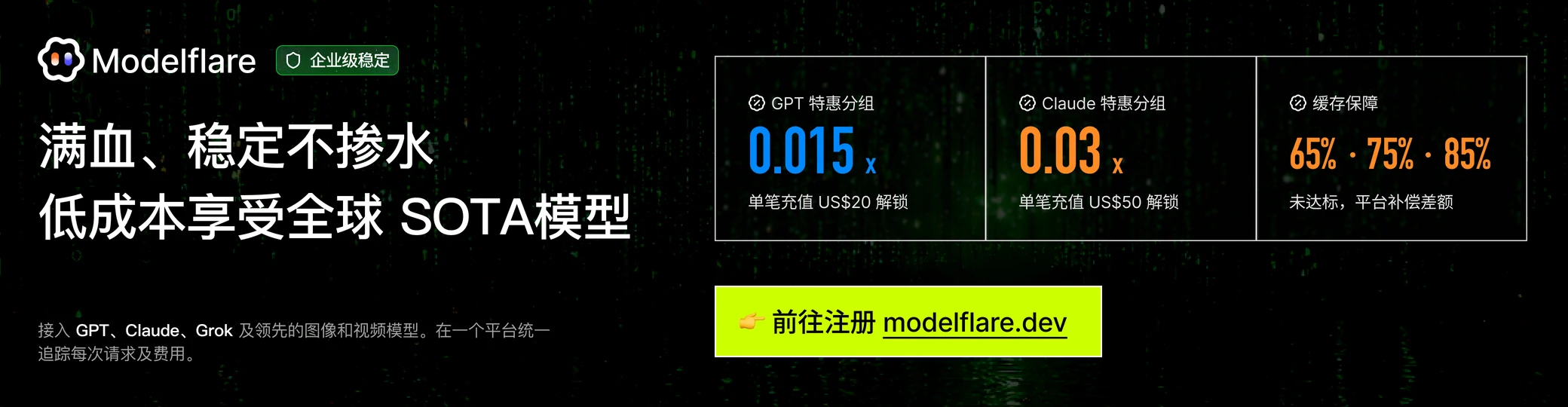
AnyModelBot 的模型全部来自 Modelflare:满血、稳定不掺水,低成本享受全球 SOTA 模型。Modelflare 由美国公司 Havenbyte LLC 运营,已有 20 万+ 注册开发者。一个 API Key 就能调用 13 家供应商的 70+ 个文本、图片和视频模型,GPT、Claude、Gemini、Grok、DeepSeek、Kimi、GLM 都在里面,兼容 OpenAI、Anthropic、Gemini 等常用接口协议。请求会在多个供应商之间路由并自动回退,每一次请求都记录用量和费用,价格表公开,按 token 计费。
缓存补偿是一大亮点:OpenAI 的价格优先、稳定、高级三个分组,分别保证每天 65%、75%、85% 的缓存命中率;符合条件的请求没达到目标,Modelflare 会补偿差额。
特惠活动:单笔充值达到指定金额,就能解锁 0.015 倍价格倍率的 GPT 特惠分组和 0.03 倍的 Claude 特惠分组,适合个人开发、功能验证和轻量使用。这是限时活动,门槛和规则以 Modelflare 页面为准,通过专属链接注册即可参与。
注册 Modelflare → · 价格表 · API 文档 · 信任中心 · X
AnyModelBot 怎么用 Modelflare
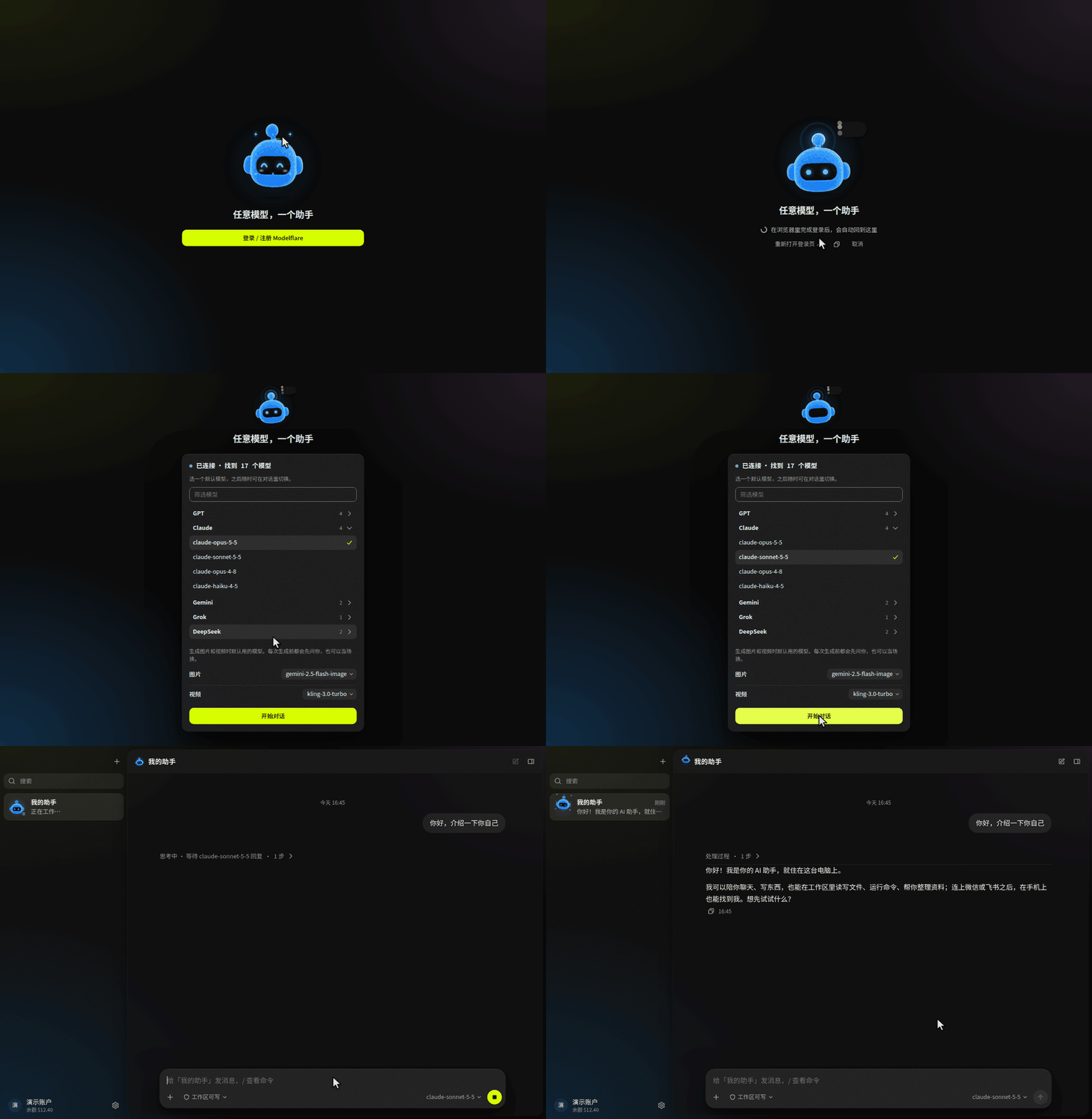
- 登录一次就行。 首次启动会打开浏览器,登录(或注册)Modelflare。之后应用自己把这台设备连上,不用复制 Key。在 Docker 或服务器上运行?改为粘贴一个 API Key。
- 所有模型,一个选择器。 你的 Modelflare 模型会自动列出,每个模型旁边都有上下文长度、能力标记和参考价。
- 用多少付多少。 余额、低余额提醒和每日用量都在应用里看。选模型之前,先看公开价格表,和官方价格对比一下。
- 一条诚实的边界。 模型请求会经过 Modelflare 转发给你选定的供应商,Modelflare 会保留请求日志;保留什么、保留多久,见信任中心。除此之外的内容都留在你的设备上(详情)。
📥 下载
选择你的平台。每个 Release 页面都列出全部安装包和 SHA256SUMS 校验文件。
| 平台 | 架构 | 安装包 | |
|---|---|---|---|
 |
x64 | anymodel-bot--win-x64.exe |
下载 |
|
arm64 | anymodel-bot--win-arm64.exe |
下载 |
 |
Apple 芯片 | anymodel-bot--mac-arm64.dmg |
下载 |
|
Intel | anymodel-bot--mac-x64.dmg |
下载 |
 |
x64 | anymodel-bot--linux-x86_64.AppImage |
下载 |
|
arm64 | anymodel-bot--linux-arm64.AppImage |
下载 |
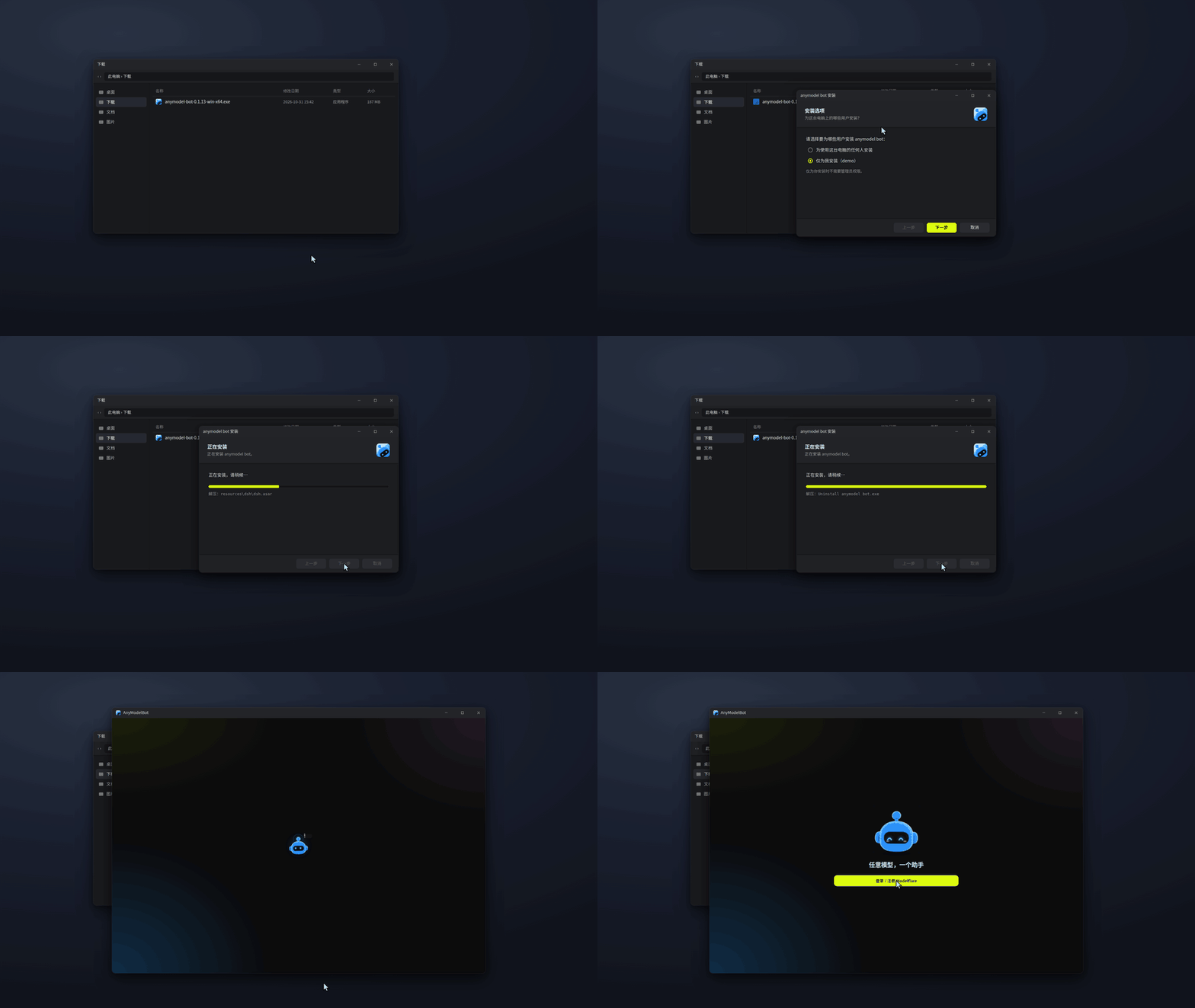
首次打开。 如果系统提示这是从网上下载的应用:Windows 点「更多信息 → 仍要运行」,macOS 在「系统设置 → 隐私与安全性」里点「仍要打开」。Linux 先给 AppImage 加可执行权限(chmod +x)再运行。关闭窗口会把 AnyModelBot 收到托盘,要退出请用托盘菜单或设置里的选项。
校验下载文件。
sha256sum -c SHA256SUMS --ignore-missing
macOS 用 shasum -a 256 ,Windows PowerShell 用 Get-FileHash ,再和 SHA256SUMS 里的值对照。
用 Docker 部署到 NAS 或服务器(镜像同时支持 x64 和 arm64)
docker run -d --name amb -p 3600:3600 -v amb-data:/data ghcr.io/modelflare-ai/anymodel-bot
docker exec amb cat /data/ui-token   # 然后打开 http://<主机>:3600/?token=<令牌>
不要把 3600 端口直接暴露到公网。
从源码运行
git clone https://github.com/modelflare-ai/AnyModelBot.git
cd AnyModelBot
npm install
npm run setup      # 拉取并编译内置网关
npm start          # 本地管理界面:http://127.0.0.1:3600/
从源码构建需要 Node.js 22.13+ 和 Go 1.26.8+。想自己构建 Docker 镜像,见开发文档。
🌠 截图
截图是简体中文界面;应用也有英文界面,在设置里切换。
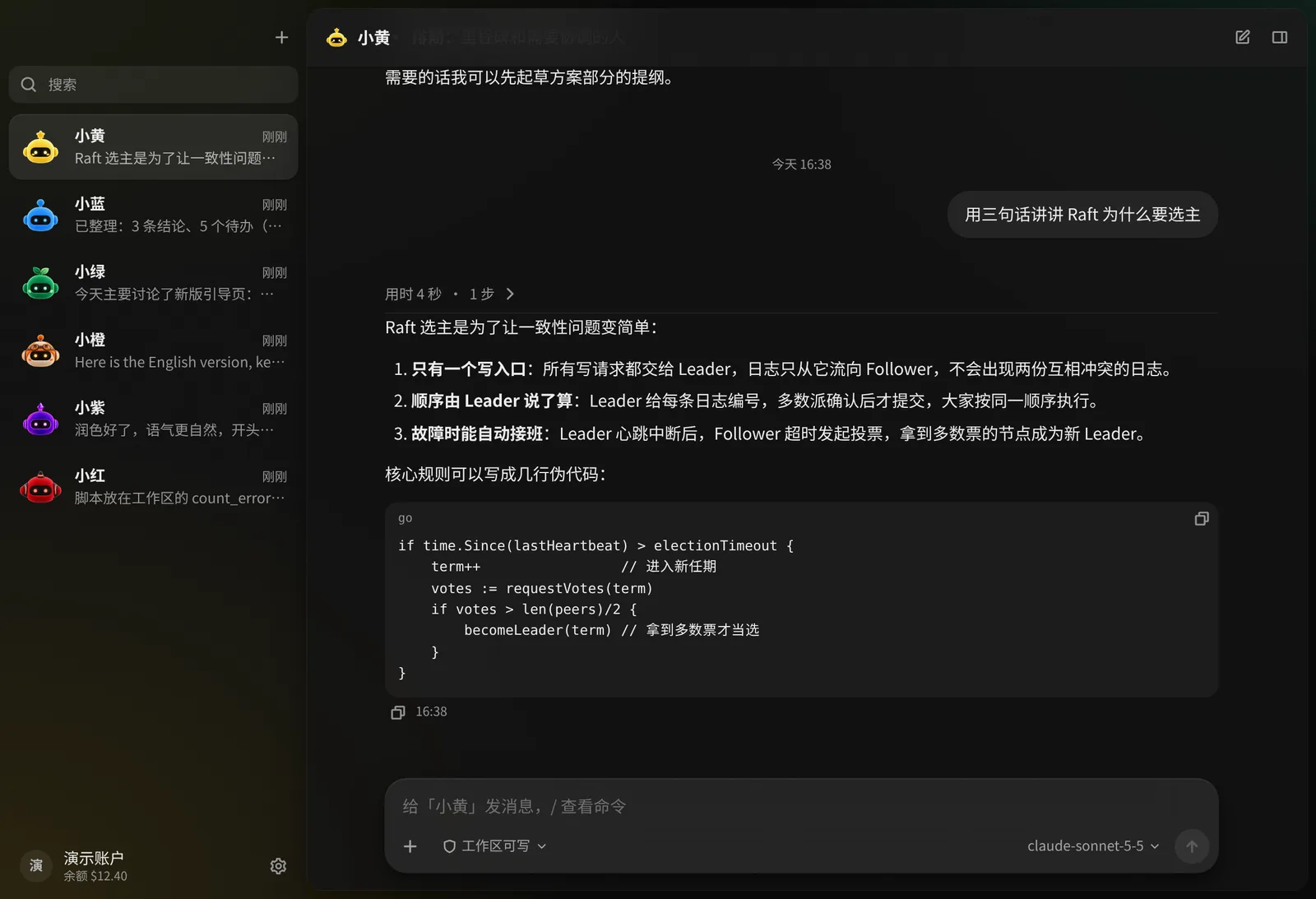
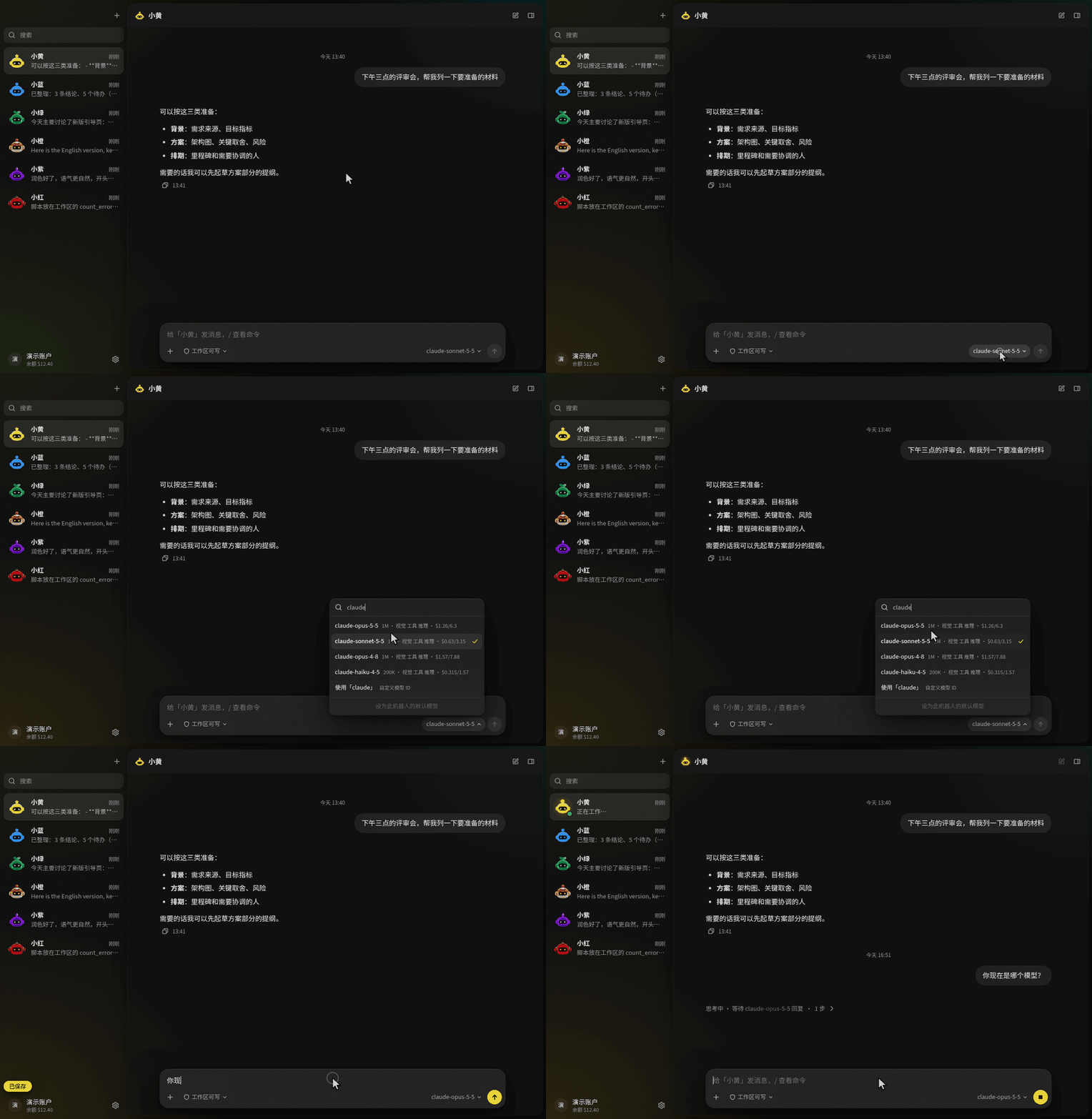
和机器人聊天。回复支持 Markdown 和代码块,输入框会显示当前用的模型。
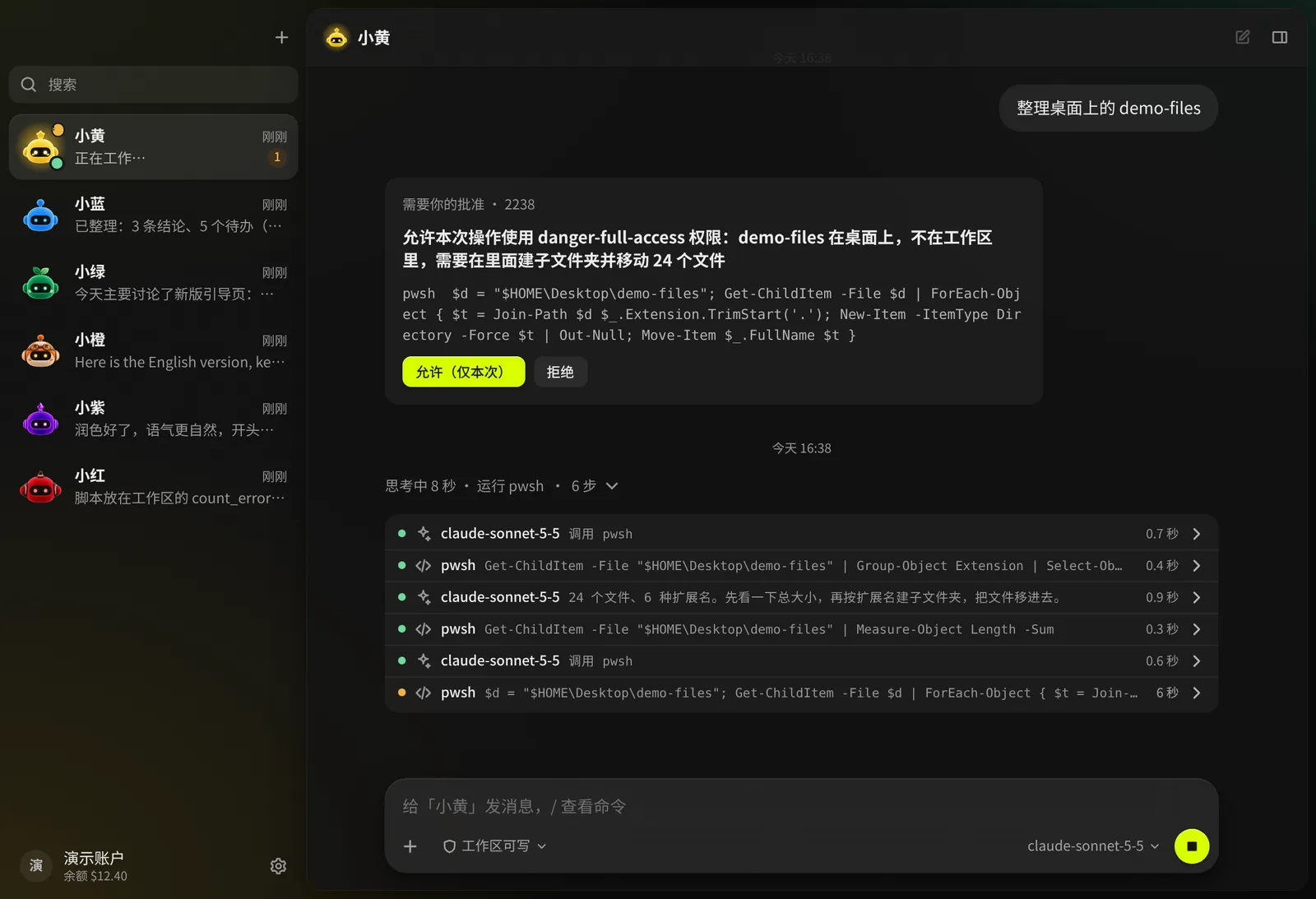
智能体做了什么,一步一步看得见。工作区之外的操作要等你批准。
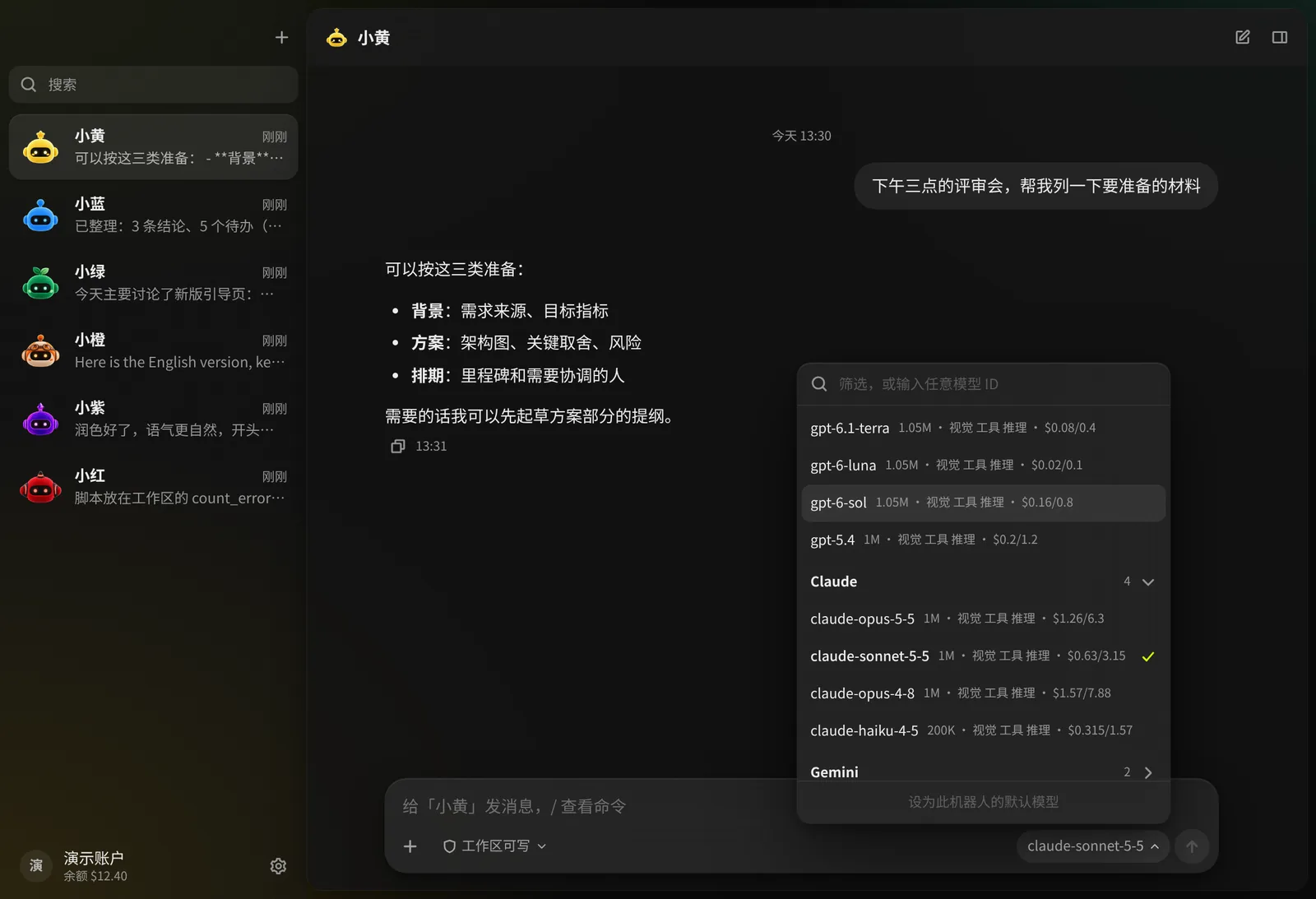
每个对话都能选任意 Modelflare 模型,上下文长度、能力和参考价就在旁边。
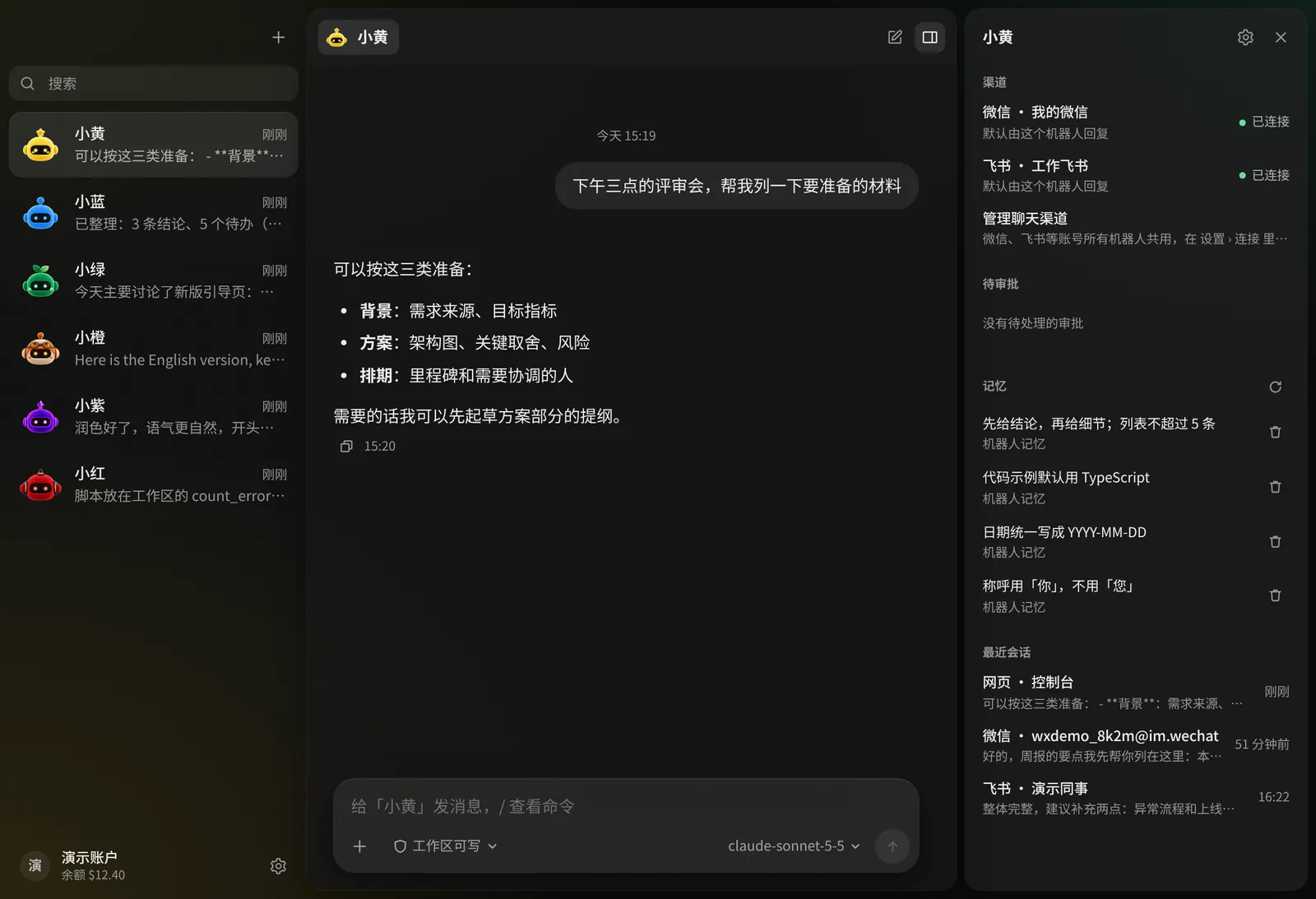
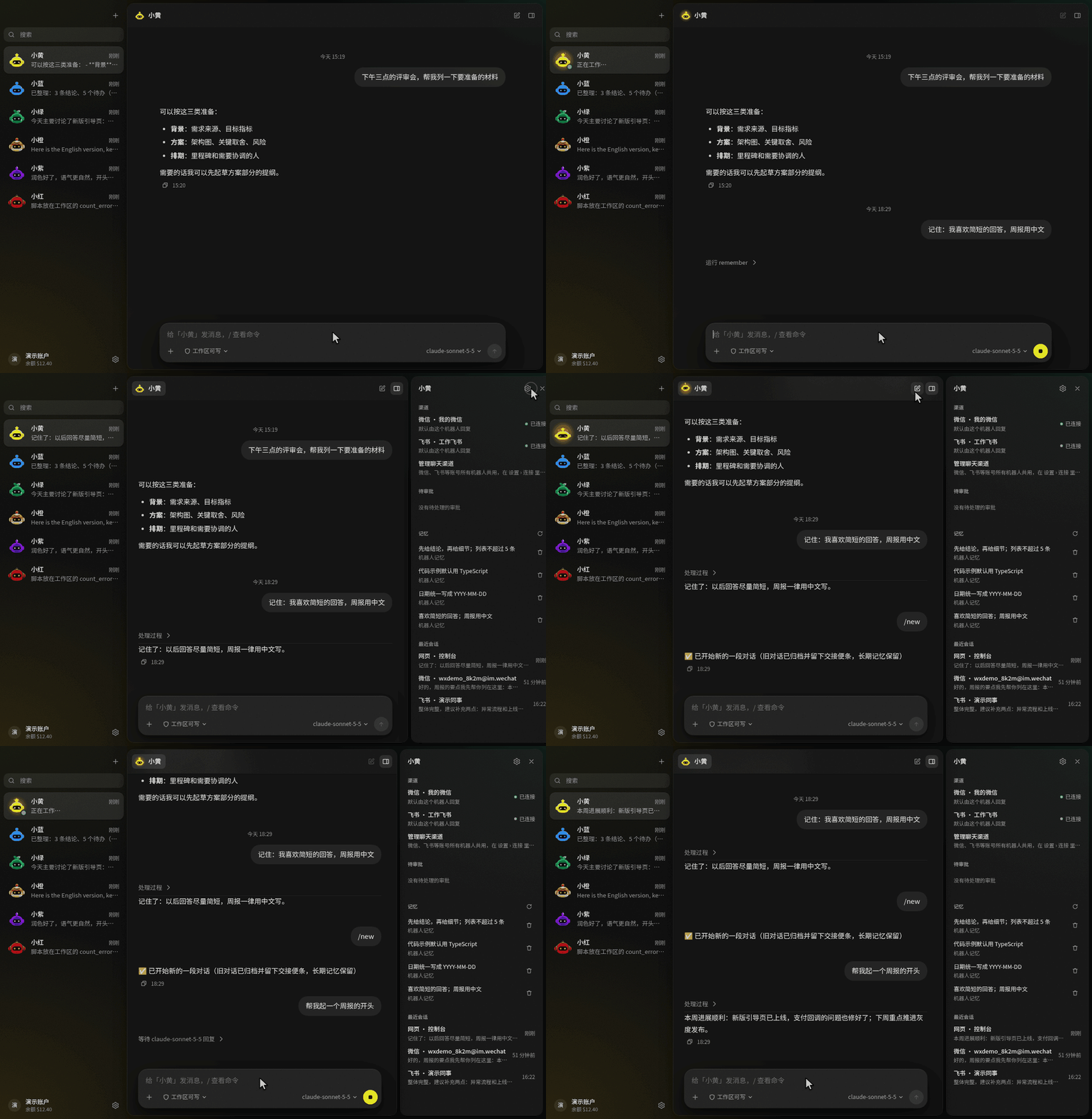
每个机器人的记忆、渠道和会话,集中在一个面板里。
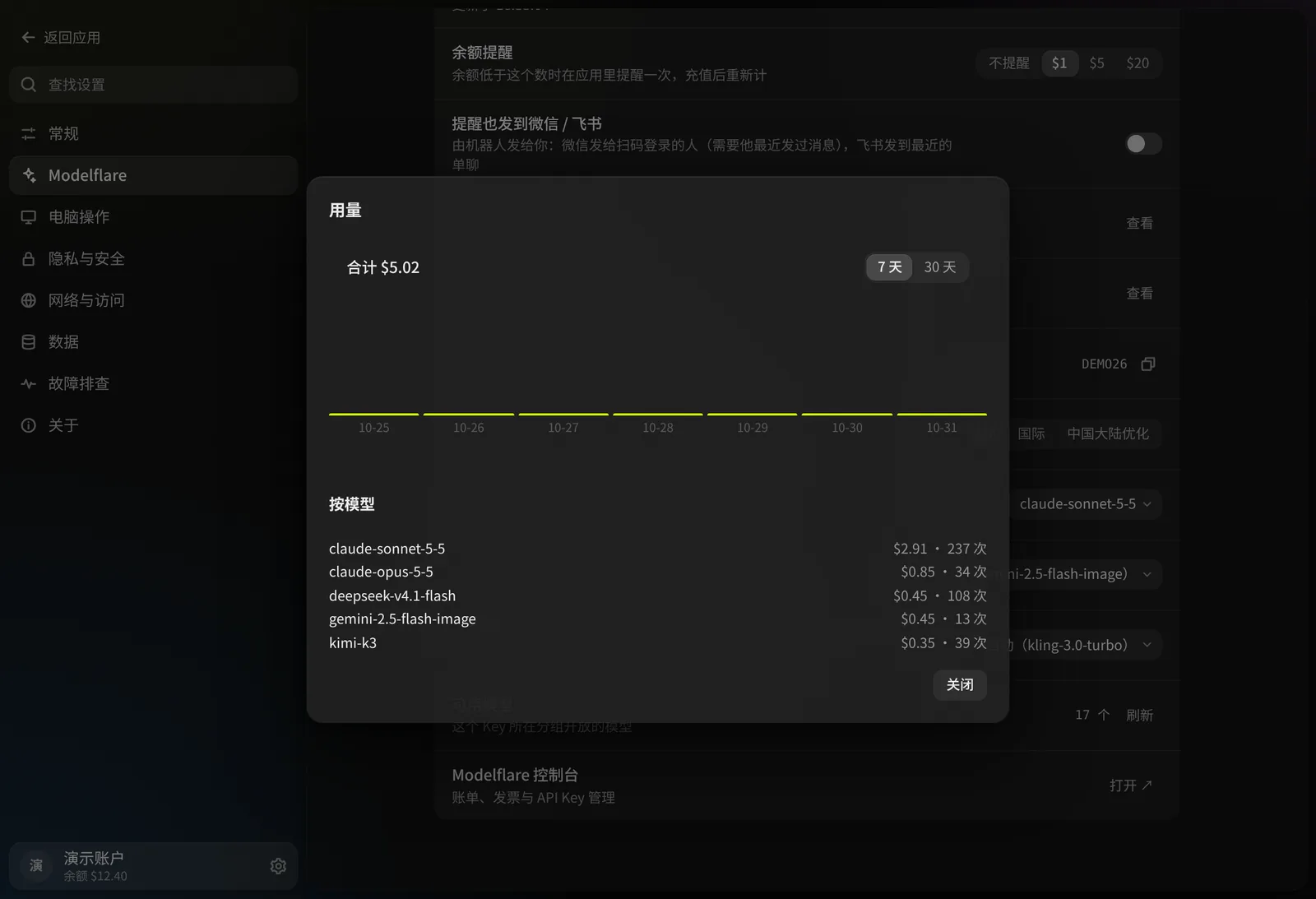
应用里的 Modelflare 账户:余额、用量和默认设置。
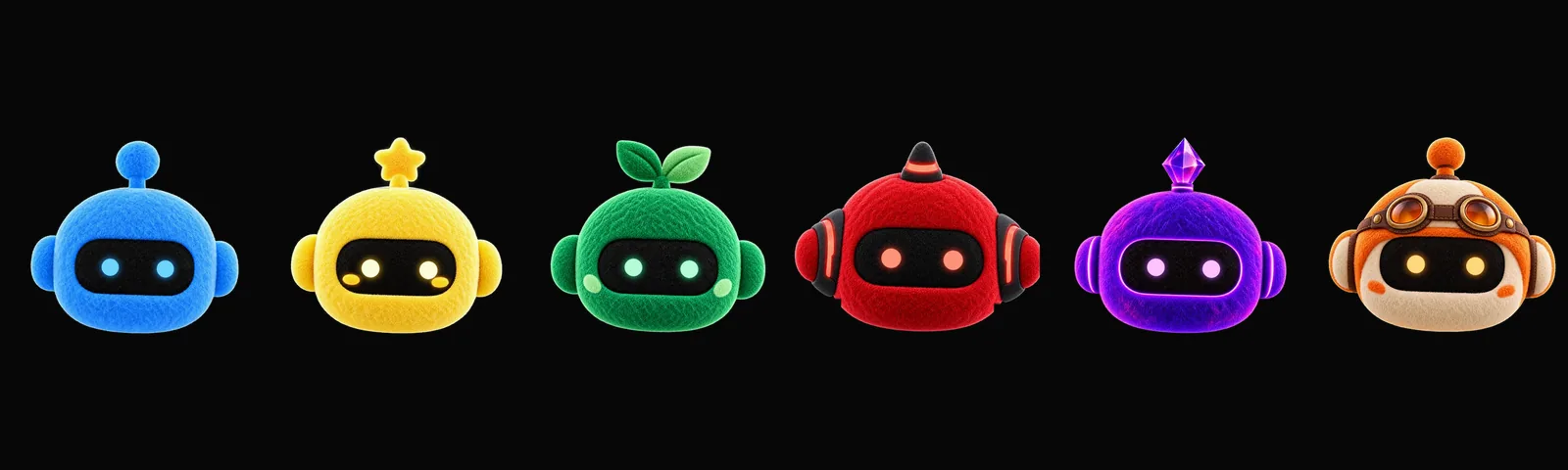
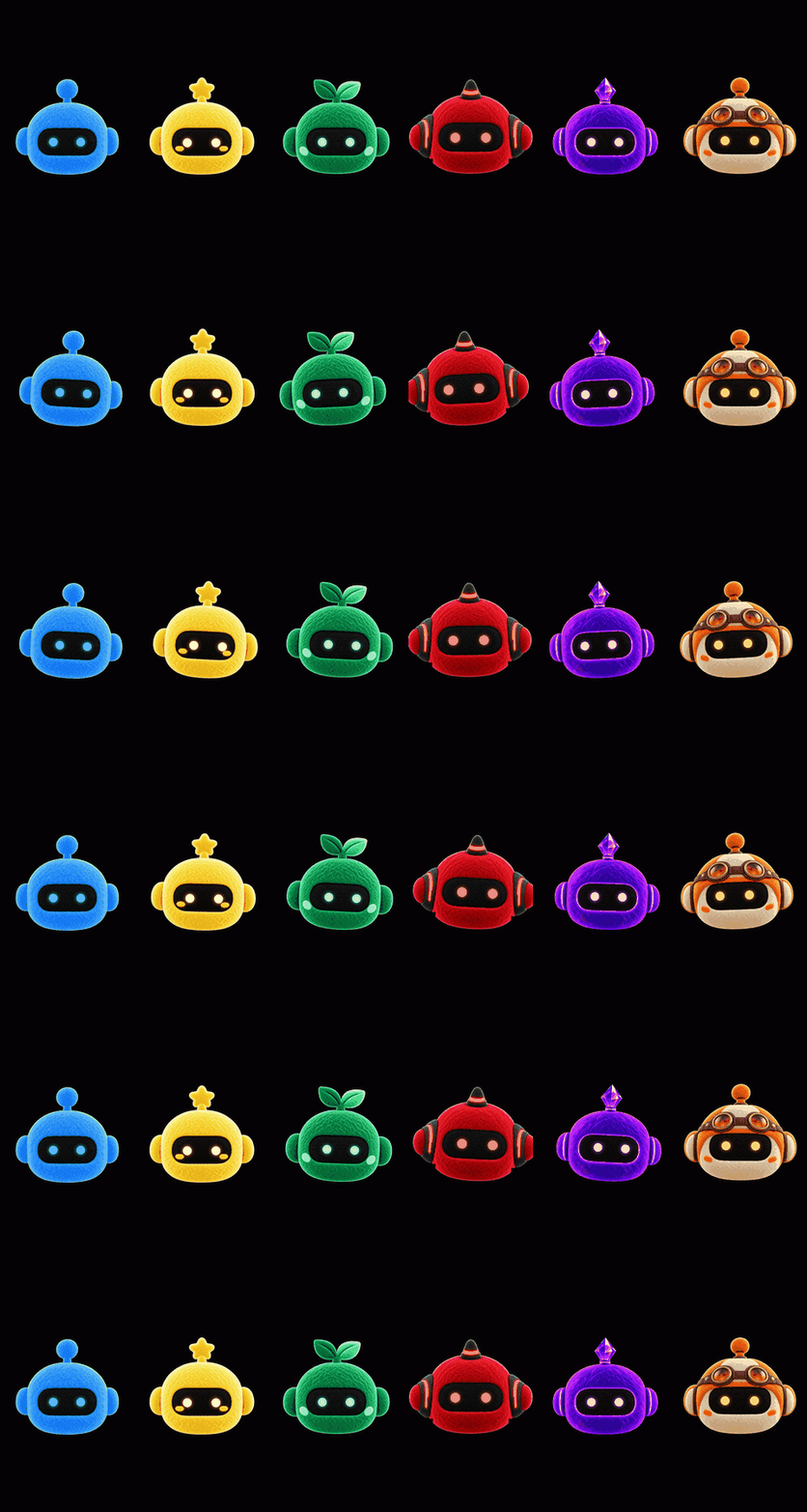
六个角色,帮你分清不同的机器人。它们的眼睛会跟着你的鼠标转。
🌟 核心功能
🤖 真能干活的机器人
机器人不只是一个聊天窗口:它有自己的人设、默认模型、工作区和记忆。
- 想建几个就建几个,每个都有自己的人设、模型、工作区和头像。
- 它是谁由你写。 人设就是一段话,模板只是起点,每个字都能改;六个头像只管长相,不决定它能做什么。
- 真正的文件操作。 机器人能读写文件、在沙箱里执行命令,并把结果作为文件发回聊天。
- 每个机器人三档权限。 只读、工作区(默认:只能写自己的文件夹,越界先问你)、完全权限(不进沙箱;递归删除仍会先问)。
- 审批卡片,没有意外。 越界的操作会停下来,等你回答。
- 重启了也会告诉你。 应用退出或崩溃时还没处理完的消息,下次启动会在原对话里说一声,请你重新发送,不会自动重做。
- 斜杠命令,如
/model、/reset,在应用和各个聊天渠道里都能用;在聊天渠道里发/bot可以换机器人。
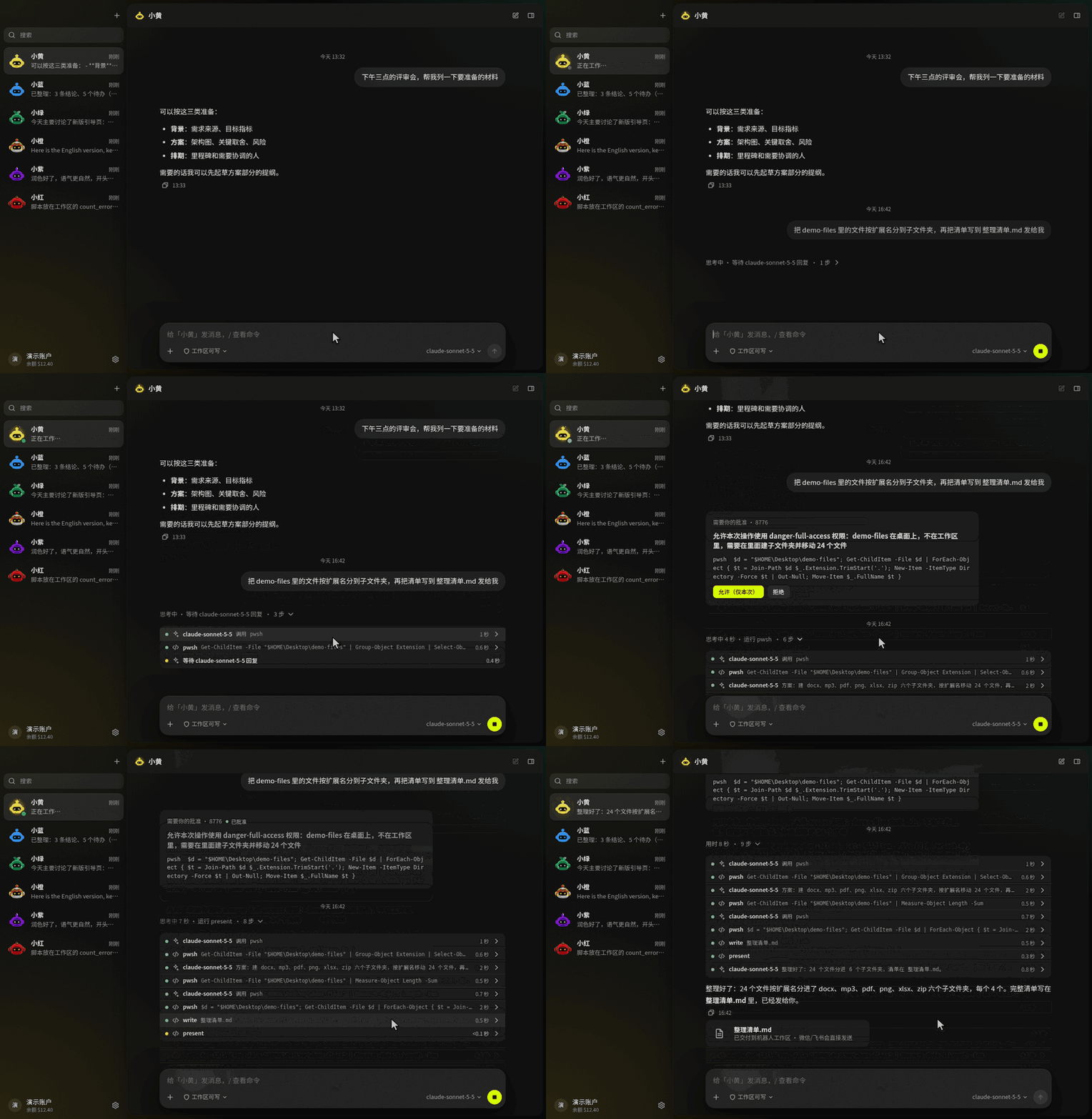
⏳ 在后台干活,需要你时才来找你
- 后台任务。 要跑一阵子的事(调研、做报告、整理文件),或者你说一句「后台做」,机器人会开一个后台任务,你可以接着聊别的。做完把结果发回原来的对话。
- 接着问。 在微信里引用结果、在飞书里回复那条消息,就是继续问这个任务。
- 规则。 「每天早上 8 点看看 X 的价格,低于 200 告诉我」会建成一条规则,到点就去查,有值得说的才告诉你。想先看看它会怎么做,就说「先观察」:只记下本会说什么,不发消息、不改文件,看过几次再改成执行。
- 「需要你」。 所有机器人在等你回答、批准或重试的事都在侧栏这一行里;没事时这一行不出现。信息面板的「任务」组列着这个机器人的任务和规则,每一步都看得到。
- 不吵你。 只推结果、要你决定的事和失败,进展不推。默认 22:00 到 08:00 免打扰;主动消息每天有上限(微信 3 条,其他渠道 5 条),多了合成一条。
- 有预算。 每个任务、每条规则都有预算(任务默认 1 美元,规则每次 0.1 美元、每月 3 美元),快用完时停下问你,可以在任务详情和规则编辑器里改。
- 随时暂停。 机器人设置 › 主动消息里一个开关暂停后台工作,聊天照常。
- 用完会清理。 任务和运行记录留 30 天;任务文件夹 30 天没动过会自动删除,不来问你,任务详情里写着哪天删,想留就点保留。运行记录能导出成 Markdown。
完整介绍见《AnyModelBot 超级智能体》。
🖥️ 操作你的电脑,生成图片和视频
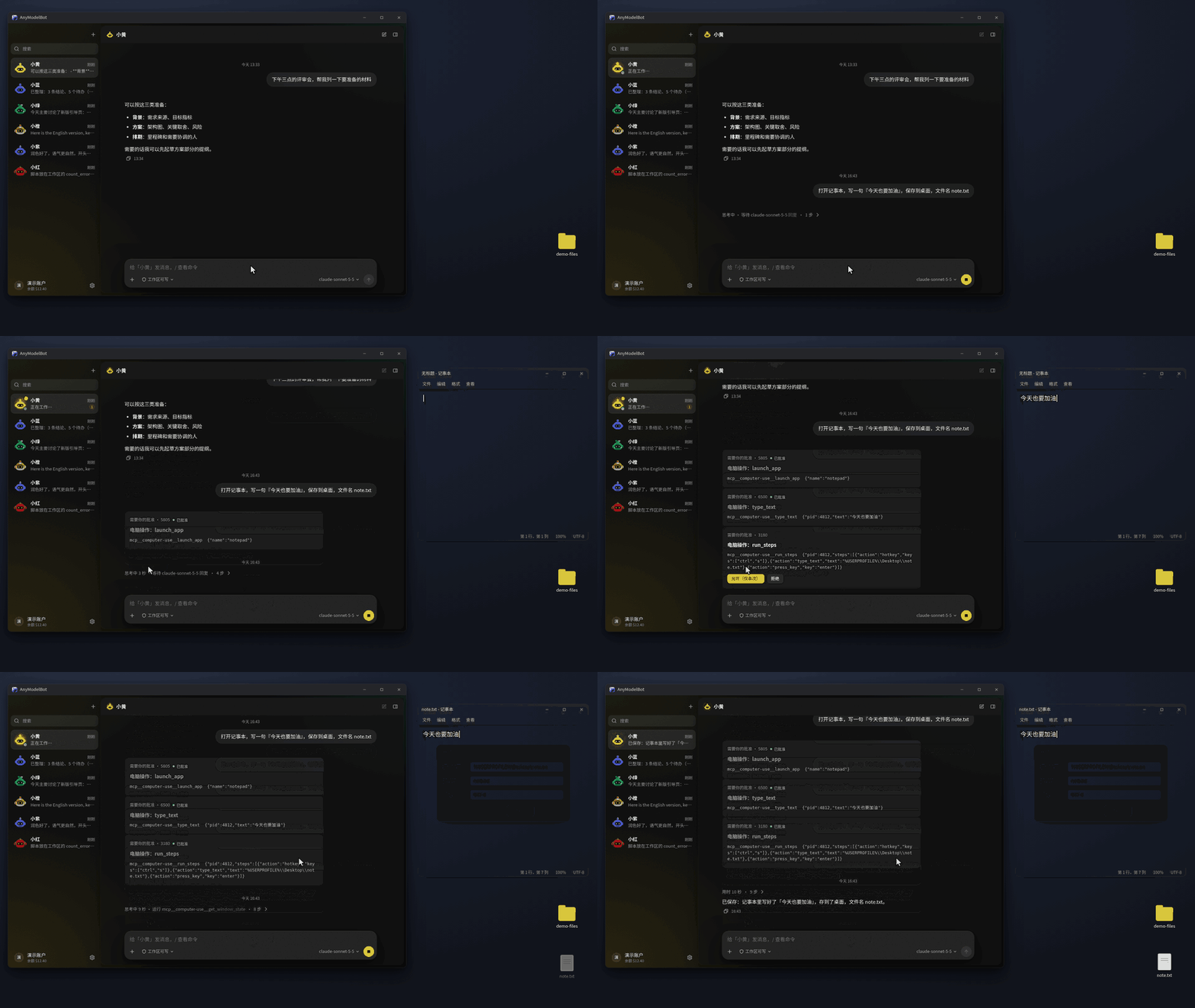
- 电脑操作由内置的 Cua Driver 提供。默认自动执行;把某个机器人切到「改变界面前先问我」,每一次点击和输入都要等你点头。读取屏幕内容永远不需要审批。macOS 上的电脑操作是 Beta 功能。
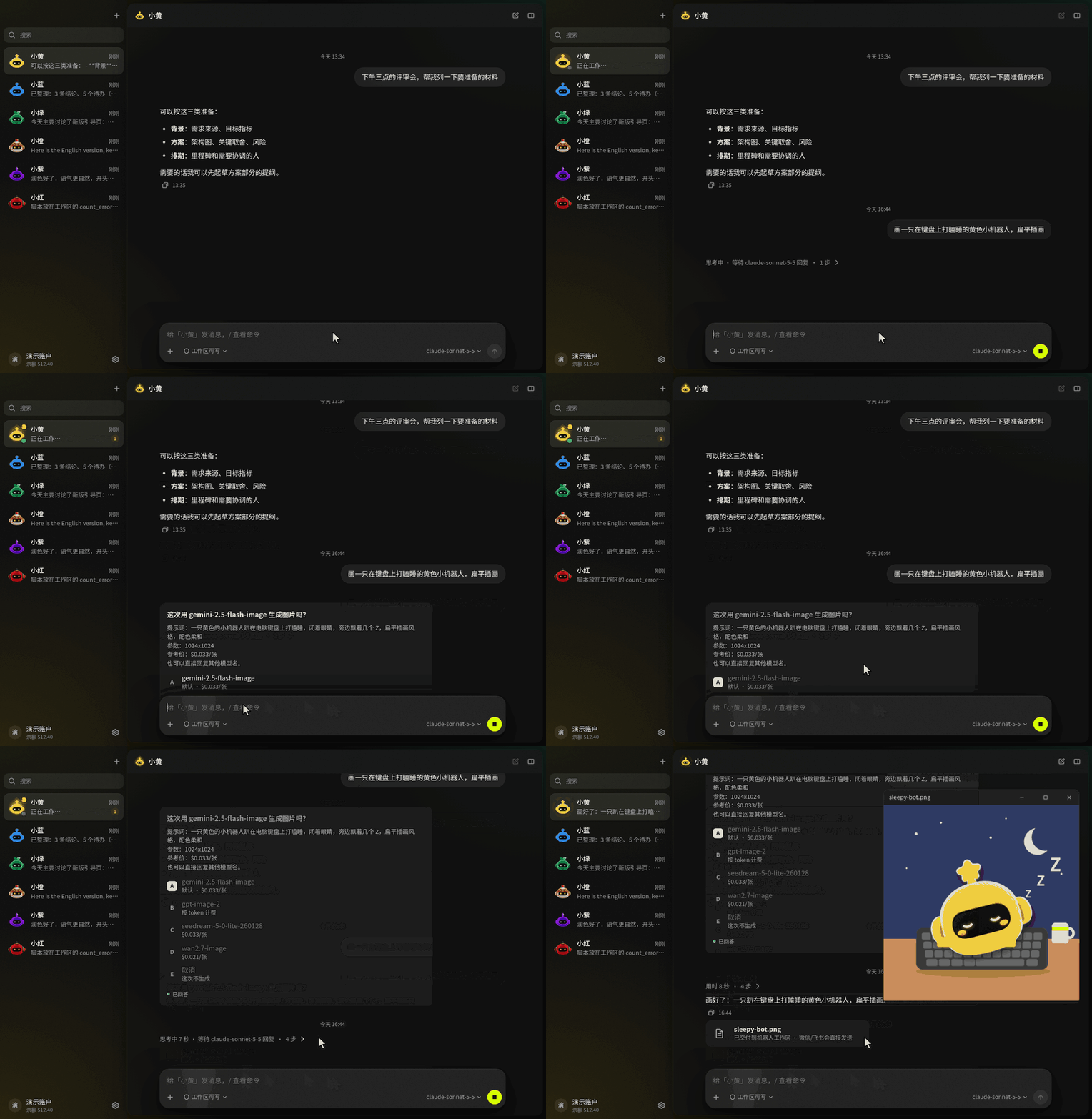
- 图片和视频生成直接生成,要求没说清的按最合理的理解来;预计花费超过 0.5 美元时才先问你,让你看到模型和提示词,也可以当场换模型。想每次都确认,在机器人设置里打开即可。
🌐 任意模型,通过 Modelflare
- 登录一次,你的 Modelflare 模型就会自动出现。更想用 Key?直接粘贴也行。
- 一个选择器,覆盖所有模型。 GPT、Claude、Gemini、Grok、DeepSeek、Kimi、GLM 等,每个都标出上下文长度、能力和参考价。
- 按对话切换,也可以给每个机器人设默认模型;记忆整理、上下文交接这类后台小任务,还能单独指定一个模型。
- 两条线路。 国际线路和中国大陆优化线路,由你自己选,AnyModelBot 不会自动来回切换。
- 按量付费。 钱包余额、低余额提醒、每日用量、每个机器人的预算 Key 都内置。AnyModelBot 没有订阅。
🧠 有记忆,随处可达
- 记忆会延续。 机器人用 Markdown 保存三层记忆(团队、机器人、群),会过滤看起来像密钥的内容。
- 长对话也能用下去。 上下文快满之前,上下文管家会压缩,或开一个新段并带上交接摘要。
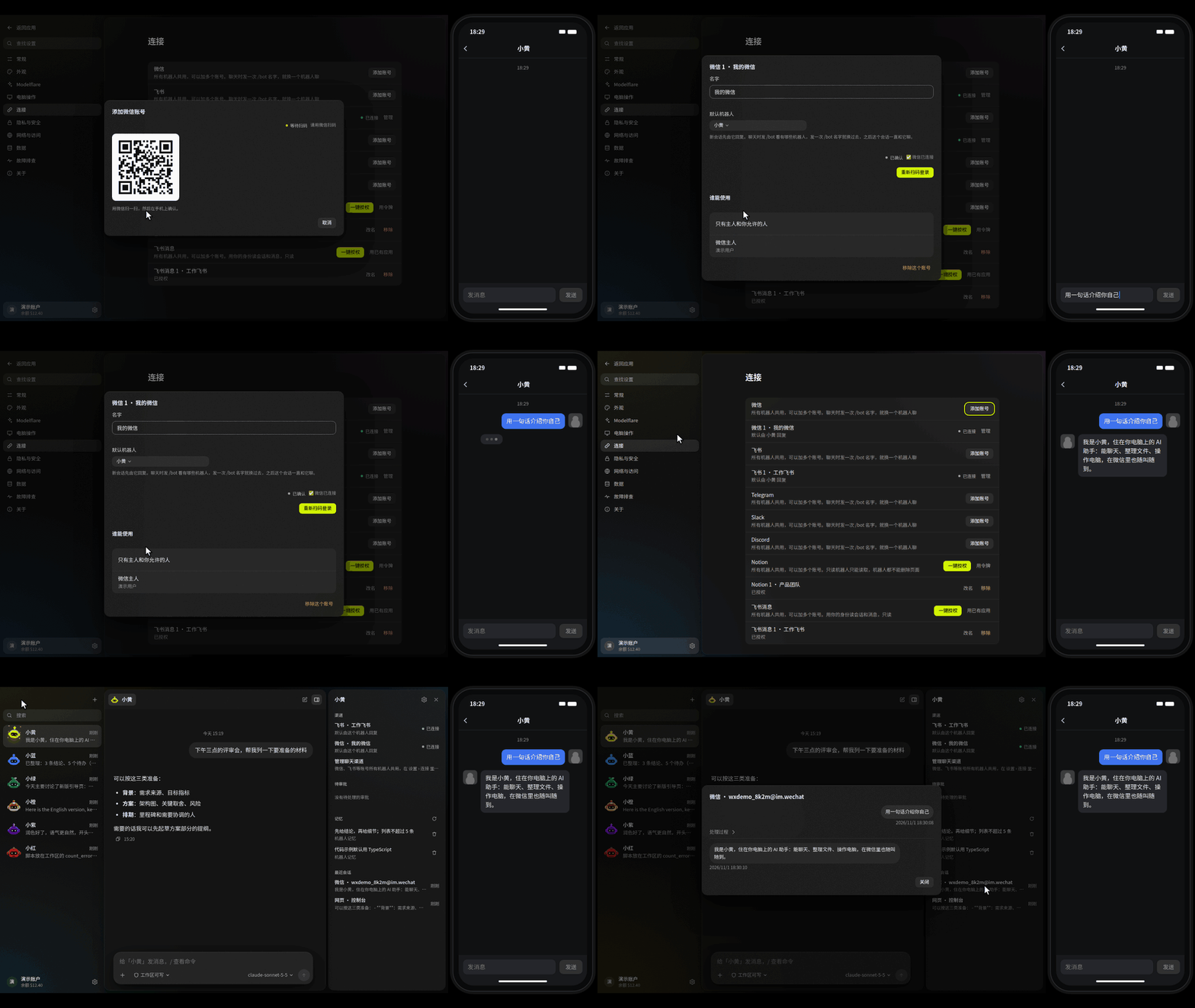
- 账号全局共用。 微信、飞书、Telegram、Slack、Discord、Notion 的账号在设置里加一次,所有机器人共用,每个服务可以加多个、起别名。在聊天软件里发一次
/bot 名字就换一个机器人聊,也可以让机器人读你的 Notion 和飞书消息。 - 微信和飞书。 微信扫码连接,飞书机器人支持流式回复卡片;微信还能收发图片和文件。
- Telegram、Slack、Discord。 在 设置 › 连接 里填 token 连接,不需要公网地址;回复边写边显示,能收发图片和文件。目前只处理单聊,审批和提问回复文字。
- 四种运行方式。 桌面版、命令行、Docker,以及
127.0.0.1:3600的本地网页控制台。
🔒 本地优先,也好看
- 数据留在你手里。 对话、记忆、文件和 API Key 都存放在你的设备上。本地控制台只监听
127.0.0.1,桌面版每次启动都会生成新的访问令牌。 - 只听主人的。 机器人默认只回应主人(扫码登录的微信;飞书、Telegram、Slack、Discord 连上后第一个给它发消息的人,也就是你)和你允许的人。其他人发消息只会收到一句提示,不会调用模型;你在信息面板里,或在聊天里回复「同意 编号」放行。
- 回复不会丢。 回复先存到本地再发;网络断了会自动重试,应用重启后接着发;你在微信里超过 24 小时没说话时,回复先留着,等你下次发消息时一起送到。
- 遥测保持关闭。 内置电脑操作驱动的遥测已关闭,内置网关以关闭自动更新的方式运行。
- 浅色、深色或跟随系统。 六个机器人角色,眼睛会跟着你的鼠标转。
- 托盘与开机自启。 关闭窗口会收到托盘;macOS 和 Windows 支持开机自启。
[!NOTE] 功能是否可用取决于你选择的模型、操作系统和授予的权限。电脑操作需要桌面会话,macOS 上的电脑操作为 Beta。模型请求会经过 Modelflare 转发给你选定的供应商,详见工作原理与隐私。
🆚 对比 Grok Bot / OpenAI dots / Claude Duet
2026 年下半年,xAI 的 Grok Bot、OpenAI 的 dots 和 Anthropic 的 Claude Duet 接连发布,"常驻的个人 AI 智能体"成了热门:它替你盯着事情、在后台干活,需要你决定时再来找你。AnyModelBot 做的是同一类事,换了一种做法:开源、跑在你自己的设备上、任意模型都能用。
| AnyModelBot | Grok Bot | OpenAI dots | Claude Duet | |
|---|---|---|---|---|
| 开源 | ✅ MIT | — | — | — |
| 智能体跑在哪 | 你自己的电脑或服务器 | xAI 的云端电脑 | OpenAI 的云端电脑 | Anthropic 的云端 |
| 能用的模型 | GPT、Claude、Gemini、Grok、DeepSeek、Kimi、GLM 等 70+ 个(经 Modelflare) | 以 xAI 的 Grok 模型为主 | OpenAI 的模型 | Claude(Opus 5.5) |
| 费用 | 应用免费,模型按 token 计费 | 订阅 | ChatGPT Pro / Business Premium 订阅 | Claude Pro / Max 订阅 |
| 在哪找它 | 桌面应用(Windows、macOS、Linux)、Docker、微信、飞书、Telegram、Slack、Discord | 桌面应用、iPhone | ChatGPT、Slack、Teams | iOS、Android、claude.ai |
| 现在能用吗 | 直接下载 | 测试版 | 部分地区开放 | 研究预览,美国候补名单 |
AnyModelBot 同样能在后台干活:交代的任务可以在后台跑完,再把结果发到你用的聊天渠道;需要你批准或回答时,它会出现在侧栏的「需要你」里。机器人做的每一步都看得见,越出工作区的操作先问你。
[!NOTE] 其他产品的信息来自 2026 年 10 月的公开报道,可能已有变化,以各家官方说明为准。Grok Bot、dots、Claude Duet 分别是 xAI、OpenAI、Anthropic 的产品和商标,AnyModelBot 与它们没有关联。
🔐 工作原理与隐私

| 留在你的设备上 | 会离开你的设备 |
|---|---|
| 对话与会话(本地 SQLite 数据库) | 模型回答所需的提示词、文件内容和工具结果,经 Modelflare 发给你选定的供应商 |
| 记忆(Markdown 文件) | 你让机器人用电脑操作看屏幕时的屏幕截图 |
| 每个机器人工作区里的文件 | 你通过聊天渠道收发的消息,会经过对应的平台 |
| 你的 API Key 和登录令牌 | 你登录 Modelflare 的过程,发生在 modelflare.dev |
| 设置 | 你添加 Notion 或飞书账号后,机器人会读写这些账号的内容,读到的内容也会进入模型请求 |
Modelflare 会保留请求日志;保留什么、保留多久,见它的信任中心。我们不声称能做到万无一失:凡是你发给模型的内容,都会离开你的设备。完整清单见 docs/privacy.md。
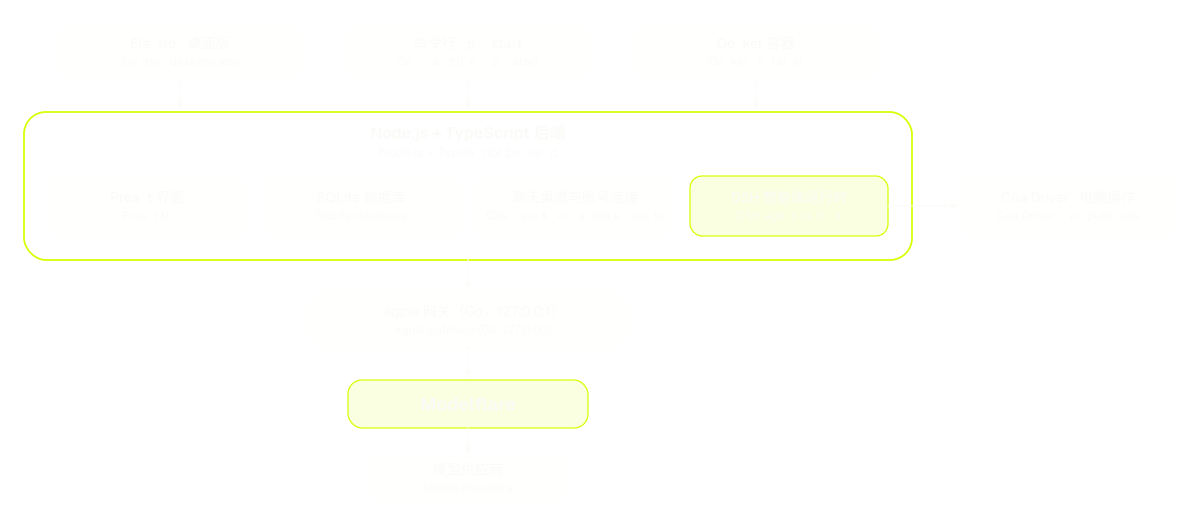
| 层 | 技术 |
|---|---|
| 界面 | Preact + htm,无构建步骤 |
| 后端 | Node.js 22.13+、TypeScript、node:sqlite |
| 桌面外壳 | Electron,带托盘 |
| 模型网关 | magpie(Go,MIT),随应用打包并由应用启动 |
| 智能体运行时 | DeepSeek Harness(MIT),作为独立进程运行 |
| 电脑操作 | Cua Driver,随应用打包 |
| 渠道 | 飞书(长连接 + 流式卡片)、微信(iLink)、Telegram(长轮询)、Slack(Socket Mode)、Discord(Gateway) |
| 数据账号 | Notion(REST API、官方远程 MCP)、飞书消息(用户身份,只读) |
| 测试与 CI | Vitest、GitHub Actions |
📝 路线图
我们正在探索的方向。它们不是承诺,顺序也不是排期。每个版本实际改了什么,见更新日志。
- 定时任务:让机器人按时间表自己干活(已上线,就是上面的规则)。
- 群聊:目前各聊天渠道只处理一对一对话。
- 英文界面:已支持中英双语,在设置里切换。
- macOS 电脑操作:在更多真机上验证 direct 模式,让它脱离 Beta。
- 独立的手机应用:目前可以从微信、飞书、Telegram、Slack、Discord 找到你的机器人。
有别的想法?欢迎提 issue 或发起讨论。我们决定要做的事项,会用 roadmap 标签跟踪。
🤝 参与贡献
欢迎提交 bug 报告、修复、文档和想法。
先看看已有的 issue 和讨论。带
good first issue标签的 issue 适合入门。Fork 仓库,从
master新建分支。本地运行并修改:
npm install
npm run setup          # 拉取并编译内置网关
npm run electron:dev   # 开发模式运行桌面版
npm run typecheck && npm test
向
master提交 Pull Request,写清楚改了什么、为什么改。比小修复大的改动,请先开 issue,我们先对齐方案。
完整说明见贡献指南。如果要报告安全问题,请按 SECURITY.md 处理,不要公开提 issue。
🔗 相关项目
- Modelflare:AnyModelBot 模型背后的 AI API 网关。
- magpie:随应用打包的 Go 网关(MIT)。
- DeepSeek Harness:智能体运行时(MIT)。
- Cua:电脑操作驱动。
- kimi-computer-use:macOS 的电脑操作桥接。
- openclaw-weixin:我们移植的微信渠道实现(MIT)。
- DS Bot:记忆与上下文管家的设计来源(Apache-2.0)。
完整的许可证与声明见 THIRD_PARTY_NOTICES.md。
💬 社区
- 提问与想法: GitHub Discussions
- Bug 与功能建议: GitHub Issues
- 邮件联系: support@anymodel.bot
- Modelflare 动态: X 上的 @modelflare_dev
🚀 贡献者
⭐️ Star 趋势
📜 许可证
AnyModelBot 以 MIT 许可证发布。随附的第三方软件保留各自的许可证,见 THIRD_PARTY_NOTICES.md 和 LICENSES/ 目录。