Apache Answer is an Apache-2.0 licensed, Go and React question-and-answer platform that teams of any size can run as a community forum, help center, or knowledge management system, and it is aimed at organisations that want their own Q&A site rather than a hosted one.
What it is
Apache Answer is a self-hosted Q&A platform software published by the Apache Software Foundation under the Apache License 2.0. It combines a Go backend with a React and TypeScript frontend, and it ships as a Docker image, apache/answer, with the current published tag being apache/answer:2.0.2. The project lives in the Go and TypeScript ecosystems and is distributed through the Apache organisation on GitHub, with its documentation and plugin catalogue hosted at answer.apache.org.
The concrete problem it solves is ownership of community knowledge. Instead of renting a proprietary community or help centre product, a team can run the software on its own infrastructure, keep the questions, answers, and user data inside its own deployment, and extend the product through a plugin system rather than waiting on a vendor roadmap. The README frames the same software for three workloads: a public community forum, a support help center, and an internal knowledge management platform.
Key capabilities
- Runs three documented workloads from one codebase: community forum, help center, and knowledge management platform.
- Deploys as the
apache/answer Docker image, with apache/answer:2.0.2 given as the example tag in the quick start.
- Serves HTTP on container port
80, mapped in the documented example to host port 9080.
- Persists state through a mounted volume, shown as
-v answer-data:/data in the quick start command.
- Provides a plugin system so developers can create custom plugins and expand features, documented at
answer.apache.org/community/plugins, with a plugin list at answer.apache.org/plugins.
- Built from source with Go, React and TypeScript, requiring Golang >= 1.23, Node.js >= 20, pnpm >= 9,
mockgen >= 0.6.0, and wire >= 0.5.0.
- Uses
make generate, make ui, and make build as the documented build steps, with make check to verify tooling.
Who uses it and how
- Teams running a public community forum, where the platform carries questions, answers, and discussion for an open product or project.
- Support organisations operating a help center, using the same software as a customer-facing knowledge base.
- Internal teams that need knowledge management, keeping accumulated answers inside a self-hosted deployment instead of a SaaS tenant.
- Plugin developers, who extend the product through the documented plugin system and publish into the plugin catalogue.
- Self-hosting operators who run the container directly with Docker and bind a host port of their choosing, such as
9080, against container port 80.
- Contributors, since the project is listed under the
hacktoberfest topic and carries a contributing guide at answer.apache.org/community/contributing.
Getting started
The README quick start is a single Docker command: docker run -d -p 9080:80 -v answer-data:/data --name answer apache/answer:2.0.2. Installation guidance beyond that command lives at answer.apache.org/docs/installation.
How it compares
No list of paid products that this project replaces is provided, and the facts name no comparable tools. On the evidence available, Apache Answer stands alone in this registry: it is the only entry here presented as an Apache Software Foundation Q&A platform under Apache-2.0.
When to use it — and when not to
Self-hosters must run the container and keep the /data volume, and the README excerpt does not spell out the supporting infrastructure such as database, object storage, or mail configuration, so operational requirements must be checked against answer.apache.org/docs/installation before committing. Teams that want a managed service with no container to operate should not pick it. The README excerpt is thin on screenshots and configuration detail and defers most of it to the project site, so expect to lean on external documentation rather than the repository front page.
project readme (upstream, from github) — read inline

Apache Answer - Build Q&A platform
A Q&A platform software for teams at any scales. Whether it’s a community forum, help center, or knowledge management platform, you can always count on Answer.
To learn more about the project, visit answer.apache.org.





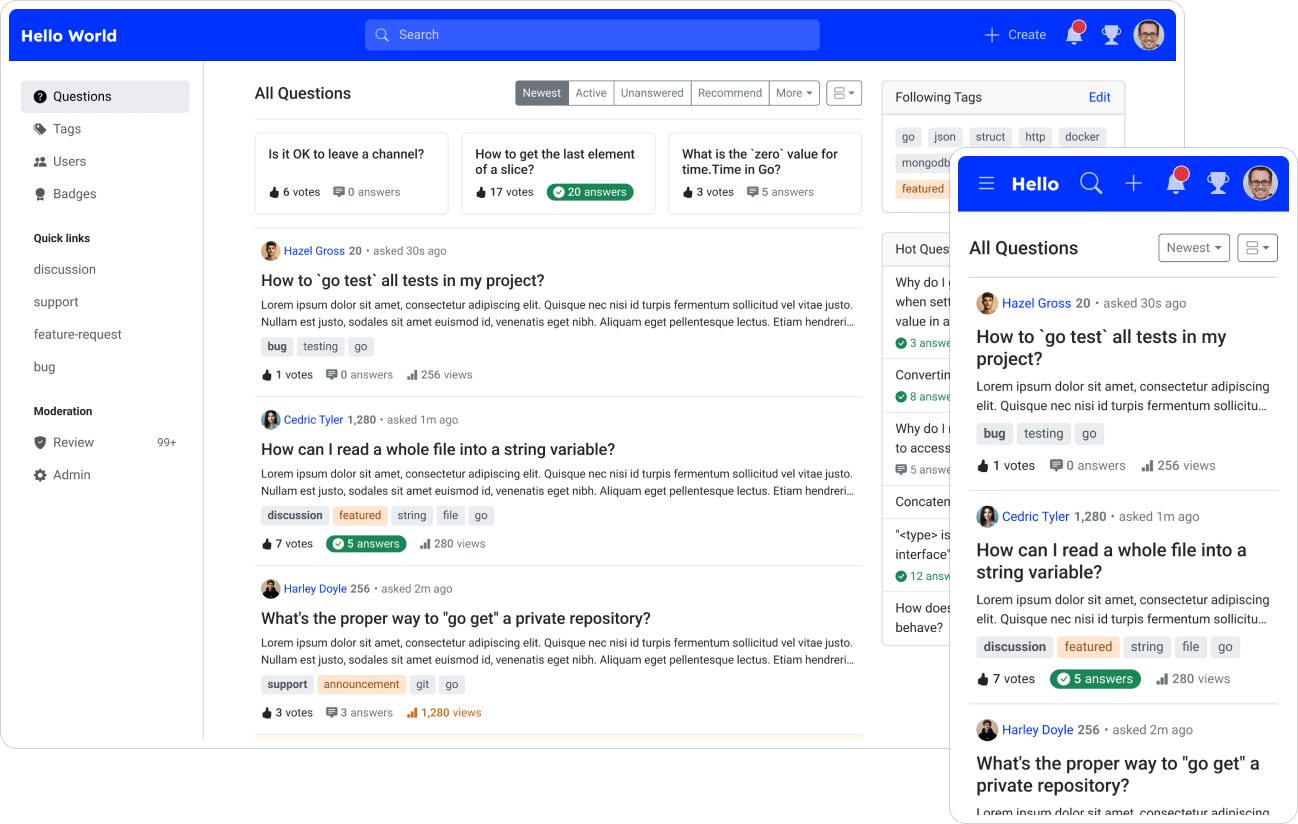
Screenshots
Quick start
Running with docker
docker run -d -p 9080:80 -v answer-data:/data --name answer apache/answer:2.0.2
For more information, see Installation.
Plugins
Answer provides a plugin system for developers to create custom plugins and expand Answer’s features. You can find the plugin documentation here.
We value your feedback and suggestions to improve our documentation. If you have any comments or questions, please feel free to contact us. We’re excited to see what you can create using our plugin system!
You can also check out the plugins here.
Building from Source
Prerequisites
- Golang >= 1.23
- Node.js >= 20
- pnpm >= 9
- mockgen >= 0.6.0
- wire >= 0.5.0
Build
# Install wire and mockgen for building. You can run `make check` to check if they are installed.
$ make generate
# Install frontend dependencies and build
$ make ui
# Install backend dependencies and build
$ make build
Contributing
Contributions are always welcome!
See CONTRIBUTING for ways to get started.
License
Apache License 2.0