angle-grinder 

Slice and dice log files on the command line.
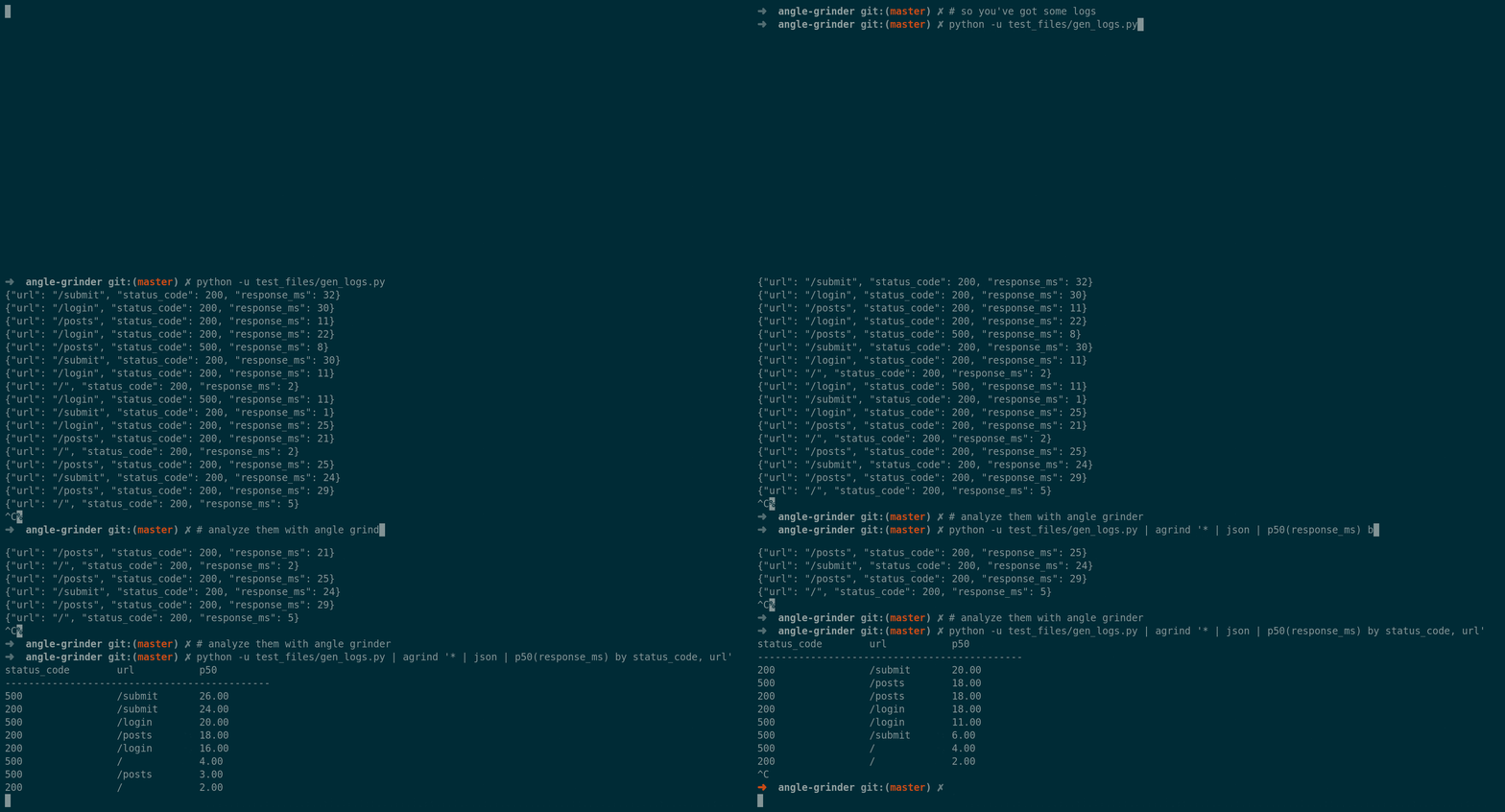
Angle-grinder allows you to parse, aggregate, sum, average, min/max, percentile, and sort your data. You can see it, live-updating, in your terminal. Angle grinder is designed for when, for whatever reason, you don't have your data in graphite/honeycomb/kibana/sumologic/splunk/etc. but still want to be able to do sophisticated analytics.
Angle grinder can process well above 1M rows per second (simple pipelines as high as 5M), so it's usable for fairly meaty aggregation. The results will live update in your terminal as data is processed. Angle grinder is a bare bones functional programming language coupled with a pretty terminal UI.
Quick Links
Installation
Binaries are available for Linux and OSX. Many more platforms (including Windows) are available if you compile from source. In all of the commands below, the resulting binary will be called agrind. Starting with v0.9.0, agrind can self-update via the --self-update flag. Thanks to the many volunteers who maintain angle-grinder on different package managers & environments!
macOS
Brew
brew install angle-grinder
Macports
sudo port selfupdate
sudo port install angle-grinder
FreeBSD
pkg install angle-grinder
Linux (any MUSL compatible variant)
curl -L https://github.com/rcoh/angle-grinder/releases/download/v0.18.0/agrind-x86_64-unknown-linux-musl.tar.gz \
  | tar Ozxf - \
  | sudo tee /usr/local/bin/agrind > /dev/null && sudo chmod +x /usr/local/bin/agrind

agrind --self-update
Cargo (most platforms)
If you have Cargo installed, you can compile & install from source: (Works with Stable Rust >=1.26)
cargo install ag
Query Syntax
An angle grinder query is composed of filters followed by a series of operators.
The filters select the lines from the input stream to be transformed by the operators.
Typically, the initial operators will transform the data in some way by parsing fields or JSON from the log line.
The subsequent operators can then aggregate or group the data via operators like sum, average, percentile, etc.
agrind '<filter1> [... <filterN>] | operator1 | operator2 | operator3 | ...'
A simple query that operates on JSON logs and counts the number of logs per level could be:
agrind '* | json | count by log_level'
Escaping Field Names
Field names containing spaces, periods, or quotes must be escaped using [""]:
agrind '* | json | count by ["date received"], ["grpc.method"]
Filters
There are three basic filters:
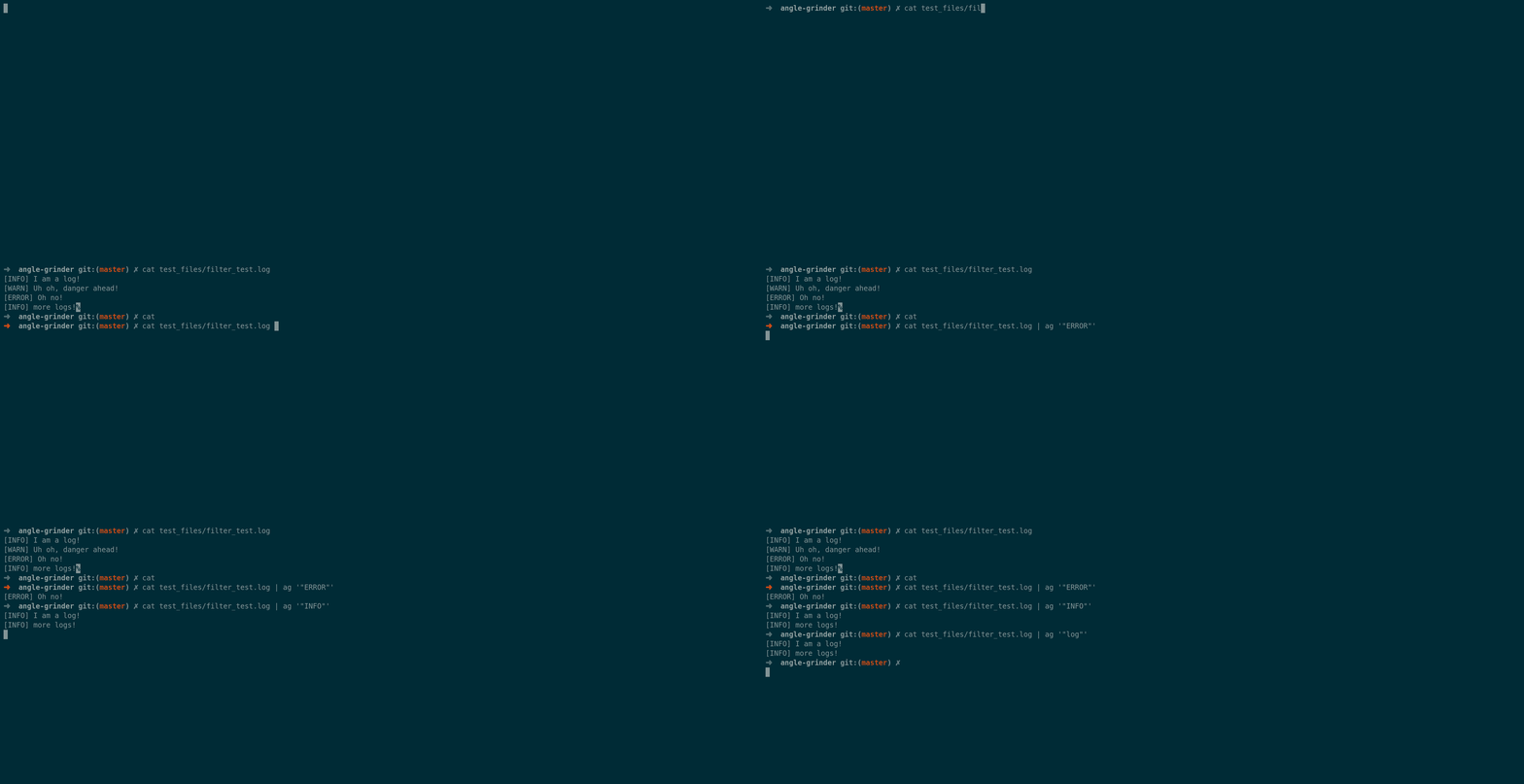
*: Match all logsfilter-me*(with no quotes) is a case-insensitive match that can include wildcards- "filter-me" (in quotes) is a case-sensitive match (no wildcards,
*matches literal*,filter-me, or"filter me!".
Filters can be combined with AND, OR and NOT
("ERROR" OR WARN*) AND NOT staging | count
Sub-expressions must be grouped in parenthesis. Only lines that match all filters will be passed to the subsequent operators.
Aliases
Starting with v0.12.0, angle grinder supports aliases, pre-built pipelines do simplify common tasks or formats.
By default, angle-grinder will look in the .agrind-aliases directory in your current working directory and all parent directories.
Alias files look like this:
keyword = "apache"
template = """
parse "* - * [*] \\"* * *\\" * *" as ip, name, timestamp, method, url, protocol, status, contentlength
"""
Your operators are parsed, then expanded into the resulting pipeline. When invalid aliases are present, a warning will be displayed when running angle-grinder.
Note that aliases are currently considered an experimental feature and precise behavior may change in the future.
Examples:
* | apache | count by status
Operators
Non Aggregate Operators
These operators have a 1 to 1 correspondence between input data and output data. 1 row in, 0 or 1 rows out.
JSON
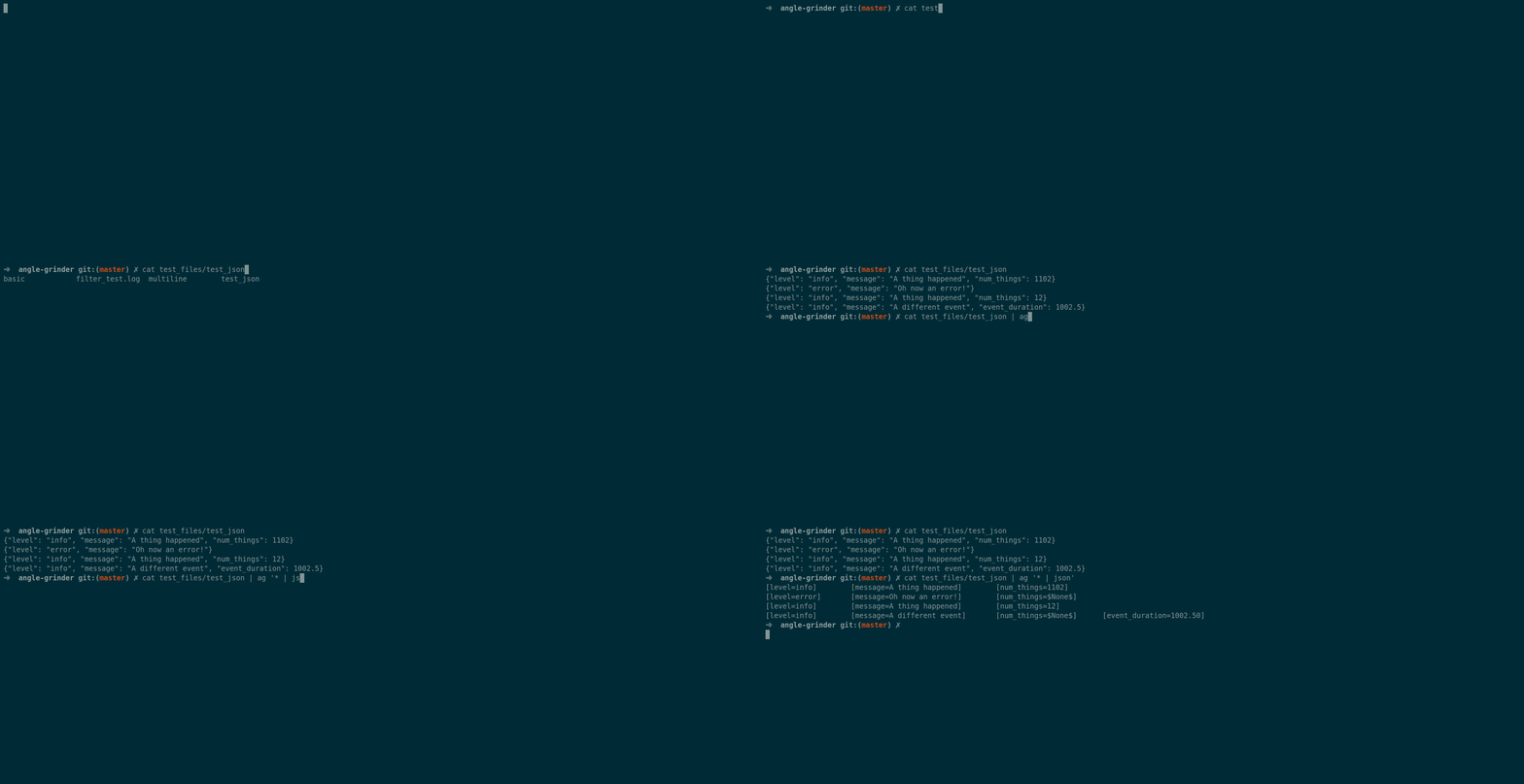
json [from other_field]: Extract json-serialized rows into fields for later use. If the row is not valid JSON, then it is dropped. Optionally, from other_field can be
specified. Nested JSON structures are supported out of the box. Simply access nested values with .key[index], for example, .servers[6]. Negative indexing is also supported.
Examples:
* | json
* | parse "INFO *" as js | json from js
Given input like:
{"key": "blah", "nested_key": {"this": "that"}}
* | json | count_distinct(nested_key.this)
Logfmt
logfmt [from other_field]: Extract logfmt-serialized rows into fields for later use. If the row is not valid logfmt, then it is dropped. Optionally, from other_field can be specified. Logfmt is a an output format commonly used by Heroku and Splunk, described at https://www.brandur.org/logfmt.
Examples:
* | logfmt
Given input like:
{"key": "blah", "nested_key": "some=logfmt data=more"}
* | json | logfmt from nested_key | fields some
Split
split[(input_field)] [on separator] [as new_field]: Split the input via the separator (default is ,). Output is an array type. If no input_field or new_field, the contents will be put in the key _split.
Examples:
* | split on " "
Given input like:
INFO web-001 influxd[188053]: 127.0.0.1 "POST /write HTTP/1.0" 204
Output:
[_split=[INFO, web-001, influxd[188053]:, 127.0.0.1, POST /write HTTP/1.0, 204]]
If input_field is used, and there is no new_field specified, then the input_field will be overridden with the split data-structure. For example:
* | parse "* *" as level, csv | split(csv)
Given input like:
INFO darren,hello,50
WARN jonathon,good-bye,100
Will output:
[csv=[darren, hello, 50]]        [level=INFO]
[csv=[jonathon, good-bye, 100]]        [level=WARN]
Other examples:
* | logfmt | split(raw) on "blah" as tokens | sum(tokens[1])
Parse
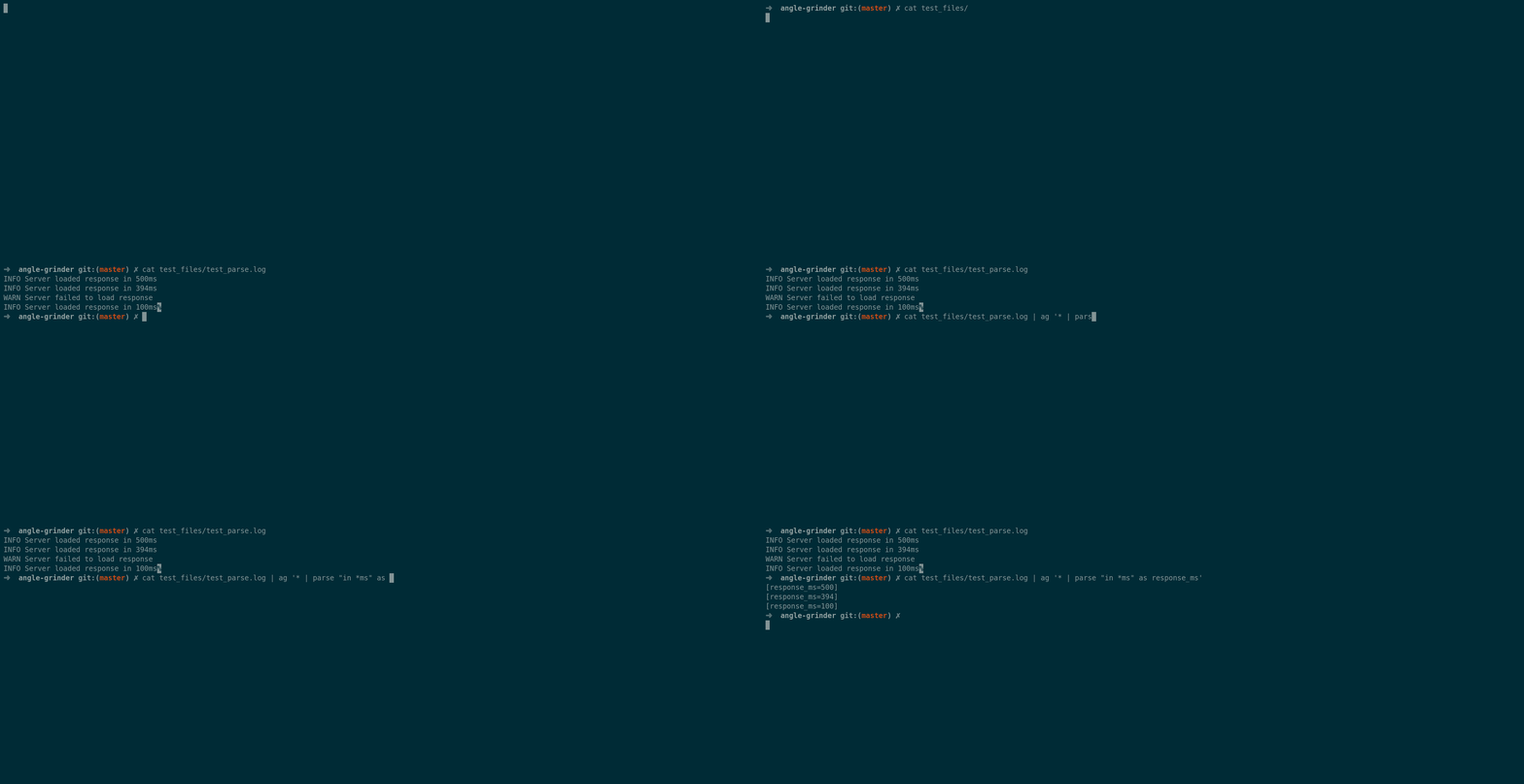
parse "* pattern * otherpattern *" [from field] as a,b,c [nodrop] [noconvert]: Parse text that matches the pattern into variables.
- Lines that don't match the pattern will be dropped unless
nodropis specified.*is equivalent to regular expression.*and is greedy. noconvertwill prevent parse from converting parsed fields into structured data and instead preserve them as strings. This can be helpful if you are parsing fields that sometimes have values like00000.
By default, parse operates on the raw text of the message. With from field_name, parse will instead process input from a specific column. Any whitespace in the parse
expression will match any whitespace character in the input text (eg. a literal tab).
Examples:
* | parse "[status_code=*]" as status_code
Parse Regex
parse regex "" [from field] [nodrop]: Match the
input text against a regular expression and populate the record with the named
captures. Lines that don't match the pattern will be dropped unless nodrop is
specified. By default, parse operates on the raw text of the message. With
from field_name, parse will instead process input from a specific column.
Notes:
- Only named captures are supported. If the regular expression includes any unnamed captures, an error will be raised.
- The Rust regular expression syntax is used.
- Escape sequences do not require an extra backslash (i.e.
\wworks as-is).
Examples: To parse the phrase "Hello, ...!" and capture the value of the "..." in the name field:
* | parse regex "Hello, (?P<name>\w+)"
Fields
fields [only|except|-|+] a, b: Drop fields a, b or include only a, b depending on specified mode.
Examples:
Drop all fields except event and timestamp
* | json | fields + event, timestamp
Drop only the event field
* | fields except event
Where
where : Drop rows where the condition is not met.
The condition must be an expression that returns a boolean value.
The expression can be as simple as a field name or a comparison (i.e. ==, !=, =, )
between fields and literal values (i.e. numbers, strings).
The '!' operator can be used to negate the result of a sub-expression.
Note that None == None, so a row where both the left and right sides match a non-existent key will match.
Examples
* | json | where status_code >= 400
* | json | where user_id_a == user_id_b
* | json | where url != "/hostname"
Limit
limit #: Limit the number of rows to the given amount. If the number is positive, only the
first N rows are returned. If the number is negative, the last N rows are returned.
Examples
* | limit 10
* | limit -10
Field Expression
as: The given expression is evaluated and the result is stored
in a field with the given name for the current row. The expression can be
made up of the following:
+,-,*,/: Mathematical operators with the normal precedence rules. The operators work on numeric values and strings that can automatically be converted to a number. In addition, these operators work for date-time and duration values when appropriate. For example, you can take the difference between two date-times, but cannot add them together.==,!=(or), `=`,: Boolean operators work on most data types.and,&&,or,||: Short-circuiting logical operators.- ``: The name of a field in the current row. If the row does not contain the given field, an error will be reported.
- Parentheses to group operations
The following functions are supported within expressions:
- Mathematical functions:
abs(),acos(),asin(),atan(),atan2(),cbrt(), ceil(),cos(),cosh(),exp(),expm1(),floor(),hypot(),log(),log10(), log1p(),round(),sin(),sinh(),sqrt(),tan(),tanh(),toDegrees(),toRadians() concat(arg0, ..., argN)- Concatenate the arguments into a stringcontains(haystack, needle)- Return true if the haystack contains the needle.length(str)- Returns the number of characters in "str".now()- Returns the current date and time.num(value)- Returns the given value as a number.parseDate(str)- Attempt to parse a date from the given string.parseHex(str)- Attempt to convert a hexadecimal string into an integer.substring(str, startOffset, [endOffset])- Returns the part of the string specified by the given starting offset up to the end offset (if specified).toLowerCase(str)- Returns the lowercase version of the string.toUpperCase(str)- Returns the uppercase version of the string.isNull(value)- Returns true if value isnull, false otherwise.isEmpty(value)- Returns true if value isnullor an empty string, false otherwise.isBlank(value)- Returns true if value isnull, an empty string, or a whitespace-only string, false otherwise.isNumeric(str)- Returns true if the given string is a number.
Examples
Multiply value by 100 to get the percentage
* | json | value * 100 as percentage
if Operator
if(, , ): Choose between two values
based on the provided condition.
Examples
To get byte counts for successful requests:
* | json | if(status == 200, sc_bytes, 0) as ok_bytes
Aggregate Operators
Aggregate operators group and combine your data by 0 or more key fields. The same query can include multiple aggregates. The general syntax is:
(operator [as renamed_column])+ [by key_col1, key_col2]
In the simplest form, key fields refer to columns, but they can also be generalized expressions (see examples) Examples:
* | count
* | json | count by status_code
* | json | count, p50(response_ms), p90(response_ms) by status_code
* | json | count as num_requests, p50(response_ms), p90(response_ms) by status_code
* | json | count, p50(response_ms), p90(response_ms), count by status_code >= 400, url
There are several aggregate operators available.
Count
count[(condition)] [as count_column]: Counts the number of input rows. Output column defaults to _count. Optionally, you
can provide a condition -- this will count all rows for which the condition evaluates to true.
Examples:
Count number of rows by source_host:
* | count by source_host
Count number of source_hosts:
* | count by source_host | count
Count the number of info vs. error logs:
* | json | count(level == "info") as info_logs, count(level == "error") as error_logs
Sum
sum(column) [as sum_column]: Sum values in column. If the value in column is non-numeric, the row will be ignored.
Examples:
* | json | sum(num_records) by action
Min
min(column) [as min_column] [by a, b] : Compute the min of values in column. If the value in column is non-numeric, the row will be ignored.
Examples:
* | json | min(response_time)
Average
average(column) [as average_column] [by a, b] : Average values in column. If the value in column is non-numeric, the row will be ignored.
Examples:
* | json | average(response_time)
Max
max(column) [as max_column] [by a, b] : Compute the max of values in column. If the value in column is non-numeric, the row will be ignored.
Examples:
* | json | max(response_time)
Percentile
pXX(column): calculate the XXth percentile of column
Examples:
* | json | p50(response_time), p90(response_time) by endpoint_url, status_code
Sort
sort by a, [b, c] [asc|desc]: Sort aggregate data by a collection of columns. Defaults to ascending.
Examples:
* | json | count by endpoint_url, status_code | sort by endpoint_url desc
In addition to columns, sort can also sort an arbitrary expressions.
* | json | sort by num_requests / num_responses
* | json | sort by length(endpoint_url)
Timeslice
timeslice() [as ]: Truncates a timestamp to the
given duration to allow for partitioning messages into slices of time. The
timestamp parameter must be a date value, such as that returned by the
parseDate() function. The duration is an amount followed by one of the
following units:
ns- nanosecondsus- microsecondsms- millisecondss- secondsm- minutesh- hoursd- daysw- weeks
The resulting timestamp is placed in the _timeslice field by default or the
field specified after the as keyword.
Examples:
* | json | timeslice(parseDate(ts)) 5m
Total
total(a) [as renamed_total]: Compute the running total of a given field. Total does not currently support grouping!
Examples:
* | json | total(num_requests) as tot_requests
Count Distinct
count_distinct(a): Count distinct values of column a. Warning: this is not fixed memory. Be careful about processing too many groups.
Examples:
* | json | count_distinct(ip_address)
Example Queries
- Count the number of downloads of angle-grinder by release (with special guest jq)
curl  https://api.github.com/repos/rcoh/angle-grinder/releases  | \
   jq '.[] | .assets | .[]' -c | \
   agrind '* | json
         | parse "download/*/" from browser_download_url as version
         | sum(download_count) by version | sort by version desc'
Output:
version       _sum
-----------------------
v0.6.2        0
v0.6.1        4
v0.6.0        5
v0.5.1        0
v0.5.0        4
v0.4.0        0
v0.3.3        0
v0.3.2        2
v0.3.1        9
v0.3.0        7
v0.2.1        0
v0.2.0        1
- Take the 50th percentile of response time by host:
tail -F my_json_logs | agrind '* | json | pct50(response_time) by url'
- Count the number of status codes by url:
tail -F my_json_logs | agrind '* | json | count status_code by url'
More example queries can be found in the tests folder
Rendering
Non-aggregate data is simply written row-by-row to the terminal as it is received:
tail -f live_pcap | agrind '* | parse "* > *:" as src, dest | parse "length *" as length'
[dest=111.221.29.254.https]        [length=0]        [src=21:50:18.458331 IP 10.0.2.243.47152]
[dest=111.221.29.254.https]        [length=310]      [src=21:50:18.458527 IP 10.0.2.243.47152]
Alternate rendering formats can be provided with the --output flag. Options:
--output json: JSON output--output logfmt: logfmt style output (k=v)--output format=: This flag uses rust string formatting syntax. For example:tail -f live_pcap | agrind --format '{src} => {dst} | length={length}' '* | parse "* > *:" as src, dest | parse "length *" as length' 21:50:18.458331 IP 10.0.2.243.47152 => 111.221.29.254.https | length=0 21:50:18.458527 IP 10.0.2.243.47152 => 111.221.29.254.https | length=310
Aggregate data is written to the terminal and will live-update until the stream ends:
k2                  avg
--------------------------------
test longer test    500.50
test test           375.38
alternate input     4.00
hello               3.00
hello thanks        2.00
The renderer will do its best to keep the data nicely formatted as it changes and the number of output rows is limited to the length of your terminal. Currently, it has a refresh rate of about 20hz.
The renderer can detect whether or not the output is a tty -- if you write to a file, it will print once when the pipeline completes.
Contributing
angle-grinder builds with Rust >= 1.26. rustfmt is required when submitting PRs (rustup component add rustfmt).
There are a number of ways you can contribute:
- Defining new aliases for common log formats or actions
- Adding new special purpose operators
- Improve documentation of existing operators + providing more usage examples
- Provide more test cases of real queries on real world data
- Tell more people about angle grinder!
cargo build
cargo test
cargo install --path .
agrind --help
... write some code!

cargo fmt

git commit ... etc.
When submitting PRs, please run cargo fmt -- this is necessary for the CI suite to pass. You can install cargo fmt with: rustup component add rustfmt if it's not already in your toolchain.
See the following projects and open issues for specific potential improvements/bugs.
Project: Improving Error Reporting
Usability can be greatly improved by accurate and helpful error messages for query-related issues. If you have struggled to figure out why a query is not working correctly and had a hard time fixing the issue, that would be a good place to jump in and start making changes!
First, you need to determine where the problem is occurring.
If the parser is rejecting a query, the grammar may need some tweaking to be more accepting of
some syntax.
For example, if the field names are not provided for the parse operator, the query can still
be parsed to produce a syntax tree and the error can be raised in the next phase.
If the query passes the parsing phase, the problem may lie in the semantic analysis phase where the
values in parse tree are verified for correctness.
Continuing with the parse example, if the number of captures in the pattern string does not
match the number of field names, the error would be raised here.
Finally, if the query has been valid up to this point, you might want to raise an error at
execution time.
For example, if a field name being accessed does not exist in the records being passed to an
operator, an error could be raised to tell the user that they might have mistyped the name.
Once you have an idea of where the problem might lie, you can start to dig into the code.
The grammar is written using nom and is contained in the
lang.rs module.
The enums/structs that make up the parse tree are also in the lang.rs module.
To make error reporting easier, values in the parse tree are wrapped with a Positioned object
that records where the value came from in the query string.
The Positioned objects are produced by the with_pos!() parser combinator.
These objects can then be passed to the SnippetBuilder in the
errors.rs module to highlight
portions of the query string in error messages.
The semantic phase is contained in the
typecheck.rs module and
is probably where most of the work will need to be done.
The semantic_analysis() methods in that module are passed an ErrorBuilder that can be used to
build and send error reports to the user.
After adjusting the grammar and adding a check for the problem, it will be time to figure out how
to inform the user.
Ideally, any errors should explain the problem, point the user to the relevant part of the query
string, and lead the user to a solution.
Using the ErrorBuilder, you can call the new_error_report_for() method to construct a
SnippetBuilder for a given error.
To highlight a portion of the query string, use the with_code_pointer() method with the
Positioned object that refers to the relevant segment of the query string.
Finally, additional help/examples can be added by calling the with_resolution() method.
Once you're all done, you should see a nicely formatted error message like the following:
error: Expecting an expression to count
  |
1 | * | count_distinct
  |     ^^^^^^^^^^^^^^ No field argument given
  |
  = help: example: count_distinct(field_to_count)
Similar Projects
- Angle Grinder is a rewrite of Sumoshell written to be easier to use, testable and a better platform for new features.
- lnav is a full featured log analysis platform in your terminal (with many more features than angle-grinder). It includes support for common log file formats out-of-the-box, generalized SQL queries on your logs, auto-coloring and a whole host of other features.
- visidata is a spreadsheets app in your terminal