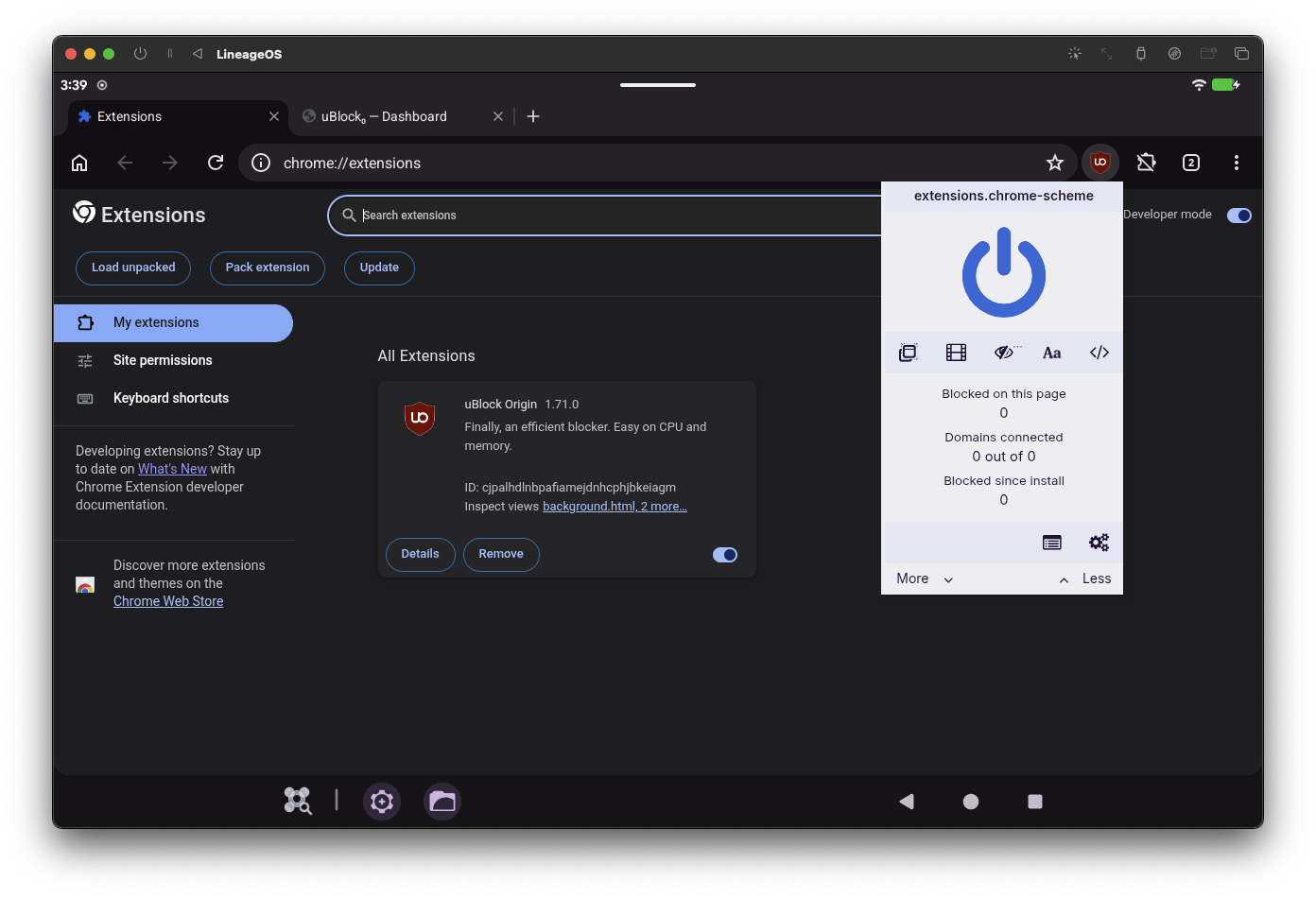
android-titanium-browser is a free, open source browsers & extensions project written in Shell and released under GPL-2.0. It has 2,624 GitHub stars, 119 forks and 131 open issues, and was last pushed 32 hours ago. On this registry it ranks #90 of 133 tracked projects in Browsers & Extensions, with 5 head-to-head comparisons available.

What is android-titanium-browser?

Titanium Browser for Android is a secure, fully open-source, Chromium-based mobile web browser with support for extensions, built for Android users who want desktop-style browser extensions and configurable privacy controls on a phone.

What it is

Titanium Browser for Android is a Chromium-based web browser for Android, licensed under GPL-2.0 and derived from Vanadium by GrapheneOS. It was formerly released as Helium Browser for Android and was renamed to avoid branding confusion. To keep the browsing experience fast and native, the project modularizes advanced functionality into a companion app, Titanium Extension for Android, instead of inflating the core browser. The project lives in the Android ecosystem, publishes on Google Play under the package id io.github.jqssun.helium, and also distributes builds through GitHub Releases.

The concrete problem it solves is that mainstream Android browsers generally do not let users run desktop browser extensions. Titanium Browser changes that by allowing extensions to be installed from the Chrome Web Store, with support extending to Opera Add-ons, Microsoft Edge Add-ons, and other marketplaces through targeted User Agent modifications, and by accepting manually loaded unpacked extensions. In practice it replaces the default Android browser for users who need extension capability on a phone, while staying on the Chromium engine rather than a custom one.

Key capabilities

  • Install Chrome extensions from the Chrome Web Store by enabling Desktop site through the ⋮ menu and then proceeding as normal.
  • Reach Opera Add-ons, Microsoft Edge Add-ons, and other marketplaces through targeted User Agent modifications documented in Titanium Extension for Android.
  • Load unpacked extensions from chrome://extensions by enabling Developer mode, selecting Load unpacked, and picking the extension folder through the Storage Access Framework (SAF) picker; Manifest V2 (MV2) extensions are supported and a short load delay is possible.
  • Permit individual extensions in Incognito (OTR) mode through Manage extensions, Details, and Allow in Incognito.
  • Inspect debug URLs at chrome://chrome-urls and toggle experiments at chrome://flags.
  • Configure the WebRTC IP policy under Settings, Privacy and security, switching to "Default public interface only" or "Default" when default shielding breaks services such as Discord Voice.
  • Extend the browser with Titanium Extension for Android for external download manager support, enhanced dark mode, and additional privacy options.

Who uses it and how

  • Android users who depend on extensions such as content blockers or password managers that are only distributed through desktop browser stores.
  • Privacy-focused users who allow-list specific extensions for Incognito (OTR) sessions rather than enabling them wholesale.
  • Users who install from GitHub Releases instead of Google Play, including those who move between the two, because updates flow seamlessly in both directions.
  • Users who want extra functionality without a heavier browser, by adding the separate Titanium Extension for Android companion app.
  • Users troubleshooting WebRTC-dependent services on Android, who adjust the WebRTC IP policy to restore calls and voice features.

Getting started

Install from Google Play as io.github.jqssun.helium, or download the latest build from GitHub Releases. Releases from both channels update in place.

How it compares

Among the tools named in the project's own documentation, Titanium Browser sits as a Chromium-based, extension-capable browser derived from Vanadium by GrapheneOS, rather than as an operating-system-level hardening project. The README is explicit that for better protection on Android, users should use GrapheneOS with Vanadium, which additionally integrates patches into Android System WebView and provides kernel and memory management hardening at the OS level.

When to use it — and when not to

This is a mobile application, so adopters do not operate a database, storage, or mail server to run it; the operational burden is limited to installing and updating the app itself. It is a poor fit for anyone who needs operating-system-level memory and kernel hardening or WebView patches, since the project states it only attempts to improve security and privacy where possible. The project carries a substantial open issue count and relies on User Agent workarounds for some marketplaces, so users who need guaranteed extension compatibility everywhere should weigh that before switching.

project readme (upstream, from github) — read inline

Titanium Browser for Android


Stars GitHub license build release

A secure and fully open-source, Chromium-based web browser with support for extensions, based on Vanadium by GrapheneOS. This project was formerly known as Helium Browser for Android but was later renamed to avoid branding confusion. To maintain a fast and native experience for everyone, advanced features are modularized into Titanium Extension for Android.

For the latest builds, see Releases. You can also update between GitHub and Google Play releases seamlessly.

Get it on Google Play Get it on GitHub

Usage

Installing Extensions

For Chrome extensions, navigate to Chrome Web Store, enable Desktop site using the menu button ⋮ in the top right corner, and proceed as normal.

For Opera Add-ons, Microsoft Edge Add-ons, or other marketplaces, targeted User Agent modifications may be required. See Titanium Extension for Android for instructions.

You can also load an unpacked extension manually by navigating to the Manage extensions page or chrome://extensions. Enable Developer mode, select Load unpacked, and choose the folder containing the extension in the Storage Access Framework (SAF) picker. Manifest V2 (MV2) extensions are supported. It may take a moment for the extension to load.

Using Extensions

To run an extension in Incognito (OTR) mode, go to Manage extensions, find the extension you want to use in Incognito mode, select Details, and turn on Allow in Incognito.

For advanced features including external download manager support, enhanced dark mode, and additional privacy options, you can use Titanium Extension for Android.

Debug URLs

To view and access the debug URLs, use chrome://chrome-urls. For Experiments, use chrome://flags.

WebRTC IP Policy

The option is available by using the menu button ⋮ in the top right corner, then selecting Settings, Privacy and security. If you experience issues with WebRTC due to IPs being shielded by default (e.g. Discord Voice), try changing it to Default public interface only, or Default.

Implementation

[!WARNING] Titanium Browser for Android only attempts to improve security and privacy where possible. For better protection on Android, you should instead use GrapheneOS with Vanadium, which additionally integrates patches into Android System WebView and provides significant kernel and memory management hardening on the OS level.

---
config:
  layout: dagre
---
flowchart TD
 subgraph s1["Additional Patches"]
        n5["Feature Overrides"]
        n6["UI Overrides"]
        n7["Manifest V2 + Secure Off Store Install Support"]
        n8["Miscellaneous Fixes + Improvements"]
  end
 subgraph s2["Vanadium"]
        n9["Generic Patches<small><br>patches/*.patch</small>"]
        n10["Subprojects Patches<small><br>subprojects_patches/**/*.patch</small>"]
  end
 subgraph s3["Titanium Browser for Android"]
        n11["GN Build Configuration<small><br>args.gn</small>"]
        n12["Signed Release"]
  end
    n1["Chromium"] --> s1 & s2
    n5 --> n6
    n6 --> n7
    n7 --> n8
    s1 --> s3
    s2 --> s3
    n11 --> n12
    n5@{ shape: subproc}
    n6@{ shape: subproc}
    n7@{ shape: subproc}
    n8@{ shape: subproc}
    n9@{ shape: subproc}
    n10@{ shape: subproc}
    n11@{ shape: subproc}
    n12@{ shape: subproc}
    n1@{ shape: rounded}
    classDef Aqua stroke-width:1px, stroke-dasharray:none, stroke:#46EDC8, fill:#DEFFF8, color:#378E7A
    style n5 stroke:#FF6D00
    style n7 stroke:#FF6D00

Building

All releases are built using Actions. Current releases can also be attested using GitHub CLI.

gh attestation verify *.apk -R jqssun/android-titanium-browser

This repository provides the build script to compile on the latest Ubuntu, and may also work with other Linux distributions.

To build these releases yourself via CI (e.g. GitHub Actions), fork this repository. Supply your base64 encoded keystore.jks and local.properties (containing keyAlias, keyPassword and storePassword) to Repository secrets under Settings > Secrets and variables > Actions. To generate a release, go to Actions, select Build, and select Run workflow. Under Runner, you can either use a GitHub-hosted runner by entering ubuntu-latest, or self-hosted for your own hardware.

Credits

This project would not have been possible without the huge community contributions from Vanadium, and without the privacy-focused, open-source approach shared by various other Chromium projects. All credit goes to the original authors and contributors. This project started around the same time as Helium Browser for Linux but it is not affiliated with the desktop Helium project.

Frequently asked questions

Is android-titanium-browser free to use?

android-titanium-browser is open source under the GPL-2.0 licence. There is no licence fee and no seat count — you can self-host it or, where the project offers one, pay a vendor for a managed version instead.

What does android-titanium-browser do?

Secure open-source Android browser with support for extensions

What is android-titanium-browser written in?

android-titanium-browser is primarily written in Shell. Its source is publicly available at https://github.com/jqssun/android-titanium-browser, and it has 2,624 GitHub stars.