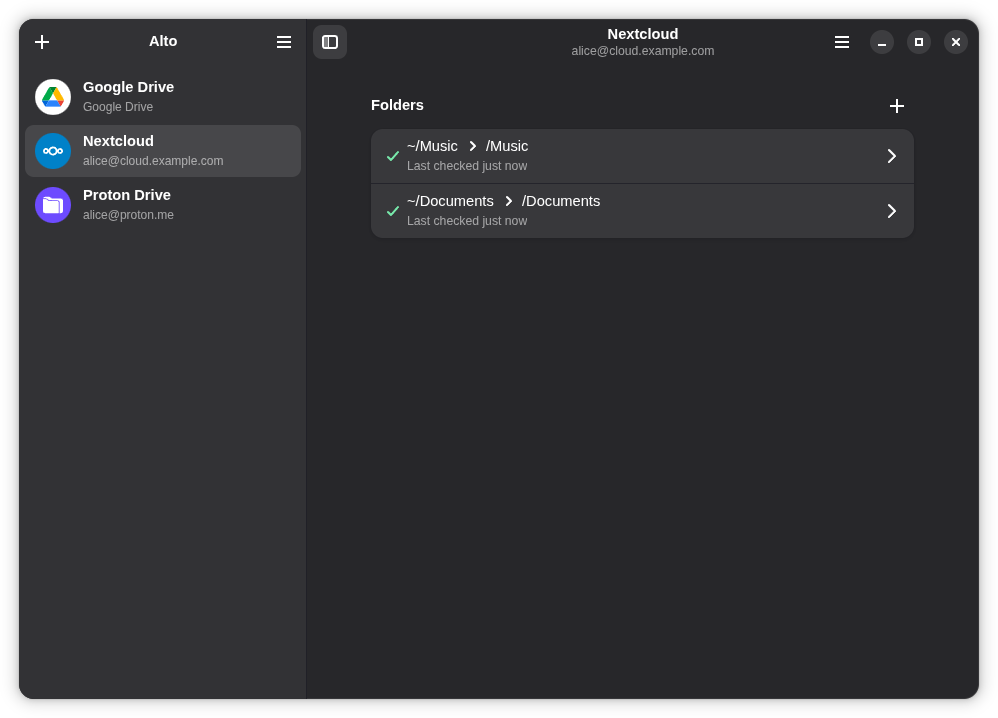
Alto is a GPL-3.0-licensed desktop client, written in TypeScript, that keeps folders on a computer in true two-way sync with cloud storage such as Google Drive, Dropbox, Proton Drive, Nextcloud, ownCloud and WebDAV, and it is aimed at Linux users on GNOME who want a native-feeling application rather than a browser tab for each account.
What it is
Alto is a file-sync application for the desktop. It pairs folders on a local machine with folders in a cloud storage account and keeps the two sides mirrored: new files, edits and deletions travel in both directions. It is built to look and feel native on the desktop, with current support for Linux with GNOME specifically, while apps for macOS, Windows and Android are described as in the works. The project lives in the cloud-storage and file-sync space alongside the Linux desktop stack, and its topic list places it with GTK4 and libadwaita tooling as well as with the providers it speaks to.
The concrete problem it solves is having several cloud accounts from different vendors and no single native place to sync them from. Alto connects as many accounts as the user likes, across different providers, and syncs folders from all of them at once, so a Google Drive folder, a Dropbox folder and a Nextcloud folder can all be handled by one application. It is also the designated successor to Celeste, rebuilt from the ground up, and it replaces that earlier project rather than extending it: settings are not imported, so accounts and folders must be added again.
What capabilities
- True two-way sync, where new files, edits and deletions propagate in both directions rather than in a single upload or download direction.
- Multiple simultaneous accounts across different providers, all synced at once from one application.
- Support for Google Drive, Dropbox, Proton Drive, Nextcloud, ownCloud and WebDAV, with more providers stated to be on the way.
- Safe behaviour across several computers: before overwriting or deleting anything, Alto checks that things have not changed since it last looked, so a change made elsewhere in the meantime is not lost.
- Shared exclusions through a folder-level
.altoignore file using .gitignore-style patterns; the ignore file itself syncs, so every computer skips the same files.
- A native desktop interface built on GTK4 and libadwaita for GNOME, rather than a cross-platform web wrapper.
- An extension path for new providers, documented in
CONTRIBUTING.md under the section on adding a provider.
Who uses it and how
- Linux users on GNOME who want a native application to manage cloud folders instead of a browser session per provider.
- People who hold accounts with more than one provider, for example Google Drive for work and Proton Drive or Nextcloud for personal files, and who want those folders synced side by side.
- Users working across several computers, who rely on the pre-write change check to avoid losing edits made on another machine.
- Projects and teams that want a shared, synced ignore list so that build output and other unwanted files are skipped consistently on every machine.
- Existing Celeste users migrating to the successor, who should expect to re-add their accounts and folders by hand.
Getting started
The README does not name a packaged installer, distribution package or container image; it directs readers to CONTRIBUTING.md for how to build Alto from source, understand how it works, or help out.
How it compares
No list of paid products that Alto replaces is provided in the facts, so the comparison rests on the tools it is actually named alongside: rclone appears among its topics, and Celeste is named as the project it succeeds and rebuilds from the ground up. Alto therefore sits as the native GNOME-facing sync client in that company rather than as a command-line sync engine, and it deliberately does not carry Celeste's settings forward.
When to use it — and when not to
Choose Alto if the desktop is Linux on GNOME and the goal is a native two-way sync client covering several providers at once; the facts describe no server component, database or mail relay for a user to operate, since the application runs on the machine that holds the folders. Readers on macOS, Windows or Android should wait, as those apps are only described as in the works, and anyone expecting a ready-made package will find no install command in the README, only a source build route through CONTRIBUTING.md. Former Celeste users should also weigh the manual re-setup, because settings are not imported.