
File transfer without the cloud storage.
Files go directly between your devices — end-to-end encrypted, no accounts, nothing stored, no limits.


Website · Download · Discord · X
Contents
About
AlterSend is a free, open-source app for sending files directly between your devices, with no cloud storage and no uploads. Files transfer P2P with no size limit and are end-to-end encrypted.
Why use WeTransfer, Dropbox, or Google Drive when you can send files straight to the recipient, instantly and privately, with no upload step?
Features
- No accounts — no signup, no login, no email address required
- No cloud storage — files go directly between devices; nothing is ever uploaded or stored on a server
- Receive in a browser — recipients open a share link at app.altersend.com and download straight from the sender, no install
- End-to-end encrypted — only your devices can read your files, always
- No size limit P2P — send a 100 MB photo or a 500 GB video archive, same experience
- Pair your devices — pair a device once, then send to it without scanning or typing a code each time
- Cross-platform — macOS, Windows, Linux, iOS, Android
- Works everywhere — local network or across continents, same code path
- Multi-language — fully translated UI, available in 13 languages
- Open source — Apache-2.0, audit every line yourself
Download
Get the latest release from altersend.com/download or directly from the table below.
| Platform | Download |
|---|---|
| Windows | Microsoft Store (signed) · EXE installer |
| macOS | DMG — Apple Silicon · DMG — Intel · Homebrew |
| Linux | AppImage · Flatpak |
| Android | Google Play · APK |
| iOS | App Store |
macOS Homebrew
You can also install AlterSend on macOS using Homebrew:
brew install --cask altersend
Linux Flatpak
You can build and install the included Flatpak manifest yourself (needs flatpak-builder):
git clone https://github.com/denislupookov/altersend.git && cd altersend
flatpak-builder --user --install --install-deps-from=flathub --force-clean build-dir flatpak/com.altersend.AlterSend.yaml
Arch Linux
AlterSend is available in the AUR as two packages: altersend-bin for official release binaries and altersend-git for the latest Git changes compiled from source.
yay -S altersend-bin
yay -S altersend-git
How it works
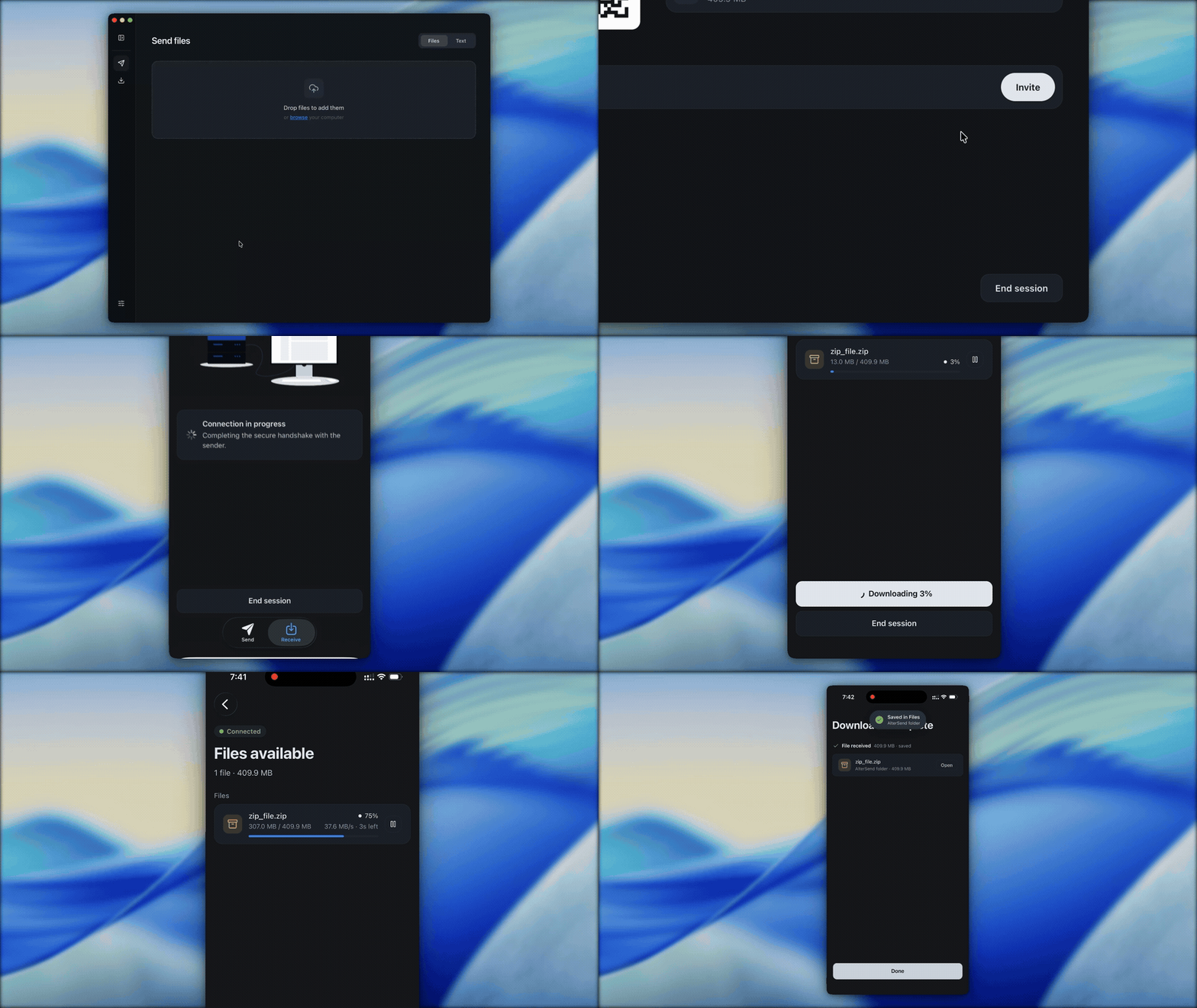
- Open AlterSend on both devices
- One device shows a join code (or QR)
- The other scans or types it
- Files transfer directly — peer to peer
   ┌──────────┐                                  ┌──────────┐
   │ Device A │ ◄─── direct, E2E encrypted ────► │ Device B │
   └──────────┘                                  └──────────┘
      │    ▲                                        ▲    │
      │    └───── discovery via Hyperswarm DHT ─────┘    │
      │             (hash of join code only)             │
      │                                                  │
      │            ┌───────────────────────┐             │
      └──────────► │ Relay (fallback only) │ ◄───────────┘
                   │ forwards encrypted    │
                   │ bytes it can't read   │
                   └───────────────────────┘
Under the hood
AlterSend is built on Hyperswarm, a Kademlia DHT at its core. Behind those four steps:
- A random 32-byte key is generated for each transfer (
crypto.randomBytes(32)). That 64-char hex string is the join code you share. - Peers rendezvous on a hash of that key, not the key itself. Both sides compute the same discovery key — a BLAKE2b hash derived from the join code — and join the DHT on that. The raw key never leaves your device, only its hash is published.
- Public bootstrap nodes are the only entry point. A handful of them get peers onto the DHT. After that, no central server is involved in discovery. Most transfers are direct peer-to-peer; when a direct connection can't be established — usually because both peers are behind symmetric NAT (for example both on a VPN) — the transfer falls back to a relay that forwards the already-encrypted stream between them without ever seeing file contents. It's on by default and can be turned off in Settings → Relay.
- The connection is end-to-end encrypted. Peers connect over a Noise-encrypted socket. The sender reads each file straight off disk in chunks and hashes every one with BLAKE2b; the receiver checks the hash and writes the chunk at its offset in the destination file.
Pair once, skip the code. You can pair devices you own so future transfers go straight through — no code to scan or type. Pairing only stores a public device key, the secret stays in your OS keychain, and a paired device is recognized without exposing your identity to anyone else. See docs/architecture.md for the full design.
For developers
Prerequisites
- Node.js 20+
- npm 10+
- Xcode (iOS) or Android Studio (Android)
Setup
git clone https://github.com/denislupookov/altersend.git
cd altersend
npm install

cp apps/desktop/.env.example apps/desktop/.env
cp apps/mobile/.env.example apps/mobile/.env
Run
npm run dev
npm run mobile:start
Build
npm run desktop:build
Platform installers (.dmg, .exe, .AppImage) are produced by the release CI workflow — trigger manually from the Actions tab.
Project structure
apps/
  desktop/    Electron app — main + renderer + Bare worklet
  mobile/     React Native / Expo app
  web/        Browser receiver
packages/
  core/       P2P protocol — Hyperswarm, transfer orchestration, RPC
  drive/      Chunked file transfer — reads and writes files in place
  domain/     State management — Zustand store, business logic
  components/ Cross-platform UI — React Strict DOM + Tailwind
  locales/   Shared locale metadata, i18next setup, and catalogs
docs/
  architecture.md   Full system overview
  i18n.md           Translation workflow and locale coverage
See docs/architecture.md for data flow and inter-process boundaries.
Internationalization
Desktop and mobile share translation catalogs through @altersend/locales, currently covering 13 locales. See docs/i18n.md for the translation workflow.
Tech stack
Electron · React Native · Expo · Bare · Hyperswarm · Protomux · React Strict DOM · Tailwind · Zustand
Crash reporting
Crash reporting via Sentry is opt-in and off by default.
Contributors
Contributing
Pull requests welcome. See CONTRIBUTING.md for setup, code style, and the PR process.
Security
Found a vulnerability? Follow the disclosure process in SECURITY.md — please don't open a public issue.
License
Apache-2.0 © AlterSend