 AliasVault
AliasVault is a privacy-first password and email alias manager. Create unique identities, strong passwords, and random email aliases for every website you use. Fully end-to-end encrypted, with a built-in email server and zero third-party dependencies.


Try the cloud version 🔥 | Website | Documentation | Self-host instructions
⭐ Star us on GitHub, it motivates us a lot!
If you enjoy using AliasVault, please also consider leaving a review on our apps or browser extensions, and share it with your friends or colleagues. Your support helps others discover a privacy-first alternative to traditional & closed-source password managers.
About
Built on 15 years of experience, AliasVault is independent, open-source, self-hostable and community-driven. It’s the response to a web that tracks everything: a way to take back control of your digital privacy and help you stay secure online.
– Leendert de Borst (@lanedirt), Creator of AliasVault
Screenshots
| Responsive web app | Browser extensions |
|---|---|
|
|
|
| Native iOS & Android apps | & much more |
|
|
|
Cloud-hosted
Use the official cloud version of AliasVault at app.aliasvault.com. This fully supported platform is always up to date with our latest release.
AliasVault is available on:

Self-hosting
[!NOTE] Requirements: 1 vCPU, 1GB RAM, 16GB disk, Docker ≥ 20.10, 64-bit Linux
AliasVault can be self-hosted on your own servers using two different installation methods. Both use Docker, but they differ in how much is automated versus how much you manage yourself.
Option 1: Install Script - Managed solution with automatic SSL (recommended for VPS/cloud)
Option 2: Docker Compose - Single container with manual setup for use with existing SSL infrastructure (NAS, homelab)
Quick Start (Install Script)
# Download and run install script
curl -L -o install.sh https://github.com/aliasvault/aliasvault/releases/latest/download/install.sh

# Make install script executable and run it. This will create the .env file, pull the Docker images, and start the AliasVault containers.
chmod +x install.sh

./install.sh install
For other installation methods and more detailed steps, please read the full installation guide in the official docs.
Documentation
For more information about the installation process, manual setup instructions and other topics, please see the official documentation website:
Security Architecture
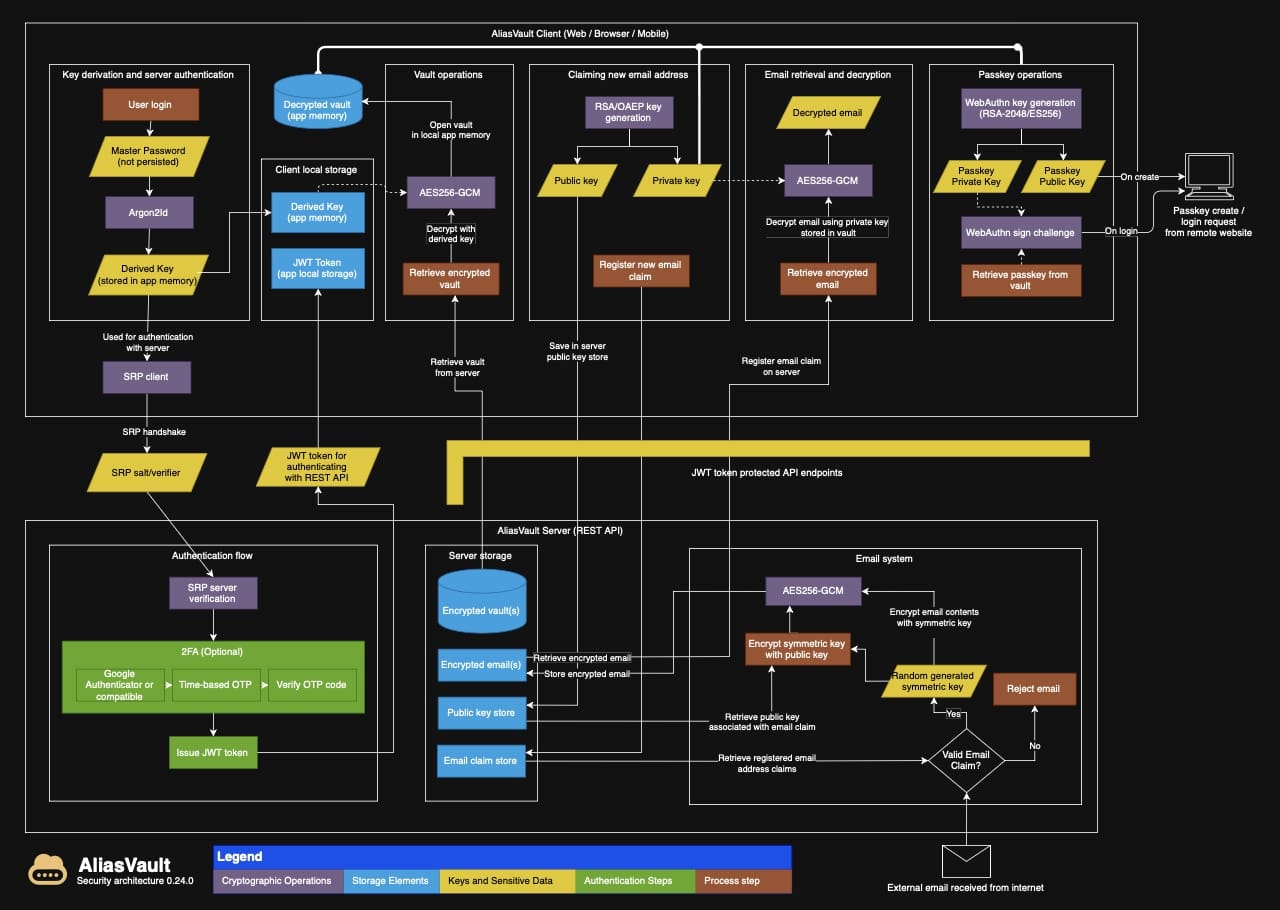
AliasVault takes security seriously and implements various measures to protect your data:
- All sensitive user data is encrypted end-to-end using industry-standard encryption algorithms. This includes the complete vault contents and all received emails.
- Your master password never leaves your device.
- Zero-knowledge architecture ensures the server never has access to your unencrypted data
For detailed information about our encryption implementation and security architecture, see the following documents:
Features & Roadmap
AliasVault is under active development, with a strong focus on usability, security, and cross-platform support. The main focus is on ensuring robust usability for everyday tasks, including comprehensive autofill capabilities across all platforms.
🛠️ Incremental releases are published every 2–3 weeks, with a strong emphasis on real-world testing and user feedback. During this phase, AliasVault can safely be used in production as it maintains strict data integrity and automatic migration guarantees.
Core features that are being worked on:
- Core password & alias management
- Full end-to-end encryption
- Built-in email server for aliases
- Easy self-hosted installer
- Browser extensions with autofill feature (Chrome, Firefox, Edge, Safari, Brave)
- Built-in TOTP authenticator
- Import passwords from traditional password managers
- iOS native app
- Android native app
- Editing in browser extension
- Multi-language support across all client applications
- Passkeys
- Data model improvements (more flexible aliases and credential types, folder support, offline mode etc.)
- Usability improvements (save credentials when browsing, more credential types, mobile app feature-parity with web app)
- Support for FIDO2/WebAuthn hardware keys
- Adding support for family/team sharing (organization features)
👉 View the full AliasVault roadmap here
Got feedback or ideas?
Feel free to open an issue or discussion on GitHub. We warmly welcome all contributions: whether it’s translating, testing, helping to build features, sharing feedback - or helping spread the word about AliasVault. Every bit of support helps the project grow, so don’t hesitate to jump in and say hi to us on Discord!
Support the mission
AliasVault is open-source and community-driven. If you like what we’re building, consider supporting us through Open Collective or through:

License
The source code in this repository is licensed under the GNU Affero General Public License v3.0 (AGPL-3.0), except where otherwise noted.
The software license does not grant rights to use the project's trademarks, names, or logos. See TRADEMARKS.md for details.